Serial TTL
Serial TTL (Transistor-Transistor Logic) communication is a method of transmitting data over short distances using low voltage levels. Typically, it operates at 5V or 3.3V, making it ideal for interfacing with microcontrollers, sensors, and other low-power devices. Serial TTL uses a simple, asynchronous communication protocol, often via UART (Universal Asynchronous Receiver/Transmitter), to transmit data one bit at a time. Due to its limited voltage levels and lack of error-checking mechanisms, TTL communication is generally confined to short distances and low-noise environments.
In industrial applications, serial TTL is commonly used in programmable logic controllers (PLCs) and other automation equipment to interface with peripheral devices like sensors, actuators.
The M-Duino PLC family PLCs features 2 Serial TTL Ports. The Ardbox family PLCs, however, does not have any but you can use Software Serial as you can see in this post.
Hardware
The M-Duino family PLCs features two external serial TTL ports:
- Serial0 (with pins TX0 and RX0)
- Serial1 (with pins TX1 and RX1)
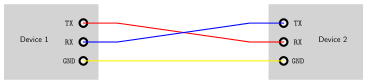
These are the hardware serial ports in the Arduino Mega inside the PLC, their characteristics and usage are the same as with a regular Arduino board. When using Serial TTL, the connections between devices are:
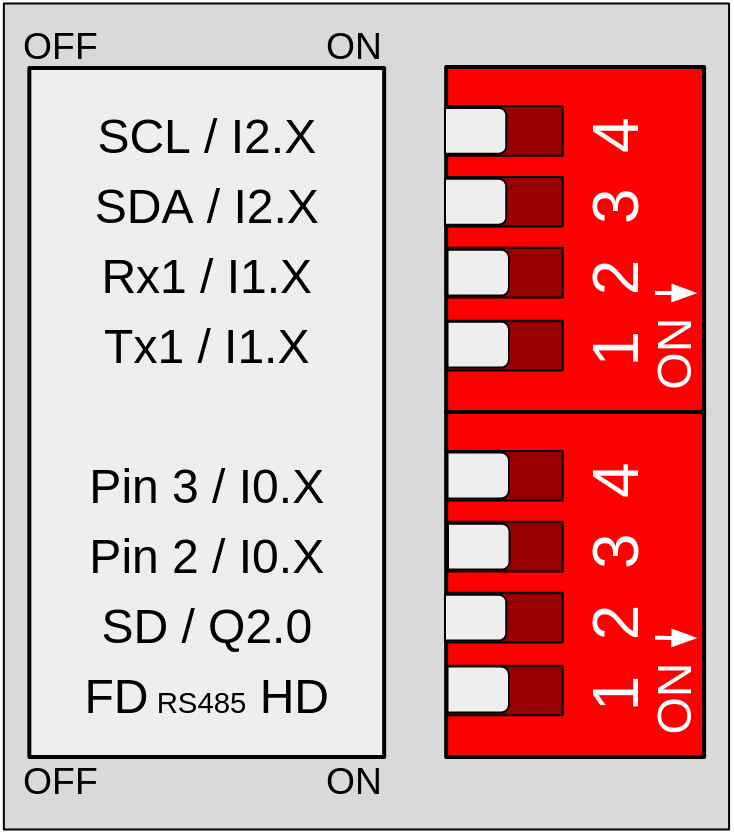
To utilize the Serial1 port, configure the communications switch as follows:
- Set switch 1 (Top) to OFF to enable TX1
- Set switch 2 (Top) to OFF to enable RX1
Remember to properly power the PLC with a 12-24V power supply.
Software
Since the serial ports in the M-Duino Family PLCs are essentially the ones on the Arduino Mega, its usage is the same as another Arduino board: it leverages the Arduino Serial library.
The following example demonstrates how to send and receive bytes using the USB serial port and Serial 1. In the case of Serial 0, this port is the same used in the USB, so you can use the Serial object.
Check Serial - Arduino Reference for more information about the API reference.
There are no comments for now.
to be the first to leave a comment.