RS485
RS485 is a standard for serial communication, defining the electrical characteristics of drivers and receivers for use in balanced digital multipoint systems. It allows multiple devices (up to 32 nodes) to communicate over a single pair of twisted wires, and it is widely used in industrial environments due to its robustness and long-distance communication capabilities.
The Arduino based Industrial Shields PLCs feature RS485 communication, leveraging an RS485 transceiver (the MAX485) and a serial port of the Arduino in the PLC. As such, the RS485 usage is really similar to the one of common Serial TTL ports.
Hardware
RS485 uses differential signaling over twisted pair, which means that 2 cables are needed in order to have half-duplex communication. For full-duplex, 4 cables are needed. The Ardbox and M-Duino PLC lines support both half and full duplex, depending on the mode used, the following pins will be used for RS485:
- Half-duplex (HD) using A+ and B-.
- Full-duplex (FD) using A+, B-, Y+ and Z-.
Typically, the connections between devices are:

Half-duplex
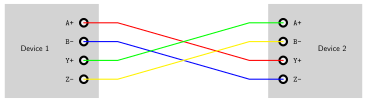
Full-duplex
Additionally, the two devices should have a common GND reference. If they do not, add an extra connection between GND nodes.
Depending on the PLC, the steps needed to configure the RS485 are different. Follow the procedure according to your PLC model:
DIP Switches
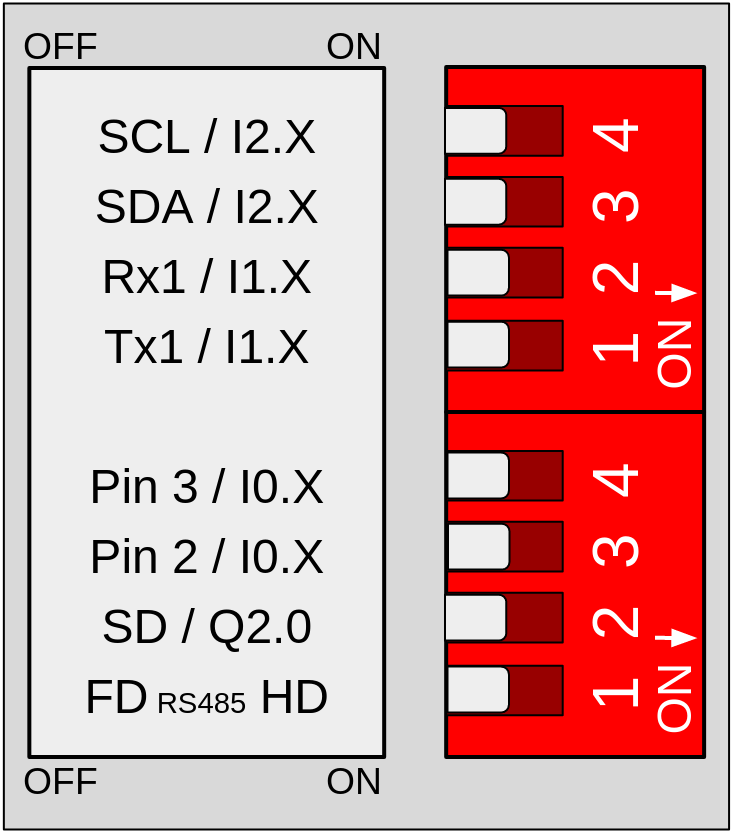
Locate the switches located on the left zone of the PLC and configure them accordingly:
- 1 (bottom): choose between half-duplex (HD) and full-duplex (FD) for the RS485 communication.
DIP Switches
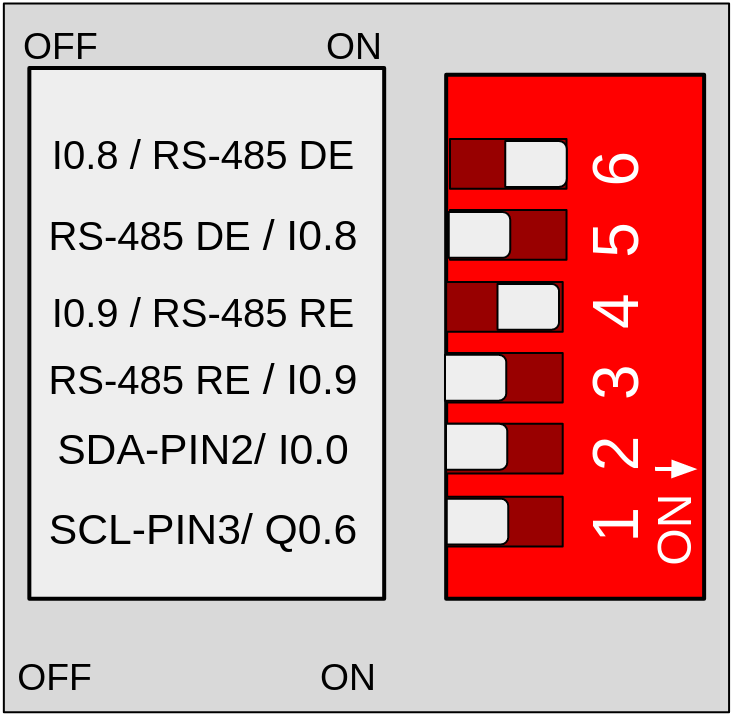
For this family, configure the switches this way:
- Left switch:
- 3: set to OFF to enable the RS-485 RE pin.
- 4: set to ON to enable the RS-485 RE pin.
- 5: set to OFF to enable the RS-485 DE pin.
- 6: set to ON to enable the RS-485 DE pin.
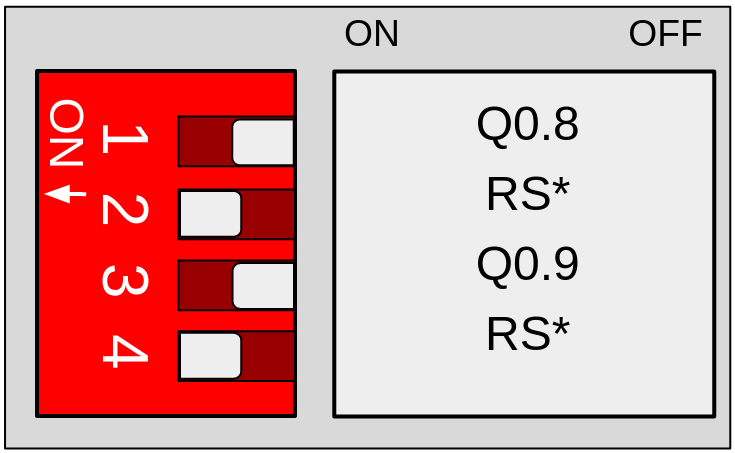
- Top switch:
- 1: set to OFF to enable RS-485.
- 2: set to ON to enable RS-485
- 3: set to OFF to enable RS-485.
- 4: set to ON to enable RS-485.
- Right switch:
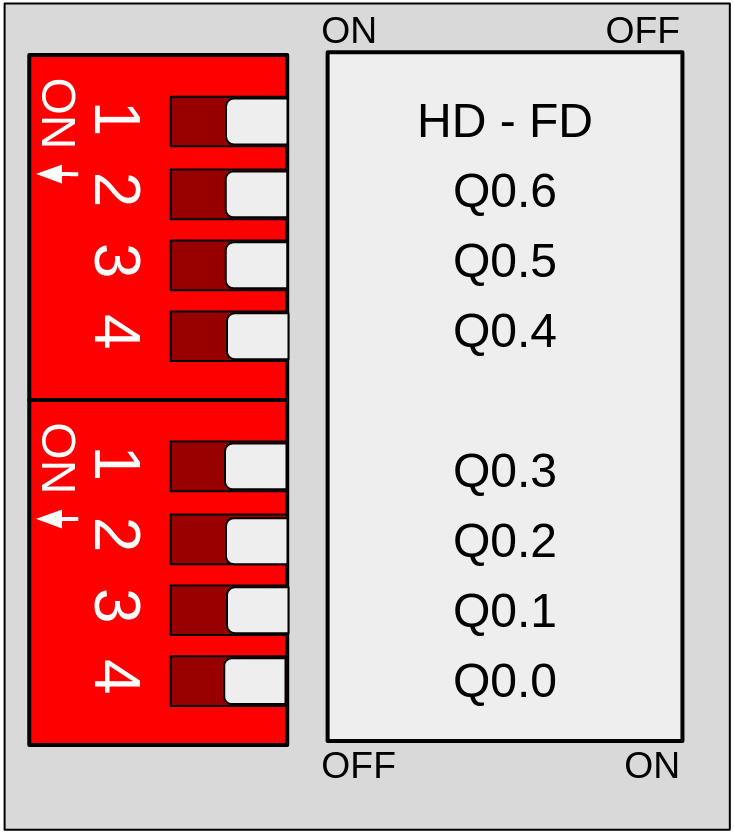
- 1 (bottom): choose between half-duplex (HD) and full-duplex (FD) for the RS485 communication.
Left Switch
Top Switch
Right Switch
DIP Switches
Configure the switches the following way:
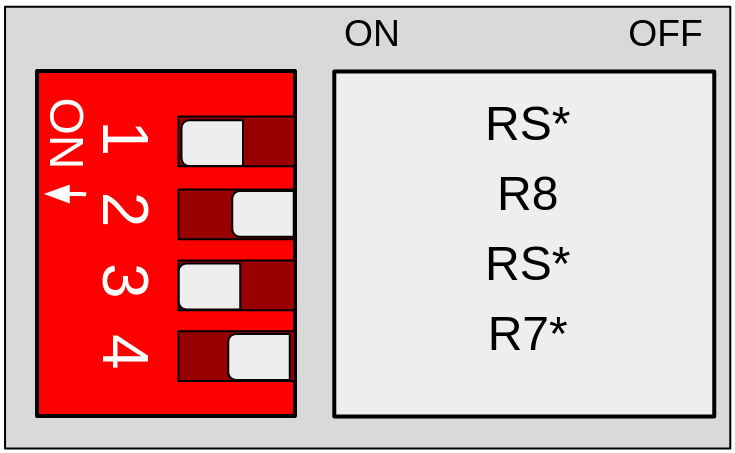
- Top switch:
- 1: set to ON to enable RS-485.
- 2: set to OFF to enable RS-485
- 3: set to ON to enable RS-485.
- 4: set to OFF to enable RS-485.
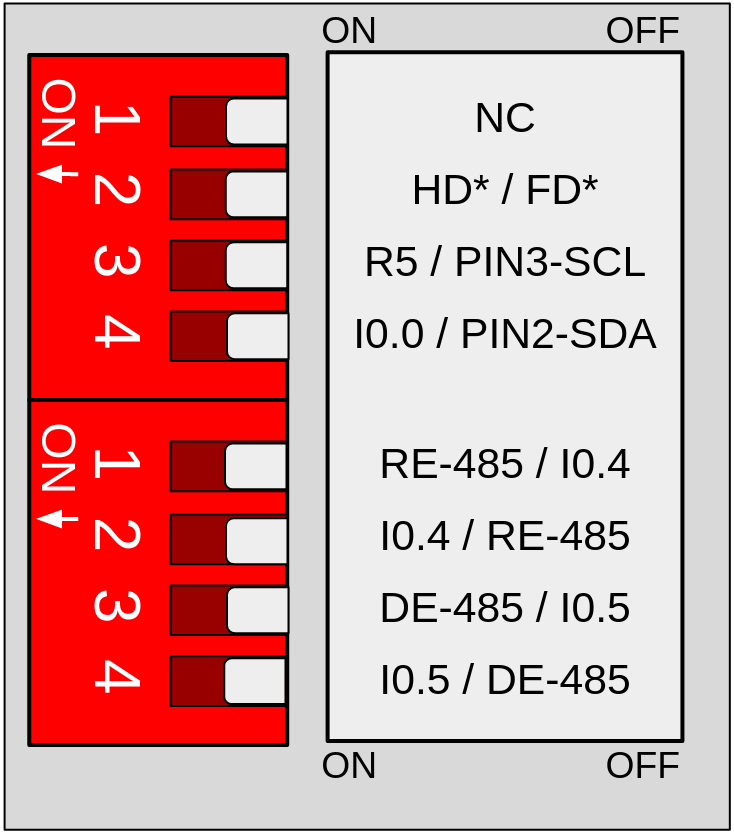
- Right switch:
- 1 (top): choose between half-duplex (HD) and full-duplex (FD) for RS485 communication.
- 1 (bottom): set to ON to enable the RS-485 RE pin.
- 2 (bottom): set to OFF to enable the RS-485 RE pin.
- 3 (bottom): set to ON to enable the RS-485 DE pin.
- 4 (bottom): set to OFF to enable the RS-485 DE pin.
- 1 (top): choose between half-duplex (HD) and full-duplex (FD) for RS485 communication.
Top Switch
Right Switch
Remember to properly power the PLC with a 12-24V power supply.
Software
The industrialshields boards package includes an RS485 library to make programming easier. This library is used as the Arduino Serial library, with methods such as available(), read(), write(), etc.
The following example establishes a Half-Duplex communication and allows the user to read or send messages from the terminal of the PC:
API Reference
Description:
Checks if there are any bytes available to read from the RS485 buffer.
Syntax:
RS485.available();
Parameters:
- RS485: The RS485 object.
Returns:
Returns the number of bytes available to read.
Description:
Reads a byte from the RS485 buffer.
Syntax:
RS485.read();
Parameters:
- RS485: The RS485 object.
Returns:
Returns the byte read from the RS485 buffer, or -1 if no data is available.
Description:
Writes a byte or a buffer of bytes to the RS485 bus.
Syntax:
RS485.write(value);
RS485.write(buff, len);
Parameters:
- RS485: The RS485 object.
- value: The byte to be transmitted over RS485.
- buff: A pointer to the buffer of bytes to be transmitted.
- len: The number of bytes to transmit from the buffer.
Returns:
Returns the number of bytes written.
There are no comments for now.
to be the first to leave a comment.