GPRS / GSM
GPRS (General Packet Radio Service) is a mobile data service used to transmit data over cellular networks (2G), offering moderate-speed data transfer in the range of 56 to 114 kbps. GPRS is widely used in applications where continuous, low-bandwidth data transmission is needed, such as in IoT devices, mobile internet, and telemetry systems.
GSM (Global System for Mobile Communications) is a widely used standard for mobile networks, enabling voice calls, SMS, and basic data services across 2G networks.
In industrial settings, GPRS and GSM allow PLCs (Programmable Logic Controllers) to communicate remotely by sending data and receiving commands over cellular networks. This connectivity is crucial for monitoring and controlling systems in locations without wired infrastructure.
GPRS/GSM is an optional communication. Only the M-Duino and Ardbox PLCs with the additional communication board can use it.
Hardware
The PLCs of the M-Duino and the Ardbox Family with this optional communication feature a SIM800L GPRS module, a compact GSM/GPRS module widely used in IoT (Internet of Things) applications for providing cellular communication capabilities to various devices. It supports quad-band GSM/GPRS, allowing it to operate globally. This GPRS module communicates with the Arduino using a serial port and a RST pin.
SIM slot location
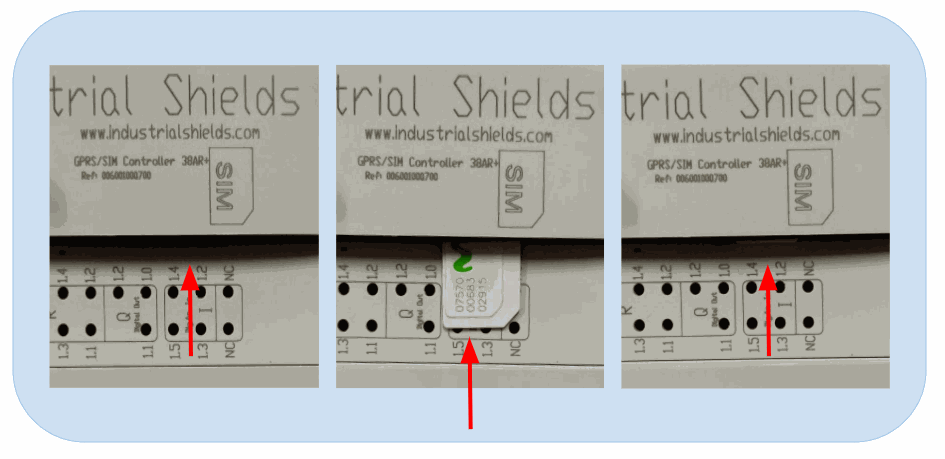
In order to use GPRS, a microSIM card with a GPRS plan is necessary. The SIM card slot is located at the top of the device, as the image shows:
DIP Switches
Locate the switches located on the left zone of the PLC and make sure they are in the right position (by default, they are already set for GPRS):
- Switch 1 (top) to OFF to enable GPRS.
- Switch 2 (top) to OFF to enable GPRS.
- Switch 3 (bottom) to OFF to enable GPRS RST.
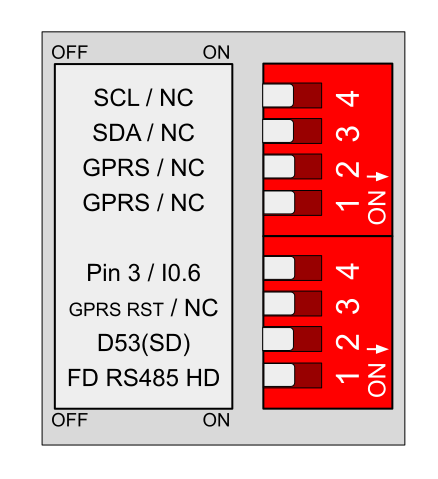
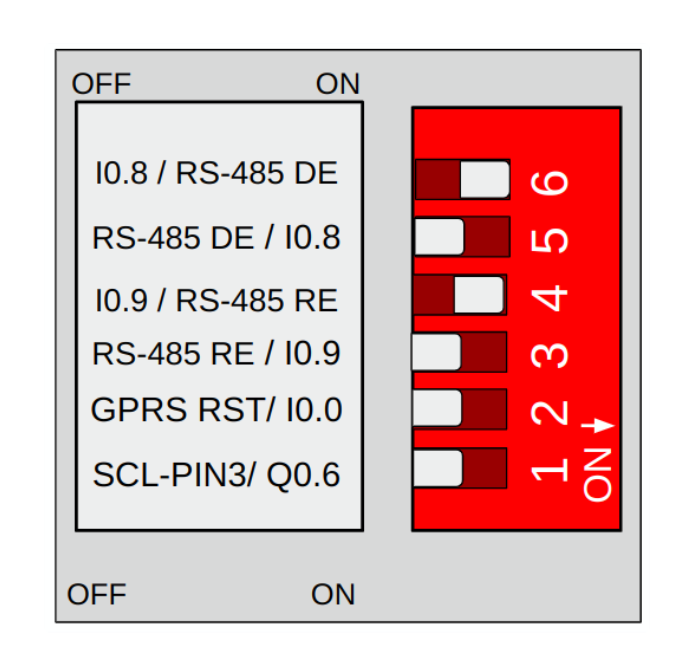
Locate the switches located on the left zone of the PLC and make sure they are in the right position (by default, they are already set for GPRS):
- Switch 2 to OFF to enable GPRS RST.
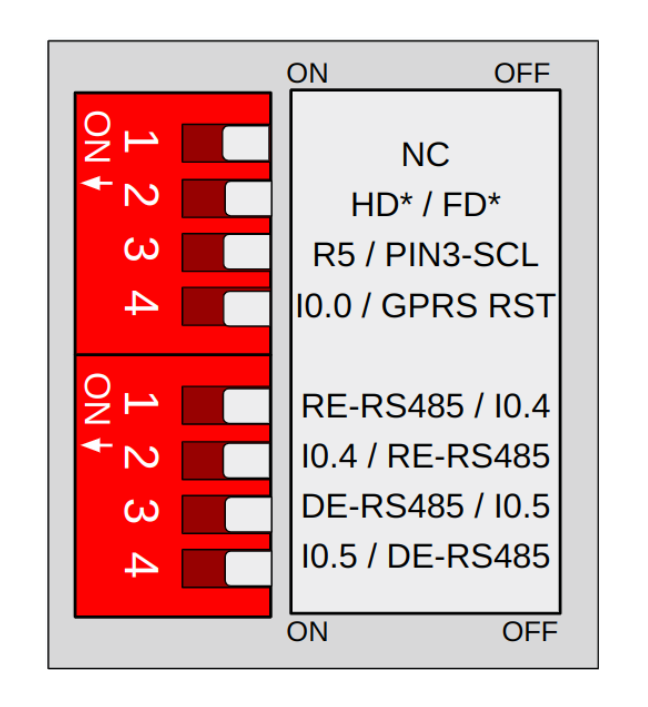
Locate the switches located on the right zone of the PLC and make sure they are in the right position (by default, they are already set for GPRS):
- Switch 4 (top) to OFF to enable GPRS RST.
Remember to properly power the PLC with a 12-24V power supply.
Software
The GPRS module can be used with the GPRS library included with our boards package. First, however, the right board needs to be selected:
- On the Arduino IDE the board needs to be set to "M-Duino GPRS Family", "Ardbox Analog GPRS Family" or "Ardbox Relay GPRS" Family, depending on the PLC.
- On PlatformIO, add "_gprs" to your board in the platformio.ini file. For example: "mduinoplc_21+_gprs" or "ardbox_relay_hfplus_rs485_gprs".
The Industrial Shields boards package includes a library to use the GPRS module: the GPRS library. In order to use it, its header must be included into the program, like this: #include <GPRS.h>
The library includes two program examples which can be found in the Arduino IDE: Files > Examples > GPRS. The following section explains how they work and how to use them.
There are no comments for now.
to be the first to leave a comment.