SPI
Serial Peripheral Interface (SPI) is a widely utilized, high-speed, synchronous communication protocol designed for short-distance data exchange, typically between a microcontroller and peripheral devices like sensors, memory chips, or display modules. One of SPI's key characteristics is its full-duplex communication capability, allowing data to be transmitted and received simultaneously. SPI operates in a master-slave configuration, which enables the master device to control the clock signal and coordinate the data exchange across multiple devices.
In the context of programmable logic controllers (PLCs), SPI facilitates communication between the PLC and various sensors, actuators, and other peripheral components, making it a a versatile and efficient protocol for high-speed short-distance data transfers between devices in embedded systems.
Hardware
The Arduino based PLCs feature one external SPI port, consisting of the following pins:
- MOSI (Master Out Slave In): the master sends data to the slave using this line.
- MISO (Master In Slave Out): the slave sends data back to the master using this line.
- SCLK (Serial Clock): the clock signal generated by the master, synchronizes the master and slave devices.
- CS (Slave Select or Chip Select): used by the master to select which slave it wants to communicate with. There must be 1 CS pin for each slave.
Note that in some devices the SPI pins might be named differently, such as:
- SCLK / SCK / CLK
- MOSI / SDO / SO
- MISO / SDI / SI
- CS / SS
The following diagram illustrates how to connect two devices as slaves to a master using SPI:
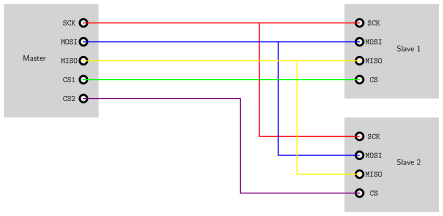
Additionally, the two devices should have a common GND reference. If they do not, add an extra connection between GND nodes.
Note that there is no pin directly assigned to be the CS. Any of the dedicated I/O pins available on the PLC can be used as the slave select, such as Pin 2 or Pin 3.
The SPI communication on any of the Arduino based PLCs does not involve any specific hardware configuration. However, some of the pins that can be used as chip select do. Pins 2 and 3, for example, might need to be activated via a DIP switch. Check the switches on your PLC or the user guide for more information.
Remember to properly power the PLC with a 12-24V power supply.
Software
The industrialshields boards package includes an SPI library, based on the Arduino SPI library. This library allows programming the Arduino based PLCs as an SPI master.
This program shows how to set up the PLC as a master in SPI communication, and send and receive data. In this case the character "0" is sent, and the received data is stored in the corresponding variable (SPI transfer is based on a simultaneous send and receive) and printed through the serial port.
API Reference
Description:
Initializes the SPI bus, setting up the required parameters for SPI communication. Must be called before any other SPI functions.
Syntax:
SPI.begin();
Parameters:
None.
Returns:
None.
Description:
Begins an SPI transaction with the specified settings, configuring the SPI bus parameters for the duration of the transaction.
Syntax:
SPI.beginTransaction(settings);
Parameters:
- settings: An SPISettings object that specifies the SPI clock speed, bit order, and data mode.
Returns:
None.
Description:
Transfers a byte of data to the SPI bus and simultaneously receives a byte of data from the SPI bus.
Syntax:
SPI.transfer(data);
Parameters:
- data: The byte of data to be sent over the SPI bus.
Returns:
Returns the byte of data received from the SPI bus during the transfer.
Description:
Ends the SPI transaction, releasing the SPI bus and allowing other SPI devices to use it.
Syntax:
SPI.endTransaction();
Parameters:
None.
Returns:
None.
There are no comments for now.
to be the first to leave a comment.