Case study · Conveyor belt · M-Duino 42+
The PLC sets the speed. The inverter moves the belt.
VFD speed reference, motor current feedback, a Panel PC on Ethernet.
The inverter turns the motor. The PLC decides how fast.
A current sensor shows how hard the motor works.
This case describes a model to control an asynchronous motor with a frequency inverter from an Arduino based PLC. It does not name the customer, the motor or the inverter. This page is about the speed loop of one conveyor belt: the speed reference, the motor current and the operator. If you want to send the speed over a fieldbus instead of an analog signal, the FAQ links a Modbus RTU example.
The challenge
Hold the belt speed you need. See what the motor does.
The main objective of the customer was to regulate the speed of the conveyor belt according to the desired parameters. A conveyor belt moves between two drums and slides on roller stations, plate cradles or a bed of air. Its AC induction motor turns at a speed set by the frequency of its supply.
Speed to the parameters
The main goal: regulate the belt speed according to the desired parameters, not run the belt at one fixed speed.
An induction motor
An asynchronous AC motor turns at a speed set by the supply frequency. To change the speed, you change the frequency. That is the job of the frequency inverter.
Current at the motor
The PLC must read the current that reaches the motor, and use it to decide what to ask from the inverter.
An operator in the loop
See the values in real time and change them at any time. Start, emergency stop, and an alarm if the belt goes over the speed limit.
Autonomous, with a manual override
The system regulates the speed by itself. If someone needs a different speed, they change it from the Panel PC, through the Ethernet port of the PLC.
How it works
Three loops: set, measure, operate.
Each loop shows one part of the pattern. Move the sliders and press the buttons. The panels are illustrative simulations: voltages, frequencies, currents, limits and speeds are examples, not data from the installation.
An analog output tells the inverter how fast to go.
The PLC program has functions that control the parameters of the frequency inverter. In the scheme, an analog output of the PLC goes to the inverter. The inverter changes the frequency of the motor supply, and the motor speed follows. A typical way to do it: 0 to 10 V on the analog output means 0 to 50 Hz at the inverter, with an acceleration ramp set in the inverter.
- Analog output of the M-Duino 42+ to the inverter
- The frequency of the supply voltage sets the motor speed
- Example: a 4-pole motor turns near 1,500 rpm at 50 Hz
Illustrative simulation. Example values, no data from the installation. Example: 0 to 10 V means 0 to 50 Hz, 4-pole motor, 0.60 m/s at 50 Hz, ramp of 10 Hz per second.
A current sensor shows how much the motor works.
A current sensor sits between the inverter and the AC induction motor. Its signal goes to an analog input of the PLC. The PLC makes decisions based on the current it reads and sends new values to the inverter. A typical way to do it: if the current stays above a limit, the PLC lowers the speed reference step by step, and brings it back when the current drops. In the panel, add load to the belt.
- Current sensor between the inverter and the motor, on an analog input
- Decisions based on the current that the PLC reads
- New values to the inverter, with no operator needed
PLC decisions (example)
Illustrative simulation. Example values, no data from the installation. Example rule: above 2.8 A for 1 s, the PLC lowers the reference by 1 Hz per step.
The operator sees the speed and changes it at any time.
The Panel PC is connected to the PLC through the Ethernet port. It shows the values in real time, and the operator can change them at any time. It also has a start function, an emergency stop function, live sampling of the motor speed, and an alarm if the speed goes over the limit. Press Start, then push the speed above the limit.
- Real-time speed of the AC motor
- Manual speed change at any time
- Start, emergency stop and a speed limit alarm
Panel PC events (example)
Illustrative simulation. Example values, no data from the installation. On a real machine, the emergency stop must also work without the screen and the network. See the FAQ.
Code example: Modbus RTU VFD speed control with an M-Duino PLC
System architecture
How does a PLC control a conveyor through a frequency inverter?
The M-Duino 42+ sends a speed reference to the frequency inverter on an analog output. The inverter feeds the AC induction motor that drives the belt. A current sensor on the motor cables returns to an analog input of the PLC. A Panel PC on Ethernet shows the values and sends manual changes.
| Signal | Between | Type | Purpose |
|---|---|---|---|
| Speed reference | BetweenM-Duino 42+ → frequency inverter | TypeAnalog out | PurposeTells the inverter the speed the belt needs. Range not published |
| Motor supply | BetweenFrequency inverter → AC induction motor | TypeVariable frequency | PurposeThe motor speed follows the frequency of the supply voltage |
| Motor current | BetweenCurrent sensor → M-Duino 42+ | TypeAnalog in | PurposeThe current that reaches the motor, for the decisions of the PLC |
| Live values | BetweenM-Duino 42+ → Panel PC | TypeEthernet | PurposeReal-time motor speed and the other values. Protocol not published |
| Operator commands | BetweenPanel PC → M-Duino 42+ | TypeEthernet | PurposeManual speed change, start, emergency stop function |
| Speed alarm | BetweenPanel PC | TypeScreen | PurposeAlarm if the speed goes over the limit |
Why it works
One pattern for a belt driven by an inverter.
Works with common inverters
Most general purpose frequency inverters accept an analog speed reference. The M-Duino 42+ has six analog outputs (0-10 V), so one PLC can command more than one drive. Check the input range of your inverter first.
Feedback from the motor side
The current sensor sits between the inverter and the motor. The PLC sees what the motor really draws, not only the speed it asked for.
One program, two functions
The PLC program, made with the Arduino IDE, holds both functions: the inverter parameters and the current reading. You can read it and change it.
The operator on one screen
The Panel PC connects to the PLC through the Ethernet port: live values, manual speed, start, emergency stop function and a speed alarm.
Room for a fieldbus
The same M-Duino 42+ has RS-485. If your inverter supports Modbus RTU, the PLC can write the speed and read the status over two wires.
Made for the cabinet
DIN rail mounting, a 12 to 24 Vdc supply and optoisolated digital inputs and outputs, next to the inverter.
Hardware used
M-Duino 42+ to control. Panel PC to operate.
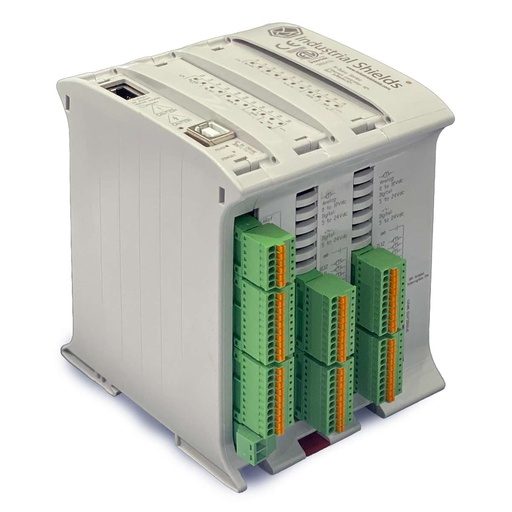
M-Duino Ethernet PLC Arduino 42
An industrial PLC built on an original Arduino Mega 2560, with 26 inputs and 16 outputs, Ethernet, RS-485 and RS-232, for DIN rail. On this belt it sends the speed reference to the inverter, reads the motor current and talks to the Panel PC.
- Role
- Speed reference, current reading, link to the Panel PC
- Inputs
- 26: 12 analog/digital (0-10 V), 14 digital optoisolated, 4 with interrupt
- Outputs
- 16: 10 digital optoisolated, 6 analog/digital/PWM (0-10 V)
- Comms
- Ethernet (RJ45), RS-485, RS-232, TTL, I2C, SPI
- Power supply
- 12 to 24 Vdc
- Mounting
- DIN rail TS35, IP20
The case names the "MDuino 42 I/Os PLUS". That is the M-Duino 42+, the version sold on this product page.
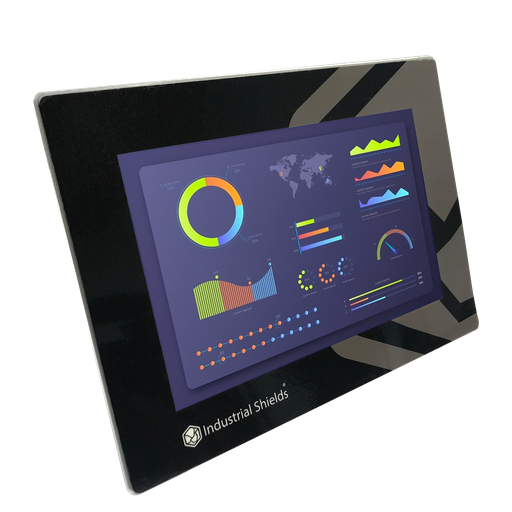
TouchBerry Pi Panel PC 10.1"
The operator station of the belt. An industrial 10.1" Panel PC with a Raspberry Pi 4. It shows the live values, changes the speed and has the start, emergency stop and speed alarm functions.
- Role
- Live values, manual speed, start, emergency stop function, speed alarm
- Screen
- 10.1"
- Computer
- Raspberry Pi 4
- Link to the PLC
- Ethernet
The case says "an Industrial Shields Panel PC". The old case page showed the TouchBerry Pi 10.1". The image and the link show the current TouchBerry Pi Panel PC 10.1" FLEX.
Questions about this case
How do you control a frequency inverter (VFD) with a PLC?
There are two common ways. With analog signals, the PLC sends a speed reference, often 0-10 V or 4-20 mA, to the analog input of the inverter, and digital outputs give run and stop. With a fieldbus such as Modbus RTU, the PLC writes the speed and reads the status over RS-485. In this case the scheme shows an analog output from the M-Duino 42+ to the inverter. Read more in our post Using a variable frequency drive with an industrial Arduino based PLC.
Why read the motor current on a conveyor?
The current shows how much the motor works. In this case the current sensor sits between the inverter and the motor, and the PLC makes decisions based on the current it reads. Typical uses: detect an overload or a jam, or lower the speed when the belt carries too much. Use a Hall effect or true RMS sensor rated for drive outputs, or read the current from the inverter itself.
Can the emergency stop be a button on the Panel PC?
The case lists an emergency stop function on the Panel PC. On any machine, the emergency stop must also work without the screen and the network. Design it as a hardwired safety circuit that follows your risk assessment, IEC 60204-1 and ISO 13850, and use the screen function as an extra. The hardwired circuit must remove torque from the motor: through the Safe Torque Off (STO) input of the drive or a contactor, as a stop category 0 or 1 (IEC 60204-1). A speed reference of 0 from the PLC is not an emergency stop. See safety interlocks and e-stop on a PLC.
Analog reference or Modbus: which one for a VFD?
Analog is simple: one output, one input, and most inverters accept it. Modbus RTU gives more data over two wires: speed, status, current and fault codes, read from the inverter itself. The M-Duino 42+ can do both: it has 0-10 V analog outputs and RS-485. See the Modbus RTU VFD control example for M-Duino. For an inverter on RS-485 inside a full project with code, see the bioreactor control project pack.
How does the system know the belt speed?
The case lists real-time sampling of the motor speed on the Panel PC. Common ways to measure it: calculate it from the output frequency of the inverter, read it from the inverter over a fieldbus, or count pulses from an encoder or a proximity sensor on a drum. In the simulation, the speed comes from the frequency (example: 4-pole motor).
Which parts of this case are facts, and which are examples?
Facts: an asynchronous AC induction motor, a frequency inverter, an M-Duino 42 I/Os PLUS programmed with the Arduino IDE, an analog output to the inverter, a current sensor between the inverter and the motor on an analog input, and a Panel PC on Ethernet with live values, manual speed change, start, emergency stop function and a speed limit alarm. Examples: voltages, frequencies, currents, limits, the current rule, speeds, the motor size and the protocol.
Download the case study
4-page PDF with the challenge, the logic, the architecture and the hardware. No form required.
Similar belt?
Tell us your motor and your inverter. An engineer will answer.
Tell us the motor power, the inverter brand and model, how you want to set the speed (analog, Modbus or another fieldbus) and what the operator needs to see. We will tell you which controller fits and how to wire it.
- You get an answer from our technical team
- I/O count and controller sizing for your belt
- Arduino, ESP32 or Raspberry Pi based PLCs