Case study · Bottle labelling · Arduino PLC
Label bottles in motion, while the line speed changes.
An encoder, a photocell and two stepper motors on one Arduino based PLC.
Bottles arrive when they arrive.
The label follows the conveyor.
This case describes a real labelling conveyor. We do not name the customer. Bottles on a conveyor belt run through a labelling mechanism that applies a label to each bottle. Nobody regulates the gap between the bottles, and the conveyor can slow down, speed up or stop at any time. One Arduino based PLC from Industrial Shields controls two stepper motors: the first one moves the large label roll, the second one moves the conveyor. A rotary encoder on the conveyor gives the speed of the line. A photocell gives the position of each bottle.
The challenge
Put a label on a moving bottle. At any speed, with any gap.
The customer listed five requirements: apply labels accurately to bottles in motion, allow a variable conveyor speed, allow an inconsistent distance between bottles, pull the label web through the dispenser, and label smoothly and consistently at all speeds. A fixed time delay is not enough when the speed changes. The label has to follow the real movement of the belt.
Bottles in motion
The label goes on while the bottle moves. It has to land in the same place on every bottle.
Speed changes at any time
The conveyor can slow down, speed up or stop at any moment. The labelling has to follow it.
Irregular gaps
Nobody regulates the spacing between the bottles. The system has to find each bottle on its own.
A heavy label roll
The label web comes from a large roll and goes through the dispensing head. The motor needs enough torque and speed to overcome the friction of the head and the inertia of the roll.
How it works
Two loops: measure the line, then meet each bottle.
Move the slider and press the buttons. The panels show the general pattern: what the PLC reads, what it drives and when. They are illustrative simulations. They do not show the program, the speeds or the data of the installation.
The encoder is the reference. Not a timer.
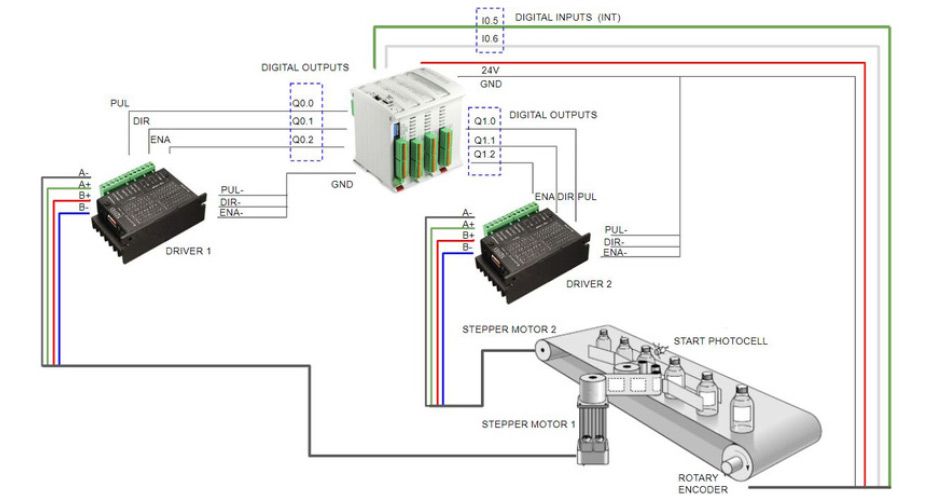
A rotary encoder is mounted on the conveyor. Its two signals go to two interrupt inputs of the PLC, I0.5 and I0.6. Each pulse is a small piece of belt travel. The PLC refers all the speeds and distances of the label roll to this count. When the conveyor slows down, speeds up or stops, the reference changes with it. With interrupts, the PLC does not have to ask the encoder for data all the time.
- Rotary encoder on the conveyor, on interrupt inputs I0.5 and I0.6
- Encoder supplied with 24 V and GND, as in the original diagram
- All speeds and distances of the label roll refer to the encoder
- Stepper motor 2 moves the conveyor through driver 2
Illustrative simulation. Example speeds and encoder counts, scaled in time. The real encoder resolution and line speeds of the installation are not published.
RelatedHow to use interrupt inputs with industrial Arduino boardsSolution Library: pulse counter with interrupts (ESP32 PLC)
The photocell finds the bottle. The label meets it at line speed.
A photocell detects the position of each bottle before the labelling head. The gaps are not regular, so each bottle starts its own label cycle. The PLC commands the label motor to accelerate to line speed at the moment the first edge of the label touches the bottle. The motor keeps line speed until the full label is on the bottle. Then it slows to a stop and waits for the next bottle.
- Start photocell: position of each bottle at the time of labelling
- Stepper motor 1 pulls the label web from the large roll through the dispenser
- Accelerate, hold line speed, slow down, stop, wait
- Goal of the customer: smooth, consistent labelling at all speeds
Yellow line: label motor speed. Grey dashed line: line speed from the encoder.
Event log (example)
Illustrative simulation. Example distances, gaps, speeds and ramps, scaled in time. Where the ramp starts is an example. The real values of the installation are not published.
RelatedStepper motor speed control with an Arduino based PLC and a rotary encoder
System architecture
How does one Arduino PLC synchronise a label roll with a conveyor?
The rotary encoder goes to two interrupt inputs. Three digital outputs drive each stepper driver: pulse, direction and enable. Driver 1 moves the label roll, driver 2 moves the conveyor. The start photocell gives the position of each bottle. This diagram follows the original wiring diagram of the case, shown below it.
| Signal | Between | Type | Purpose |
|---|---|---|---|
| Encoder signals | BetweenRotary encoder → I0.5 and I0.6 | TypeDigital inputs with interrupt | PurposeLine speed and belt travel, without constant polling |
| Encoder supply | Between24 V and GND → rotary encoder | TypePower | PurposeSupplies the encoder, as in the original diagram |
| Bottle position | BetweenStart photocell → PLC | TypeDigital input (pin not shown in the diagram) | PurposePosition of each bottle at the time of labelling |
| Label motor: pulse, direction, enable | BetweenQ0.0, Q0.1, Q0.2 → driver 1 | TypeDigital outputs | PurposeSteps, direction and enable of stepper motor 1 (label roll) |
| Conveyor motor: pulse, direction, enable | BetweenQ1.0, Q1.1, Q1.2 → driver 2 | TypeDigital outputs | PurposeSteps, direction and enable of stepper motor 2 (conveyor) |
| Driver returns | BetweenPUL-, DIR-, ENA- of both drivers → GND | TypeCommon reference | PurposeCloses the input circuits of the drivers |
| Motor phases | BetweenDriver → stepper motor | TypeA+, A-, B+, B- | PurposeTwo phases per motor |
Why it works
One distance reference. Simple signals.
Interrupts for the encoder
The encoder uses two interrupt inputs. The PLC does not ask the encoder for data all the time: the pulses come to it.
Three outputs per motor
Each stepper driver takes three digital outputs: pulse, direction and enable. The same PLC drives the label roll and the conveyor.
Speed and distance, not time
The label roll follows the encoder, and each bottle starts from the photocell. The cycle adapts when the speed or the gap changes.
Hardware used
One Arduino based PLC on the DIN rail.
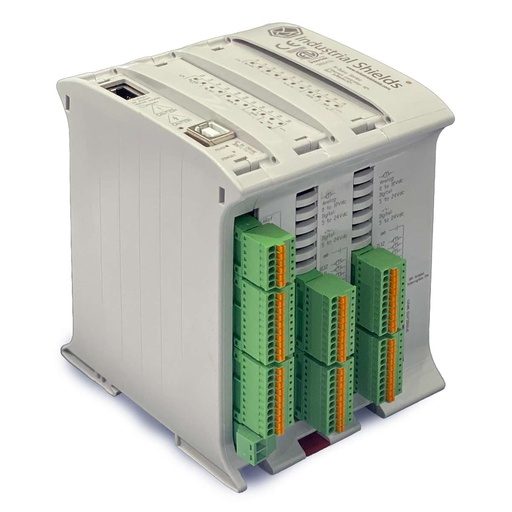
M-DUINO ETHERNET PLC ARDUINO 42
An industrial PLC built around an original Arduino Mega 2560. It has the pins of the original diagram: interrupt inputs I0.5 and I0.6, and digital outputs Q0.0 to Q0.2 and Q1.0 to Q1.2. You program it in C++ with the Arduino IDE.
- Inputs
- 26: 12 analog/digital (0-10 V), 14 digital optoisolated (5 to 24 Vdc), 4 with interrupt
- Outputs
- 16: 6 analog/digital/PWM (0-10 V), 10 digital optoisolated (5 to 24 Vdc)
- Network and serial
- Ethernet 10/100 (RJ45), RS-485, RS-232, I2C, SPI
- Built in
- Real-time clock, microSD slot
- Power supply
- 12 to 24 Vdc
- Mounting
- DIN rail TS35, IP20
The case does not publish the exact PLC model. The image and the link show the M-Duino 42+ (reference IS.MDuino.42+), a current model with all the pins of the diagram. The case does not publish the models of the drivers, the motors, the encoder or the photocell. Before you wire a stepper driver, check that its inputs accept the output voltage of the PLC.
Questions about this case
How does the label stay in sync when the conveyor speed changes?
A rotary encoder on the conveyor measures the belt travel. The PLC refers all the speeds and distances of the label roll to the encoder, not to a timer. When the line slows down or speeds up, the reference changes with it.
Why is the encoder on interrupt inputs?
The encoder goes to two interrupt inputs, I0.5 and I0.6. This way the PLC does not have to make constant requests to get the encoder data. Each pulse triggers a short routine that updates the count.
What does the label motor do for each bottle?
The photocell detects the bottle. The PLC commands the label motor to accelerate to line speed at the moment the first edge of the label touches the bottle. The motor holds line speed until the full label is applied, then slows to a stop and waits for the next bottle.
Stepper motors or servo motors?
The case uses two stepper motors: the introduction and the wiring diagram both say so. They run with pulse, direction and enable drivers. The hardware text of the case also speaks of a servo system, because the label motor needs torque and speed for the dispensing head and the large roll. Many servo drives also accept pulse and direction inputs.
Which PLC was used?
An Arduino based PLC from Industrial Shields. The case does not name the model. The diagram uses interrupt inputs I0.5 and I0.6 and outputs Q0.0 to Q0.2 and Q1.0 to Q1.2. The M-Duino 42+ has all of them.
Do I need to program in Arduino?
The PLC is programmed in C++ with the Arduino IDE. You start from your machine, not from the code: tell us the sequence, the signals and the motors, and our engineers will tell you how to build it.
Download the case study
4-page PDF with the challenge, the logic, the architecture and the hardware. No form required.
Similar project?
Tell us your line and your labels. An engineer will answer.
Tell us what you label, how the products arrive, how the line speed changes and which motors and drivers you use. We will tell you how to connect the encoder, the sensor and the drives, and which controller fits.
- You get an answer from our technical team
- I/O count for your machine
- Arduino, ESP32 or Raspberry Pi based PLCs