Case study · Automated warehouse · M-Duino 19R+
Heavy boxes go low. Every box finds its dock.
Automated warehouse: weighing, 3-axis storage and dock dispatch.
Weigh every box before you store it.
The heaviest ones go to the bottom.
This case describes the design of an automated warehouse for boxes of different weights. One Arduino based PLC, an M-Duino, manages the motors: three axes for storage and two conveyors. TouchBerry touch screens read QR codes at check-in and at every loading dock, and a server connects every process over WiFi. The case does not name a customer and does not publish results. It is a technical pattern that you can reuse in your own warehouse.
The challenge
Store, track and ship boxes of different weights.
The warehouse keeps boxes of different weights on a group of shelves. It must also send any stored box to its line at the loading docks. And the people who run it must know the state of the warehouse at all times.
Automatic storage
A stock of boxes is stored with no forklift and no manual placing. A conveyor brings each box in, and a three axis system puts it on a shelf.
Every package tracked
A QR code identifies each box when it enters. The system records the tracking of every package, from check-in to dock.
Less energy to lift
Lifting a heavy box high costs energy. One goal of the case is to optimise the energy consumed when the system raises loads.
Several docks
The warehouse ships through several docks. Each box must leave on the conveyor of its own area, not the next one.
Managed from the office
The state of the warehouse must be visible and manageable from another place. A server connects every process over WiFi, and the scheme shows remote control from the office through a VPN or an intranet.
How it works
Three loops: check in, store, ship.
Each loop shows one part of the pattern. Press the buttons and move the slider. The panels are illustrative simulations: box IDs, weights, weight bands, shelf heights and the number of docks are examples, not data from the case.
A QR code opens the record. A load cell gives the weight.
At check-in, a QR reader on the USB port of a TouchBerry screen reads the code that identifies the box. The M-Duino turns on the check-in conveyor through a drive. An IR sensor at the end of the conveyor tells the PLC that the box has reached the warehouse location. A strain gauge (load cell) weighs the load.
- QR reader on USB, connected to the TouchBerry check-in screen
- Check-in conveyor: a drive with an analog signal from the PLC
- IR sensor on a digital input: the box has arrived
- Load cell on an analog input: the weight of the box
Check-in records (example)
Illustrative simulation. Example values, not data from the case.
Code example: drive speed over Modbus RTU, an alternative to the analog signal
The heaviest boxes go to the bottom of the shelf.
Three servomotors move the load on the X, Y and Z axes. The case says servomotors, and the scheme draws stepper type drivers (A+, A-, B+, B-). Each one has a driver that gets three digital signals from the PLC: pulse, direction and enable (PUL, DIR, ENA). The application sorts the loads by weight in ascending order and places the heaviest boxes at the bottom. The case gives two reasons: less energy to raise loads, and a better structural load on the shelves. A typical way to do it: weight bands per shelf level and a table of free slots, as in the panel.
- 3 axis drivers, each with PUL, DIR and ENA from the PLC
- Heaviest boxes on the lowest levels
- Example rule: weight bands per level and a table of free slots
Illustrative simulation. Example values, not data from the case. Example bands: 30 kg or more on level 1, 20 to 30 kg on level 2, 10 to 20 kg on level 3, under 10 kg on level 4. Example shelf heights: 0.3, 0.9, 1.5 and 2.1 m. Lift energy = mass × 9.81 × height.
Request a box. The dock screen takes it off the line.
Someone requests a box from a TouchBerry screen, or an external server sends the request. The PLC sends the collection of the box, brings it to the shipping conveyor and runs that conveyor through its drive. Each dock has a QR reader on the USB port of its own TouchBerry screen. When the dock screen detects that the box is for its position, the box is diverted to the conveyor of that area.
- Requests from a TouchBerry screen or an external server
- Shipping conveyor: a drive with an analog signal from the PLC
- A QR reader and a TouchBerry screen at every dock
- A digital signal at each diverter. The case does not say which device switches it
Dispatch records (example)
Illustrative simulation. Example values, not data from the case. Example: three docks. The scheme of the case shows dock A, dock B and more.
Code example: a touch screen HMI in kiosk mode on a Raspberry Pi
System architecture
How does one M-Duino run 3-axis storage and dock dispatch?
One M-Duino does the motor management: three axis drivers, two conveyor drives, an IR sensor and a load cell. TouchBerry screens with USB QR readers work at check-in and at every dock. A server connects every process over WiFi, and the office controls the warehouse through a VPN or an intranet. This diagram follows the original scheme of the case.
| Signal | Between | Type | Purpose |
|---|---|---|---|
| X, Y and Z axes | BetweenM-Duino → 3 drivers → 3 servomotors | TypeDigital: PUL, DIR, ENA | PurposeMove the load to its place on the shelf |
| Check-in conveyor | BetweenM-Duino → drive → motor | TypeAnalog | PurposeBrings the box from check-in to the shelves |
| Shipping conveyor | BetweenM-Duino → drive → motor | TypeAnalog | PurposeTakes the box past the docks |
| Box at the shelves | BetweenIR sensor → M-Duino | TypeDigital input | PurposeTells the PLC that the box has arrived |
| Box weight | BetweenLoad cell → M-Duino | TypeAnalog input | PurposeDecides the shelf level of the box |
| Box identity | BetweenQR reader → TouchBerry | TypeUSB | PurposeCheck-in, and dock detection on the shipping line |
| Diverter | BetweenAt each dock | TypeDigital | PurposeSends the box to its dock conveyor. Switching device not published |
| Requests and state | BetweenTouchBerry screens, server, M-Duino | TypeWiFi | PurposeRequests from a screen or an external server. Protocol not published |
| Remote control | BetweenOffice ↔ VPN or intranet ↔ router | TypeNetwork | PurposeRemote management of the warehouse |
Why it works
One controller for the motors. A screen where people work.
One PLC for every motor
The three axes and the two conveyors run in one program, on one M-Duino. Storage, retrieval and dispatch share the same state.
The rule lives in the code
Heaviest boxes at the bottom, in ascending order. If your rule changes, for example a new weight band or a reserved level, you change the program, not the rack.
A screen at every point of work
TouchBerry screens at check-in, in the shipping area and at every dock show the package information and the tasks to do. Each one reads QR codes on its own USB port.
Open tools on both sides
You program the M-Duino in C++ with the Arduino IDE. The TouchBerry runs Linux on a Raspberry Pi 4B, so your team can build the check-in and dock applications with standard Linux tools.
Hardware used
One M-Duino for the motors. TouchBerry screens for the people.
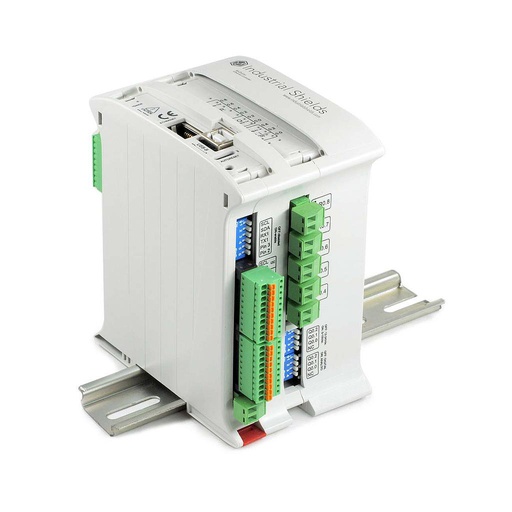
M-Duino Ethernet PLC Arduino 19R+
The PLC named in the case, built around an original Arduino Mega 2560. It manages the motors: the three axes, the two conveyor drives, the IR sensor and the load cell.
- Inputs
- 6: 4 analog/digital (0-10 V), 2 digital isolated with interrupt
- Outputs
- 11: 3 analog/digital/PWM (0-10 V), 8 relays
- Communications
- Ethernet, 2 × RS-485, RS-232, TTL, I2C, SPI
- Built in
- Real-time clock, microSD slot
- Programming
- Arduino IDE, over USB or Ethernet
- Power and mounting
- 12 to 24 Vdc, DIN rail
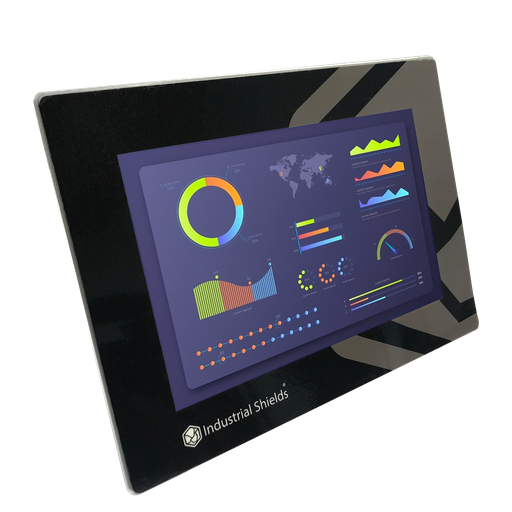
TouchBerry Pi Panel PC 10.1"
The screens of the system: at check-in, in the shipping area and at every loading dock. Each one reads QR codes through a USB reader, shows the package information and the tasks to do, and connects over WiFi.
- Role
- Check-in, requests, dock detection
- Screen
- 10.1" touch screen
- Computer
- Raspberry Pi 4B, Linux
- Links
- WiFi to the server, USB to the QR reader
The case names the TouchBerry Pi 10.1" with a Raspberry Pi 4B and does not publish the exact version. The image and the link show the current TouchBerry Pi Panel PC 10.1" FLEX.
Questions about this case
How does an automated warehouse decide where to store a box?
In this case, by weight. A QR code identifies the box, a load cell weighs it, and the application sorts the loads in ascending order: the heaviest boxes go to the bottom of the shelf. That saves energy when the system raises loads and improves the structural load on the shelves. The weight bands on this page are examples.
Can one Arduino PLC control a whole warehouse?
In this case, a single PLC does all the motor management: three axes and two conveyors, plus an IR sensor and a load cell. The TouchBerry screens handle check-in, requests and dock detection, and a server connects every process over WiFi.
How many outputs does this wiring need?
As drawn: 9 digital outputs for the three axis drivers, with PUL on fast transistor outputs, 2 analog outputs for the conveyor drives, 1 digital input for the IR sensor and 1 analog input for the load cell. Add one digital output per diverter if the PLC switches them. The M-Duino family scales with that count. For example, the M-Duino 38AR+ has 11 transistor outputs (6 analog/digital/PWM and 5 digital) plus 8 relays, and the M-Duino 42+ has 16 (6 analog/digital/PWM and 10 digital). Or you keep the count low with axis drivers on RS-485.
How do the X, Y and Z axes move?
Three servomotors move the load. Each driver gets three digital signals from the PLC: PUL (one pulse per step), DIR (direction) and ENA (enable). A typical way to position an axis: the PLC finds a home position at start-up and then counts pulses to each slot. The case does not publish homing, limit switches or step resolution.
How does a box reach the right loading dock?
The PLC brings the requested box to the shipping conveyor. Each dock has a QR reader on the USB port of its own TouchBerry screen. When the dock screen detects that the box is for its position, the box is diverted to the conveyor of that area. The scheme shows a digital signal at each diverter.
How do you read a load cell with an M-Duino?
The case weighs the boxes with a strain gauge. A load cell gives a signal of a few millivolts, and the M-Duino 19R+ analog inputs read 0-10 V. A typical way: a load cell transmitter converts the signal to 0-10 V, and you calibrate zero and span in the program with a known weight.
Which parts of this case are facts, and which are examples?
Facts: one M-Duino for the motor management, three axes with PUL, DIR and ENA, two conveyors on drives, an IR sensor, a load cell, QR readers on TouchBerry screens at check-in and at every dock, heaviest boxes at the bottom, requests from a screen or a server, WiFi and remote control. Examples: weights, weight bands, shelf heights, box IDs, the number of docks, homing and the network protocol.
Download the case study
4-page PDF with the challenge, the logic, the architecture and the hardware. No form required.
Similar warehouse?
Tell us your racks and your docks. An engineer will answer.
Tell us how many shelf positions and axes you have, how you identify boxes (QR, barcode or RFID), how many docks you ship to and where the requests come from. We will tell you which controller fits and how to connect your drives.
- You get an answer from our technical team
- I/O count and controller sizing for your warehouse
- Arduino, ESP32 or Raspberry Pi based PLCs