Case study · Logistics · Raspberry PLC
Scan and sort every package at the entry. Control it from the office.
Barcode scan, conveyor sorting, own database, remote control.
Know every package from the moment it enters.
Then keep track of it to its place.
This case study is a reference design from Industrial Shields, not a named customer installation. The goal: develop and optimise a logistics warehouse with Raspberry Pi based PLCs. Packages are sorted when they enter, by the patterns you set, and stored so that their location is known at all times. A server stores the data and gives remote control from anywhere. The case does not publish a site, a package volume or measured results.
The challenge
Sort every package on entry. Know where it is.
To compete, a company must deliver a good product in the shortest time. In a warehouse, that means processes that get the most done in the least time. The case proposes electronic control: sensors on each stage of collection and distribution, plus communication elements, so that an old operation can become an Industry 4.0 warehouse.
Control at the entry
The case says it plainly: to keep control of the packages through the whole process, you need control at the moment of entry.
A place for every box
Each box has a specific place, controlled by sensors. That is how the warehouse keeps total control of the stock.
Data the office can reach
The data must be stored, backed up and visible from anywhere. The main office must also send orders to the warehouse.
Sorted by your own patterns
Packages are sorted according to the patterns you set, and stored so that their location is known at all times. The case does not fix the patterns. They are yours.
How it works
Three loops: scan, sort, report.
Each loop shows one part of the design. Press the buttons and move the slider. The three panels share one simulation: a package you confirm in loop 1 travels on the belt in loop 2, and the office can stop the chain in loop 3. Codes, lanes, frequencies and times are examples, not data from an installation.
A USB barcode reader identifies each package.
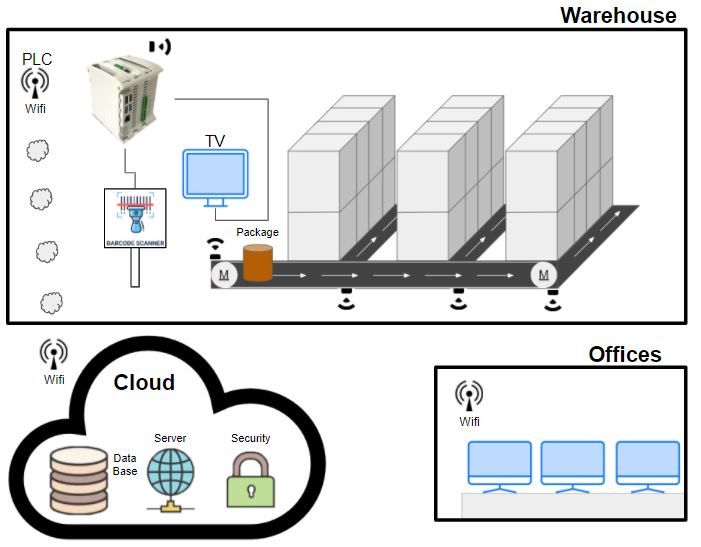
At the entry, a barcode reader connected by USB to the Raspberry PLC reads the information of each package. The PLC saves it in its own database. A TV with an HDMI connection shows the package data at all times. When the package is confirmed, it goes to the belt.
- Barcode reader on a USB port of the PLC
- A TV in the warehouse shows the package data at all times
- Every reading saved in the PLC database
Rows in the PLC database (example)
Illustrative simulation. Example values, no data from an installation.
The PLC starts the motors. Sensors follow the package.
When a package is confirmed, the PLC activates the motors, and the conveyor belts carry the package to its destination. A frequency inverter drives the motors, so the PLC controls them without using unnecessary I/O. Sensors along the belt tell the PLC where the package is. The case suggests motion or weight detectors.
- Motors on a frequency inverter: no unnecessary I/O
- Sensors along the belt: motion or weight detectors
- Each box ends in its own place: total stock control
Illustrative simulation. Example values, no data from an installation.
Own database, own server, a copy in the cloud.
The PLC updates its database with each new reading and makes backup copies to the cloud. It also runs its own server, so the main office sees the warehouse over the internet. From the office you can send orders, act on the chain, and send on/off or emergency messages.
- Database and server on the Raspberry PLC
- Backup copies to the cloud
- Office: orders, on/off and emergency messages
Office messages (example)
Illustrative simulation. Example values, no data from an installation. A remote message is not a safety function. The emergency stop of a real belt stays hardwired at the machine.
Code example: MQTT to SQL Server bridge in Python on a Raspberry PLC
System architecture
How does one Raspberry PLC scan, sort and report?
The Raspberry PLC is the master controller of all the sensors. It reads the barcode reader on USB, shows the status on a TV in the warehouse, drives the conveyor motors through a frequency inverter and reads the sensors along the belt. It keeps its own database and runs its own server. The data goes to the cloud as a backup, and the main office connects over the internet. In the original scheme, the PLC, the cloud and the offices all show Wi-Fi. The case does not publish the inverter interface, the number of sensors or the wiring.
| Data | Between | Type | Purpose |
|---|---|---|---|
| Package code | BetweenBarcode reader → Raspberry PLC | TypeUSB | PurposeReads the information of each package at the entry |
| Live view | BetweenRaspberry PLC → TV (screen in the warehouse) | TypeDisplay | PurposeShows the package data and the system status at all times. HDMI connection named in the case. The Raspberry PLC datasheet lists no HDMI port |
| Package position | BetweenBelt sensors → Raspberry PLC | TypeSensor | PurposeTells the PLC where the package is. Motion or weight detectors are one option |
| Conveyor motors | BetweenRaspberry PLC → frequency inverter → motors | TypeInverter | PurposeMoves the package to its destination. Interface not published |
| Records | BetweenRaspberry PLC → own database | TypeLocal | PurposeSaves every package and its place |
| Backup | BetweenRaspberry PLC → cloud | TypeInternet | PurposeBackup copies of the database |
| Remote control | BetweenMain office ↔ PLC server | TypeInternet | PurposeView, orders, on/off and emergency messages |
Why it works
One controller for the whole inbound flow.
Control from the first second
The package is identified at the entry, before it moves. Every later step builds on that reading.
PLC, database and server in one device
The Raspberry PLC runs Linux. The design uses that to keep its own database and its own server on the controller, next to the I/O.
Two copies of the data
The PLC writes each new reading to its database and makes backup copies to the cloud.
Fewer I/O for the motors
A frequency inverter drives the motors, so the PLC controls them without using unnecessary I/O.
Sensors that fit the package
Motion or weight detectors tell the PLC where each package is. Choose the type that fits your boxes.
Fast to put in place
The case points to the power of the Raspberry PLC: one controller covers all these goals with a rapid implementation of the components.
Hardware
One Raspberry PLC as master controller.
Raspberry PLC
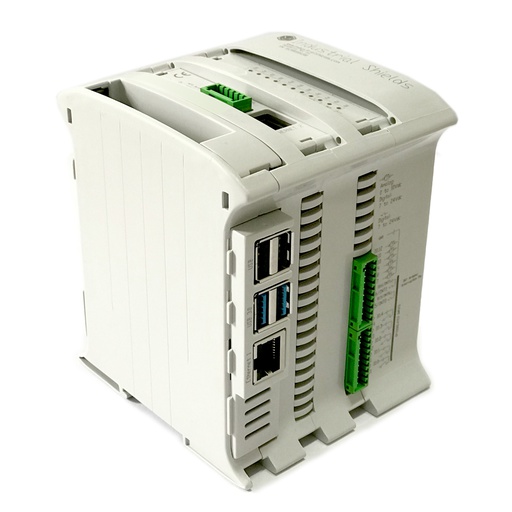
Industrial PLCs built around a Raspberry Pi, for your DIN rail. In this design, one Raspberry PLC is the master controller: it reads the barcode reader and the sensors, drives the motors through the inverter, keeps the database and runs the server.
- Role
- Master controller, database and server
- Computer
- Raspberry Pi 4, quad core 64-bit
- Operating system
- Debian 64-bit, preinstalled
- Programming
- Python, Node-RED, C/C++
- Network
- 2 x Ethernet, Wi-Fi, Bluetooth LE
- USB
- 2 x USB 2.0, 2 x USB 3.0
- Serial
- 2 x RS-485
- Family
- 19R, 21, 38AR, 38R, 42, 57R, 58, CPU-Gateway
The case does not publish the exact Raspberry PLC model. The values above are for the Raspberry PLC 21, and the image shows the RASPBERRY PLC 21 FLEX. Count your sensors and motor signals first, then choose the model of the family.
Questions about this case
How does a PLC sort packages when they enter a warehouse?
In this design, a barcode reader on a USB port of the Raspberry PLC reads each package at the entry. The PLC saves the data in its own database and shows it on a screen. When the package is confirmed, the PLC starts the conveyor motors through a frequency inverter, and the belts carry the package to its destination. Sensors along the belt report where the package is, and each box has a specific place, so the stock is always known. The sorting patterns are yours to set.
Can a Raspberry PLC keep its own database and server?
Yes. That is a core idea of this case: the PLC saves the information in its own database and runs its own server, where you can see everything. The Raspberry PLC runs Debian 64-bit, so you can use Python, Node-RED or C/C++ and the Linux tools you already know. The case does not name the database or the server software. For a related example, see the MQTT to SQL Server bridge in Python on a Raspberry PLC. For activation records synced with an ERP, see the industrial mixing project pack (TouchBerry and SQL Server).
How do you connect a USB barcode reader to a PLC?
Plug it into a USB port of the Raspberry PLC. The Raspberry PLC 21, for example, has two USB 2.0 and two USB 3.0 ports. A typical way to read it: many USB barcode readers appear to Linux as a keyboard or as a serial port, and a Python program reads each code and writes it to the database. Check the mode of your reader. The case does not publish the reader model.
How does the PLC move each package to its lane?
When a package is confirmed, the PLC activates the conveyor motors, and the belts carry the package to its destination. Sensors along the belt tell the PLC where the package is. The case suggests motion or weight detectors. A frequency inverter manages the motors, so the PLC controls them without using unnecessary I/O. The sorting patterns are yours: the PLC decides the lane of each package from its reading at the entry. The case does not publish the patterns or the inverter interface.
Can the office stop the warehouse from a distance?
In this design, yes: from the main office you can send orders, act on the chain and send on/off or emergency messages over the internet. A remote message is not a safety function. The emergency stop of the belt must stay hardwired at the machine. The original scheme also shows a security block in the cloud, and the case does not publish how it works. See safety interlocks and E-stop on a Raspberry PLC.
Which parts of this case are facts, and which are examples?
Facts from the original case: a Raspberry Pi based PLC as master controller of all the sensors, its own database and its own server, a USB barcode reader at the entry, a TV with an HDMI connection and a display in the warehouse, conveyor belts with motors on a frequency inverter, sensors along the belt (motion or weight detectors as an option), a specific place for each box, backup copies to the cloud, remote control from the main office with orders, on/off and emergency messages, and Wi-Fi in the scheme. Examples: package codes, lanes, sort patterns, inverter frequencies, the backup interval, the inverter interface, the database and server software, and the PLC model.
Download the case study
4-page PDF with the challenge, the logic, the architecture and the hardware. No form required.
Similar inbound flow?
Tell us your packages and your destinations. An engineer will answer.
Tell us how packages enter, which codes you read (barcode, QR or RFID), how many destinations you have, how the belts are driven, and where the data must go. We will tell you which controller fits and how to connect it.
- You get an answer from our technical team
- I/O count and controller sizing for your warehouse
- Arduino, ESP32 or Raspberry Pi based PLCs