Case study · Cobot cell · ESP32 PLC
One cobot, many references. One PLC to run it.
An ESP32 PLC 38R runs the program of each part and shows the output live.
The PLC runs the program of the reference. The screen shows the production. The log feeds maintenance.
A cobot next to the operators, with its data in view.
This case describes how to control and monitor a collaborative robot with an ESP32 PLC from Industrial Shields. It is based on a real project at a manufacturer of components for the automotive industry, built with an engineering company that is an Industrial Shields customer. The case does not name the companies. The values in the panels are examples, not data from the cell.
The challenge
More output from the line, with a robot that works next to people.
The manufacturer makes components, and its main customer is a direct supplier to an automotive assembly plant. It wanted to raise the efficiency of its production lines and cut downtime. Its answer was to invest in collaborative robots (cobots) that work alongside the operators on the lines. Each cobot had to be controlled, adapted to each reference and watched.
Many references
The line makes several references. Each one needs its own configuration of the cobot, and three types of grippers adapt the arm to the product.
Work next to people
The cobot has sensors that detect when an operator is nearby, and software that slows down or stops its movements.
One controller for the cell
The PLC controls the movements of the cobot, receives inputs from sensors and cameras, and talks to the production control system of the line.
Production in sight
The operator needs the state of the cobot and the production of each product in real time, on a screen at the cell.
Data for maintenance
The energy consumption is monitored, and the movements of the cobot and of its critical elements, those most likely to wear out, are saved for preventive maintenance.
How it works
Three stages: configure, produce, maintain.
Each stage shows one part of the system. Press the buttons. The panels are illustrative simulations: references, programs, masses, times, energy and intervals are examples, not data from the cell.
Each reference has its own program. The PLC loads it.
The cell makes several references. For each one, the PLC runs a customised program: the configuration of the cobot and the gripper that fits the product. Before the arm moves, the PLC reads its sensors and cameras. Choose a reference and run a cycle.
- One program and one configuration per reference
- Three types of grippers for the products
- Inputs from sensors and cameras
Cell events (example)
Illustrative simulation. Example values, no data from the cell. Example: three references, each with a program number, a gripper and a part mass under the 10 kg payload. The case says the programs and configurations match each reference, and does not publish them.
The screen shows the production of each product, live.
An external touch screen connected to the PLC shows the state of the cobot and the production of the current product: units per minute, time to run the sequence, total parts and pending parts. When an operator comes close, the cobot slows down by itself, and the screen shows the effect on the sequence time. Run the cell for a minute.
- State of the cobot in real time
- Units per minute and sequence time
- Total and pending parts of the order
Screen (example)
Illustrative simulation. Example values, no data from the cell. Example: an order of 120 parts and a sequence of 7.5 s, or 12 s when the cobot slows down for an operator. The case lists the four figures on the screen and does not publish its times or order sizes. The slowdown is done by the cobot itself; the PLC sees it in the sequence time.
Energy and movements go to a log. Maintenance plans from it.
The PLC monitors the energy consumption of the cell and saves the movements of the cobot and of the elements most likely to wear out. With that log, maintenance can service a part before it fails. A typical way to do it: count the cycles of each wear element and warn before its service interval. Run a shift.
- Energy consumption of the cell
- Movements of the cobot and of the wear elements
- Preventive warnings from the counters
Maintenance log (example)
Illustrative simulation. Example values, no data from the cell. Example: 0.35 kW average power, one cycle every 8 s, a gripper service every 20,000 cycles and a warning 4,000 cycles before. The case says energy and movements are saved for preventive maintenance, and does not publish the intervals or where the log is kept.
System architecture
How does an ESP32 PLC control and monitor a cobot?
The ESP32 PLC 38R sits between the cobot and the line. It receives inputs from sensors and cameras and the state of the cobot, and controls the movements of the cobot through the program of each reference. It sends the production data to an external touch screen at the cell and talks to the production control system of the line. It also monitors the energy consumption and keeps a log of movements for maintenance. The case does not publish the interfaces; the diagram shows one typical way to wire them.
| Signal | Between | Type | Purpose |
|---|---|---|---|
| Cobot state | BetweenCobot controller → PLC | TypeDigital in (typical) | PurposeReady, running, done or fault, for the sequence and the screen |
| Program and start | BetweenPLC → cobot controller | TypeRelay or digital out (typical) | PurposeRuns the program of the current reference |
| Cell sensors | BetweenSensors → PLC | TypeAnalog or digital in | PurposePart present, gripper state and other conditions of the cell |
| Camera result | BetweenCamera → PLC | TypeDigital in or Ethernet (typical) | PurposeInputs from the cameras before and during the cycle |
| Production data | BetweenPLC → touch screen | TypeEthernet (typical) | PurposeState, units per minute, sequence time, total and pending parts |
| Line data | BetweenPLC ↔ production control system | TypeEthernet (typical) | PurposeReference to make, order size and counts back |
| Energy | BetweenEnergy meter → PLC | TypeRS-485, Modbus RTU (typical) | PurposeEnergy consumption of the cell |
| Movement log | BetweenPLC → log | TypeEthernet (typical) | PurposeMovements and wear counters for preventive maintenance |
Why it works
One controller between the cobot and the line.
One program per reference
The configurations match each reference, so a change of product is a change of program, not a new cell.
Two cores, two jobs
The ESP32 has two cores: the process and the communications run apart, so each task runs as it should.
Connected to the line
Ethernet, Wi-Fi, Bluetooth LE and RS-485 link the PLC with the screen, the line system and the meters. It can also send data to cloud services for analysis and remote management.
Production in sight
Units per minute, sequence time, total and pending parts on a screen at the cell, in real time.
Maintenance from data
Energy and movements are saved, so the elements that wear out can be serviced before they fail.
Open and modular
Programmed with the Arduino IDE, with no licence fees. Optional boards add 4G, LoRa or CAN, and I2C expansion modules add I/O when the cell grows. Our technical team helps from the first contact to after sales.
Hardware used
An ESP32 PLC for the cell. A touch screen beside it.
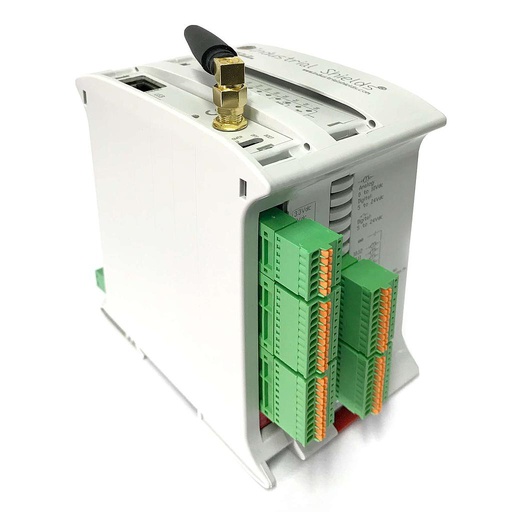
ESP32 PLC 38R
An industrial controller built on the dual-core ESP32, with Ethernet, Wi-Fi, Bluetooth LE, RS-485 and RS-232, for DIN rail. It is programmed in C++ with the Arduino IDE. In this cell it runs the program of each reference, reads the sensors and the cameras, controls the cobot and sends the production data to the screen and the line.
- Role
- Cobot control, inputs, production data, energy and log
- Inputs
- 12: 8 analog/digital (0-10 V, 11-bit), 4 digital optoisolated (5 to 24 Vdc), 4 with interrupt
- Outputs
- 22: 6 analog/digital/PWM (0-10 V, 12-bit), 16 relays (230 Vac 4 A / 24 Vdc 2 A, resistive)
- Communications
- Ethernet 10/100, Wi-Fi 2.4 GHz, Bluetooth LE, RS-485, RS-232, I2C, SPI
- Processor
- ESP32 dual core, up to 240 MHz
- Built in
- Real-time clock
- Power supply
- 12 to 24 Vdc
- Mounting
- DIN rail TS35, IP20
The case names the ESP32 PLC 38R. Size it for your cell: count the signals from the cobot, the sensors and the cameras, and the outputs you need. The ESP32 PLC family has smaller and larger models, and optional boards for 4G, LoRa or CAN.
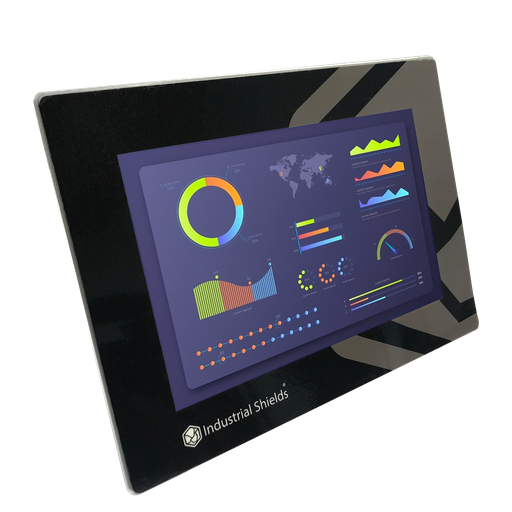
TouchBerry Pi Panel PC 10.1" FLEX
For the touch screen at the cell, one current option is an industrial Panel PC with a Raspberry Pi 4 and a capacitive touchscreen, connected to the PLC over Ethernet. It shows the state of the cobot and the production figures of each product.
- Role
- State of the cobot and production figures
- Screen
- 10.1", capacitive touch
- Computer
- Raspberry Pi 4
- Network
- Gigabit Ethernet
The case uses an external touch screen connected to the ESP32 PLC and does not publish its model. The current TouchBerry Pi family has 7", 10.1" and 18.5" models.
Questions about this case
How does an ESP32 PLC control and monitor a cobot?
In this case, the ESP32 PLC 38R controls the movements of the cobot through the program of each reference, receives inputs from sensors and cameras, and talks to the production control system of the line. An external touch screen shows the state of the cobot and the production. The robot program itself runs in the cobot controller; the PLC says which program to run and when, and reads the answers. See the handshake between a PLC and a robot in the assembly station simulator.
How does one cobot handle several references?
With one program and one configuration per reference, and a gripper that fits the product: the cell has three types of grippers. The case says the engineers adapted the configurations to each reference and does not publish them. A typical way to do it: a recipe table in the PLC with the program number, the gripper and the limits of each reference, selected from the screen or sent by the line system.
Who keeps the operators safe next to the cobot?
The cobot itself: it has sensors that detect a nearby operator and software that slows down or stops its movements. The PLC is not the safety system. As in any robot cell, the safety functions follow ISO 10218-1 and -2, including their requirements for collaborative operation, on the robot safety controller or a safety relay; the PLC reads their state. The case does not publish its safety circuit. See how a PLC reads the state of interlocks and the e-stop.
Which production figures does the screen show?
Four, for each product: units per minute, the time to run the sequence, total parts and pending parts, plus the state of the cobot. A typical way to get them: the PLC timestamps the done signal of each cycle with its real-time clock, counts the parts and subtracts them from the order. Watch the same kind of figures on a line in the Machine Monitor simulator.
How do energy and movement data help preventive maintenance?
The case monitors the energy consumption and saves the movements of the cobot and of the elements most likely to wear out. Counters of cycles per element tell maintenance when to service each one, and a rise in energy for the same work points to a part that needs attention. A typical way to read energy: a meter on RS-485 with Modbus RTU on an ESP32 PLC, as in the energy meter simulator. To keep counters through a power cut, see persistent counters on an ESP32 PLC.
Which controller should I choose for a similar cell?
Start from the list of signals: the state and commands of the cobot, the sensors, the cameras and the links to the screen and the line. The ESP32 PLC 38R has 12 inputs (8 analog) and 22 outputs with 16 relays, plus Ethernet, Wi-Fi, Bluetooth LE and RS-485. Its two cores run the process and the communications apart. Send us the signal list and an engineer will answer.
Download the case study
4-page PDF with the challenge, the logic, the architecture and the hardware. No form required.
Similar cell?
Tell us your robot, your references and what the line needs to see.
Tell us which cobot or robot you use, how many references it must handle, which sensors and cameras the cell has, and where the production data must go. We will tell you which controller fits and how to connect it.
- You get an answer from our technical team
- I/O count and controller sizing for your cell
- Arduino, ESP32 or Raspberry Pi based PLCs