Case study · Automotive line · M-Duino 38R
Measure the part. Command the robot.
An M-Duino PLC runs the line. A Panel PC shows it, also on a phone.
The PLC runs the stations and the robots. The Panel PC is where people manage them.
One MQTT broker on the panel: the same data on the panel, a tablet and a remote screen.
This case describes how to automate an automotive production line with Industrial Shields equipment. It does not name a customer or a plant. It is a reference design: the case says it can be changed to fit each line. This page follows one part through a station, one order to a robot, and the data on their way to the screens.
The challenge
An assembly line must measure, decide and give orders, all day.
The stations collect data with many kinds of sensors. The robots and the mechanised arms need orders. Operators need to see the line and to change its parameters, at the line or from a tablet. And the line changes often, so the system must change with it.
Data from every station
Load cells weigh some pieces. Lasers measure distances. Pressure devices measure the force applied when two pieces are assembled.
Orders for robots and arms
The PLC processes the data and sends the orders to the actuators of the line: robots and mechanised arms.
More than one line
Select one line or another and apply its own parameters, from the same system.
A line that changes
The hardware can be modified and the software reprogrammed for every small change in the line.
Remote access through a VPN
The information can be reached from anywhere, through a VPN connected to the MQTT server. A typical reason for the VPN: the line does not have to be open to the internet.
How it works
Three stages: measure, command, watch.
Each stage shows one part of the line. Press the buttons. The panels are illustrative simulations: parts, tolerances, programs, set points and topics are examples, not data from a plant.
Weigh, measure, press. The PLC reads each value.
The stations send their data to the PLC on analog inputs: the weight from a load cell, a distance from a laser, the assembly force from a pressure device. The PLC processes each value. A typical way to do it: compare each value with a window, release the part when all of them are in, and stop it with an alert when one is out. Pick a part and press Run the station.
- Load cell, laser and force sensor on analog inputs
- Each value compared with a window (example)
- Result to the line and to the Panel PC
Station steps (example)
Illustrative simulation. Example values, no data from a plant. Example windows: weight 4.80 to 5.20 kg, distance 119.5 to 120.5 mm, force 8 to 12 kN. The case does not publish the parts, the ranges or the limits. A typical way to do it: keep each window in the recipe of the line.
The order comes from the PLC or from the panel. The robot does the work.
The PLC sends the orders to the actuators of the line, such as robots and mechanised arms. The orders can be stored in the PLC, or the operator can change them on the Panel PC. The same system can select one line or another and apply its own parameters. Pick a line and a source, then press Start cycle.
- Orders stored in the PLC or sent from the Panel PC
- One line or another, each with its own parameters
- Digital/relay and analog outputs to the actuators
Order steps (example)
Illustrative simulation. Example values, no data from a plant. Example: program 3 and 6.0 V for line A, program 5 and 4.5 V for line B. The case says the PLC sends the orders to the robots and the arms, and does not publish the interface. A typical way to do it: a start signal and a program number on relay outputs, a "done" signal back on a digital input. The robot program itself runs in the robot controller.
Run a full station with the robot handshake in the Assembly station simulator
One broker, many screens: the panel, a tablet, a remote user.
The PLC sends its data to the Panel PC over Ethernet. On the Panel PC, an MQTT broker receives and sends the data between the PLC and the panel, and Node-RED shows them. A phone or a tablet reaches the panel over WiFi. From outside the plant, a VPN connects to the MQTT server. Pick a screen and a work area, then change a limit.
- MQTT broker and Node-RED on the Panel PC
- Phone or tablet over WiFi, remote users through a VPN
- Work areas divided in the interface
MQTT traffic (example)
Illustrative simulation. Example values, no data from a plant. Example topic names and rates. The case puts the MQTT broker and Node-RED on the Panel PC and does not publish the topics or the screens. The work area names are an example of "divided work areas" in the interface.
Try line monitoring over MQTT in the Machine Monitor simulator
System architecture
How does a PLC automate an automotive production line?
An Ethernet PLC based on Arduino reads the sensors of the stations on analog and digital inputs: load cells, lasers and pressure devices. It sends the orders to the robots and the mechanised arms on digital/relay outputs, and analog set points where an actuator takes one. Over Ethernet it exchanges data with a Panel PC that runs an MQTT broker and Node-RED. Phones and tablets reach the Panel PC over WiFi, and remote users through a VPN to the MQTT server.
| Signal | Between | Type | Purpose |
|---|---|---|---|
| Weight of a piece | BetweenLoad cell → PLC | TypeAnalog in | PurposeWeighs certain pieces. A weighing transmitter turns the millivolts into 0-10 V |
| Distance | BetweenLaser sensor → PLC | TypeAnalog in | PurposeMeasures distances on the part or the line |
| Assembly force | BetweenPressure device → PLC | TypeAnalog in | PurposeMeasures the force applied when the pieces are assembled |
| States of the line | BetweenSensors, robot → PLC | TypeDigital in | PurposeExample: part present, robot ready, robot done |
| Orders to robots and arms | BetweenPLC → actuators | TypeDigital/relay out | PurposeExecute the orders. Example: start and program number |
| Set points | BetweenPLC → actuators | TypeAnalog out | Purpose0-10 V, where an actuator takes an analog command |
| Line data and orders | BetweenPLC ↔ Panel PC | TypeEthernet, MQTT | PurposeBroker on the Panel PC. Monitoring and parameters with Node-RED |
| Monitoring and management | BetweenPanel PC ↔ phone, tablet | TypeWiFi | PurposeThe same screens away from the panel |
| Remote access | BetweenRemote user ↔ MQTT server | TypeVPN | PurposeThe information from anywhere |
Why it works
One controller for the line. One broker for the people.
The PLC keeps the orders
The orders can be stored in the PLC and run from there. The Panel PC changes them when the operator needs it.
Measure in the process
Weight, distance and force are read while the part is in the station. A typical way to use them: act on each part (see stage 1).
One broker, many screens
With MQTT, the PLC publishes its data once. The panel, a tablet and a remote user read the same data from the broker.
Work areas in the interface
The monitoring interface is divided into work areas, so each team sees its own part of the line.
One system, several lines
Select one line or another and apply its parameters, from the same system.
Open to change
The PLC is programmed with the Arduino IDE. When the line changes, you change the I/O or the program, not the whole system.
Hardware used
An Ethernet PLC to run the line. A Panel PC to manage it.
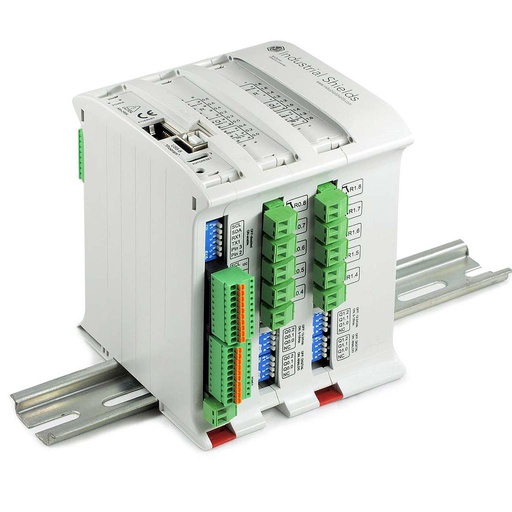
M-DUINO ETHERNET PLC ARDUINO 38R
An industrial PLC built around an original Arduino Mega 2560, with Ethernet, RS-485 and RS-232, for DIN rail. It is programmed with the Arduino IDE. On this line it reads the load cells, the lasers and the force sensors, sends the orders to the robots and the arms, and exchanges data with the Panel PC over Ethernet.
- Role
- Station measurements, orders to robots and arms, data to the panel
- Inputs
- 12: 8 analog/digital (0-10 V, 10-bit), 4 digital optoisolated (5 to 24 Vdc)
- Outputs
- 22: 16 relays (230 Vac 4 A / 24 Vdc 2 A, resistive), 6 analog/digital/PWM (0-10 V)
- Communications
- Ethernet (W5500, RJ45), RS-485, RS-232, I2C, SPI
- Built in
- Real-time clock, microSD slot
- Programming
- Arduino IDE
- Power supply
- 12 to 24 Vdc
- Mounting
- DIN rail TS35, IP20
The text of the case names an Ethernet PLC based on Arduino and does not fix the model. The product photo in the original case document is the M-Duino 38R, which is still in the catalogue. Size it for your line: the case says the inputs and outputs can be digital or analog, within the I/O of the device. If a line needs more, the M-Duino family has larger models, and several PLCs can send their data to the same Panel PC.
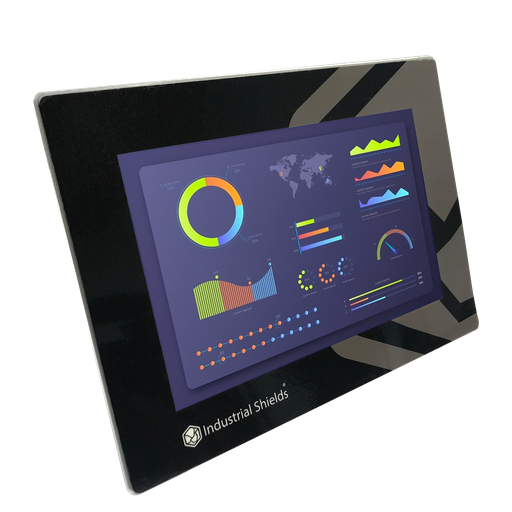
TouchBerry Pi Panel PC 10.1" FLEX
The management point of the line. An industrial Panel PC with a Raspberry Pi 4, connected to the PLC over Ethernet. It runs the MQTT broker and Node-RED, shows the data, lets the operator configure the parameters and serves the screens for phones and tablets over WiFi.
- Role
- MQTT broker, Node-RED, parameters, screens
- Screen
- 10.1"
- Computer
- Raspberry Pi 4
- Link to the PLC
- Ethernet
The case uses a Panel PC based on a Raspberry Pi 3, and the old page links the 10.1" TouchBerry Pi. The current model is the TouchBerry Pi Panel PC 10.1" FLEX, with a Raspberry Pi 4. The family also has 7" and 18.5" models.
Questions about this case
How does a PLC automate an automotive production line?
It reads the sensors of the stations, processes the data and sends the orders to the robots and the mechanised arms. In this case, load cells weigh pieces, lasers measure distances and pressure devices measure the assembly force. An Ethernet PLC based on Arduino runs the line, and a Panel PC with an MQTT broker and Node-RED is the management point. Try the monitoring side in the Machine Monitor simulator.
How does the PLC read a load cell, a laser and a force sensor?
On its analog inputs, which read 0-10 V. A load cell gives a few millivolts, so it needs a weighing transmitter with a 0-10 V or 4-20 mA output. Most laser distance sensors and force transducers with an amplifier give 0-10 V or 4-20 mA. For 4-20 mA, add a 500 Ω precision shunt (20 mA gives 10 V) and scale the value in the program.
How does the PLC give orders to a robot?
The case says the PLC sends the orders to the robots and the arms, and does not publish the interface. A typical way to do it: the PLC sends a start signal and a program number on its outputs, and the robot controller answers with "ready" and "done" signals on PLC inputs. The robot program runs in the robot controller. Industrial robots also accept fieldbuses; check which one your robot controller supports.
Why is the MQTT broker on the Panel PC?
The broker receives and sends the data between the PLC and the Panel PC. The PLC publishes its data once, and every screen reads it from the broker: Node-RED on the panel, a tablet over WiFi, a remote user through the VPN. Two building blocks: a central Mosquitto MQTT broker and a Node-RED dashboard on a TouchBerry with MQTT. For divided work areas with access levels, see a Node-RED login on a TouchBerry.
How can people manage the line from a tablet or from outside the plant?
In the plant, a phone or a tablet connects to the Panel PC over WiFi. From outside, the case uses a VPN connected to the MQTT server. A typical way to do it: keep the broker off the internet, with user names and passwords on the broker, TLS on the connections, and a network design that follows IEC 62443.
Which safety devices work alongside the PLC in a robot cell?
The PLC runs the line, gives the orders and reads the states. Around it, as in any robot cell: guards, light curtains and the robot safety functions designed to ISO 10218-2 and ISO 13849-1, on a safety relay or a safety controller; and an emergency stop that does not depend on the standard PLC program (IEC 60204-1, ISO 13850). The case does not publish its safety circuit. See how a PLC reads the state of interlocks and the e-stop.
Download the case study
4-page PDF with the challenge, the logic, the architecture and the hardware. No form required.
Similar line?
Tell us your stations and your robots. An engineer will answer.
Tell us what each station measures, which robots and arms get orders, how many lines you run and who must see the data. We will tell you which controller fits and how to connect it.
- You get an answer from our technical team
- I/O count and controller sizing for your line
- Arduino, ESP32 or Raspberry Pi based PLCs