Case study · End-of-line test · M-Duino 42
Test every unit. Keep the result.
An M-Duino 42 runs the test steps and records OK or KO for each serial number.
A tested unit and an untested unit look the same.
The record per serial number tells them apart.
This case starts from a real project: test benches built in series, each one with an M-Duino 42. The customer is not named, and its test program is not published. This page shows a typical way to build such a bench for a wiring harness or a small electrical assembly: the test steps, the wire scan and the record per serial number. Each example is marked as an example.
The challenge
The last test before the unit ships.
End-of-line testing checks every unit, not a sample. For a wiring harness, the test must find an open wire, a short and two crossed wires. Then the result must stay with the unit, so that anyone can check it later.
Same steps
The bench runs the same steps in the same order on every unit. The operator cannot skip a step or start before the unit is in place.
Faults that hide
A tester that only checks that each wire conducts finds an open wire. It does not find a short between two wires, and it does not see two crossed wires: each wire still conducts. You must drive one wire and read every end.
A result with a name
A green lamp is gone when the next unit arrives. The result must stay with the serial number: date, time, OK or KO, and the step that failed.
Built in series
When you build the same bench many times, each bench needs the same controller, the same program and the same wiring. A fix on one bench then goes to all of them.
When someone asks about one unit
With the record per serial number, you look up the unit and find the date, the time, the result and the failed step. A repaired unit shows each test, not only the last one.
How it works
Scan, test, decide, record.
Three panels, one for each part of the bench. Press the buttons. They are illustrative simulations: the harness, the steps, the values and the times are examples. The test program of the real project is not published.
No serial number, no test. The first failed step stops it.
The operator scans the serial number and closes the fixture. The PLC starts only when both are true. Then it runs the steps in a fixed order. Each step has a pass condition. A typical way to do it: the first step that fails ends the test, and the result names that step. Pick a unit and press Run test.
- Serial number from a barcode scanner on RS-232
- Fixture sensor on a digital input: the connectors are seated before any wire is driven
- The first failed step ends the test and goes into the record
- Green lamp and red lamp on two digital outputs
Test steps (example)
Illustrative simulation. Example sequence and times. A real bench adds the steps of its own product.
Drive one wire. Read every end.
The PLC switches on one output, at the start of wire 1. Only input 1, at the end of the same wire, may see the voltage. Then wire 2, and so on. With 8 wires, that is 8 drives and 64 reads. An open wire is a missing point on the diagonal. A short is an extra point in a row. Crossed wires move the points off the diagonal. Pick a harness and press Scan.
- Expected map: one point per row, on the diagonal
- Open wire: the point is missing
- Short: two inputs see the same output
- Crossed wires: each point moves to the other column
Illustrative simulation. Example harness of 8 wires. One output on at a time, all 8 inputs read each time.
One line per test, with the serial number as the key.
At the end of each test the PLC writes one line: serial number, date and time from its real-time clock, result, failed step, fault and attempt. It keeps the line on its microSD card and sends it to the line PC over Ethernet. A KO unit can be repaired and tested again. The retest adds a new line and does not erase the old one. A typical rule: a unit leaves the station only when its last result is OK. Press Test next unit.
- Date and time from the real-time clock of the PLC
- microSD on board: the line stays on the PLC if the network is down
- Ethernet to the line PC, for example with Modbus TCP
- A retest adds a line. The history of the unit stays complete.
| Serial | Time | Result | Step |
|---|
Line written to the microSD and sent to the line PC
Illustrative simulation. Example record format and example times. The real format is your choice.
System architecture
How does a PLC run an end-of-line test bench?
A typical layout for an 8-wire harness. The M-Duino 42 reads the serial number from a barcode scanner on RS-232 and the fixture sensor on a digital input. Eight digital outputs drive the wire starts, one at a time, at connector X1. Eight digital inputs read the wire ends at connector X2. Two more digital outputs switch the green and the red lamp. The PLC keeps each result on its microSD card and sends it over Ethernet to the line PC. This layout uses 9 of the 14 digital inputs and all 10 digital outputs.
| Signal | Between | Type | Role in the test |
|---|---|---|---|
| Serial number | BetweenBarcode scanner → PLC | TypeRS-232 | Role in the testStarts the test. Key of the record line |
| Fixture closed | BetweenFixture sensor → PLC | TypeDigital in | Role in the testConnectors seated before any wire is driven |
| Wire starts 1 to 8 | BetweenPLC → connector X1 | Type8 digital out | Role in the testOne output on at a time drives one wire |
| Wire ends 1 to 8 | BetweenConnector X2 → PLC | Type8 digital in | Role in the testShows which ends see the voltage: open, short or crossed |
| Green lamp | BetweenPLC → lamp | TypeDigital out | Role in the testResult OK |
| Red lamp | BetweenPLC → lamp | TypeDigital out | Role in the testResult KO, with the failed step on the line PC |
| Date and time | BetweenReal-time clock in the PLC | TypeOn board | Role in the testTimestamp of each record line |
| Record line | BetweenPLC → microSD card | TypeOn board | Role in the testOne line per test, kept on the PLC |
| Record and status | BetweenPLC ↔ line PC | TypeEthernet | Role in the testModbus TCP or a TCP socket to the line PC or a database |
Why it works
The PLC runs the test. The record follows the unit.
The test runs on the PLC
The steps, the scan and the decision run on the PLC, not on a PC. The line PC receives the result. It does not run the test.
A clock and a card on board
The M-Duino 42 has a real-time clock and a microSD slot. Each line gets a date and time, and stays on the PLC if the network is down.
One program for every bench
You write the program in the Arduino IDE. Every bench of the series runs the same program, and a change goes to all of them.
Industrial I/O
14 optoisolated digital inputs and 10 optoisolated digital outputs at 5 to 24 Vdc, on a DIN rail. The harness is wired to terminals, not to a test board.
Open to the line
Ethernet with Modbus TCP, RS-485 with Modbus RTU, and RS-232. The bench talks to the line PC, a database or another PLC.
Room to grow
Twelve analog inputs at 0-10 V are free for voltage checks on an electrical assembly. For more wires, add a second PLC on Ethernet.
Hardware used
One M-Duino 42 for each bench.
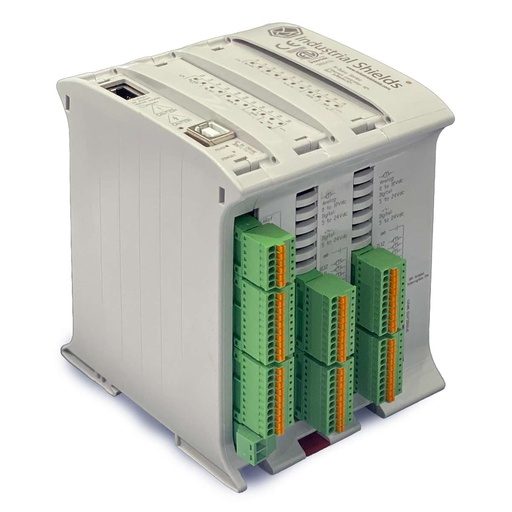
M-DUINO ETHERNET PLC ARDUINO 42
An industrial PLC built around an original Arduino Mega 2560. On this bench it reads the serial number, drives and reads the harness, decides OK or KO and keeps the record. You program it with the Arduino IDE.
- Role
- Test sequence, wire scan, OK/KO record per serial number
- Inputs
- 26: 14 digital optoisolated (5-24 Vdc), 12 analog/digital (0-10 V, 10-bit)
- Outputs
- 16: 10 digital optoisolated (5-24 Vdc), 6 analog/digital/PWM (0-10 V)
- Built in
- Real-time clock, microSD slot
- Comms
- Ethernet (Modbus TCP), RS-485 (Modbus RTU), RS-232, I2C, SPI
- Programming
- Arduino IDE
- Power supply
- 12 to 24 Vdc
- Mounting
- DIN rail TS35, IP20
The real project behind this case uses the M-Duino 42. The harness size, the wiring, the steps and the record format on this page are an example. Its outputs are optoisolated transistor outputs, not relays: to switch the supply of an electrical assembly, add an interface relay. Check the output current and the input levels in the family datasheet before you wire the fixture. In a real fixture, a series resistor or diode on each wire start protects the outputs when two wires are shorted.
Questions about this case
What is end-of-line testing?
It is the last test of a product before it leaves the line. Every unit is tested, not a sample. The result is OK or KO, and it is stored with the serial number of the unit, so you can trace it later.
How does a PLC test a wiring harness?
It drives one wire at a time with a digital output and reads all the wire ends with digital inputs. Only the end of the same wire may see the voltage. This finds open wires, shorts and crossed wires. With 8 wires, that is 8 drives and 64 reads.
How many wires can one M-Duino 42 test?
With one output per wire start and one input per wire end, the limit is the 10 digital outputs and the 14 digital inputs. The example on this page tests 8 wires and keeps one input for the fixture and two outputs for the lamps. For more wires, a typical way is a second PLC on Ethernet or RS-485 with Modbus.
How is each result linked to the serial number?
A barcode scanner on RS-232 reads the serial number before the test starts. At the end, the PLC writes one line with the serial number, the date and time from its real-time clock, the result and the failed step. It keeps the line on the microSD card and sends it to the line PC. For Modbus TCP, see this Modbus TCP register map on an M-Duino.
Can the bench also measure insulation or resistance?
Not with the digital inputs: they give yes or no, not a value. The analog inputs read 0-10 V, which is enough for a voltage check on an assembly. High-voltage insulation and low-resistance tests need a dedicated instrument. The PLC can start it in the sequence and read its pass or fail signal. For another test bench with code and a bill of materials, see the fuse test bench project pack, built on a Raspberry PLC.
Which parts of this page are facts, and which are examples?
Facts: a real project uses the M-Duino 42 in test benches built in series, and the specifications come from its datasheet. Examples: the 8-wire harness, the steps, the wiring, the scanner, the lamps, the record format and every value in the panels. The customer and its test program are not published.
Download the case study
4-page PDF with the challenge, the logic, the architecture and the hardware. No form required.
Similar test?
Tell us your unit and your test steps. An engineer will answer.
Tell us what you test (harness, connector, electrical assembly), how many points, which steps and where the result must go. We will tell you which controller fits and how to map the I/O.
- You get an answer from our technical team
- I/O count and controller sizing for your bench
- Arduino, ESP32 or Raspberry Pi based PLCs