Case study · Test bench · Arduino based PLC
Prove a pneumatic sequence on a bench first.
A belt, 3 cylinders, 8 sensors and one Arduino based PLC.
A sequence can look right on paper.
A bench shows it before a real line runs it.
This case describes a bench model of a box labelling line, built for testing and learning. An industrial Arduino based PLC from Industrial Shields runs it: a conveyor belt, three pneumatic cylinders, two capacitive sensors and six inductive end-of-stroke sensors. The program is written in the Arduino IDE and follows a GRAFCET of eight steps. The original case was written for schools. The same kind of bench is useful to anyone who must check a sequence before it runs on a machine, or train people on sequential logic: system integrators, maintenance teams and in-company training.
From the original case
What the case publishes.
The original case gives the device list, the wiring rule and the GRAFCET. It does not give the PLC model, the program or the valve type. This page keeps that line: facts are facts, and examples are marked as examples.
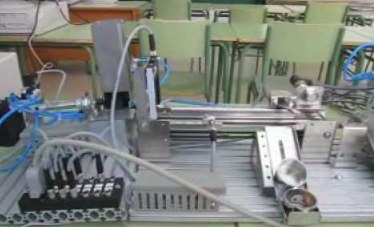
- A box labelling line as a bench model
- 3 cylinders (C1, C2, C3) moved with compressed air through 3 solenoid valves
- 2 capacitive sensors (S1, S2) and 6 inductive sensors (micro 1 to 6), two per cylinder
- A conveyor belt moved by a motor
- All sensors on digital inputs, all actuators on digital outputs
- A GRAFCET of 8 steps, redrawn on this page
The challenge
Check the sequence before it moves a real box.
A labelling line looks simple: feed a box, put a label on it, take it out. The control logic has to run every step in the right order and wait for the right sensor each time. The bench lets you see each step happen.
Eight steps, one order
C1 places the box, C2 puts the label, C3 takes the box out. Each cylinder must finish its stroke before the next one moves. From step 1 to step 7, the PLC waits for a sensor before it moves on.
Twelve signals to wire
Eight inputs and four outputs, with two types of sensor. Each signal must reach the right terminal and the right variable in the program.
Real air, real motion
Three cylinders move with compressed air through three solenoid valves. A motor runs the belt. These are real actuators with real end-of-stroke sensors.
Built for testing and learning
You see the cylinder move and the sensor switch. That makes the bench a direct way to test a sequence and to teach sequential logic to a team.
How it works
Run the GRAFCET. Then break it on purpose.
Press the buttons. The first panel runs the GRAFCET of the case on a drawing of the bench. The second panel lets you make a sensor fail and shows where the sequence stops. They are illustrative simulations with scaled times. They do not show the program of the case.
Eight GRAFCET steps. Steps 1 to 7 wait for a sensor.
Step 0 starts the belt. In step 1 the PLC waits for a box at S1. Then C1 places the box on the belt, and the belt carries it to S2. C2 moves down and back to put the label. C3 takes the box out of the labelling area. The cycle closes when C3 is back (micro 6) and S2 sees no box.
- Steps 1 to 7 end on a sensor, never on a fixed time
- Two end-of-stroke sensors per cylinder: one forward, one back
- C2 only moves when C1 is back (micro 2) and the box is at S2
- A new cycle only starts when the station is empty (S2 OFF)
Transitions
Example: one single-solenoid valve per cylinder (output ON moves forward, OFF moves back). The case names 3 valves and does not publish their type. Illustrative simulation of the GRAFCET published with the case. Scaled times. The program of the case is not published.
Make a sensor fail. See where the sequence stops.
In a GRAFCET, a step ends only when its transition is true. If a sensor never switches, the sequence waits in that step for ever. On a bench you find this with a cable you unplug, not on a running line. A typical way to make it visible: a timer per step. If a step lasts longer than expected, the PLC switches the outputs off and reports the missing signal. The case does not publish its fault handling.
- The waiting step tells you which device to check
- A step timer turns a silent stop into a clear alarm
- You test the fault handling before the machine needs it
- Add an emergency stop and interlocks before you use real air pressure
Make a sensor fail
Select one or more sensors. They will never switch ON.
GRAFCET redrawn from the original case. The step timer and the alarm are a typical pattern, not part of the published case.
System architecture
How does one Arduino based PLC run a pneumatic labelling bench?
Eight sensors go to digital inputs of the PLC: two capacitive sensors for the box and six inductive sensors for the ends of stroke. Four digital outputs drive the three solenoid valves and the belt motor. The case also names a USB link to a Panel PC (HMI). Industrial Shields PLCs connect to other devices over Ethernet and Modbus. Wi-Fi, GPRS and LoRa are available in specific versions.
| Signal | Between | Type | Role in the GRAFCET |
|---|---|---|---|
| S1, capacitive | BetweenSensor → PLC | TypeDigital input | Role in the GRAFCETBox present: step 1 to step 2 |
| S2, capacitive | BetweenSensor → PLC | TypeDigital input | Role in the GRAFCETBox at the labelling station: step 3 to 4. OFF when the box has left: step 7 to 0 |
| micro 1, inductive | BetweenC1 → PLC | TypeDigital input | Role in the GRAFCETC1 forward: step 2 to 3 |
| micro 2, inductive | BetweenC1 → PLC | TypeDigital input | Role in the GRAFCETC1 back: step 3 to 4, with S2 |
| micro 3, inductive | BetweenC2 → PLC | TypeDigital input | Role in the GRAFCETC2 forward, label applied: step 4 to 5 |
| micro 4, inductive | BetweenC2 → PLC | TypeDigital input | Role in the GRAFCETC2 back: step 5 to 6 |
| micro 5, inductive | BetweenC3 → PLC | TypeDigital input | Role in the GRAFCETC3 forward, box out: step 6 to 7 |
| micro 6, inductive | BetweenC3 → PLC | TypeDigital input | Role in the GRAFCETC3 back: step 7 to 0, with S2 OFF |
| Valve C1 | BetweenPLC → solenoid valve | TypeDigital output | Role in the GRAFCETMoves C1 (steps 2 and 3) |
| Valve C2 | BetweenPLC → solenoid valve | TypeDigital output | Role in the GRAFCETMoves C2 (steps 4 and 5) |
| Valve C3 | BetweenPLC → solenoid valve | TypeDigital output | Role in the GRAFCETMoves C3 (steps 6 and 7) |
| Belt motor | BetweenPLC → motor | TypeDigital output | Role in the GRAFCETRuns the conveyor belt from step 0 |
| HMI link | BetweenPLC ↔ Panel PC | TypeUSB | Role in the GRAFCETOption named in the case. Not part of the sequence |
Why it works
An industrial PLC on the bench. Open code in your hands.
You own the application
You write the program in the Arduino IDE, which is free. You know every line of the code, so you can change the sequence, add a step or reuse it on another machine.
Industrial hardware on the bench
The bench runs on an industrial Arduino based PLC for the DIN rail. A sequence you prove on the bench runs on the same family of controllers in a cabinet.
Ready to connect
Industrial Shields PLCs connect to a Panel PC (HMI) over USB and to other devices over Ethernet and Modbus. Wi-Fi, GPRS and LoRa are available in specific versions. You can add a screen or a link to a line controller later.
Hardware used
One Arduino based PLC for the whole bench.
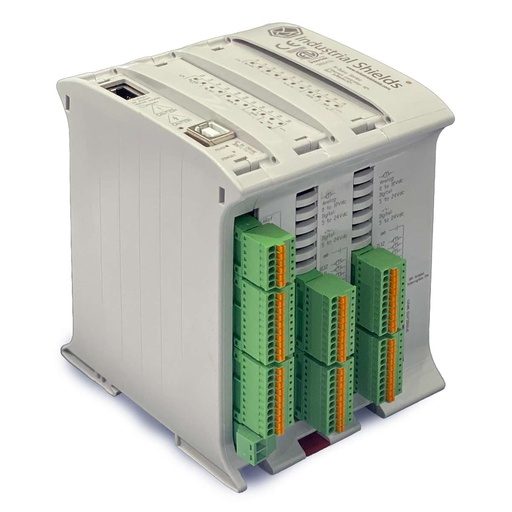
M-DUINO ETHERNET PLC ARDUINO 42
An industrial PLC built around an original Arduino Mega 2560. On this bench it reads the 8 sensors, drives the 3 solenoid valves and the belt motor, and runs the GRAFCET. You program it with the Arduino IDE.
- Inputs
- 26: 14 digital optoisolated, 12 analog/digital (0-10 V)
- Outputs
- 16: 10 digital optoisolated, 6 analog/digital/PWM (0-10 V), 5 to 24 Vdc
- Ethernet
- W5500, 10/100 Mbit, RJ45
- Serial and buses
- RS-485, RS-232, TTL, I2C, SPI
- Power supply
- 12 to 24 Vdc
- Mounting
- DIN rail TS35, IP20
The case names an Arduino based PLC from Industrial Shields and does not publish the exact model. The original PDF shows an M-Duino. The image shows the M-DUINO ETHERNET PLC ARDUINO 42: its 14 digital inputs and 10 digital outputs cover the 8 inputs and 4 outputs of this sequence, with spare I/O. Its outputs are optoisolated, without relays: the belt motor needs a contactor or an interface relay. Check the current of your valve coils in the family datasheet.
Questions about this case
What does the bench automate?
A box labelling line. A conveyor belt, three pneumatic cylinders (C1 places the box, C2 puts the label, C3 takes the box out), two capacitive sensors and six inductive end-of-stroke sensors. One Arduino based PLC from Industrial Shields runs the sequence.
How many I/O does the PLC need for this sequence?
Twelve digital signals: 8 inputs (S1, S2 and micro 1 to 6) and 4 outputs (three solenoid valves and the belt motor). The M-Duino 42 has 14 digital inputs and 10 digital outputs, so it covers them with spare I/O. To choose the valve for each cylinder, see 5/2 and 5/3 solenoid valves and how to wire them.
How do you turn a GRAFCET into Arduino code?
The case does not publish its program. A typical way: one variable holds the active step, and a switch statement has one case per step. Each case sets the outputs of the step and checks its transition. If the transition is true, the variable moves to the next step. A team that works with GRAFCET can map it line by line.
Is this bench only for schools?
No. The original case was written for schools. The same bench is a way to check a sequence before it runs on a machine, and to train integrators or maintenance teams on sequential logic with real cylinders and sensors. For another test bench with code and a bill of materials, see the fuse test bench project pack.
Can the bench talk to an HMI or to other devices?
Yes. The case names a USB link to a Panel PC (HMI). Industrial Shields PLCs connect to other devices over Ethernet and Modbus. Wi-Fi, GPRS and LoRa are available in specific versions. The case does not publish an HMI screen or a network setup.
Which parts of this page are facts, and which are examples?
Facts from the original case: the device list, the wiring rule (sensors on digital inputs, valves and motor on digital outputs), the GRAFCET and the communication options. Examples: the PLC model in the image, the valve type, the step timer, the times in the simulations and the code structure.
Download the case study
4-page PDF with the challenge, the logic, the architecture and the hardware. No form required.
Similar project?
Tell us your sequence. An engineer will answer.
Send us your steps or your GRAFCET, your sensors and your actuators. Bench, training rig or real machine: we will tell you which controller fits and how to map the I/O.
- You get an answer from our technical team
- I/O count and controller sizing
- Arduino, ESP32 or Raspberry Pi based PLCs