Case study · Steam boiler · WiFi PLC
Water, purge, flame, pressure. In that order.
A relay PLC with WiFi runs the burner sequence of a fire-tube boiler.
The PLC runs the sequence. People watch it on a panel and a phone.
Each step waits for its condition: water, a clean chamber, a flame, the pressure.
This case describes how to automate a boiler with Industrial Shields equipment. It does not name a customer or a site. The example is a fire-tube (pyrotubular) steam boiler, and the case says the same system works for other types of boilers. This page follows one start: the water, the purge, the ignition, the pressure band and the alerts.
The challenge
A boiler start is a sequence. Each step needs a condition.
Steam generation must run correctly and safely. The burner must not light without water, without a clean combustion chamber or without a confirmed flame. The pressure must stay in its band. And when something goes wrong, a person must know, even when nobody is next to the boiler.
Water before fire
The PLC checks the water level first. With low water, the pump runs until the level is right.
A clean chamber
Before the ignition, the fan sweeps the combustion gases out for a defined time.
An ignition that stops
No flame: the PLC tries again, three times. If the fourth try fails, it purges and aborts.
Pressure in a band
The burner fires up to 2 bar, stops, and starts again at 1 bar, until the user stops the cycle.
Alerts that reach someone
A fault shows first as a local alert on the Panel PC. If nobody is there, the alert goes out over WiFi. The case adds a database and a mobile application with security alerts and emergency shutdown.
How it works
Three stages: prepare, ignite, hold.
Each stage shows one part of the boiler sequence. Press the buttons and move the sliders. The panels are illustrative simulations: times, rates and waits are examples, not data from a boiler.
No water, no fire. Then the fan clears the chamber.
When the user switches the boiler on, the PLC first checks the water with the level sensor, on a digital input. If there is not enough water, it turns the pump on until the level is right. Then the fan sweeps the combustion gases out of the boiler for a defined time. Only then can the ignition start. Press Switch on. Tick the box to start with low water.
- Level sensor on a digital input
- Pump on a relay output until the level is right
- Fan purge for a defined time before the ignition
Start steps (example)
Illustrative simulation. Example values, no data from a boiler. Example times: the filling takes a few seconds and the purge 30 s, shown 10 times faster. The case says "a defined time" and does not publish the purge time.
Spark and gas. No flame: try again. Then stop.
The ignition turns on the transformer, which makes the spark, and opens the solenoid valve, which lets the gas pass. The flame sensor tells the PLC if there is a flame. If there is no flame, the PLC repeats the ignition three times. If the fourth try also fails, the PLC runs another purge and aborts the ignition. Pick a case and press Ignite.
- Transformer and gas solenoid valve on relay outputs
- Flame sensor on a digital input
- Three repeats, then purge and abort
Ignition steps (example)
Illustrative simulation. Example values, no data from a boiler. Example: each try lasts 5 s, shown 5 times faster. A typical way to do it: close the gas valve at the end of a try with no flame. In a real gas burner, the certified burner control decides if a retry is allowed and runs a full purge before it (EN 676, EN 298).
The burner works between 1 and 2 bar. A fault goes to the panel, then out.
With a flame, the PLC reads the boiler pressure on an analog input. At 2 bar it switches the burner off. When the pressure drops to 1 bar, it starts the burner again. The cycle repeats until the user stops it. If a level or an element does not behave as expected, the PLC shows a local alert on the Panel PC. If nobody is there, the alert must go out remotely, over WiFi. Move the steam demand and press Simulate a fault.
- Pressure sensor on an analog input
- Burner off at 2 bar, on again at 1 bar
- Local alert on the Panel PC, remote alert over WiFi
Events (example)
Illustrative simulation. Example values, no data from a boiler. Example rates: the pressure moves about 20 times faster than in a real boiler. A typical way to do it: if nobody acknowledges the local alert in 10 s, send it out (here shown twice as fast). The real wait is your choice.
System architecture
How does a PLC automate a steam boiler?
A PLC with relay outputs and WiFi reads the level sensor, the flame sensor and the two buttons (On/Off and Emergency stop) on digital inputs, and the pressure sensor on an analog input. Its relay outputs switch the four 220 V loads: the water pump, the fan, the ignition transformer and the gas solenoid valve. A Panel PC on Ethernet shows the live values and lets the operator control each actuator by hand. Over WiFi, the PLC sends all the information to a web server.
| Signal | Between | Type | Purpose |
|---|---|---|---|
| Water level | BetweenLevel sensor → PLC | TypeDigital in | PurposeEnough water before the ignition. Low level starts the pump |
| Flame | BetweenFlame sensor → PLC | TypeDigital in | PurposeConfirms the ignition. No flame: repeat, then purge and abort |
| Boiler pressure | BetweenPressure sensor → PLC | TypeAnalog in | PurposeBurner off at 2 bar, on again at 1 bar. Sensor range not published |
| On/Off | BetweenPush button → PLC | TypeDigital in | PurposeStarts and stops the boiler cycle |
| Emergency stop | BetweenPush button → PLC | TypeDigital in | PurposeEmergency stop of the boiler. See the FAQ on safety |
| Water pump | BetweenPLC → pump | TypeRelay out | PurposeFills the boiler until the level is right |
| Fan | BetweenPLC → fan | TypeRelay out | PurposeSweeps the combustion gases for a defined time |
| Ignition transformer | BetweenPLC → transformer | TypeRelay out | PurposeMakes the spark of the ignition |
| Gas solenoid valve | BetweenPLC → valve | TypeRelay out | PurposeLets the gas pass to the burner |
| Live values, manual control | BetweenPanel PC ↔ PLC | TypeEthernet | PurposeParameters in real time, each actuator by hand, local alerts |
| Data and alerts | BetweenPLC → web server | TypeWiFi | PurposeAll the information. Database, mobile app, remote alerts |
Why it works
One sequence, written once, for each boiler.
Conditions before actions
Each step starts only when the step before is complete: level, purge, flame. The PLC program can be written as a sequence of states with clear exits.
A limit on the ignition
In this case, the number of tries is fixed in the program. After the fourth failure the PLC purges and stops, instead of sending gas again and again. In a real gas burner, the certified burner control sets the retries and the purge before each one.
A band, not a set point
Off at 2 bar and on at 1 bar. The gap between the two values keeps the burner from starting and stopping every few seconds.
Relays for the 220 V loads
The pump, the fan, the transformer and the gas valve are on relay outputs. Each relay of the ESP32 PLC 19R switches up to 4 A at 230 Vac with a resistive load. Motors and coils are inductive: use contactors for the motors and add RC snubbers.
Local first, then remote
The Panel PC shows the alert next to the boiler. WiFi takes it to the web server, the database and the mobile application when nobody is there.
Many boilers, one point
The case says you can replicate the system on several boilers, with one PLC each. All of them connect to the Panel PC and the web server, so you control the network from one point.
Hardware used
A relay PLC with WiFi to run it. A Panel PC to watch it.
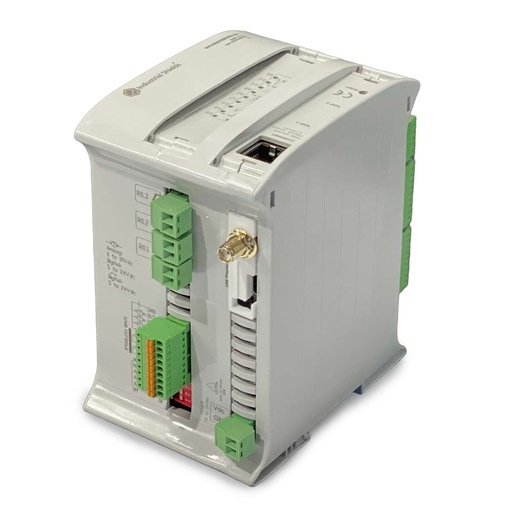
ESP32 PLC 19R
An industrial controller built on the dual-core ESP32, with WiFi, Bluetooth LE, Ethernet, RS-485 and RS-232, 8 relay outputs, for DIN rail. It is programmed with the Arduino IDE. In this boiler it reads the level, the flame, the pressure and the two buttons, switches the pump, the fan, the transformer and the gas valve, and sends the data over WiFi.
- Role
- Boiler sequence, pressure band, alerts over WiFi
- Inputs
- 6: 4 analog/digital (0-10 Vdc analog, 0-24 Vdc digital), 2 digital optoisolated (5-24 Vdc)
- Outputs
- 11: 8 relays (230 Vac 4 A / 24 Vdc 2 A, resistive), 3 analog/digital/PWM (0-10 V)
- Wireless
- WiFi 2.4 GHz, Bluetooth LE
- Wired comms
- Ethernet (RJ45), RS-485, RS-232, I2C, SPI
- Programming
- Arduino IDE
- Power supply
- 12 to 24 Vdc
- Mounting
- DIN rail TS35, IP20
The case names an Arduino based PLC with relay outputs and WiFi, and does not fix the model. The old page shows an M-Duino 19R. The M-Duino versions with WiFi are not in the online shop today. The current controller with relays and WiFi on board is the ESP32 PLC 19R, also programmed with the Arduino IDE. This sequence uses 5 of its 6 inputs (4 digital, 1 analog) and 4 of its 8 relays. In digital mode, the analog/digital inputs take 24 Vdc signals, so the four digital signals fit.
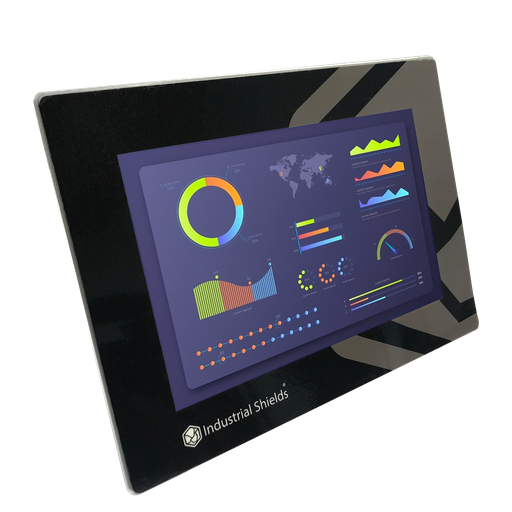
TouchBerry Pi Panel PC 10.1" FLEX
The local SCADA screen of the boiler. An industrial Panel PC with a Raspberry Pi 4, connected to the PLC over Ethernet. It shows the parameters in real time, lets the operator switch each actuator by hand and shows the local alerts.
- Role
- Live values, manual control, local alerts
- Screen
- 10.1"
- Computer
- Raspberry Pi 4
- Link to the PLC
- Ethernet
The case says "PC Panel". Its scheme shows an Industrial Shields Panel PC with a Raspberry Pi, and the old page links the 10.1" TouchBerry Pi. The image and the link show the TouchBerry Pi Panel PC 10.1" FLEX. The family also has 7" and 18.5" models.
Questions about this case
How does a PLC control a steam boiler?
It runs a fixed sequence. In this case: check the water with the level sensor and fill it with the pump; purge the combustion gases with the fan; light the burner with the transformer and the gas solenoid valve, and confirm the flame with the flame sensor; then keep the pressure between 1 and 2 bar. A relay PLC with WiFi does it, and a Panel PC shows it. A state machine is a clean way to write it: see the solenoid valve state machine example.
Why does the fan purge the boiler before the ignition?
Unburnt gas can stay in the combustion chamber and in the flue after a stop or a failed try. A spark in that mixture is dangerous. The purge blows fresh air through the chamber first. The case uses a defined purge time and does not publish it. The burner manufacturer and the gas burner standard (EN 676 for forced draught gas burners) set the minimum purge in a real installation.
What happens when there is no flame?
The PLC repeats the ignition three times. If the fourth try also fails, it runs another purge and aborts the ignition. A typical way to do it: after an abort, keep the burner locked out until a person checks it and resets it, and send the alert to the Panel PC and over WiFi.
Which safety devices work alongside the PLC in a gas boiler?
The PLC runs the sequence, reads the status of the safety devices and sends the alerts. Around it, as in any gas boiler: flame supervision and gas shut-off in a certified burner control unit (EN 298); low water and high pressure limiters, independent and certified to EN 12953-6 and EN 12953-9; and an emergency stop that does not depend on the standard PLC program (IEC 60204-1, ISO 13850). The case does not publish its safety circuit. See safety interlocks and e-stop on a PLC.
How does the PLC hold the pressure between 1 and 2 bar?
It reads the pressure sensor on an analog input. At 2 bar it switches the burner off, and at 1 bar it starts it again: an on/off control with a gap (hysteresis), so the burner does not start and stop every few seconds. The ESP32 PLC reads 0-10 V. For a 4-20 mA transmitter, add a 500 Ω precision shunt. See 4-20 mA pressure sensors on an ESP32 PLC.
How do the data and the alerts go out over WiFi?
The PLC sends all the information to a web server over WiFi. The case adds a database and a mobile application with security alerts and emergency shutdown. With several boilers, each PLC sends its data to the same server. Two building blocks: non-blocking WiFi reconnection, so the boiler logic never waits for the network, and MQTT remote commands with a response topic.
Download the case study
4-page PDF with the challenge, the logic, the architecture and the hardware. No form required.
Similar boiler?
Tell us your boiler and your sequence. An engineer will answer.
Tell us the type of boiler and burner, the sensors you have, the loads you switch and where the alerts must go. We will tell you which controller fits and how to wire it.
- You get an answer from our technical team
- I/O count and controller sizing for your boiler
- Arduino, ESP32 or Raspberry Pi based PLCs