Case study · Biogas plant · Raspberry PLC 58
One PLC for the whole biogas plant.
Digester heat, gas pressure, user levels, data on Ethernet.
The digester makes the gas. The PLC keeps the process in its limits.
Temperature, pressure and sludge on one controller, one screen and one server.
One controller runs the whole anaerobic digestion process: the four plant sections, the heating and the gas pressure, the local operator screen and the data to the cloud. The case uses an Industrial Shields Raspberry PLC and a TouchBerry Panel PC. It does not name the customer or the plant, and it does not publish set points, signal ranges or the protocol to the server.
The challenge
Four process sections. One place to manage and monitor them.
The customer wanted to manage and monitor every step of the biogas process from one place. That meant three jobs: the control system and the plant automation, a screen for local control and management, and data sent to the cloud. The plant processes biomass waste of vegetable or animal origin. Microorganisms break it down without oxygen, and the result is biogas. The plant has four sections, each with its own process. The plant also has sludge probes, air and biogas meters.
Substrate input and digestion
Biomass waste enters the anaerobic digestion module. After a period of time, the module produces biogas. A heating system keeps it at a set temperature.
Nitrogen removal
Part of the digestate goes to a nitrogen feed reactor, also under heating. Its product goes back to the digestion module: the plant recirculates.
Effluent extraction
The other part of the digestate goes to an operating accumulation pond.
Biogas to energy
The biogas feeds an engine that produces electric and thermal energy. Pressure is a vital parameter in any gas system, so a probe reads it in real time.
One control system, a local screen, the cloud
Control and automate the four sections, give the operators a screen next to the process, and send the plant data to a server. One PLC does the control, one Panel PC does the local management, and Ethernet carries the data.
How it works
Three loops: heat, pressure, operation.
Each loop shows one part of the pattern. Move the sliders and press the buttons. The panels are illustrative simulations: temperatures, pressures, thresholds, user levels and record counts are examples, not data from the plant.
The heating holds the temperature in the digester and the reactor.
The anaerobic digestion module and the nitrogen feed reactor work under a heating system that keeps a temperature over time. Temperature sensing tells the PLC where each tank is. A typical way to do it: on and off control with a band around the set point for each tank, and an alarm if the temperature falls too far. In the panel, raise the heat loss until the heating can no longer keep up.
- Temperature sensing on the heated tanks, on the PLC inputs
- Heating outputs for the digestion module and the nitrogen reactor
- An alarm when the temperature leaves its band
Illustrative simulation. Example values, no data from the plant. Example: one reading per tank, digester set point 38.0 °C, reactor set point 35.0 °C, heating on below the set point minus 0.5 °C and off above the set point plus 0.5 °C, alarm 2 °C below the set point. The real set points are not published.
A pressure probe shows the gas side in real time.
Pressure is a vital parameter in gas management, so a specific probe reads it in real time. The engine uses the biogas to make electric and thermal energy. A typical way to do it: a high and a low threshold on the pressure, each with an alarm on the Panel PC and an entry in the history. In the panel, change the production and start or stop the engine.
- Real-time gas pressure from a dedicated probe
- Alarms and sensor history on the Panel PC
- Sludge probes, air and biogas meters on the same PLC
Alarm and sensor history (example)
Illustrative simulation. Example values, no data from the plant. Example thresholds: high alarm above 5.0 mbar, low alarm below 1.0 mbar. Illustrative thresholds. The real set points of the installation are not published.
The right people change the right things. The server gets the data.
The TouchBerry Panel PC shows the plant in real time, controls the operations, shows alarms and the history of sensors and actuators, and configures all available parameters. It also defines a hierarchy of users. The data goes to the cloud server over Ethernet. A typical way to do it: each user level unlocks more functions, and the PLC keeps the records while the link is down and sends them when it is back. Pick a user level, press the buttons, then cut the link.
- Five functions on the Panel PC, from live view to user levels
- Data to the cloud server on Ethernet
- Ethernet chosen for its speed and bandwidth
User level (example)
Panel PC events (example)
Illustrative simulation. Example values, no data from the plant. Example permissions: an operator acknowledges alarms, a supervisor also changes set points, an admin also manages users. The case defines a user hierarchy but does not publish its levels.
Code example: MQTT to SQL Server bridge in Python on a Raspberry PLC
System architecture
How does one PLC automate and monitor a biogas plant?
The biogas sensors go to the digital and analog inputs of the Raspberry PLC 58. Its digital and analog outputs drive the biogas actuators. The PLC sends the plant data to a cloud server over Ethernet. The TouchBerry Panel PC shows the information and is the local control and management screen. In the case diagram, the Panel PC is also on Ethernet, next to the server.
| Signal | Between | Type | Purpose |
|---|---|---|---|
| Temperature (heated tanks) | BetweenTemperature sensor → Raspberry PLC 58 | TypeInput | PurposeTemperature sensing for the digestion module and the nitrogen reactor, both under heating. Range not published |
| Gas pressure | BetweenPressure probe → Raspberry PLC 58 | TypeInput | PurposeReal-time pressure on the gas side. Range not published |
| Sludge, air and biogas | BetweenSludge probes, air and biogas meters → Raspberry PLC 58 | TypeDigital or analog in | PurposeProcess values for the four sections |
| Heating and actuators | BetweenRaspberry PLC 58 → biogas actuators | TypeDigital or analog out | PurposeHeating and the other actuators of the plant. List not published |
| Plant data | BetweenRaspberry PLC 58 → cloud server | TypeEthernet | PurposeData to the server, chosen over Wi-Fi or GPRS. Protocol not published |
| Local screen | BetweenTouchBerry Panel PC | TypeEthernet | PurposeLive view, control, alarms and history, parameters, user levels |
Why it works
One controller sized for a whole plant.
Many signals on one PLC
The Raspberry PLC 58 has 39 inputs, 18 of them analog (0-10 V), and 24 outputs, 9 of them analog or PWM. Temperatures, pressure, probes, meters and actuators of four sections fit on one controller.
Processes at the same time
A Raspberry Pi 4 with Debian 64-bit runs several processes at once: control, logging, the link to the screen and the link to the server. You program it in Python, Node-RED or C/C++.
Ethernet for the data
The case chose Ethernet for its speed and bandwidth. The PLC has two Ethernet ports, so the plant network and the server link can use separate ports.
Other links when you need them
Two RS-485 ports for Modbus RTU meters and drives, Wi-Fi and Bluetooth LE on board, and one optional board for CAN, LoRa or 4G.
The data survives a power cut
A UPS with supercapacitors lets Linux shut down cleanly on power loss, and a real-time clock keeps the time stamps right.
Open and modular
An open solution with no license fees. The project can grow: more I/O, more devices, more screens.
Hardware used
Raspberry PLC 58 to control. TouchBerry to operate.
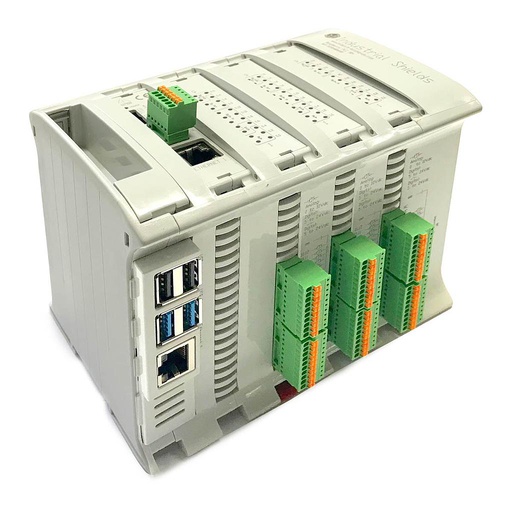
Raspberry PLC 58
An industrial PLC built around a Raspberry Pi 4, with 39 inputs and 24 outputs, two Ethernet ports, two RS-485 ports, Wi-Fi and Bluetooth LE, for DIN rail. In this plant it reads the sensors of the four sections, drives the actuators and sends the data to the server.
- Role
- Control of the four sections, data to the cloud server
- Inputs
- 39: 18 analog/digital (0-10 V, 12-bit), 21 digital optoisolated
- Outputs
- 24: 9 analog/digital/PWM (0-10 V), 15 digital optoisolated
- Comms
- 2 x Ethernet, 2 x RS-485, Wi-Fi, Bluetooth LE, I2C, SPI
- Computer
- Raspberry Pi 4, Debian 64-bit
- Power and mounting
- 12 to 24 Vdc, DIN rail TS35, IP20
The case names the "Raspberry 58+ PLC". This product page sells the current Raspberry PLC 58.
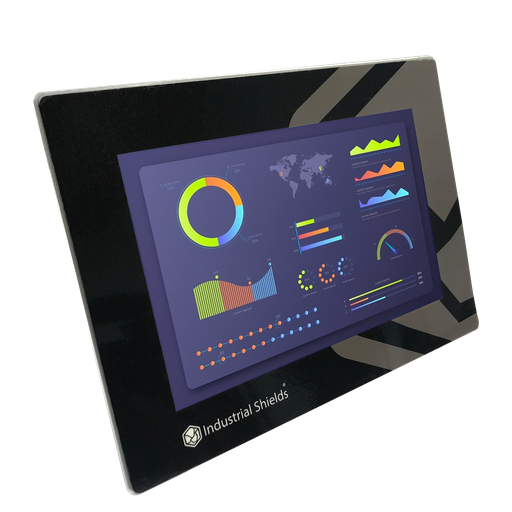
TouchBerry Pi Panel PC 10.1"
The local control and management screen of the plant. An industrial Panel PC with a Raspberry Pi 4. It shows the plant in real time, controls the operations, shows alarms and history, sets the parameters and manages the user levels.
- Role
- Live view, control, alarms and history, parameters, user levels
- Screen
- 10.1"
- Computer
- Raspberry Pi 4
- Network
- Ethernet
The case says "a TouchBerry Panel PC" and does not publish its size. The image and the link show the TouchBerry Pi Panel PC 10.1" FLEX.
Questions about this case
How do you automate a biogas plant with a PLC?
Connect the process sensors (temperature, pressure, sludge probes, air and biogas meters) to the PLC inputs and the actuators (heating and the other process equipment) to its outputs. The PLC runs the control logic of each section, a Panel PC gives the operators a local screen, and a network link sends the data to a server. In this case one Raspberry PLC 58 does the control of four sections and a TouchBerry Panel PC is the local screen.
Why send the data on Ethernet and not on Wi-Fi or GPRS?
The case chose Ethernet for its higher speed and bandwidth. When there is no cable to the server, the same PLC has Wi-Fi on board, and an optional 4G board (LTE-M/NB-IoT or LTE Cat 4). For a plant that publishes many values, MQTT to a broker and a database is a common pattern: see the MQTT to SQL Server bridge example for the Raspberry PLC.
Which signals does an anaerobic digester need?
In this case: temperature sensing on the heated tanks, a pressure probe on the gas side, sludge probes, and air and biogas meters. Many process transmitters give 4-20 mA. The analog inputs of the Raspberry PLC 58 read 0-10 V, so a 4-20 mA signal needs a converter or a precision resistor. Meters with Modbus RTU go on one of the two RS-485 ports.
Can the PLC go next to the digester? Biogas is flammable.
The case does not describe the hazardous area classification. In general, biogas plants have hazardous areas (ATEX in Europe). The Raspberry PLC 58 is an IP20 device for a cabinet in a safe area, and the Panel PC also goes outside the hazardous zones. Instruments inside a hazardous zone must be certified for that zone, and the gas safety devices must work without the PLC. Follow your risk assessment and your local rules.
How do user levels work on the Panel PC?
The case defines a hierarchy of users for the system. A typical way to do it: an operator sees the plant and acknowledges alarms, a supervisor also changes set points, and an admin also manages users and the configuration. The screen can talk to the PLC over a TCP socket: see TCP socket between Python and Node-RED on a Raspberry PLC and the touchscreen HMI example.
Which parts of this case are facts, and which are examples?
Facts: a biogas plant in four sections (substrate input with anaerobic digestion, nitrogen removal, effluent extraction, biogas to electric and thermal energy), recirculation from the nitrogen reactor to the digestion module, heating with a temperature sensor, a pressure probe, sludge probes, air and biogas meters, a "Raspberry 58+ PLC", a TouchBerry Panel PC with five functions, data to a cloud server over Ethernet, and a fully automated system. Examples: set points, bands, pressures, thresholds, user levels, permissions, record counts and the buffering of data.
Download the case study
4-page PDF with the challenge, the logic, the architecture and the hardware. No form required.
Similar plant?
Tell us your process and your signals. An engineer will answer.
Tell us the sections of your plant, the sensors and actuators of each one, how the operators work and where the data has to go. We will tell you which controller fits and how to connect it.
- You get an answer from our technical team
- I/O count and controller sizing for your plant
- Arduino, ESP32 or Raspberry Pi based PLCs