Case study · Knitting plant · ESP32 PLC
Stops, alarms and kWh. One PLC per machine.
One ESP32 PLC per knitting machine: state, alarms and energy over MQTT.
Each machine reports what it does and what it uses. The network is allowed to fail.
Three questions per machine: is it running, why did it stop, how much energy did it use.
This case describes how to monitor knitting machines and their energy with Industrial Shields equipment. It is based on a real project in a knit fabric plant and does not name the customer or the site. The values in the panels are examples, not data from the plant.
The challenge
Many machines, different makers, one factory WiFi.
Maintenance wants to know when a machine stops and why. Management wants to know what each machine produces and what it uses. The machines come from different makers and give different signals. The factory WiFi does not always hold, and a lost event is a lost stop.
Different machines, different signals
One machine type gives six contacts: running, emergency stop, needle, oil, roll finished and broken yarn. Others give only the speed and the turns of the main shaft.
Machine circuits stay as they are
Coupling relays copy each machine signal to a clean 24 Vdc contact. The PLC does not share a circuit with the machine control.
Energy per machine, not per plant
A three-phase power meter in each machine. The plant meter gives the total. It cannot tell which machine used it.
A network that can drop
Events must not get lost when the WiFi fails. Each PLC keeps its data until the next layer has it.
One view for maintenance and management
A concentrator in each production area collects the data of its machines, keeps it until the server confirms it and passes it on to the business software. A heartbeat shows which PLC is silent.
How it works
Three stages: state, energy, delivery.
Each stage shows one part of the system. Press the buttons and move the slider. The panels are illustrative simulations: speeds, powers and times are examples, not data from the plant.
A contact changes. The PLC publishes it at once.
Coupling relays copy the machine signals to the digital inputs of the PLC. Each change of an input is an event: the PLC publishes it over MQTT at once, with a time stamp from its real-time clock and a unique message ID. The speed and the turns of the main shaft come as pulses on the two interrupt inputs. Pick an event and watch the state, the stop count and the log.
- Six contacts through coupling relays, on 24 Vdc inputs
- An MQTT event on every input change, with a unique message ID
- Speed and shaft turns on the two interrupt inputs
MQTT events (example)
Illustrative simulation. Example values, no data from the plant. Example speed: 25 rpm, shown 4 times faster. The real speed depends on the machine and the fabric.
Try a full monitored line with OEE, alarms and energy in the Machine Monitor simulator.
A meter on each machine. The PLC reads it and adds the state.
A three-phase power meter measures each machine. A typical way to do it: the PLC, as Modbus RTU master, polls the meter (a slave) on its RS-485 port every few seconds and gets voltage, current, power and the energy counter. The PLC adds the machine state to each reading. Then the plant sees the energy a machine uses while it runs, and while it stands still. Move the load and stop the machine.
- Three-phase power meter on the RS-485 port
- Voltage, current, power and energy counter
- Each reading tagged with the machine state
Meter readings (example)
Illustrative simulation. Example values, no data from the plant. Example values: 400 V three-phase, power factor 0.85, a reading every 5 s, time shown about 60 times faster. The log shows one reading out of ten. The real power depends on the machine.
Energy per machine, step by step: Energy Meter simulator.
The WiFi drops. The data waits on the card.
A typical way to do it: the PLC writes every event and every reading to an SD card, one file per day, as in the offline-first logging example. When the WiFi or the concentrator is not there, the PLC keeps working and keeps writing. When the link comes back, it sends what is pending, and the message ID lets the concentrator find duplicates. The concentrator keeps the data until the server confirms it. Cut the WiFi, then restore it.
- Daily files on an SD card
- Resend after the reconnection, duplicates found by message ID
- The concentrator keeps the data until the server confirms it
Data path (example)
Illustrative simulation. Example values, no data from the plant. Example: one event per second. The resend rate and the size of the card set how long a cut the system can hold.
Code for this pattern: textile monitoring project pack.
System architecture
How do you monitor knitting machines and their energy with a PLC?
In each machine there is an ESP32 PLC 21 CORE, a three-phase power meter, coupling relays and a 24 Vdc supply. The PLC reads the machine contacts on digital inputs, the speed and the turns on two interrupt inputs, and the meter on RS-485. It keeps a local record and publishes it over MQTT on the factory WiFi. In each production area, a GateBerry concentrator runs the local MQTT broker, keeps and resends the data, gives the time and the firmware updates to the PLCs, and passes the data to the server and the business software.
| Signal | Between | Type | Purpose |
|---|---|---|---|
| Machine running | BetweenMachine contact → relay → PLC | TypeDigital in | PurposeRunning or stopped. Every change is an MQTT event |
| Emergency stop alert | BetweenMachine contact → relay → PLC | TypeDigital in | PurposeStop reason |
| Needle alert | BetweenMachine contact → relay → PLC | TypeDigital in | PurposeStop reason: needle |
| Oil alert | BetweenMachine contact → relay → PLC | TypeDigital in | PurposeStop reason: lubrication |
| Roll finished | BetweenMachine contact → relay → PLC | TypeDigital in | PurposeA piece of fabric is complete |
| Broken yarn | BetweenMachine contact → relay → PLC | TypeDigital in | PurposeStop reason: yarn |
| Speed | BetweenMachine pulse → PLC | TypeInterrupt in | PurposeSpeed in rpm, on machines without the six contacts |
| Main shaft turns | BetweenMachine pulse → PLC | TypeInterrupt in | PurposeTurn counter for the production |
| Power and energy | BetweenPower meter ↔ PLC | TypeRS-485 | PurposeVoltage, current, power, kWh. Modbus RTU is a typical choice |
| Events and readings | BetweenPLC → concentrator | TypeMQTT over WiFi | PurposeAn event on each change, a full snapshot at fixed times |
| Local record | BetweenPLC → SD card | TypeDaily file | PurposeEverything is written first. Resent after a network cut |
| Heartbeat | BetweenPLC → concentrator | TypeMQTT over WiFi | PurposeShows which PLC is silent |
| Time and firmware | BetweenConcentrator → PLC | TypeWiFi | PurposeTime for the real-time clock, firmware updates |
| Plant data | BetweenConcentrator → server | TypeEthernet | PurposeKept until the server confirms it, then to the business software |
Why it works
The record lives at the machine. The network only carries it.
An event, not a poll
The PLC publishes a change when it happens. A short stop does not hide between two polls. A full snapshot at fixed times (every 20 s, for example) confirms the state.
The card is the record
In this pattern, every event and every reading is written to the SD card first. The network is only the way out, so a WiFi cut delays the data but does not delete it.
Relays between two systems
The datasheet asks for a common ground or for isolation when you connect other systems to the PLC. Coupling relays give the PLC a dry contact at 24 Vdc, and the machine circuits stay as the maker wired them.
Energy with a reason
A kWh value alone says little. With the machine state next to it, it splits into the energy of production and the energy of waiting.
One time base
The concentrator gives the time to all the PLCs, and the battery-backed real-time clock keeps it during a cut. Events from many machines line up in the order they happened on the floor.
Built to repeat
Every PLC runs the same program and takes its own ID from its configuration. A new machine is one more PLC, one more meter and one more MQTT topic.
Hardware used
A PLC in each machine. A gateway in each area.
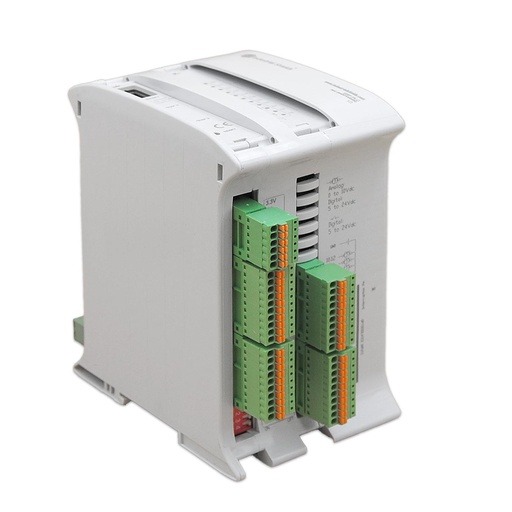
ESP32 PLC 21 CORE
An industrial controller built on the dual-core ESP32, with WiFi, Bluetooth LE, Ethernet, RS-485 and RS-232, 13 inputs and 8 outputs, for DIN rail. It is programmed with the Arduino IDE. In each machine it reads the contacts, the pulses and the power meter, keeps a local record and publishes over MQTT.
- Role
- Machine state, alarms, pulses, power meter, local record
- Inputs
- 13: 6 analog/digital (0-10 Vdc analog, 0-24 Vdc digital), 7 digital isolated (5-24 Vdc, 2 with interrupts, up to 1 kHz)
- Outputs
- 8: 3 analog/digital/PWM (0-10 V), 5 digital isolated
- Wireless
- WiFi 2.4 GHz, Bluetooth LE
- Wired comms
- Ethernet (RJ45), RS-485, RS-232, I2C, SPI
- Clock and memory
- RTC DS3231 with battery, 16 MB flash
- Programming
- Arduino IDE
- Power supply
- 12 to 24 Vdc, DIN rail TS35, IP20
The CORE is the ready-to-ship version without an expansion board. For 4G, LoRa or CAN on board, see the ESP32 PLC 21 FLEX. Input count: the six contacts use 6 inputs and the pulses use the 2 interrupt inputs, so even a machine with both uses 8 of 13.
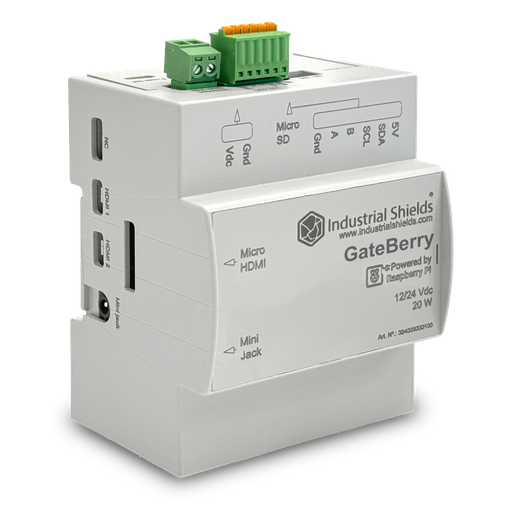
GateBerry FLEX
The concentrator of each production area. An industrial gateway with a Raspberry Pi, for DIN rail, running Linux. It hosts the local MQTT broker and Node-RED, keeps the data of its PLCs until the server confirms it, gives them the time and the firmware updates, and watches their heartbeat.
- Role
- MQTT broker, buffer and resend, time, firmware, heartbeat
- Network
- Gigabit Ethernet, WiFi, Bluetooth LE
- Field bus
- RS-485 with switchable termination, I2C
- Built in
- UPS for a safe shutdown, real-time clock
- Power supply
- 12 to 24 Vdc, DIN rail, IP20
The project used one concentrator per production area. The GateBerry FLEX can be configured with more RAM, and with LoRa, 4G, CAN, M-Bus or RS-232. See how to build it in the Node-RED MQTT concentrator example.
Questions about this case
How do you monitor knitting machines that have no data port?
With the signals they already have. Coupling relays copy each contact (running, alarms) to a 24 Vdc input of the PLC, and the speed and the turns come as pulses on interrupt inputs. The machine control is not changed. See the production pulse counter with interrupts.
How do you measure the energy of each machine?
With a three-phase power meter in the supply of each machine. A typical way to do it: the PLC, as Modbus RTU master, polls the meter (a slave) on RS-485 and sends voltage, current, power and energy together with the machine state. See the Modbus RTU master on an ESP32 PLC.
What happens to the data when the WiFi goes down?
The PLC keeps working and keeps a local record. A typical way to do it: daily files on an SD card. When the link is back, it resends what is pending. The concentrator keeps the data until the server confirms it. See offline-first MQTT logging with an SD card and non-blocking WiFi reconnection.
Why one PLC per machine?
The wiring stays short and inside the machine cabinet, and a fault affects one machine only. Every PLC runs the same program with its own ID, so adding a machine is the same job each time.
How do the clocks of many PLCs stay in step?
Each ESP32 PLC has a real-time clock (DS3231) with a battery. It takes the time from the network (NTP) through the concentrator, and keeps it during a cut, so every event has a correct time stamp. See the NTP-synced RTC on an ESP32 PLC.
Where can I try it and get the code?
The Machine Monitor simulator shows OEE, alarms and energy on a monitored line. The textile monitoring project pack has the Arduino sketches and the Node-RED concentrator flow for this pattern.
Similar plant?
Tell us your machines and your signals. An engineer will answer.
Tell us which machines you have, which signals each one gives, if you want energy per machine and where the data must go. We will tell you which controller fits and how to wire it.
- You get an answer from our technical team
- I/O count and controller sizing for each machine type
- Arduino, ESP32 or Raspberry Pi based PLCs