Case study · Automotive
The robots weld one side. The operator loads the other.
One PLC coordinates the fixtures, the robots, the air and the gas. A safety relay handles the stops.
A welding cell must produce all shift, with accuracy, and stop safely when someone steps in.
So one PLC coordinates robots, fixtures, air and gas, and a Panel PC shows every cylinder and sensor.
This page comes from an application case published by Industrial Shields, developed in reply to requests from customers in the automotive sector. It does not name a customer installation. The safety devices, the spinning table with two sides, the robots with their own programs, the fixtures with cylinders, clamps and a valve pack, the Modbus signal distributor, the fluid panel, the control panel, the Panel PC and the images come from that case. Times, parts, programs, messages and panel values on this page are examples of a typical way to do it.
From the project
The cell, the tools and the air.
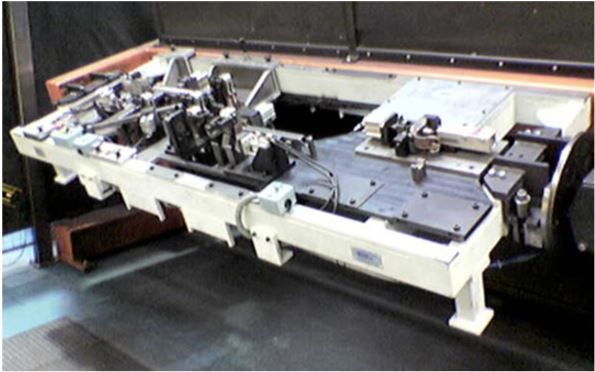
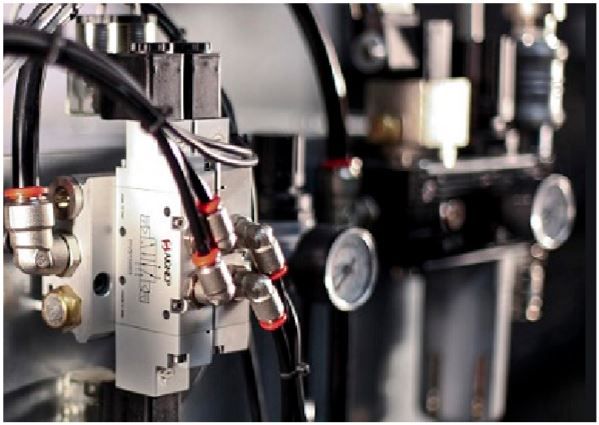
Three images from the original case: the schematic of the connections, a welding tool and the fluid panel.

The challenge
Constant, accurate and safe, in one cell.
The case describes a robotic welding cell for the automotive industry, where robotic cells for painting, handling, palletizing and welding are common. The goal is a machine that produces constantly, with accuracy, and complies with safety regulations. For that, every part must work in harmony, controlled by a PLC and a Panel PC: welding tools, robots, lights and all the safety devices.
Stop safely
Light barriers, a door lock and a scanner trip a safety relay that stops power, air and robots when someone or something gets in.
Weld while loading
Two sides on the spinning table: the robots weld one while the operator loads the other.
Hold the part
Fixtures with pneumatic cylinders and clamps, checked by sensors, closed in sequence by the PLC.
See every sensor
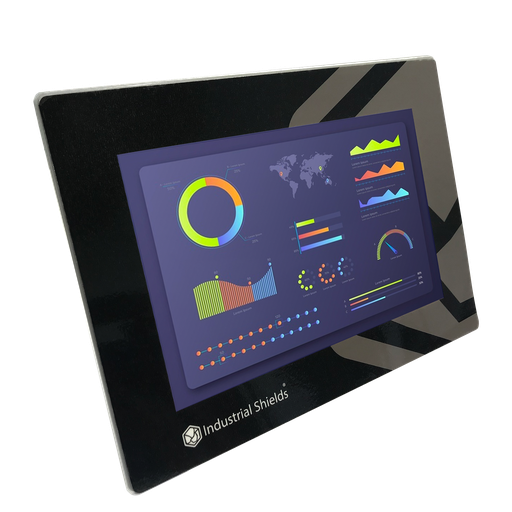
A Panel PC shows the synoptic of the welding tools, with every cylinder and sensor.
Safety comes first
The case starts with safety, the most important part of the machine. Today the safety functions run in a certified safety relay or safety PLC, and the cell PLC reads their state.
How it works
Three jobs of the PLC: follow the safety state, hold the part, feed air and gas.
Each panel shows one job of the PLC in the cell. Press the buttons. The panels are illustrative simulations: the devices come from the case, the times, parts, programs and pressures are examples.
Someone steps in. The safety relay stops power, air and robots.
The light barriers watch the entry of the cell: if the operator walks in to load a tool, the safety relay stops power, air and the robots, and the PLC shows the cause. The safety lock watches the back door to the robots: if it opens, the spinning table stops too. The scanner under the welding tool checks that no part falls into the cell. Run a cycle, then cross the barrier or open the door.
- Barriers at the entry
- Lock on the back door
- Scanner under the tool
Cell events (example)
- Cell ready.
Illustrative simulation. Example values, no data from a customer. Example sequence. The case wires the safety devices to the PLC inputs. Today they go through a certified safety relay or safety PLC, which cuts power and air, and the PLC reads its state to stop the cycle and show the cause.
The clamps close in sequence, then the robot welds.
Presence sensors see the part, and the PLC closes the clamps of the fixture in sequence through the valve pack. Sensors on each cylinder confirm the state. Only then does the table turn and the PLC tell the robot to weld, and the robot reports which part it welded. Every sensor and valve has its own Modbus address. Load a part and follow the cycle.
- Part sensors and cylinder sensors
- Valve pack on Modbus
- Order to the robot, data back
Fixture sequence (example)
- Side B empty.
Illustrative simulation. Example values, no data from a customer. Example values: part, program and number of signals. The case says the PLC gives the opening and closing sequence, and gives the robots the order to weld and reads which part is welded.
Try a station with sensors, steps and faults: assembly station simulator
One general valve feeds the air, and the safety relay cuts it all.
The general valve of the fluid panel feeds compressed air to the welding tools, and a general gas valve feeds the robots. The PLC opens and closes them. When a safety device trips or the emergency stop is pressed, the safety relay drops the general valve and the air of the whole cell is cut. The PLC reads the state. The operator chooses the work mode and resets errors on the control panel. Change the mode, then stop the cell.
- General air and gas valves
- Work mode, reset, emergency stop
- Air cut on every safety stop
Fluid and control panel (example)
- Pick a mode.
Illustrative simulation. Example values, no data from a customer. Example values. The air pressure reading is a typical addition with a pressure switch or sensor; the case does not describe it. The cut of the air on a safety stop comes from the case.
System architecture
How does a PLC control a robotic welding cell?
An M-Duino PLC is the brain of the cell. A safety relay reads the safety devices and the emergency stop, and the PLC reads the state of the relay. The control panel mode and reset reach its inputs. A Modbus signal distributor carries the cylinder sensors, the part sensors and the valve pack, so each one has its own address. Its outputs drive the general air and gas valves of the fluid panel. It gives the robots the order to weld over Modbus and reads which part was welded, and a Panel PC on Ethernet shows the synoptic.
| Signal | Between | Type | Purpose |
|---|---|---|---|
| Safety barriers | BetweenLight barriers → safety relay → PLC input (state) | TypeDigital in | PurposeStop power, air and robots |
| Back door | BetweenSafety lock → safety relay → PLC input (state) | TypeDigital in | PurposeAlso stop the spinning table |
| Scanner | BetweenSafety scanner under the tool → safety relay → PLC input (state) | TypeDigital in | PurposeNo part falls into the cell |
| Operator panel | BetweenMode and reset → PLC inputs; emergency stop → safety relay, state to the PLC | TypeDigital in | PurposeRun and recover the cell |
| Fixture | BetweenCylinder and part sensors, valve pack ↔ Modbus I/O block ↔ PLC | TypeModbus | PurposeClamp sequence, one address per device |
| Robots | BetweenPLC ↔ robot controllers | TypeModbus | PurposeOrder to weld, part and parameters |
| Air and gas | BetweenPLC → general valves of the fluid panel (the safety relay can cut the air) | TypeDigital out | PurposeAir to the tools, gas to the robots |
| Synoptic | BetweenPLC ↔ Panel PC | TypeEthernet | PurposeState of every cylinder and sensor |
Why it works
Each machine does its own job. The PLC keeps them in step.
Safety first
The design starts with the barriers, the door lock and the scanner on a safety relay, and with one valve that cuts all the air.
No waiting for the robot
Two sides on the spinning table: loading happens while welding, which saves cycle time.
Robots keep their programs
Each robot runs its own welding programs. The PLC only tells it when to weld and reads the result.
Few wires to the PLC
A Modbus signal distributor gives every sensor and valve an address, so the PLC needs few I/O for many devices.
Everything on one screen
The Panel PC shows the synoptic of the welding tools, to navigate, monitor and control every parameter.
A model to replicate
For a painting, handling or palletizing cell, remove the welding tools and the table and keep the structure. It fits metal and plastic parts too.
Hardware
An Arduino based PLC and a Panel PC.

Linked in the original caseM-DUINO ETHERNET PLC ARDUINO 57R
An industrial PLC built around an original Arduino Mega 2560, for DIN rail, programmed with the Arduino IDE. In this design it reads the safety states and the control panel, runs the clamp sequence over Modbus, gives the orders to the robots and drives the air and gas valves.
- Role
- Brain of the cell: inputs, Modbus to the fixtures and robots, valves, Panel PC
- Microcontroller
- Arduino Mega 2560 (ATmega2560, 16 MHz)
- Inputs
- 18: 12 analog/digital (0-10 V, 10-bit) and 6 digital optoisolated, 5 to 24 Vdc
- Outputs
- 31: 8 analog/digital/PWM (0-10 V), 23 relays (230 Vac 4 A / 24 Vdc 2 A, resistive)
- Communications
- Ethernet, RS-485, RS-232, I2C, SPI; Modbus RTU and TCP, master or slave
- Built in
- Real-time clock, microSD slot
- Power and mounting
- 12 to 24 Vdc, DIN rail TS35, IP20, 0 to 60 °C
The original page links this model. The case only says "our Arduino based PLC". Size the PLC to the number of direct signals: with the fixtures on Modbus, most devices do not use PLC I/O.
Linked in the original caseTouchBerry Pi Panel PC 10.1" CORE
An industrial Panel PC with a Raspberry Pi 4 and a capacitive touchscreen, connected to the PLC over Ethernet. It shows the synoptic of the welding tools, with every cylinder and sensor, and lets the operator navigate the cell.
- Role
- Synoptic of the cell, states, parameters and messages
- Screen
- 10.1", capacitive touch
- Computer
- Raspberry Pi 4
- Network
- Gigabit Ethernet
The original page links the TouchBerry Pi 10.1" CORE. The current family has 7", 10.1" and 18.5" models, in CORE and FLEX versions.
Questions about this case
Can a standard PLC handle the safety of a robotic cell?
Not on its own. The case wires the barriers, the door lock and the scanner to the PLC inputs. Today the safety functions of a robot cell follow ISO 10218-2 and ISO 13849-1: they run in a certified safety relay or safety PLC that cuts power and air, and the standard PLC reads its state to stop the cycle, show the cause on the Panel PC and manage the restart. For the interlock and emergency stop logic on the control side, see this interlock example.
How does the PLC talk to the robots?
The robots keep their own programs. The PLC only tells them when to weld and reads which part was welded and other parameters. In the schematic of the case this goes over Modbus. A typical way is a small register map: program number, start, busy, done, fault and part code. See a Modbus TCP register map with an M-Duino.
Why put the sensors and valves on Modbus?
A fixture has many sensors and valves. With a Modbus signal distributor, each sensor and electrovalve has its own address, so the PLC needs few I/O and the cell needs fewer cables back to the cabinet. Try nodes, addresses and polling in the Modbus network simulator.
Why two sides on the spinning table?
While the robots weld the parts on one side, the operator loads the other. When both are ready, the table turns. The case says this saves a lot of cycle time. The safety lock trips the safety relay, which stops the table when the back door opens.
Does the same design work for painting, handling or palletizing cells?
Yes. The case says the main structure stays the same: for a painting cell, for example, there are no welding tools and no spinning table, and you add or remove the devices of the application. It also fits other serial production, such as metal and plastic parts.
What does the Panel PC show?
The synoptic of the welding tools, with every cylinder and sensor. The operator navigates it to see the state of each one, and can monitor and control the parameters of the process. Try a station with sensors, steps and faults in the assembly station simulator.
Download the case study
4-page PDF with the challenge, the logic, the architecture and the hardware. No form required.
Similar project?
Tell us about your cell. An engineer will answer.
Tell us what the cell does, how many robots, fixtures and safety devices it has, and what the operator must see. We will tell you which controller, which I/O and which links fit.
- You get an answer from our technical team
- I/O, Modbus and the link to the robots
- Arduino, ESP32 or Raspberry Pi based PLCs