Case study · Hotel rooms · Ardbox DALI
One PLC and one panel per room. Less energy when it is empty.
Presence, heating and DALI lights, run from the door of each room.
A hotel chain asked if it could automate its hotels.
The guest sets the room. When the guest leaves, the room saves energy on its own.
This case comes from a real project for a hotel chain. The customer is not named, and the case does not publish energy figures. The times, set values and light levels in the panels are examples. This page covers the room: presence, heating, DALI lights, the guest panel and the cleaning notice.
The challenge
Give the guest more control. Stop heating empty rooms.
The customer runs a hotel chain. He wanted new options for his guests and a way to save energy, by controlling the temperature and the lights in the rooms and in the common areas. A monitoring system would also collect data from specific areas, to find where the hotel spends the most energy.
Control from the room
At the entrance of the room, a touch panel lets the guest set the temperature, choose the lights and send requests to the staff, without leaving the room.
Know if someone is in
A presence sensor over Wi-Fi tells the PLC if there are people in the room. A wired temperature sensor gives the real room temperature.
Save when it is empty
When the room stays empty for some time, the PLC sets an energy saving temperature and switches off the lights that were left on.
Clean without disturbing
At the same time, the staff get a notice: the room is empty, so the cleaning can be done without disturbing the guest.
Lights one by one, over DALI
The PLC talks DALI, a lighting protocol that controls each light on its own. So the guest can choose modes, such as a reading mode with a lower light.
How it works
Three loops: presence, lights, guest panel.
Each panel shows one loop of the room. Press the buttons and move the controls. The panels are illustrative simulations: the times, set values and light levels are examples, not data from the hotel.
When the room is empty, it saves energy.
The Wi-Fi presence sensor tells the PLC if someone is in the room. If nobody is detected for a set time, the PLC lowers the heating set value, switches off the lights left on and sends a cleaning notice to the staff. Move the guest in and out, and change the empty time and the saving set value.
- Presence sensor over Wi-Fi
- Saving set value after a set empty time
- Lights off and cleaning notice in the same step
Room events (example)
Illustrative simulation. Example values, not data from the hotel. One simulated minute per half second. The case does not publish the empty time or the saving temperature. A typical way to do it: a delay long enough for a guest who sits still, a saving set value a few degrees below comfort, and the comfort set value back as soon as the guest comes in.
Each light gets its own level.
Over DALI, the PLC sends a level to each light by its address, or one command to all of them. A mode is a set of levels: the case names a reading mode with a lower light. Pick a mode, or move the ceiling light by itself. For the DALI library and commands, see how to work with DALI on an industrial PLC.
- One two-wire DALI line for the room lights
- Levels per address, from 0 to 254
- Modes such as reading, chosen on the panel
DALI commands (example)
Illustrative simulation. Example values, not data from the hotel. Example addresses, scenes and levels. DALI (IEC 62386) gives each driver a short address and stores scenes inside the drivers, so one broadcast command can set the whole room. Levels go from 0 (off) to 254, on a logarithmic curve: level 127 gives about 3 % of the light, not half.
The guest sets the room. The staff get the requests.
The touch panel at the entrance shows the real temperature from the wired sensor and lets the guest set the comfort temperature. The PLC drives the heating. The panel also sends requests to the staff. Move the set value and send a request.
- Wired temperature sensor shown on the panel
- Heating on an analog output
- Requests to the staff from the room
Panel and requests (example)
Illustrative simulation. Example values, not data from the hotel. Example set values and room response, faster than real time. As in the case: the wired sensor gives the real temperature, the guest sees it on the panel, and the requests go to the staff. The case scheme drives the heating with an analog output. A typical way to do it: a 0-10 V signal to the heating valve actuator, with a simple PI loop in the PLC.
System architecture
How do you automate a hotel room with a PLC?
In each room, an Ardbox DALI reads the temperature, drives the heating and talks DALI to the lights. A TouchBerry Pi panel at the entrance is the screen of the guest. Every room connects to a central server with the hotel preferences. The case scheme draws Ethernet between the panel and the PLC; this page uses the default port of the DALI version, RS-485 with Modbus RTU. The case does not say which device reads the Wi-Fi presence sensor; here the panel reads it through the hotel network.
| Signal | Between | Type | Purpose |
|---|---|---|---|
| Presence | BetweenWi-Fi presence sensor → hotel network → room panel → Ardbox | TypeWi-Fi | PurposeRoom occupied or empty |
| Room temperature | BetweenWired temperature sensor → Ardbox | TypeInput (digital in the case scheme) | PurposeHeating control and real temperature on the panel |
| Heating | BetweenArdbox → heating valve actuator | TypeAnalog out, 0-10 V | PurposeComfort or saving set value |
| Room lights | BetweenArdbox → DALI drivers | TypeDALI line | PurposeA level for each light, and modes such as reading |
| DALI bus power | BetweenBus power supply → DALI line | Type250 mA at most | PurposeEach DALI line needs one; check with us if it must be external |
| Guest settings and room state | BetweenRoom panel ↔ Ardbox | TypeRS-485, Modbus RTU | PurposeSet value, light mode, presence, empty time |
| Requests and cleaning notice | BetweenRoom panel → central server | TypeHotel network | PurposeRequests to the staff; room free to clean |
| Preferences and energy data | BetweenCentral server ↔ room panels | TypeHotel network | PurposeHotel preferences; data to find where the energy goes |
Why this design
Presence decides. The guest still has the last word.
Saving only when nobody is in
The PLC lowers the heating and switches off the lights only after the room stays empty for a set time. When the guest comes in, the room goes back to comfort.
One command for many lights
DALI drivers store the levels of each mode. One broadcast command sets the whole room, and each light keeps its own address for fine control.
Housekeeping knows first
The empty room sends its own notice. The staff clean when the guest is out, without disturbing.
The same room, many times
Each room has the same PLC, panel and program. The case says the system can grow to all the common areas of the hotel.
Data to find the waste
Every room reports to the central server. With data per area, the hotel can see where it spends the most energy, which was a goal of the customer. See a Node-RED MQTT concentrator for many PLCs.
Code that you own
The PLC is programmed with the Arduino IDE and open source libraries, with no licence fees. You can add a sensor, a light or a new room type later.
Hardware
One PLC with DALI. One touch panel at the door.
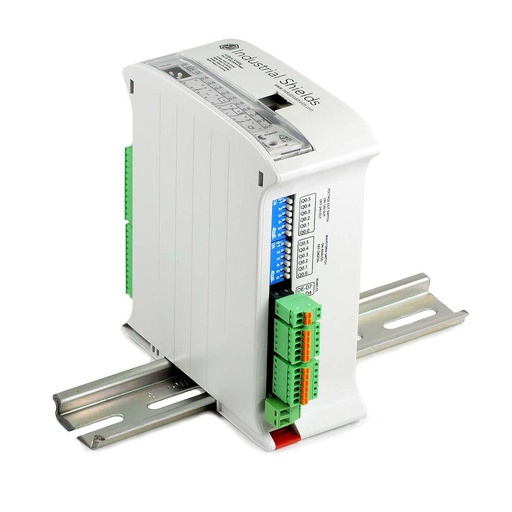
ARDBOX Analog ARDUINO based PLC
A compact industrial PLC built around an original Arduino Leonardo, 45 mm wide on the DIN rail. In its DALI version, it reads the room sensors, drives the heating with an analog output and controls the lights over DALI.
- Role
- Presence logic, heating, DALI lights, data to the panel
- Inputs
- 10: 8 analog/digital (0-10 V, 10-bit), 2 digital optoisolated (7 to 24 Vdc), 1 with interrupt
- Outputs
- 10: 7 analog/digital/PWM (0-10 V, 8-bit), 3 digital optoisolated (5 to 24 Vdc)
- Lighting
- DALI line in the DALI version (Ardbox Analog HF+ DALI, 004001001200)
- Comms
- RS-485, RS-232, TTL serial, I2C, SPI
- Programming
- Arduino IDE, Industrial Shields boards package
- Power and mounting
- 12 to 24 Vdc, DIN rail TS35, IP20, inside a cabinet, 100 x 45 x 115 mm
The original case names the Ardbox DALI PLC and does not say which version. The Ardbox family has two DALI versions, Analog HF+ DALI (004001001200) and Relay HF+ DALI (004001001300), in the DALI family datasheet. This page shows the Analog version: in the case scheme the heating takes an analog output and the lights go over DALI, so no relay is needed. For 230 Vac loads in the room, choose the Relay version. The default port of the DALI version is RS-485, with Modbus RTU: that is the link to the panel on this page.
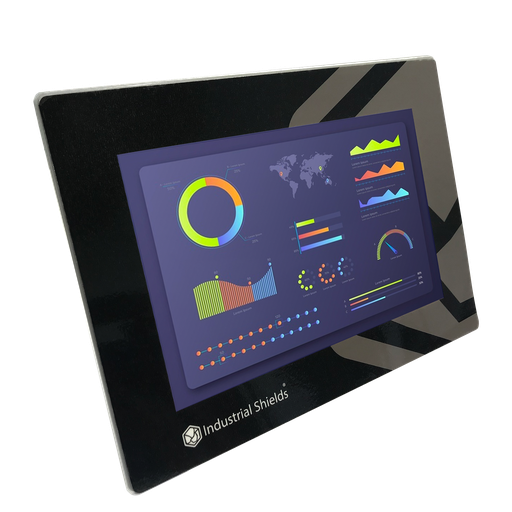
TouchBerry Pi Panel PC 10.1" CORE
The screen of the guest, at the entrance of each room: a Raspberry Pi 4 behind a 10.1" capacitive touchscreen. It shows the temperature, the light modes and the requests, and it links the room to the central server.
- Role
- Guest interface, presence data, requests, link to the central server
- Screen
- 10.1" IPS, 1280 x 800, capacitive, 900 nits
- Software
- Linux preinstalled; HMI in Node-RED, Python or a browser
- Comms
- Gigabit Ethernet, 4 x USB, one serial port (RS-485, RS-232 or TTL, chosen at order); Wi-Fi and Bluetooth on request
- Power
- 12 to 24 Vdc, UPS for safe shutdown
- Environment
- 0 to 45 °C, 10 to 90 % RH without condensation, IP20 front
The original case names the TouchBerry Pi 10.1". Today it is the TouchBerry Pi Panel PC 10.1" CORE, the standard configuration. For the link to the Ardbox, choose RS-485 as the serial port when you order. To show only the guest screen, see kiosk mode for a Node-RED dashboard. For an IP65 front, see the FLEX version.
Questions about this case
How does a hotel room save energy when nobody is in?
With a presence sensor and a timer in the PLC. In this case, a Wi-Fi presence sensor tells the PLC if there are people in the room. When the room stays empty for a set time, the PLC sets an energy saving temperature, switches off the lights left on and sends a cleaning notice to the staff. The case does not publish the time, the saving temperature or the savings. ISO 52120-1, which replaced EN 15232-1, counts presence-based control of heating and lighting among the building automation functions that reduce energy use.
What is DALI, and why use it in a hotel room?
DALI (Digital Addressable Lighting Interface, IEC 62386) is a two-wire digital bus for lighting. One line takes up to 64 drivers, each with its own short address, and each driver stores up to 16 scenes and belongs to up to 16 groups. The PLC can send a level from 0 to 254 to one light, to a group or to all of them. That is how the case gets modes such as a reading mode with a lower light. See DALI with an Arduino based PLC.
Which Industrial Shields PLCs talk DALI?
The case uses an Ardbox DALI. Today the Ardbox Analog and the Ardbox Relay both have a DALI version (see the DALI family datasheet), and the M-Duino family has DALI versions too. Each DALI line needs a bus power supply (250 mA at most, IEC 62386-101); check with us if you need an external one.
How does housekeeping know that a room can be cleaned?
In the case, when the room is empty, the PLC sends a notification to the hotel staff: the cleaning can be done without disturbing. A typical way to do it: the room panel publishes the room state to the central server, for example over MQTT, and the staff see a list of empty rooms. See a Node-RED MQTT concentrator (the example collects ESP32 PLCs; the pattern is the same).
How does the touch panel talk to the PLC?
The case scheme draws an Ethernet link between them. The default port of the Ardbox DALI is RS-485, so this page uses Modbus RTU over RS-485, with the panel as master and the Ardbox as slave. Choose RS-485 as the serial port of the TouchBerry Pi when you order. See a Modbus RTU master over RS-485 (the example runs on an ESP32 PLC; the pattern is the same).
Can the same system run common areas, offices or other buildings?
The case says yes: the system can grow to all the common areas of the hotel, and the same design applies to offices or industries that need automatic control for their daily needs. Each area gets its own PLC and the same program. With the data of every area on the central server, the hotel can see where it spends the most energy, which was a goal of the customer.
Download the case study
4-page PDF with the challenge, the logic, the architecture and the hardware. No form required.
Automating rooms in a hotel or a building?
Tell us about your rooms. An engineer will answer.
Tell us how many rooms you have, how they are heated or cooled, which lights and drivers you use, and what the staff need to see. We will propose the inputs and outputs, the controller and the panel.
- You get an answer from our technical team
- Presence, climate and DALI lights for each room
- Arduino, ESP32 or Raspberry Pi based PLCs