Case study · Home automation · M-Duino 19R
One PLC runs the house. One panel shows it.
Lights, air, blinds and alarms on one Arduino PLC, with a touch panel.
A house has many switches, sensors and alarms. Each one usually has its own box.
This case puts one controller behind all of them, and one screen in front.
This case is a design, not an installation. Industrial Shields drew a simplified model of a home automation system, so the idea is easy to follow and you can adapt it to your own building. It names the sensors, the links and the hardware. It does not publish a program or set points. The values in the panels on this page are examples.
The challenge
Comfort, safety and recording. One system the user can understand.
The goal of the case is a system that collects information from sensors in different parts of the house and drives actuators. It acts on what the sensors read or on what the user has set before. The case groups the work in three areas: automation and control, security, and audio and video.
Light where someone is
A presence sensor in each room switches its light on. A room with nobody in it stays dark.
Air by temperature
A thermostat gives the room temperature to the PLC. The PLC turns the air conditioning on or off around the selected temperature.
Blinds and appliances
Motors on the PLC move the blinds up and down. Smart appliances talk to the panel over Bluetooth, an option you order with the panel.
Safe when nobody is home
A contact on each door and window says if it is open. When the house is empty, an opening starts the alarm.
Alarms that reach you away from home
Smoke and air quality sensors detect a fire or a gas leak. The PLC sends the alarm to your phone over GPRS. Cameras can send their images to the PLC, which saves them on its microSD card.
How it works
Three stages: run the rooms, protect the empty house, size the controller.
Each panel shows one stage. Press the buttons and move the controls. The panels are illustrative simulations: the rooms, set points, delays and messages are examples, not the program of a real house.
Presence turns the light on. Temperature turns the air on.
Each room has a presence sensor, and the PLC switches the light of that room with a relay. The thermostat gives the temperature on an analog input, and the PLC turns the air conditioning on or off around the set point. The blinds go up and down with a motor on the PLC. Press a room to put someone in it, move the temperature and move the blinds.
- Presence sensor per room, digital input
- Thermostat on an analog input, air on or off
- Blind motor on the PLC outputs
Events (example)
Illustrative simulation. Example values, not data from a house. Example set point 24 °C, with 1 °C each way so the air does not switch on and off at every small change. Three rooms need more inputs than the M-Duino 19R has: stage 3 counts them.
Press a button when you leave. The PLC watches the doors and windows.
When you leave, you press a button. The program reads it and knows that nobody is in the house. If a door or a window opens, the alarm starts and you get a message on your phone. Smoke and air quality alarms are always on, at home or away. Press Leave home, wait for the alarm to arm, and open a window. Then try the smoke and the air quality.
- Leave button: the house is empty
- A door or window opened: intrusion alarm
- Smoke and gas alarms in every mode, over GPRS
Events (example)
Illustrative simulation. Example values, not data from a house. Example exit delay, alarm level and messages, shown faster than real time. Smoke and gas alarms work in every mode. The intrusion alarm works only when the house is armed.
Count the sensors and the loads. Then pick the PLC.
The case uses a simplified model, and the M-Duino 19R fits it: six inputs and eight relays. A real house has more rooms, more doors and windows and more blinds. Each one adds an input or a relay. Move the sliders to count them, and see which M-Duino with relays still fits.
- Inputs: fixed sensors, plus rooms, plus doors and windows
- Relays: lights, air, blinds up and down
- Same program and wiring style on a larger M-Duino
Count (example)
Illustrative simulation. Example values, not data from a house. Example rules: four fixed inputs (thermostat, air quality, smoke, the leave button), one presence sensor and one light per room, one contact per door or window, two relays per blind motor and one for the air. The analog inputs of the M-Duino read 0-10 V and also work as digital inputs up to 24 Vdc. The case shows a digital output for the blinds; this count puts each blind motor on two interlocked relays.
System architecture
How does a home automation system with a PLC and a touch panel work?
All the sensors are wired directly to the PLC. The thermostat and the air quality sensor go to analog inputs. The door and window contacts, the presence sensors, the smoke sensor and the leave button go to digital inputs. The PLC switches the lights, the air conditioning and the blind motors. A camera talks to the PLC over RS-485. The TouchBerry Pi panel is on Ethernet and is the screen of the whole system; in the case, it also talks to smart appliances over Bluetooth, an option on the panel. The GPRS link sends the alarms to the phone.
| Signal | Between | Type | Purpose |
|---|---|---|---|
| Room temperature | BetweenThermostat (temperature sensor) → PLC | TypeAnalog in | PurposeTurn the air conditioning on or off around the selected temperature |
| Door or window open | BetweenCapacitive sensor on each access → PLC | TypeDigital in | PurposeShows each access open or closed. With the house empty, an opening starts the alarm |
| Someone in the room | BetweenPresence sensor in each room → PLC | TypeDigital in | PurposeLight in a room only when someone is there |
| Smoke | BetweenSmoke sensor → PLC | TypeDigital in | PurposeFire alarm to the phone |
| Air quality | BetweenAir quality sensor → PLC | TypeAnalog in | PurposeGas leak alarm to the phone |
| Nobody at home | BetweenLeave button → PLC | TypeDigital in | PurposeThe program reads it and arms the intrusion alarm |
| Lights | BetweenPLC → relay → light of each room | TypeRelay out | PurposeOn with presence, off without it |
| Air conditioning | BetweenPLC → relay → on/off input of the unit | TypeRelay out | PurposeOn or off command. The relay does not carry the power of the compressor |
| Blinds | BetweenPLC → 24 Vdc motor | TypeDigital out (or two relays) | PurposeUp and down. The scheme shows one output; a motor that turns both ways needs two, never on together |
| Camera | BetweenCamera ↔ PLC | TypeRS-485 | PurposeImages saved on the microSD card of the PLC (see the FAQ) |
| Screen | BetweenPLC ↔ TouchBerry Pi 10.1" | TypeEthernet | PurposeThe user sees and controls the whole system |
| Smart appliances | BetweenTouchBerry Pi ↔ appliance | TypeBluetooth | PurposeThe panel controls the appliance directly. Bluetooth on the panel is on request |
| Alarms | BetweenPLC → phone | TypeGPRS | PurposeFire, gas and intrusion alarms |
Why it works
One controller for every signal. One screen for the person.
Every sensor on one PLC
All the sensors go directly to the PLC, and the PLC runs all the rules. There is one place to read a signal, and one program to change.
Relays on board
The M-Duino 19R has 8 relays, rated 230 Vac 4 A or 24 Vdc 2 A on a resistive load. Lights and on/off commands connect without an external relay board. For inductive loads, add an RC snubber; for large lighting groups, switch a contactor.
A screen that runs Linux
The TouchBerry Pi has a Raspberry Pi 4 behind a 10.1" touchscreen. The interface can be a Node-RED dashboard that opens on boot in kiosk mode, with the state of each room shown as status lights.
Alarms do not wait for the screen
The PLC reads the smoke, gas and door sensors and sends the alarms itself, over GPRS. A typical design keeps it that way: if the panel is off or restarting, the alarms still go out.
A record with the right time
The M-Duino has a real-time clock and a microSD slot. It can save each event and each camera image with the date and time.
Hardware used
A PLC with relays and a touch panel with a Raspberry Pi.
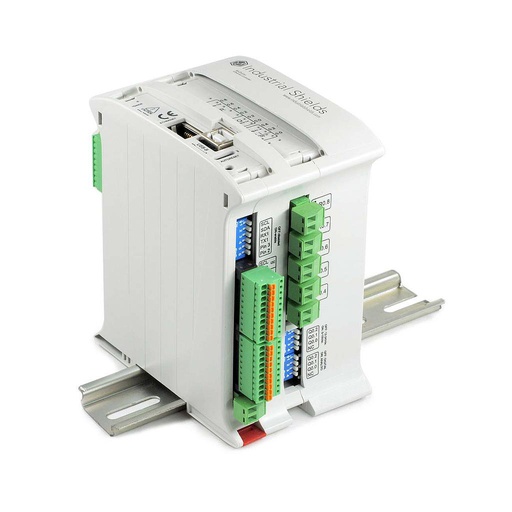
M-Duino Ethernet PLC Arduino 19R
An industrial PLC built around an original Arduino Mega 2560, with 6 inputs and 11 outputs, 8 of them relays, for DIN rail. In this case it reads every sensor of the house, switches the lights, the air and the blinds, and sends the alarms.
- Role
- All sensors, all loads, alarm logic
- Inputs
- 6: 4 analog/digital (0-10 V, 10-bit, up to 24 Vdc as digital), 2 digital optoisolated (5 to 24 Vdc)
- Outputs
- 11: 8 relays (230 Vac 4 A / 24 Vdc 2 A, resistive), 3 analog/digital/PWM (0-10 V)
- Comms
- Ethernet, RS-485, RS-232, TTL serial, I2C, SPI
- Built in
- Real-time clock, microSD slot
- Programming
- Arduino IDE, over USB or Ethernet
- Power and mounting
- 12 to 24 Vdc, DIN rail
The case names the M-Duino 19R and asks for a model of the GPRS family, to send the alarms to the phone. The current model is the 19R+, shown here. The GPRS versions of the M-Duino are described in the family datasheet: ask us for this configuration.
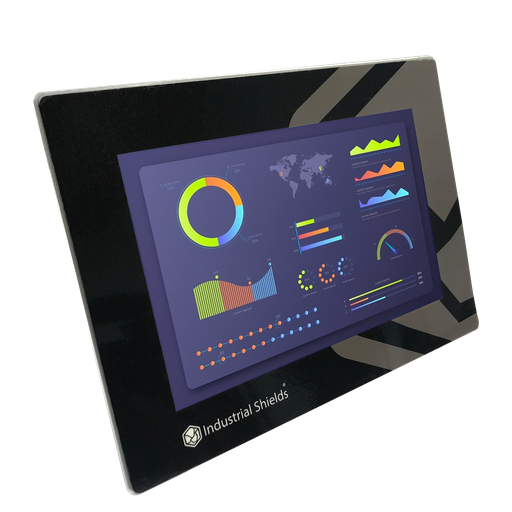
TouchBerry Pi Panel PC 10.1" FLEX
The screen of the house: a Raspberry Pi 4 behind a 10.1" capacitive touchscreen, on Ethernet to the PLC. From it, the user sees and controls the whole system.
- Role
- User interface, smart appliances
- Screen
- 10.1" IPS, 1280 x 800, capacitive, 900 nits
- Computer
- Raspberry Pi 4, Linux preinstalled
- Own I/O
- 3 digital in, 2 analog in, 5 digital out
- Comms
- Gigabit Ethernet, 4 x USB, one serial port (RS-485, RS-232 or TTL). Wi-Fi and Bluetooth on request
- Power
- 12 to 24 Vdc, UPS for safe shutdown
- Front
- IP20 or IP65 on the FLEX version
The case names the TouchBerry Pi 10.1" with a Raspberry Pi 4. In the case, the panel talks to smart appliances over Bluetooth. On the TouchBerry Pi, Wi-Fi and Bluetooth are not included by default: ask for them when you order (family datasheet).
Questions about this case
How do you automate a home with a PLC?
Wire every sensor to the PLC and let the PLC run the rules. In this case, a thermostat and an air quality sensor go to analog inputs; presence sensors, door and window contacts, a smoke sensor and a leave button go to digital inputs. Relays switch the lights, the air conditioning and the blinds. A touch panel on Ethernet is the screen, and a GPRS link sends the alarms to the phone.
How many inputs and outputs does a house need?
Count them by function. In the example of this page: four fixed inputs (thermostat, air quality, smoke, leave button), one presence sensor per room, one contact per door or window, one relay per room light, one for the air and two per blind motor. One room fits on an M-Duino 19R (6 inputs, 8 relays). Three rooms with six windows need 13 inputs: that is past the M-Duino 38R (12 inputs, 16 relays) and fits on the M-Duino 57R (18 inputs, 23 relays).
Which certified alarms should a smart home keep next to the PLC?
The PLC reads the sensors, decides and sends the alarms. Next to it, keep devices certified to: EN 14604 for smoke alarms, EN 50194-1 for domestic gas detectors, and the EN 50131 series for intrusion alarm systems. The PLC can read their alarm output as a digital input when the model has a relay output or an interconnect relay module. For a full monitoring system with these three hazards, see the intrusion, fire and gas case.
How do the house alarms reach the phone if 2G is switched off?
Through an LTE-M or NB-IoT modem instead of GPRS. Many operators have switched off or plan to switch off their 2G networks, which carry GPRS, so check the coverage in your country first. The alarm logic stays the same: only the modem changes. For example, the ESP32 PLC 19R has the same 6 inputs and 8 relays, Wi-Fi and Bluetooth LE built in, and takes a 4G LTE-M/NB-IoT board. Read testing a GPRS module with an Arduino based PLC and GPRS and Narrowband with the ESP32 PLC family.
Can the PLC record the cameras?
In the scheme of the case, the camera talks to the PLC over RS-485, and the PLC saves the images on its microSD card. An Arduino Mega based PLC can do this with still images from a serial camera. RS-485 does not carry continuous video. To record video, use a network video recorder, or the Raspberry Pi in the panel, and keep the PLC for the events.
Which parts of this case are facts, and which are examples?
Facts: the three areas (control, security, audio and video), the sensors and their input types, the blinds on motors, smart appliances over Bluetooth from the panel, the leave button and the intrusion alarm, alarms to the phone over GPRS, camera images on the microSD card, the M-Duino 19R and the TouchBerry Pi 10.1". Examples: the rooms, the set points, the exit delay, the alarm level, the messages and the counts in stage 3.
Download the case study
4-page PDF with the challenge, the logic, the architecture and the hardware. No form required.
Automating a house or a building?
Tell us about your rooms and your alarms. An engineer will answer.
Tell us how many rooms, doors and windows, blinds and loads you have, which alarms you need and how you want to get them. We will propose a controller and a panel, and count the I/O with you.
- You get an answer from our technical team
- I/O count for your rooms, accesses and loads
- Arduino, ESP32 or Raspberry Pi based PLCs