Case study · Security system · Arduino PLC
Intruders, fire, gas. One PLC watches all three.
One PLC, Panel PCs and phones on MQTT, data kept on SD and a server.
Three hazards. One controller decides.
Two ways to watch, and a copy of every reading.
This case describes the design of an automated security system built around an Arduino based PLC. It does not name the customer or the site, and it does not publish results, thresholds or reactions. This page is about the pattern: detect several hazards on one controller, show them on site and on remote devices, and keep a copy of the data.
The challenge
Watch several hazards at once. Never lose the record.
The project is designed as a fully equipped security system that can focus on different hazards and adapt to specific objectives: burglary, fire and gas contamination. Different kinds of sensors track them, and an Arduino based PLC manages them.
Three hazards, one system
Motion sensors and security cameras against burglary. Infrared sensors against fire. Gas sensors against intoxication, for the more dangerous industrial processes.
Control and monitoring 24/7
All processes controlled and monitored at all times. The system is fully automated, except some parameters that people set and the reaction they choose for each hazard.
Easy to manage
From the PLC, from the Panel PCs, or from a phone, a tablet or a PC, anywhere and at any time.
A backup that is always there
The sensor data stays on the SD card of the PLC and goes to a server. The camera recordings go straight to the server.
Open to change
Add more sensors and more monitoring methods. Change the hardware, and reprogram the PLC with the Arduino IDE when the site changes.
How it works
Three loops: detect, monitor, keep.
Each loop shows one part of the pattern. Press the buttons and move the slider. The panels are illustrative simulations: zones, thresholds, reactions, topics and files are examples, not data from the installation.
Four sensor types feed one PLC. The PLC decides.
Motion sensors, security cameras, infrared fire sensors and gas sensors send their signals to the inputs of the PLC. The source names analog inputs, and RS-232 or RS-485 when the sensor supports it. The system works by itself: people set some parameters and choose the reaction method for each hazard. A typical way to do it: fire and gas zones are active all the time, intrusion zones only when the site is armed, and each zone has its own threshold and its own reaction. Arm the site, then trigger the sensors.
- Motion, camera, IR fire and LPG gas sensors on the PLC inputs
- RS-232 or RS-485 when the sensor supports it
- People set the parameters and the reaction, the PLC does the rest
PLC events (example)
Illustrative simulation. Example values, no data from the installation. Example rules: fire and gas zones are always active, intrusion zones only when the site is armed, gas alarm at 20 % LEL (lower explosive limit).
Panel PCs on site. Phones, tablets and PCs through MQTT.
The PLC sends its data through an Ethernet switch to several Panel PCs. The data also goes to an MQTT server, so phones, tablets and PCs can connect at the same time, from anywhere. Both ways use an interface made with Node-RED, ready for different professional profiles. A typical way to do it: the PLC publishes each zone on its own topic, and the broker keeps the last state as a retained message, so a phone that connects later sees the current state at once. Send events, then take the phone offline and back online.
- Ethernet switch to several Panel PCs
- MQTT server for several remote devices at the same time
- Node-RED interface on both ways
MQTT messages (example)
Illustrative simulation. Example values, no data from the installation. Example topics and payloads.
The SD card keeps the data. FTP sends it to the server.
The sensor data is saved on the SD card of the PLC and sent to the server with FTP over the GPRS/GSM link. The camera recordings go straight to the server, because video files are too big for this path. A typical way to do it: the PLC writes the readings to a file on the SD card, uploads each closed file, and keeps it on the card until the upload works. Cut the cellular link, then bring it back.
- Sensor log on the SD card of the PLC
- FTP upload to the server over GPRS/GSM
- Camera video straight to the server
Backup events (example)
Illustrative simulation. Example values, no data from the installation. Example: one file every 10 readings, one upload per closed file. Video does not use this path.
System architecture
How does one PLC run an intrusion, fire and gas system?
Four sensor types go to the inputs of an Ethernet and GPRS/GSM PLC based on Arduino. The PLC sends its data through an Ethernet switch to several Panel PCs and to a server. The server runs MQTT for phones, tablets and PCs and stores the sensor files that the PLC uploads with FTP over GPRS/GSM. The camera recordings go straight to the server.
| Signal | Between | Type | Purpose |
|---|---|---|---|
| Motion | BetweenMotion sensor → PLC | TypeInput | PurposeDetects people in a protected area |
| Camera | BetweenSecurity camera → PLC | TypeInput | PurposeDetects a robbery attempt. The video itself goes to the server |
| Fire | BetweenIR fire sensor → PLC | TypeInput | PurposeDetects the infrared light of a flame |
| Gas | BetweenLPG gas sensor → PLC | TypeInput | PurposeDetects gas contamination |
| Sensor bus | BetweenSensors ↔ PLC | TypeRS-232 / RS-485 | PurposeOption when the sensor supports it |
| Local view | BetweenPLC → switch → Panel PCs | TypeEthernet | PurposeNode-RED interface on several Panel PCs |
| Remote view | BetweenPLC → MQTT server → phone, tablet, PC | TypeMQTT | PurposeSeveral devices at the same time, anywhere |
| Sensor backup | BetweenSD card of the PLC → server | TypeFTP over GPRS/GSM | PurposeCopy of the sensor data, kept on the card and on the server |
| Video | BetweenCamera → server | TypeDirect | PurposeRecordings too big for the FTP path |
Why it works
One pattern for a site with several hazards.
One controller, three hazards
Intrusion, fire and gas sensors share one PLC and one program. One place to set the parameters and the reactions.
Two ways to watch
Panel PCs on site through an Ethernet switch, and phones, tablets and PCs through an MQTT server. Several people can follow the same alarm.
A local copy first
The PLC saves the sensor data on its own SD card before the upload. A server problem does not erase the record.
Two networks
Ethernet on site and GPRS/GSM for the backup. The source lists both as ways to keep the data.
Node-RED for every profile
The same Node-RED interface on the Panel PCs and on the remote devices, made for different professional profiles.
Ready to grow
More sensors and monitoring methods can be added. The program is made with the Arduino IDE, so your team can read it and change it.
Hardware used
An Arduino PLC to decide. Panel PCs to watch.
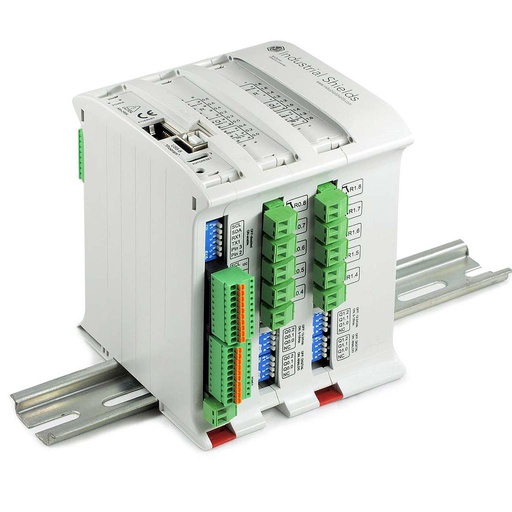
M-Duino Ethernet PLC Arduino 38R
An industrial PLC built on an original Arduino Mega 2560, with analog inputs, 16 relays, Ethernet, RS-485, RS-232, a real-time clock and a microSD slot, for DIN rail. In this design it reads the sensors, decides the reaction, saves the data and talks to the Panel PCs and the server.
- Role
- Sensor inputs, reactions, SD card log, link to the Panel PCs and the server
- Inputs
- 12: 8 analog/digital (0-10 V), 4 digital optoisolated
- Outputs
- 22: 16 relays, 6 analog/digital/PWM (0-10 V)
- Comms
- Ethernet (RJ45), RS-485, RS-232, TTL, I2C, SPI
- Built in
- Real-time clock, microSD slot
- Power supply
- 12 to 24 Vdc
- Mounting
- DIN rail TS35, IP20
The case names "an Ethernet and GPRS/GSM PLC based on Arduino" and does not publish the exact model. The PDF includes a product photo of the M-Duino 38R. The GPRS/GSM versions of the M-Duino are described in the M-Duino GPRS family datasheet.
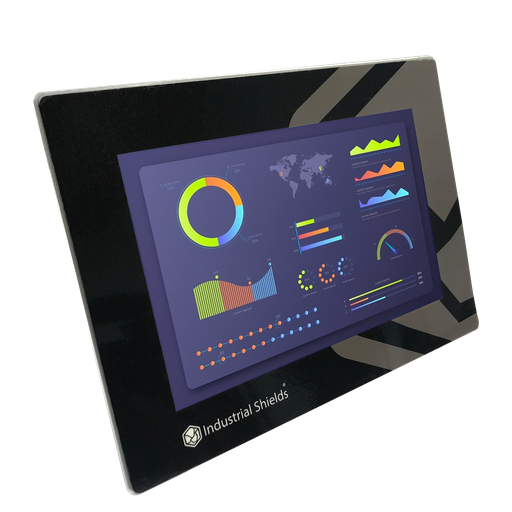
TouchBerry Pi Panel PC 10.1"
The local station of the security system. An industrial 10.1" Panel PC with a Raspberry Pi 4, on the Ethernet switch. It shows the Node-RED interface with the state of every sensor.
- Role
- Node-RED interface on site
- Screen
- 10.1"
- Computer
- Raspberry Pi 4
- Link to the PLC
- Ethernet, through the switch
The case says "several Panel PCs". The old case page showed the TouchBerry Pi 10.1" (Raspberry Pi 4B). The image and the link show the current TouchBerry Pi Panel PC 10.1" FLEX.
Questions about this case
How do you build an intrusion, fire and gas monitoring system with a PLC?
Connect the detectors to the inputs of the PLC, write the rules for each zone (when it is active, its threshold, its reaction), and drive sirens, lights or other outputs from the PLC. Show the state on a local screen and send it to remote devices. In this case, motion, camera, infrared fire and gas sensors go to an Arduino based PLC, Panel PCs show a Node-RED interface over Ethernet, and an MQTT server serves phones, tablets and PCs.
How does a PLC work with certified fire, gas and intrusion systems?
Where the law or the insurer asks for a certified system, the PLC works alongside it: fire detection and alarm systems to EN 54 (Europe) or NFPA 72 (US), flammable gas detectors to IEC 60079-29-1, toxic gas detectors to EN 45544, intrusion alarms to EN 50131. The PLC reads their relay or 4-20 mA outputs, logs them, shows them and starts other actions, such as stopping a process or opening a vent. The analog inputs of the M-Duino 38R measure 0-10 V: to read a 4-20 mA loop, add a 500 Ω precision shunt resistor. Detectors in a hazardous (Ex) area must be certified for it; the PLC stays in a cabinet in a safe area.
Why save the data on the SD card and then send it with FTP?
The SD card keeps the record if the link or the server fails. The file goes to the server when the link works. Plain FTP sends data and passwords as clear text. Protect the cellular link with a private APN or a VPN, or let a gateway that supports FTPS or SFTP make the upload. Video files are too big for this path, so the cameras record straight to the server. See an alarm history example with Node-RED and MySQL.
Is GPRS/GSM still a good choice for the backup link?
Check your country first. Many operators have switched off or plan to switch off their 2G and 3G networks, so a GPRS/GSM modem can stop working. LTE-M, NB-IoT or 4G modems do the same job on current networks. Tell us where the site is and we will tell you which cellular option fits the controller.
How do phones and tablets get the alarms?
Through MQTT. The PLC publishes the state of each zone to a broker, and the Node-RED interface on each device subscribes to it. Keep the PLC and the broker on the site network, use TLS and a user name and password between the broker and the remote devices, and do not expose the PLC itself to the internet. Read MQTT basics: publish/subscribe, topics, QoS and security, and see a Node-RED dashboard for several stations.
Which parts of this case are facts, and which are examples?
Facts: burglary, fire and gas as hazards; motion sensors, security cameras, infrared fire sensors and gas sensors on the inputs of an Ethernet and GPRS/GSM PLC based on Arduino; RS-232 or RS-485 as options; several Panel PCs on Ethernet through a switch; an MQTT server for phones, tablets and PCs; a Node-RED interface; sensor data on the SD card and sent to the server with FTP over GPRS/GSM; video straight to the server; parameters and reactions set by people. Examples: zones, arming, thresholds, % LEL values, reactions, topics, payloads and file sizes.
Download the case study
4-page PDF with the challenge, the logic, the architecture and the hardware. No form required.
Similar site?
Tell us your hazards and your site. An engineer will answer.
Tell us which hazards you need to watch, how many zones and sensors you have, which signals they give (contact, 0-10 V, 4-20 mA, RS-485), who needs to see the alarms and where the data must be stored. We will tell you which controller fits and how to connect it.
- You get an answer from our technical team
- I/O count and controller sizing for your site
- Arduino, ESP32 or Raspberry Pi based PLCs