Success story · Dinokeng Game Reserve · ESP32 PLC 19R
Reserve gates on Wi-Fi. An ESP32 PLC opens the boom.
From RS485 cable to Wi-Fi, barcode tickets and the same printers.
The gates ran on old cable. Parts and upkeep cost too much.
Gañar Group moved them to Wi-Fi, with an ESP32 PLC at the gate.
Dinokeng Game Reserve is a nature reserve in South Africa. Its access system for staff and visitors used a wired RS485 interface at 5 entrance gates, and the maintenance cost and the lack of spare parts had become prohibitive. Gañar Group upgraded it with a Wi-Fi network, a central gate controller software and ESP32 PLC 19R units at the entrance and exit gates. The existing ticket printers stayed in service. Short version: less cable, the same printers, and a shielded controller that handles the electrical noise of the gate much better.
From the field
The gates, the pedestal and the drawing.
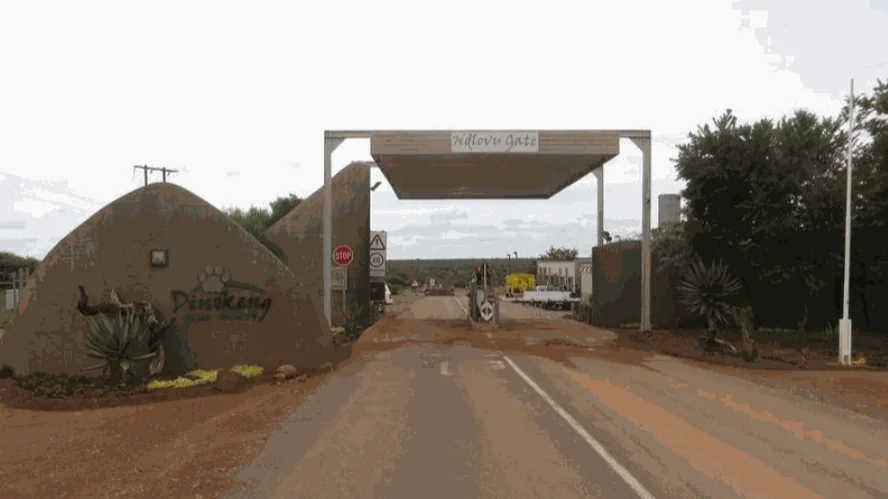
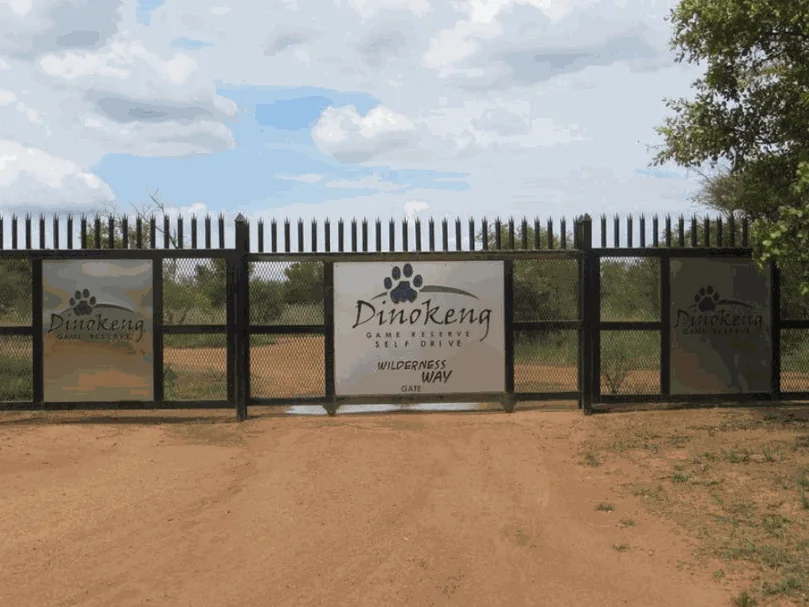
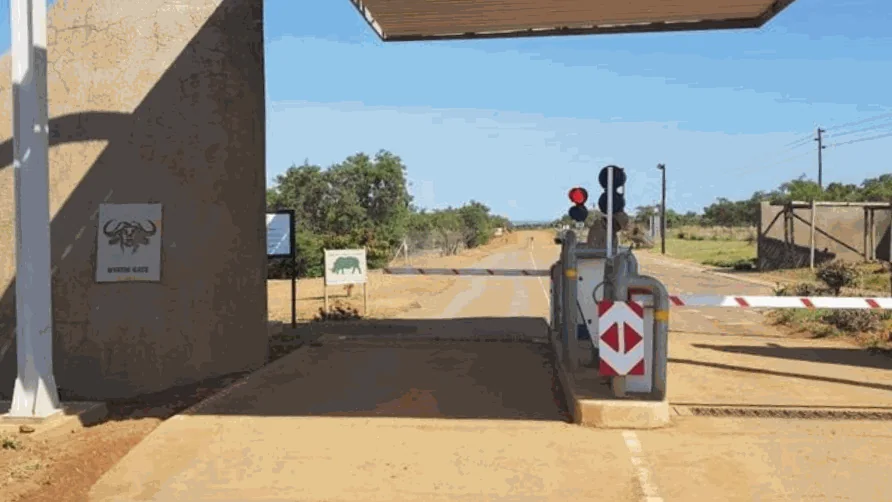
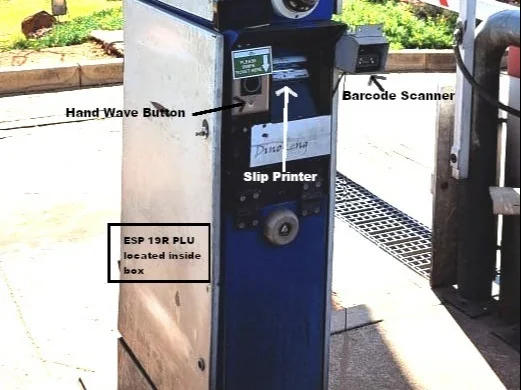
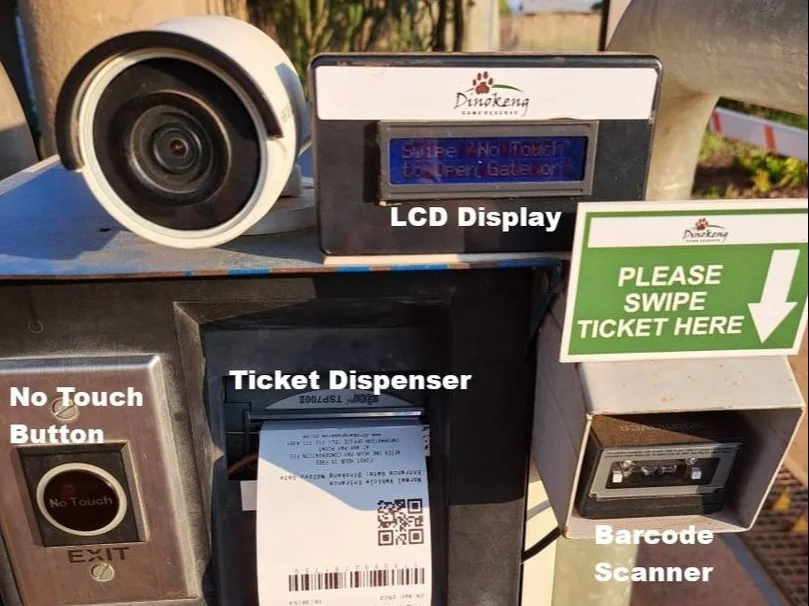
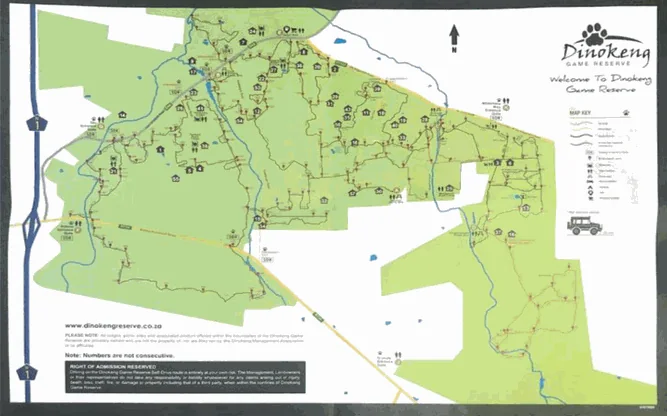
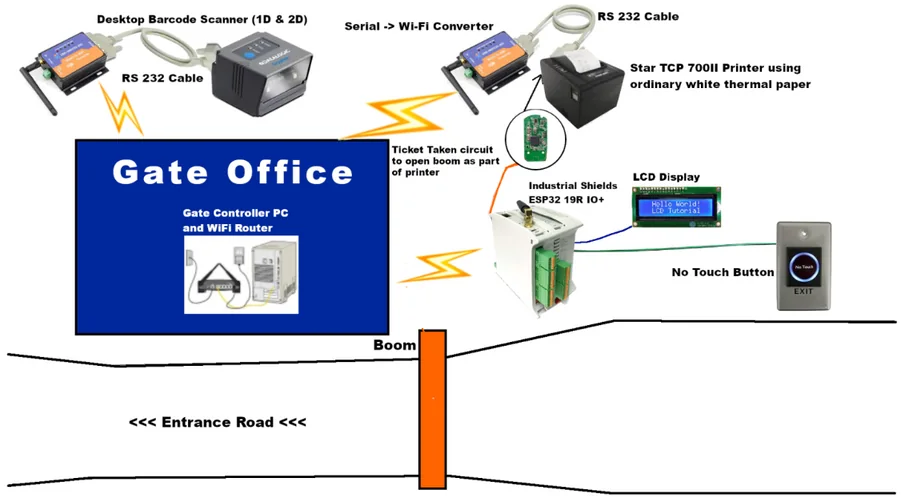
Real material from the original success story: two of the reserve gates, the entrance lane, the gate pedestal with its devices, the original architecture drawing and the reserve map.
The challenge
Replace the cable. Keep the printers. Open only for paid tickets.
Access control in a nature reserve has two jobs. It protects the habitat and the animals, and it lets staff and visitors in and out under control. The old system at Dinokeng was out of date, so the reserve decided to modernise it for more security, better control and more automatic processes.
Old cable, high cost
The access system at 5 entrance gates used a wired RS485 interface. Maintenance and spare parts had become prohibitive.
Tickets without touch
A hand wave near a No Touch sensor must print a barcode and QR ticket and open the barrier. Up to 2 sensors per entrance: normal and large vehicles.
Keep what works
The existing serial Star TSP700II slip printers stay in service. Serial to Wi-Fi devices connect them to the new network.
Paid or not, at the gate
Barcode readers scan prepaid permits and tickets. A cloud database confirms the payment before the gate opens.
Upgraded by Gañar Group
Gañar Group was asked to upgrade the gate access control at Dinokeng Game Reserve. The goal was to control the system with open source technology. With a Wi-Fi PLC and a sensor at each entrance, Gañar Group got the ticket printed and the barrier opened, with quality hardware and easy programming.
How it works
Three loops: the entrance, the check and the radio link.
Each loop shows one part of the gate. The sequences come from the case. The timing, the example values and the LCD messages in the panels are an illustrative simulation.
Wave a hand, take the ticket, drive in.
A driver waves a hand near the No Touch sensor. Each entrance can have two: one for normal vehicles and one for large vehicles. The ESP32 PLC 19R talks to the gate controller software, and the software prints a barcode and QR ticket on the Wi-Fi printer. When the driver takes the ticket, a Ticket Taken signal goes to the PLC. The PLC opens the boom and asks the software for a form feed.
- No Touch sensor: up to 2 per entrance
- Ticket printed on the existing Star TSP700II slip printer
- Ticket Taken signal: the PLC opens the boom
Illustrative simulation. Scaled times and example messages, no program from the installation.
The software checks the code. The PLC tells the driver.
Wi-Fi 1D/2D barcode readers scan prepaid permits at the entrance and tickets at the exit. They send the code to the gate controller software, which checks it in a cloud database. The permit seller can also be a third party. The software sends a message to the ESP32 PLC 19R, which shows it on a 2-line LCD. The message decides if the gate opens. Each barcode has an entrance timestamp, and the exit uses it to calculate the length of stay.
- Validity checks in the gate controller software
- Cloud database, also for third-party permit sellers
- Entrance timestamp, designed to work offline
- The LCD message decides: open or not
Boom: Closed
Example LCD messages and times. The case does not publish the messages or the offline rules.
A stable link at the gate, set up from a phone.
The first prototype used off the shelf ESP32 chips and had a basic system working in 3 months. Then electromagnetic noise at the gates caused hang-ups and disconnects. The team adapted its Arduino IDE code to ESP32 PLC 19R units at the entrance and exit gates, and the shielding was a vast improvement. An external antenna typically raised the RSSI from -80 dB to -50 dB. Each PLC serves a local setup page in Access Point mode, over HTTP on port 80, and saves the parameters in its flash memory.
- Bare ESP32 chips: hang-ups and disconnects from EMI
- ESP32 PLC 19R: shielding was a vast improvement
- External antenna: RSSI from -80 dB to -50 dB
- Setup in AP mode, HTTP port 80, settings in flash
-80 dB and -50 dB are the values in the case. The event pattern is illustrative.
Setup page · AP mode · HTTP port 80
Example fields and values. The case does not publish the list of parameters.
System architecture
How does an ESP32 PLC fit into a Wi-Fi gate system?
One Wi-Fi network links the gate office with the devices at each gate. The gate controller software runs on a PC in the gate office, next to the Wi-Fi router, and checks the codes in a cloud database. Printers and barcode scanners reach it through serial to Wi-Fi converters and socket connections. The ESP32 PLC 19R handles the signals of the gate itself.
| Flow | Between | Type | Purpose |
|---|---|---|---|
| Hand wave | BetweenNo Touch sensor → ESP32 PLC 19R | TypeSensor input | PurposeStarts the ticket cycle. Up to 2 sensors: normal and large vehicles |
| Print request | BetweenESP32 PLC 19R → gate controller software | TypeWi-Fi | PurposeAsks the software to print a ticket |
| Ticket | BetweenGate controller software → Star TSP700II | TypeSocket, serial to Wi-Fi, RS-232 | PurposePrints the barcode and QR ticket on the existing slip printer |
| Ticket taken | BetweenTicket Taken circuit → ESP32 PLC 19R | TypeSensor input | PurposeTells the PLC that the driver took the ticket |
| Open command | BetweenESP32 PLC 19R → boom barrier | TypePLC output | PurposeOpens the boom |
| Barcode | Between1D/2D scanner → gate controller software | TypeRS-232, serial to Wi-Fi, socket | PurposeSends permit and ticket codes for the check |
| Validity check | BetweenGate controller software ↔ cloud database | TypeInternet | PurposeChecks the payment and the paid or free status. The database can belong to a third-party permit seller |
| Visitor message | BetweenGate controller software → ESP32 PLC 19R → LCD | TypeWi-Fi, then a 2-line LCD | PurposeShows the result and decides if the gate opens |
| Setup | BetweenPhone, tablet or laptop → ESP32 PLC 19R | TypeWi-Fi AP mode, HTTP port 80 | PurposeChanges the PLC parameters, saved in flash memory |
Why it works
Why the ESP32 PLC 19R fits this gate.
Built for electrical noise
Bare ESP32 chips hung and lost the link near the gate equipment. With ESP32 PLC 19R units at the entrance and exit gates, the team saw its expectations exceeded. The shielding was a vast improvement.
Same code, new board
The prototype was written in the Arduino IDE. Moving it to the industrial controller meant adapting the same code to the new board, in the same tool.
Less hardware, open and modular
One Wi-Fi PLC at the gate replaces wired interfaces back to the office. Open and modular: the code lives in the Arduino IDE, and the specifications can grow with the site.
Hardware used
One ESP32 PLC 19R in the gate pedestal.
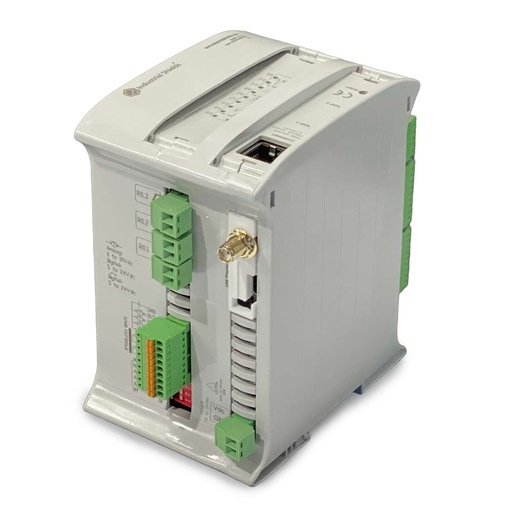
ESP32 PLC 19R
An industrial controller built on the dual-core ESP32, with Wi-Fi, Bluetooth LE, Ethernet, RS-485 and RS-232, 8 relay outputs and a real-time clock, for DIN rail. At Dinokeng it sits in the gate pedestal. It reads the No Touch sensor and the Ticket Taken signal, opens the boom and shows the messages of the gate software on a 2-line LCD.
- Processor
- ESP32 dual core, up to 240 MHz, 16 MB flash
- Inputs
- 6: 4 analog/digital (0-10 V), 2 digital optoisolated
- Outputs
- 11: 8 relays, 3 analog/digital/PWM (0-10 V)
- Wireless
- Wi-Fi 2.4 GHz, Bluetooth LE
- Wired comms
- Ethernet (RJ45), RS-485, RS-232, I2C, SPI
- Programming
- Arduino IDE
- Power supply
- 12 to 24 Vdc
- Mounting
- DIN rail TS35, IP20
The case names the controller "ESP32 19R IO+" and "ESP32 19R+". The original case page linked this same product, sold today as the ESP32 PLC 19R. The case does not publish which inputs and outputs it uses.
Questions about this case
Who upgraded the gate access control at Dinokeng Game Reserve?
Gañar Group. The project replaced a wired RS485 access control system at 5 entrance gates of Dinokeng Game Reserve with a Wi-Fi system, a central gate controller software and ESP32 PLC 19R units at the entrance and exit gates. The PLC code was written in the Arduino IDE.
Why move from bare ESP32 chips to an ESP32 PLC?
The prototype on off the shelf ESP32 chips suffered hang-ups and disconnects from electromagnetic disturbances. The team moved to ESP32 PLC 19R units, and the shielding was a vast improvement. For a new site, also add a hardware watchdog and a non-blocking Wi-Fi reconnection in the code. See our examples of a hardware watchdog and of Wi-Fi reconnection on an ESP32 PLC.
Can I keep my serial printers and barcode scanners?
Yes, as at Dinokeng. The existing serial Star TSP700II slip printers and the barcode scanners connect through serial to Wi-Fi devices with RS-232 cables. Each device opens a socket connection to the IP address of the gate controller PC on a specific port. Set each converter to the same serial settings as its device.
How does the gate check a permit or a ticket?
Wi-Fi 1D/2D barcode readers send the code to the gate controller software. The software runs the validity checks against a cloud database, which can also belong to a third party that sells permits. It sends a message to the ESP32 PLC 19R, which shows it on a 2-line LCD. The message decides if the open command runs.
What happens when the internet link is down?
The case says the entrance timestamp of each barcode must also work offline, and the exit uses it to calculate the length of stay. It does not publish how. A typical way to do it: the gate software keeps the entrance records locally and syncs them when the link is back. The ESP32 PLC 19R has a real-time clock with a backup battery if a local timestamp is needed. See NTP synced RTC timestamps on an ESP32 PLC. To see what gates do when the link drops, try the gate control simulator.
What does an RSSI change from -80 dB to -50 dB mean?
The case reports that an external antenna typically improved the RSSI from -80 dB to -50 dB. RSSI is usually given in dBm. 30 dB more signal is 1,000 times more received power. Around -80 dBm a Wi-Fi link is weak and drops easily. Around -50 dBm it is strong.
Download the success story
4-page PDF with the challenge, the logic, the architecture and the hardware. No form required.
Similar project?
Tell us about your gates. An engineer will answer.
Tell us how many gates and lanes you have, which printers, scanners and barriers are already installed, and where the codes must be checked. We will tell you which controller fits and how to connect the devices you keep.
- You get an answer from our technical team
- Inputs, outputs and links for each gate
- Arduino, ESP32 or Raspberry Pi based PLCs