Success story · Wood research · M-Duino 58
A laser shows the grain. A PLC turns the wood.
9,000 images per species, one 3.6° step at a time.
Shine a laser on wood and the spot is not round. The light travels further along the fibres.
Read that shape at 100 angles per turn, and you need a machine that never loses a step.
This success story describes a research project on the tracheid effect, the scattering of laser light in wood, in 60 commercial timber species from Malaysia. It was carried out by a university research team. The setup, the step angle, the image counts and the results come from the project. The values in the panels are examples, not data from the study. No photos of the setup are published.
The challenge
Thousands of images, each at an exact angle.
In the timber industry, the grain angle is key to judge the mechanical strength and the quality of wood. The project studied how well a laser method detects that angle in 60 commercial species from Malaysia. To do it with scientific rigour, the team needed a data acquisition system that is large, precise and automated.
Exact angles
The sample turns on a platform in steps of 3.6°. Every image must match a known angle. With a stepper motor and no position sensor, one lost step shifts every image after it.
A very large data set
1,800 images per sample and 9,000 per species. By our count, over 60 species that is 540,000 images. Too many to take by hand.
Long sessions in the dark
The laser, the camera and the sample sit in a dark chamber. The test sessions are long, and the capture must not stop in the middle of a sample.
Own software in the loop
The team wrote its own image capture software in Visual Basic. The controller has to take orders from that software and answer it.
The result
With the automated data, the study concluded that the colour and the density of the wood directly influence how well the laser method detects the grain angle. The data also trained machine learning models (such as k-NN and artificial neural networks) that predict the detection performance with an accuracy of up to 89.3%.
How it works
Three jobs: step the platform, talk to the software, fill the data set.
Each panel shows one job. Press the buttons. The panels are illustrative simulations: the 200-step motor, the 3.6° step, the 3 revolutions, the 6 sampling points and the image counts are the ones of the project. The messages, the timings and the driver signals are examples.
Two steps, 3.6°, then stop.
A 200-step motor moves 1.8° per full step. Two full steps give 3.6°, so one revolution has 100 positions. The PLC sends the step pulses to a stepper driver, and the driver powers the motor coils. Advance one position, or run a full revolution.
- 200 steps per revolution: 1.8° per step
- 2 full steps = 3.6° = 1 position
- 100 positions per revolution
PLC events (example)
Illustrative simulation. Example values, not data from the study. At full step. With a microstepping driver, multiply the pulses: at 1/8 step, one position is 16 pulses. The project does not publish the driver or its setting.
Move, confirm, capture, save.
The capture software runs on a PC. It asked the PLC to advance the platform, took the image and saved it automatically. The project does not publish the messages. A typical way to do it: the PC sends a short command, the PLC moves and answers when the platform stands still, and only then the PC takes the image. Run the cycle, then lose an answer.
- The PC asks, the PLC moves
- The PLC answers when the move is done
- No answer, no image
Capture software and PLC (example)
Illustrative simulation. Example values, not data from the study. The STEP and DONE messages and the 2 s timeout are examples. The project says that the software talked directly to the PLC to advance, capture and save; it does not publish the link or the messages.
From one step to 540,000 images.
The project took three revolutions per position and six random sampling points, for 1,800 images per sample and 9,000 per species. By our reading, that is 6 points per sample and 5 samples per species. Change the step angle, the revolutions or the time per image, and see the size of the data set and the run time.
- 1,800 images per sample
- 9,000 images per species
- 540,000 images over 60 species (our count)
Step angle
Revolutions per point
Seconds per image (example)
Illustrative simulation. Example values, not data from the study. 6 sampling points, 60 species and the image counts stay as in the project. 5 samples per species is our reading of the counts (9,000 / 1,800). The time per image is an example: the project does not publish it. Our reading of the published counts: 100 positions × 3 revolutions × 6 points = 1,800 images per sample.
System architecture
How do you take laser images of wood at exact angles?
Put the sample on a rotating platform in a dark chamber, under a 650 nm laser and an industrial camera. Turn the platform with a 200-step stepper motor and a stepper driver, and let a PLC send the steps. In this project an M-Duino 58 moved the platform in steps of 3.6°. Custom software on a PC asked for each move, took the image and saved it. The project does not name the driver, the camera or the link between the PC and the PLC.
| Signal | Between | Type | Purpose |
|---|---|---|---|
| Move request | BetweenCapture software → M-Duino 58 | TypeMessage (link not published) | PurposeAsks for the next 3.6° position |
| Step pulses | BetweenM-Duino 58 → stepper driver | TypeDigital output, PUL (typical) | Purpose2 full steps per position |
| Direction | BetweenM-Duino 58 → stepper driver | TypeDigital output, DIR (typical) | PurposeSets the direction of rotation |
| Enable | BetweenM-Duino 58 → stepper driver | TypeDigital output, ENA (typical) | PurposeEnables the driver, so the motor holds its position (polarity depends on the driver) |
| Motor current | BetweenStepper driver → motor | TypeCoil phases A and B | Purpose200 steps per revolution |
| Move done | BetweenM-Duino 58 → capture software | TypeAnswer (typical) | PurposeThe image is taken only when the platform stands still |
| Laser light | Between650 nm laser → sample | TypeLight | PurposeThe spot stretches along the fibres (tracheid effect) |
| Image | BetweenIndustrial camera → PC | TypeCamera link (not published) | Purpose1,800 images per sample |
| Files | BetweenCapture software → disk | TypeImage files | PurposeSaved automatically for the analysis |
Why it works
A known angle for every image, and code the team could change.
Logic that follows the study
The stepper control and the link with the rest of the system were programmed to fit the experiment, including 3 revolutions per position and 6 random sampling points. The PLC is programmed in the Arduino IDE.
Your own software can drive it
A PLC programmed in the Arduino IDE can read short messages from a program on a PC that can open a serial port or a socket. In this project, the program was written in Visual Basic.
Industrial hardware in the lab
The PLC is built for a cabinet: DIN rail, 12 to 24 Vdc supply, optoisolated digital I/O. The project reports that the capture was not interrupted during the long sessions over the 60 species.
A known angle from the pulse count
A stepper motor moves a fixed angle per step. If the motor is sized for the platform and does not lose steps, the angle of every image is known from the pulses sent since the start.
Room to grow
The M-Duino 58 has 36 inputs and 22 outputs, and a rig like this one uses only a few. A home sensor for the platform, a laser enable or a second axis can go on the same PLC.
Learn the pieces
See how an Arduino based PLC drives a stepper motor through a driver in our stepper motor tutorial, and how a camera GUI runs on a Raspberry Pi.
Hardware
The PLC of the project.
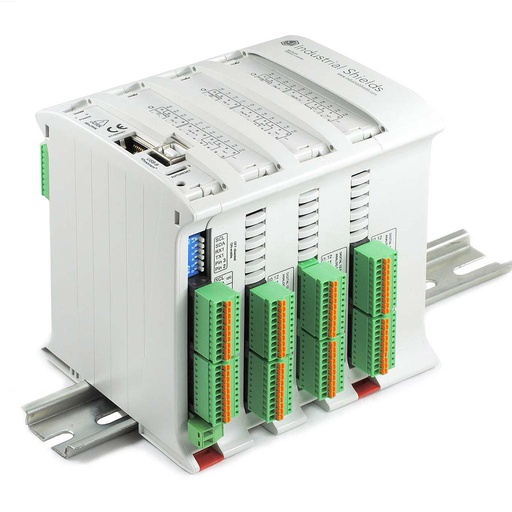
M-DUINO ETHERNET PLC ARDUINO 58
The project used an M-Duino 58. It sent the step pulses for the 200-step motor of the platform and took the orders of the capture software.
- Role in this project
- Turns the platform in 3.6° moves and answers the capture software
- Microcontroller
- Arduino Mega 2560 (ATmega2560, 16 MHz)
- Inputs
- 36: 16 analog/digital (0-10 V, 10-bit) and 20 digital optoisolated, 5 to 24 Vdc, 6 with interrupt
- Outputs
- 22: 8 analog/digital/PWM (0-10 V, 8-bit) and 14 digital optoisolated, 5 to 24 Vdc
- Communications
- USB 2.0 Type-B, Ethernet (W5500, 10/100), RS-485, RS-232, TTL, I2C, SPI
- Power and mounting
- 12 to 24 Vdc, DIN rail TS35, IP20, 0 to 60 °C; real-time clock and microSD slot
The project does not publish the stepper driver, the camera or the link between the PC and the PLC. A stepper motor always needs a driver between the PLC and the coils. Our stepper motor tutorial shows the wiring, with PUL, DIR and ENA on digital outputs. Check that the output voltage matches the inputs of your driver.
Questions about this case
What is the tracheid effect?
When a laser spot hits wood, part of the light goes into the wood and travels inside the fibres (tracheids in softwoods, fibres in hardwoods). It travels further along the fibres than across them. So the bright spot on the surface stretches into an ellipse, and its long axis shows the direction of the fibres. A camera image of the spot gives the grain angle. This project studied how well the method works in 60 commercial timber species from Malaysia.
Why does the grain angle of wood matter?
The grain angle is the angle between the wood fibres and the axis of the piece. In the timber industry it is key to judge the mechanical strength and the quality of wood: when the fibres run at an angle to the length of a board, the board is weaker in bending and in tension.
How does a PLC drive a stepper motor?
Through a stepper driver. The PLC sends one pulse on a digital output (PUL) for each step and sets the direction on another output (DIR). A third output can enable the driver (ENA). The driver powers the motor coils. With a 200-step motor at full step, each pulse is 1.8°, so 2 pulses give the 3.6° of this project. With microstepping, the driver needs more pulses per degree.
How many images does an automated laser scan of wood need?
It depends on the step angle and on the repeats. In this project the platform moved in steps of 3.6°, which is 100 positions per revolution. The project took 1,800 images per sample and 9,000 per species. Our reading of the counts: 100 positions × 3 revolutions × 6 sampling points = 1,800 images, and 5 samples per species. Over 60 species, that is 540,000 images.
How does custom PC software talk to an Arduino PLC?
Over a serial port on USB, or over Ethernet with TCP. The PLC program reads a short command, makes the move and sends an answer. Any language that can open a serial port or a network socket can do it. In this project the capture software was written in Visual Basic. The project does not publish the link it used.
What does an industrial PLC add to a lab test rig?
A case for a DIN rail, a 12 to 24 Vdc supply, optoisolated 5 to 24 Vdc digital I/O, and the Arduino IDE to program it. In this project the capture was not interrupted during the long test sessions over 60 species. The same PLC also has free I/O for a home sensor, a laser enable or a second axis.
Download the case study
4-page PDF with the challenge, the logic, the architecture and the hardware. No form required.
Building a test rig or a lab instrument?
Tell us what moves and what you measure. An engineer will answer.
Tell us what the rig must move, how precise each step must be, what takes the measurement and which software runs it. We will propose the PLC, the motor driver and the link to your software.
- You get an answer from our technical team
- PLC, motor driver and link to your software
- Arduino, ESP32 or Raspberry Pi based PLCs