Case study · Restaurants · ESP32 PLC 21
Every order, one path to the kitchen.
A WiFi PLC collects the orders. Panel PCs show them in the kitchen.
Orders come in from many places. They all end in one PLC.
The PLC sends each order to the screens: the cooks see what to cook, the preparation area sees everything.
This case describes the design of an order system for restaurants with Industrial Shields equipment. It does not name a restaurant and does not publish results from one. It is a reference design: the case says it can be adapted to the needs of each place. This page follows one order from the moment it is taken to the moment the food reaches the customer.
The challenge
Many ways to order. One kitchen that must not lose an order.
Customers order in different ways: at the table, with their own phone, from the website or by phone. The kitchen and the preparation area need every order on their screens, each with the details they need. And everyone needs to know where an order is, until the food reaches the customer.
Many ways to order
Staff enter the orders at the table. Customers order with their own phone or tablet in the restaurant, through an app. Delivery orders come from the website or by phone.
One controller for all of them
All the orders go to a PLC over WiFi or Ethernet. The PLC is the centre of control and processes each order.
Each team sees its own view
The kitchen screens show only what the cooks need. The preparation area sees all the details, to check that nothing is missing.
Follow every order
Cancel an order, mark the dishes that are done, and track the order at every step until the customer has the food.
A system that changes with the restaurant
The hardware can be modified and the software reprogrammed for every small change: a new menu, a new screen, a new way to order.
How it works
Three stages: take, prepare, deliver.
Each stage follows one part of an order. Press the buttons. The panels are illustrative simulations: orders, dishes, states, times and topic names are examples, not data from a restaurant.
Four ways in. One controller.
Staff enter the orders on a Panel PC. Customers order with their own phone or tablet over WiFi. Delivery orders come from the website, or by phone: the staff type the call into a Panel PC, as for an order at the table. Every order goes to the PLC, which stores it and sends it on. Pick a channel and press Send the order.
- Staff and phone calls: Panel PC, Ethernet
- Customer app in the restaurant: WiFi
- Website: MQTT server through a VPN (example)
Order steps (example)
Illustrative simulation. Example values, no data from a restaurant. Example orders and numbers. The case says all the orders go to the PLC over WiFi or Ethernet, and it uses an MQTT server reached through a VPN. It does not publish how the website reaches the PLC. A typical way to do it: the back end of the website publishes each order to the MQTT server.
The same order, two screens.
The PLC sends the order to the Panel PCs over Ethernet, through a switch. The kitchen screen shows only the dishes and their notes. The preparation area screen shows every detail, to check that nothing is missing before the order leaves. Switch screens, mark the dishes as cooked, or cancel the order.
- Kitchen view: dishes and notes only
- Preparation view: the whole order
- Cancel or mark as done from a Panel PC
Screen events (example)
Illustrative simulation. Example values, no data from a restaurant. Example order and dishes. The case says the kitchen screens show only the information useful for the cooks, the preparation area sees all the order details, and staff can cancel an order or mark it as made. It does not publish the screens.
Track the order until the food arrives.
Each step updates the order in the PLC, and every screen sees the new state. For delivery, the drivers control their orders with their own version of the app, on their phone. Pick eat in or delivery, then press Next step.
- One state per order, the same on every screen
- Drivers update their orders from the app
- Remote access through a VPN to the MQTT server
State messages (example)
Illustrative simulation. Example values, no data from a restaurant. Example states, times and topic names. The case says the system tracks each order at every point until the customer has the food, and that drivers control their orders with their own version of the app. It does not publish the states, the topics or the app.
System architecture
How does a PLC run a restaurant order system?
A PLC with WiFi and Ethernet collects the orders from every channel. Customers in the restaurant send them over WiFi from their own phones and tablets. Staff enter them on Panel PCs, which are wired to the PLC over Ethernet through a switch. The PLC processes each order and sends it to the Panel PCs in the kitchen and in the preparation area, each with its own interface made with Node-RED. An MQTT server, reached through a VPN, connects the PLC with the outside.
| Data | Between | Link | Purpose |
|---|---|---|---|
| Order at the table or by phone | BetweenStaff, Panel PC → PLC | LinkEthernet | PurposeThe staff enter the order, also for phone calls |
| Order from the customer app | BetweenPhone, tablet → PLC | LinkWiFi | PurposeCustomers order with their own device in the restaurant |
| Delivery order from the website | BetweenWebsite → PLC | LinkMQTT, VPN | PurposeExample path: the case does not publish it |
| Orders to the screens | BetweenPLC → switch → Panel PCs | LinkEthernet | PurposeKitchen view and preparation area view |
| Dish cooked, order cancelled | BetweenPanel PC → PLC | LinkEthernet | PurposeThe new state reaches every screen |
| Delivery state | BetweenDriver app → PLC | LinkMQTT, VPN | PurposeExample: on the way, delivered |
| Remote access | BetweenMQTT server ↔ PLC | LinkVPN | PurposeThe case connects the MQTT server to the PLC through a VPN |
Why it works
One place for every order. A screen for every team.
One place for every order
Every channel ends in the PLC. So every screen shows the same order, in the same state.
Wired where it matters
The PLC and the Panel PCs talk over Ethernet through a switch. WiFi is for the phones and tablets of the customers.
Each team sees its job
The cooks see the dishes. The preparation area sees the whole order and checks that nothing is missing.
Track it to the customer
Each step changes the state of the order, from the kitchen to the table or to the door.
Screens you can change
The interface is made with Node-RED. A new view or a new button is a change in a flow, not new hardware.
Open to change
The PLC is programmed with the Arduino IDE. When the restaurant changes, you change the program or add a screen, not the whole system.
Hardware used
A WiFi PLC to collect the orders. Panel PCs to show them.
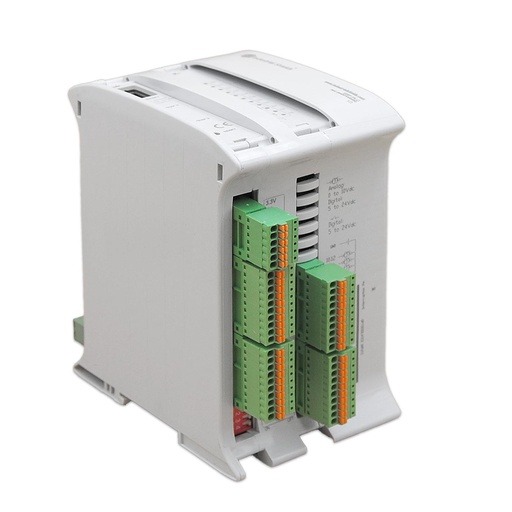
ESP32 PLC 21 CORE
An industrial controller built on the dual-core ESP32, with Ethernet and Wi-Fi built in, for DIN rail. It is programmed in C++ with the Arduino IDE. In this system it receives the orders over WiFi and Ethernet, keeps them and sends them to the Panel PCs.
- Role
- Collects the orders, keeps their state, feeds the screens
- Processor
- ESP32 dual core, up to 240 MHz, 16 MB flash, 520 KB SRAM
- Ethernet
- 1 x 10/100 Mbit, RJ45
- Wireless
- Wi-Fi 2.4 GHz, Bluetooth LE
- Real-time clock
- DS3231 with backup battery
- I/O
- 13 inputs, 8 outputs
- Programming
- Arduino IDE
- Mounting
- DIN rail TS35, IP20
The original case used an M-Duino PLC based on Arduino with WiFi and Bluetooth, which is no longer in the web shop. The ESP32 PLC 21 CORE does the same job today: it has both links of the case, Ethernet and Wi-Fi. A typical use of its real-time clock: a time stamp on each order. The case does not list any inputs or outputs; they stay free for other signals.
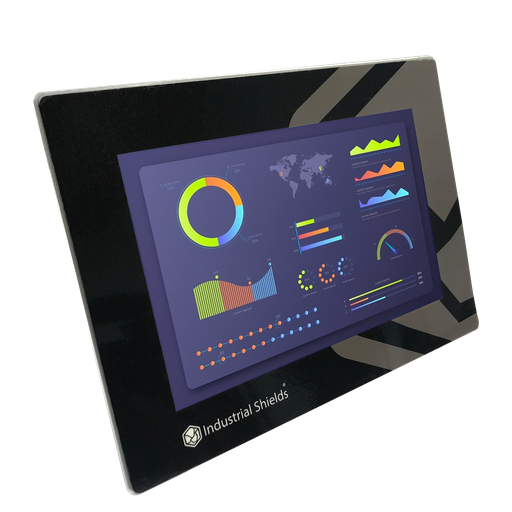
TouchBerry Pi Panel PC 10.1" FLEX
The screens of the kitchen and the preparation area. An industrial Panel PC with a Raspberry Pi 4 and a touch screen, wired to the PLC over Ethernet. It runs the Node-RED interface: the staff enter orders, see them, cancel them or mark them as done.
- Role
- Node-RED screens: order entry, kitchen, preparation area
- Screen
- 10.1", touch
- Computer
- Raspberry Pi 4
- Link to the PLC
- Ethernet, through a switch
The case uses Panel PCs based on a Raspberry Pi 3, and the old page links the 10.1" TouchBerry Pi. The current model is the TouchBerry Pi Panel PC 10.1" FLEX, with a Raspberry Pi 4. The family also has 7" and 18.5" models. The case does not publish how many Panel PCs it uses.
Questions about this case
How does a PLC run a restaurant order system?
It collects the orders from every channel, keeps them and sends them to the screens. In this case, staff enter orders on Panel PCs, customers order from their own phones over WiFi, and delivery orders come from the website or by phone. A PLC with WiFi and Ethernet is the centre of the system, and Panel PCs with a Node-RED interface show the orders in the kitchen and in the preparation area.
How do orders from an app or a website reach the PLC?
In the restaurant, the phones and tablets of the customers reach the PLC over WiFi. For the outside, the case uses an MQTT server connected to the PLC through a VPN. It does not publish the path of a website order. A typical way to do it: the back end of the website publishes each order to the MQTT server, and the PLC answers on a response topic. See MQTT commands to an ESP32 PLC with a response topic and a central Mosquitto MQTT broker.
Why do the kitchen and the preparation area see different screens?
Each team needs different information. The cooks see only what is useful to them: the dishes and their notes. The preparation area sees all the order details, to make sure nothing is missing before the order is served. Two building blocks for these screens: a Node-RED dashboard in kiosk mode on a Raspberry Pi and a Node-RED login on a TouchBerry, for views by role.
Can the PLC keep the full order history?
The case calls the PLC the centre of control and data bank, and says the system needs a proper server. The ESP32 PLC 21 has 520 KB of SRAM and 16 MB of flash. A typical way to split the work: the PLC keeps the open orders and their states, and the server keeps the history. For a simple history on the Panel PC, see CSV logging with a live table in Node-RED.
What happens to open orders if the WiFi drops?
The case does not say. In this design the Panel PCs are wired to the PLC over Ethernet, so the kitchen screens and the staff entry do not depend on WiFi. A typical way to make it robust: a non-blocking WiFi reconnection in the PLC program, order numbers kept in non-volatile memory so they survive a power cut, and a clock synced by NTP for the time of each order.
How is remote access kept safe?
The case reaches the PLC from outside through a VPN connected to the MQTT server, so the PLC is not open to the internet. A typical way to do it: user names and passwords on the broker, TLS on the connections, and a separate network for the customer WiFi and for the kitchen equipment.
Download the case study
4-page PDF with the challenge, the logic, the architecture and the hardware. No form required.
Similar system?
Tell us how your orders come in. An engineer will answer.
Tell us your ordering channels, how many screens you need in the kitchen and in the preparation area, and whether you deliver. We will tell you which controller and Panel PCs fit, and how to connect them.
- You get an answer from our technical team
- Controller and Panel PC sizing for your kitchen
- Arduino, ESP32 or Raspberry Pi based PLCs