Case study · Food distribution fleet · Ardbox Analog
Two routes, one unit. GPS shows where time goes.
Speeds, stops and routes from every truck, sent over GPRS to the data centre.
Kilometres, stops and downtime cost money.
GPS data shows them for every vehicle.
This case comes from a company that processes, sells and distributes frozen food. It does not name the customer. This page is about route efficiency: what the GPS data of the fleet showed on two very different routes, and how it helps with the arrivals at large logistics centres. The same project has a second page about the cold chain and the onboard unit, and a separate case study shows a GPS, GPRS and Bluetooth tracking architecture.
The challenge
A growing fleet. Busy platforms. Less room to waste time.
The vehicle fleet of the customer grew a lot over the last decade, with a large sales network behind it. The geolocation of the vehicles, the kilometres they travel and the downtime have a direct impact on costs and on the quality of the service. To stay competitive, the company had to improve fleet management with new technology.
A fleet that grew
More vehicles and a large sales network. The company needed the location, heading and speed of each vehicle on a server, visible at headquarters.
Large logistics platforms
Loading and unloading at large logistics platforms changed how trucks work. Some of these centres need a scheduled arrival.
Pedestrian areas
Some deliveries go into pedestrian areas where goods are unloaded. Access to them changed too.
Working hours by law
The law requires the control of working hours. Fleet data can complement the records of the working day.
One unit for every vehicle
The team defined one standard product for the whole fleet, sized for the inputs, outputs and accessories it needs, with room to grow.
How it works
Three loops: track, compare, arrive.
Each loop shows one use of the GPS data. Press the buttons and move the slider. The panels are illustrative simulations: routes, speeds, stops, distances and times are examples, not data from the fleet.
GPS gives the speed, the stops and the route.
Each unit gets the location, heading and speed of its vehicle and sends them to a server with its database. From the GPS data, the company analyses speeds, routes, types of driving and stops, to improve productivity, save fuel and work more efficiently. In the panel, play a route and see how the stops are counted. A typical way to do it: count a stop when the speed stays near zero for a set time.
- Location, heading and speed of each vehicle
- Speeds, routes, types of driving and stops
- GPS accuracy and amount of data: more than enough
Illustrative simulation. Example values, no data from the fleet. Example rule: a stop is a speed under 3 km/h for more than 2 minutes. One step of the panel is 10 seconds.
Two vehicles, two very different routes.
After the installation in the whole fleet, the first units were prepared in two kinds of vehicles. A small vehicle (3,500 kg) on a very local route, with many stops and many openings and closings of the trailer. A large vehicle on a much longer route, with only two stops at two large distribution centres. The behaviour is very different, but in both cases the data shows patterns that allow better routes. Switch the route in the panel.
- Local route: many stops, many trailer openings
- Long route: two stops, many kilometres
- Patterns in both cases to improve the routes
Illustrative simulation. Example values, no data from the fleet. Example day for each route. The case does not publish the routes, the distances or the counts.
Position data helps the logistics centre plan the arrival.
Some logistics centres are so large that the arrival must be scheduled. With control of the vehicles, the company talks with the logistics centres and meets the planned times, so trucks and drivers lose less time at the loading and unloading platforms. The company also changes routes in real time to avoid accidents, road works or congestion. A typical way to do it: estimate the arrival from the distance left and the average speed, and warn the centre when the slot is at risk.
- Communication with the logistics centres
- Planned times that can be met
- Real-time route changes to avoid accidents, road works or congestion
Messages to the logistics centre (example)
Illustrative simulation. Example values, no data from the fleet. Example: 84 km left at 09:00, average speed 70 km/h, slot at 10:30. A re-route saves part of the delay and adds a few minutes of driving.
System architecture
How does GPS data from a fleet reach the people who plan the routes?
Every vehicle carries the same unit: an Ardbox Analog with GPRS and GPS. It gets the position and the speed, keeps some data on board and sends most of it over GPRS to the data centre. The software chosen by the company turns it into dashboards for each need, and the company uses the positions to agree arrival times with the logistics centres.
| Data | Between | Type | Purpose |
|---|---|---|---|
| Position and speed | BetweenGPS → Ardbox Analog | TypeGPS | PurposeLocation, heading and speed of each vehicle |
| Fleet data | BetweenArdbox Analog → data centre | TypeGPRS | PurposeMost of the data, for analysis and decisions in real time. Some data stays on board |
| Route analysis | BetweenData centre | TypeSoftware | PurposeSpeeds, routes, types of driving and stops. Software chosen by the company |
| Dashboards | BetweenData centre → headquarters | TypeScreen | PurposeControl panels adapted to each need |
| Arrival planning | BetweenCompany → logistics centres | TypeContact | PurposePlanned times that can be met. Channel not published |
| Route changes | BetweenCompany → driver | TypeReal time | PurposeAvoid accidents, road works or congestion. Channel not published |
Why it works
Route data from every vehicle, on one standard unit.
The same unit everywhere
One standard product in the whole fleet. Every vehicle sends the same data, so routes can be compared.
Enough GPS data
One doubt was the GPS tracking. In the test, the accuracy and the amount of data were more than enough.
Quick to install
The sensors and the antennas went in very quickly, with no effect on the trailer or the tractor. The vehicle had an extra installation for the power of the PLC.
Room to grow
The I/O of the Ardbox Analog meet the needs and allow growth later without changing the installed hardware.
Dashboards for each need
The software chosen by the company handles the data quickly and shows control panels for each need.
More than routes
The company reports better driver and vehicle safety, lower consumption, records that complement the working day, savings on insurance, and customers who get their deliveries sooner and on time.
Hardware used
Ardbox Analog with GPRS, in every vehicle.
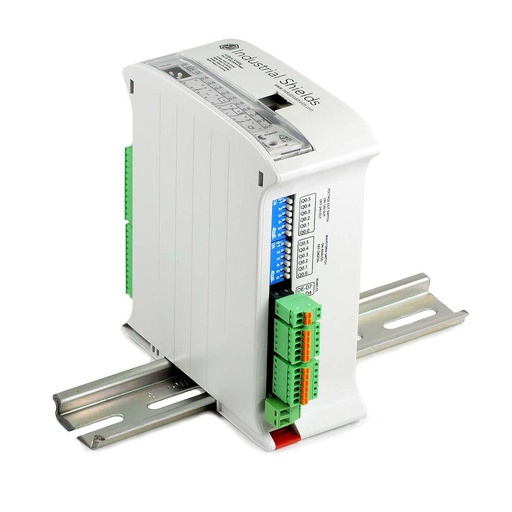
ARDBOX Analog ARDUINO based PLC
A compact industrial PLC built on an original Arduino Leonardo, with 10 inputs and 10 outputs in a 45 mm DIN rail housing. GPRS/GSM is one of the communication versions of the family. In each vehicle it gets the GPS data, keeps some data on board and sends the rest to the data centre.
- Role
- GPS data, local data, GPRS link to the data centre
- Inputs
- 10: 8 analog/digital (0‑10 V), 2 digital optoisolated
- Outputs
- 10: 7 analog/digital/PWM (0‑10 V), 3 digital optoisolated
- Comms
- RS‑485, RS‑232, TTL serial, I2C, SPI. GPRS/GSM version in the family
- Power supply
- 12 to 24 Vdc
- Mounting
- DIN rail TS35, IP20, 45 mm wide
The case names the "Ardbox Analog GPRS with GPS" from the 20 I/Os family. The image and the link show the ARDBOX Analog ARDUINO based PLC; the GPRS version is in the Ardbox HF+ GPRS family datasheet. The case does not publish the GPS receiver or how it connects.
Questions about this case
How does GPS fleet data improve route efficiency?
The GPS gives the position and the speed of each vehicle. On a server, those points become speeds, routes, types of driving and stops. In this case, the company used them to improve productivity, save fuel and work more efficiently, and to change routes in real time when there are accidents, road works or congestion.
What did the two test routes show?
The first units went into a small vehicle (3,500 kg) on a very local route, with many stops and many trailer openings, and into a large vehicle on a long route with only two stops at two large distribution centres. The behaviour was very different, but in both cases the data showed patterns that allow better routes. The case does not publish the numbers.
How do you detect a stop from GPS data?
The case lists stops among the data it analyses and does not publish its rule. A common way: count a stop when the speed stays under a few km/h for a set time, and use an input such as the ignition to tell a stop from a traffic jam. To show the positions on a map, see how to get GPS coordinates with a Node-RED maps widget.
How do you power a PLC in a truck?
In this case the power was easy: the vehicle had an extra installation for it. In any truck, the onboard supply (12 V or 24 V) has voltage dips when the engine starts and spikes when a load is cut. Use a protected supply or a DC/DC converter rated for vehicles, tested to ISO 16750-2 or ISO 7637-2, and check the input range of the PLC: 12 to 24 Vdc for the Ardbox Analog. In a 24 V truck the supply runs at about 28 V with the engine on, above that range, so use a regulated DC/DC converter. In a 12 V vehicle (up to about 14.4 V) the range fits.
How do you warn a logistics centre that a truck will miss its slot?
The case says that control of the vehicles helps the company talk with the logistics centres and meet the planned times. It does not publish how. A typical way to do it: the server estimates the arrival from the distance left, the average speed and the known delays, compares it with the slot, and sends a message to the centre when the margin gets small. The panel of loop 3 shows this pattern. For how the GPS, GPRS and Bluetooth modules connect to a PLC, see the separate tracking architecture case.
Which parts of this case are facts, and which are examples?
Facts: a frozen food company with a growing fleet; one standard product for the whole fleet, the Ardbox Analog GPRS with GPS from the 20 I/Os family; GPS data on speeds, routes, types of driving and stops; most data sent over GPRS to the data centre; a test on a small vehicle (3,500 kg) on a local route and a large vehicle with two stops on a long route; patterns in both; GPS data more than enough; dashboards in the software of the company; better planning with the logistics centres. Examples: the route shapes, speeds, the stop rule, counts, distances, delays and slot times.
Download the case study
4-page PDF with the challenge, the logic, the architecture and the hardware. No form required.
Fleet management cases
Three pages, three angles.
Each page answers a different question. Read the one that matches your project, or all three.
What the GPS data says about routes
Food distribution fleet. Speeds, stops and routes on two very different test routes, and arrivals at large logistics centres.
You are on this pageGoods temperature and position on one unit
Same fleet, other angle. One standard Ardbox unit per truck: GPS, goods temperature, local data and GPRS to the data centre.
Read the cold chain caseTracking architectureGPS, GPRS and Bluetooth on one PLC
A separate case study. How data goes from each truck to a server and to headquarters, and how messages go back to the driver phone.
Read the architecture caseSimilar fleet?
Tell us your vehicles and your routes. An engineer will answer.
Tell us how many vehicles you have, what kind of routes they drive, what you want to learn from the data (stops, speeds, arrival times, working hours), which software must receive it, and which mobile networks you have on your routes. We will tell you which controller fits and how to connect it.
- You get an answer from our technical team
- I/O count and controller sizing for your vehicles
- Arduino, ESP32 or Raspberry Pi based PLCs