
RS-485 (TIA/EIA-485) is an electrical standard for serial communication over a twisted pair. It sends each bit as the voltage difference between two wires, A and B, so it rejects noise and reaches up to 1200 m at 100 kbit/s or less, with up to 32 standard devices on one bus. The highest speeds, around 10 Mbit/s, work only over about 12 m.
This guide explains how RS-485 works, the distance and speed limits, the wiring rules (topology, termination, biasing and ground), and how to use the RS-485 port of the Industrial Shields M-Duino, Ardbox and ESP32 PLCs, with tested code for half and full duplex.
What is RS-485 and how does it work?
RS-485, also known as EIA-485, is a differential multipoint bus. The transmitter drives the two wires in opposite directions and the receiver reads only the difference between them. A difference above +200 mV is one logic state and below -200 mV is the other. Noise induced in the cable affects both wires in the same way, so the difference does not change. That is why a twisted pair carries RS-485 through industrial cabinets, next to motors and drives.
Many receivers and transmitters can share the same pair in a line (a multidrop bus). RS-485 defines only the electrical layer: the bytes, the addresses and who talks when come from a protocol on top of it, usually Modbus RTU.
| Characteristic | RS-485 |
|---|---|
| Standard | TIA/EIA-485-A |
| Signal | Differential, between A and B |
| Receiver threshold | ±200 mV |
| Common mode range | -7 V to +12 V |
| Devices per segment | 32 unit loads (more with 1/4 or 1/8 unit load transceivers) |
| Maximum length | About 1200 m at 100 kbit/s or less |
| Maximum speed | About 10 Mbit/s, over about 12 m |
| Wires | 1 twisted pair (half duplex) or 2 pairs (full duplex), plus a signal reference |
| Topology | Line (daisy chain) with a 120 Ω terminator at each end |
RS-485 distance and speed: 1200 m or 12 m?
Both figures are right, at different speeds. The cable resistance and capacitance limit how fast the signal can change, so the longer the cable, the lower the speed. A common rule of thumb is that the speed in bit/s multiplied by the length in metres should stay below about 108.
| Speed | Approximate maximum length | Typical use |
|---|---|---|
| 9600 to 100000 bit/s | 1200 m | Modbus RTU at 9600 or 19200 baud, meters, drives, sensors |
| 1 Mbit/s | About 100 m | Fast links inside a machine |
| 10 Mbit/s | About 12 m | Short links between boards or cabinets |
An earlier version of this post said that RS-485 reaches "until 12 m". That is the limit at the top speed of the standard, not the range of RS-485: at the speeds of Modbus RTU, a well-terminated bus reaches about 1200 m with a good twisted pair.
RS-485, RS-232 and TTL compared
| RS-485 | RS-232 | TTL serial | |
|---|---|---|---|
| Signal | Differential | Single-ended, ±3 to ±15 V | Single-ended, 0 to 5 V or 3.3 V |
| Devices | Up to 32 unit loads per segment | 2 (point to point) | 2 (point to point) |
| Distance | Up to about 1200 m | About 15 m | Inside the board or cabinet |
| Noise immunity | High | Medium | Low |
| Typical use in a PLC | Modbus RTU fieldbus | A single instrument, an old HMI, a modem | Modules next to the PLC |
RS-485 wiring rules
- One line, no star. Connect the devices one after the other with short stubs. A star or long branches cause reflections.
- 120 Ω at both ends. Fit one terminator between A and B at each end of the line, and only there. On a short bench cable at low speed it is not needed.
- Bias for the idle state. When nobody transmits, the bus needs a defined level: pull-up on one wire and pull-down on the other, usually in the master or in one device of the bus.
- A common reference. RS-485 tolerates -7 V to +12 V of common mode, not more. Connect the signal ground (GND or COM) of the devices with a third wire when they have no common reference.
- Twisted pair cable. Use cable made for RS-485, with a characteristic impedance near 120 Ω, shielded in noisy places, with the shield connected to earth at one point.
If a bus that worked starts to fail, follow the RS-485 troubleshooting checklist: topology, the 60 Ω termination test, bias, ground, cable and protocol settings.
RS-485 in Industrial Shields PLCs
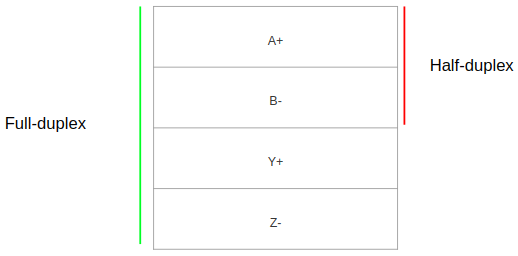
The M-Duino and Ardbox PLCs use a MAX481CSA RS-485 transceiver. In half duplex one transceiver sends and receives on A+ and B-. In full duplex a second transceiver is used, so one pair receives and the other pair transmits at the same time.
| PLC family | RS-485 terminals | Modes | Configuration |
|---|---|---|---|
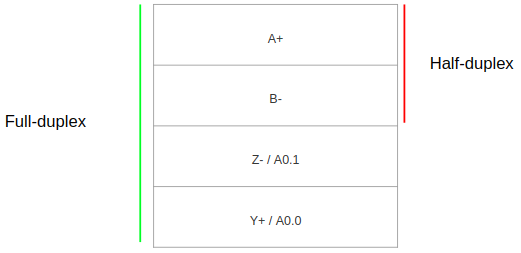
| M-Duino | A+, B-, Y+, Z- | Half and full duplex | Always active. Select HD or FD with the FD/HD switch |
| Ardbox Analog HF+ and Relay HF+ | A+, B-, Y+, Z- | Half and full duplex | RS-485 or RS-232 is chosen when you order the PLC. HD or FD with right top switch 1 (Analog) or 2 (Relay) |
| ESP32 PLC | A+, B- | Half duplex | Communication switch 3 OFF |
The detailed switch settings for each model, also for the ESP32 PLC 14, are in RS-485 with Arduino and ESP32 based PLCs.
RS-485 in the M-Duino family
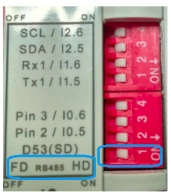
On the M-Duino family the RS-485 port is always active, so you do not need a switch to enable it. You only select half duplex or full duplex with the FD/HD switch:
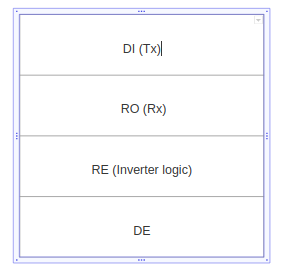
These are the terminals of the PLC for RS-485 communication:
RS-485 in the Ardbox family
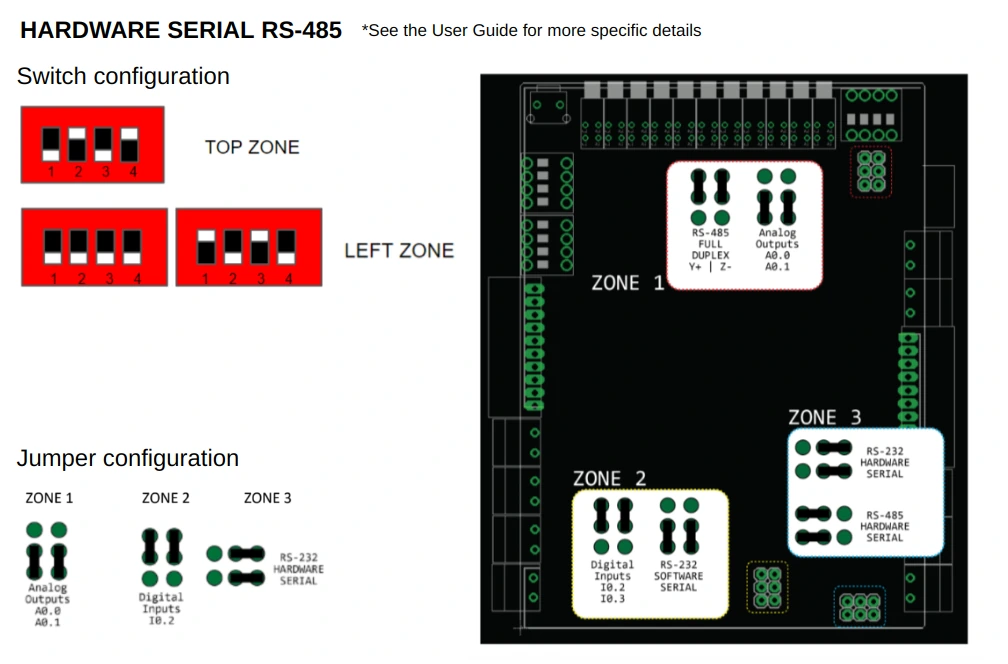
The Ardbox family has two subfamilies with hardware RS-485, the Ardbox Analog HF+ and the Ardbox Relay HF+. They share one serial port between RS-485 and RS-232. You choose the option when you order the PLC, and the switches and jumpers come set. These images show the settings:
Ardbox Analog HF+
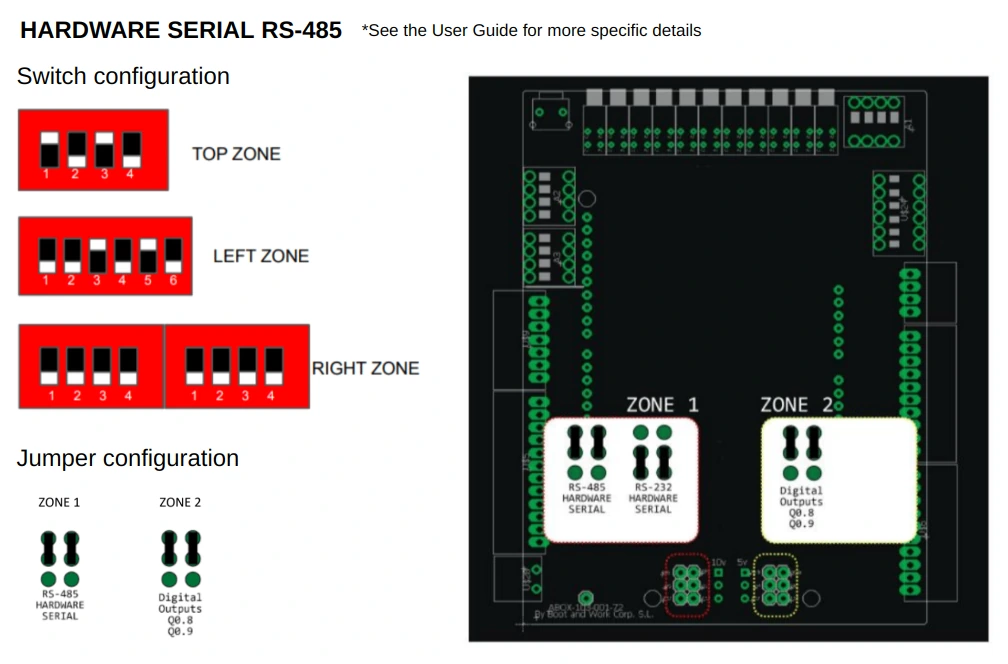
Ardbox Relay HF+
How to program the RS-485 port of the PLC
Supply the PLC with 12 to 24 Vdc and install the Industrial Shields boards in the Arduino IDE. The RS485 library comes with the boards. Open the port in setup() with the same baud rate, duplex mode and serial format as the other devices of the bus:
#include <RS485.h>

RS485.begin(38400, HALFDUPLEX, SERIAL_8N1);   // baud rate, HALFDUPLEX or FULLDUPLEX, format
If you omit the last two parameters, the library uses half duplex and 8N1. Check the speed twice: the serial monitor (USB, Serial) and the RS-485 bus (RS485) are different ports, and each one has its own baud rate. All the examples below compile without warnings for an M-Duino 21+ with the Industrial Shields AVR boards 1.2.1.
Write to the RS-485 port
// Send to the RS-485 port every byte typed in the serial monitor
#include <RS485.h>

void setup() {
  Serial.begin(9600);                        // serial monitor (USB)
  RS485.begin(38400, HALFDUPLEX, SERIAL_8N1); // RS-485 port: same settings on all devices
}

void loop() {
  if (Serial.available()) {
    byte tx = Serial.read();
    Serial.write(tx);                        // echo to the serial monitor
    RS485.write(tx);                         // and send it to the RS-485 bus
  }
}
Read from the RS-485 port
// Print every byte received on the RS-485 port, in hexadecimal and decimal
#include <RS485.h>

void setup() {
  Serial.begin(9600);
  RS485.begin(38400, HALFDUPLEX, SERIAL_8N1);
}

void loop() {
  if (RS485.available()) {
    byte rx = RS485.read();
    Serial.print("HEX: ");
    Serial.print(rx, HEX);
    Serial.print(", DEC: ");
    Serial.println(rx, DEC);
  }
}
Full duplex test
Full duplex needs two pairs and is only available on the M-Duino and the Ardbox. To test it on one PLC, connect A+ to Y+ and B- to Z-, set the FD/HD switch to FD and run this loopback:
// Full duplex loopback test (M-Duino and Ardbox only):
// connect A+ to Y+ and B- to Z- on the same PLC, and set the HD/FD switch to FD
#include <RS485.h>

const byte TEST_BYTE = 5;

void setup() {
  Serial.begin(9600);
  RS485.begin(38400, FULLDUPLEX, SERIAL_8N1);
  Serial.println("Full duplex test");
}

void loop() {
  RS485.write(TEST_BYTE);                    // the transmitter (Y+, Z-) sends
  delay(1000);
  while (RS485.available()) {                // the receiver (A+, B-) gets it back
    Serial.print("Received: ");
    Serial.println(RS485.read());
  }
}
To talk with meters, drives or other PLCs, you will use a protocol on top of these bytes. Continue with Modbus RTU with Arduino and ESP32 based PLCs.
See what travels on an RS-485 bus. In the Modbus network simulator, an M-Duino 21 polls four Modbus RTU slaves on RS-485. Change the baud rate or switch a slave off, and read the frames, the CRC and the timeouts.
Open the Modbus network simulatorAsk an engineer about your RS-485 bus
FAQ about RS-485
Is RS-485 a protocol?
No. RS-485 defines the electrical signals, not the content of the messages. Modbus RTU, BACnet MS/TP and many proprietary protocols run on top of RS-485.
What is the maximum length of an RS-485 cable?
About 1200 m at 100 kbit/s or less, with a twisted pair and termination at both ends. At higher speeds the length drops, to about 12 m at 10 Mbit/s. Repeaters extend a bus beyond these limits.
How many devices can I connect to one RS-485 bus?
32 unit loads per segment. A standard transceiver is one unit load, so the usual answer is one master and 31 slaves. Transceivers with 1/4 or 1/8 unit load allow 128 or 256 devices.
Can RS-485 work with only two wires?
The data travels on two wires, A and B. The receivers still need a common reference within -7 V to +12 V, so when the devices have no common ground, add a third wire for GND.
What is the difference between RS-485 and RS-422?
RS-422 also uses differential signals, but it has one transmitter and up to 10 receivers per pair. RS-485 allows several transmitters on the same pair, which is what a multidrop bus needs.
Do I need a 120 Ω resistor?
At each end of a long line, yes, and only at the ends. With the power off, the resistance between A and B on a correctly terminated bus is about 60 Ω (two 120 Ω in parallel).