
A MAX485 module converts the TTL serial port (UART) of a controller into a half-duplex RS-485 signal on two wires, A and B. To connect it to an M-Duino PLC: power VCC from the 5Vdc pin of the PLC, connect RO to RX1 (pin 19) and DI to TX1 (pin 18), and drive RE and DE from Pin 2 and Pin 3. Set DE and RE HIGH to transmit and LOW to receive.
Every M-Duino already has one RS-485 port on its terminals. A MAX485 module is useful when the project needs a second, separate RS-485 bus: for example, energy meters on one bus and frequency inverters on another, or a Modbus RTU slave port next to a Modbus RTU master port. This guide covers the chip, the pinout, the wiring to the PLC, the direction control in code and the bus rules. The bus rules apply to any controller with a UART, also if you don't program Arduino.
What does a MAX485 module do?
The MAX485 is a half-duplex RS-485 transceiver. On one side it has TTL logic pins for the UART of the controller. On the other side it has the differential pair A and B. At any moment the chip either drives the bus or listens to it, never both on the same pair. The module is a small board with the chip, the screw terminals for A and B, and a few resistors.
- 1 · PLCM-Duino UARTSerial1, TTL levels at 5 V
- 2 · TransceiverMAX485 moduleTTL to RS-485, direction set by DE and RE
- 3 · CableTwisted pair A and BDaisy chain, 120 Ω at both ends, common reference
- 4 · FieldRS-485 devicesModbus RTU slaves, meters, drives, sensors
The main data of the chip, from the MAX485 datasheet (Analog Devices, formerly Maxim):
| Parameter | MAX485 |
|---|---|
| Supply voltage | Single 5 V supply |
| Communication | Half duplex (one pair, one direction at a time) |
| Maximum data rate | 2.5 Mbps (driver slew rate not limited) |
| Devices on one bus | Up to 32 transceivers |
| Supply current | 300 µA typical, 500 µA maximum (no load, driver disabled) |
| Receiver fail-safe | Output HIGH if the inputs are open circuit |
| Driver protection | Short-circuit current limit and thermal shutdown |
The MAX485 is not a slew-rate-limited part. In the same family, the MAX483, MAX487, MAX488 and MAX489 limit the slew rate to reduce EMI and reflections, and stay at 250 kbps. If your bus is long or not well terminated and 250 kbps is enough, a slew-rate-limited transceiver is the safer choice.
MAX485 pinout: RO, RE, DE, DI, A and B
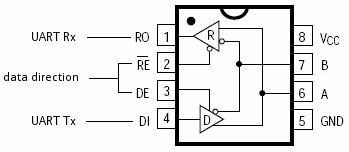
On the usual module board, RO, RE, DE and DI are on one header, and VCC, GND, A and B on the other side, with A and B also on a screw terminal.
| Pin | Function | Connect to (M-Duino) |
|---|---|---|
| RO | Receiver output: data read from the bus | RX1 (pin 19) |
| RE (active LOW) | Receiver enable: LOW turns the receiver output on | Pin 2 |
| DE (active HIGH) | Driver enable: HIGH lets the chip drive the bus | Pin 3 |
| DI | Driver input: data to send on the bus | TX1 (pin 18) |
| VCC | Supply, 5 V | 5Vdc of the communication zone |
| GND | Ground | GND of the communication zone |
| A | Non-inverting bus line | A (or A+, D+) of the other devices |
| B | Inverting bus line | B (or B-, D-) of the other devices |
RE and DE decide what the chip does:
| DE | RE | Result |
|---|---|---|
| HIGH | HIGH | Transmit: the driver is on, RO is off |
| LOW | LOW | Receive: the driver is off, RO follows the bus |
| HIGH | LOW | Transmit and listen: RO returns your own bytes (echo). Useful for a wiring test |
| LOW | HIGH | Driver and receiver output both off |
Because RE is active LOW and DE is active HIGH, you can join both to one GPIO: HIGH transmits and LOW receives. This guide keeps them on two pins, as in the drawings below, so you can also run the echo test.
Wiring a MAX485 module to an M-Duino PLC
The M-Duino is built on an Arduino Mega 2560 (ATmega2560, 5 V logic), so the MAX485 TTL pins connect directly, with no level shifter. All the pins you need are on the communication zone of the PLC: RX1, TX1, Pin 2, Pin 3, 5Vdc and GND (see the M-Duino family datasheet and the M-Duino technical features).
Which serial port to use:
- Serial1 (RX1, TX1): the recommended port for the module. This guide uses it.
- Serial0 (RX0, TX0): shared with the USB port. Uploads and the serial monitor would collide with the RS-485 traffic.
- Serial2: already used by the RS-232 port of the PLC (TX pin 16, RX pin 17).
- The built-in RS-485 port has its own UART and its own transceiver. Leave it for the first bus.
Check the communication switches. On the M-Duino, the same microcontroller pins can go to the TTL terminals or to digital inputs. RX1 and TX1 share a pin with I1.6 and I1.5, and Pin 3 and Pin 2 share a pin with I0.6 and I0.5. Set those switches to OFF to use the TTL pins. Then the inputs I0.5 and I0.6 (and I1.5, I1.6 on models with that zone) are not available. On models with a Wi-Fi, GPRS, LoRa or DALI expansion board, some serial and direct pins are used by the board: check the expansion table in the datasheet first.
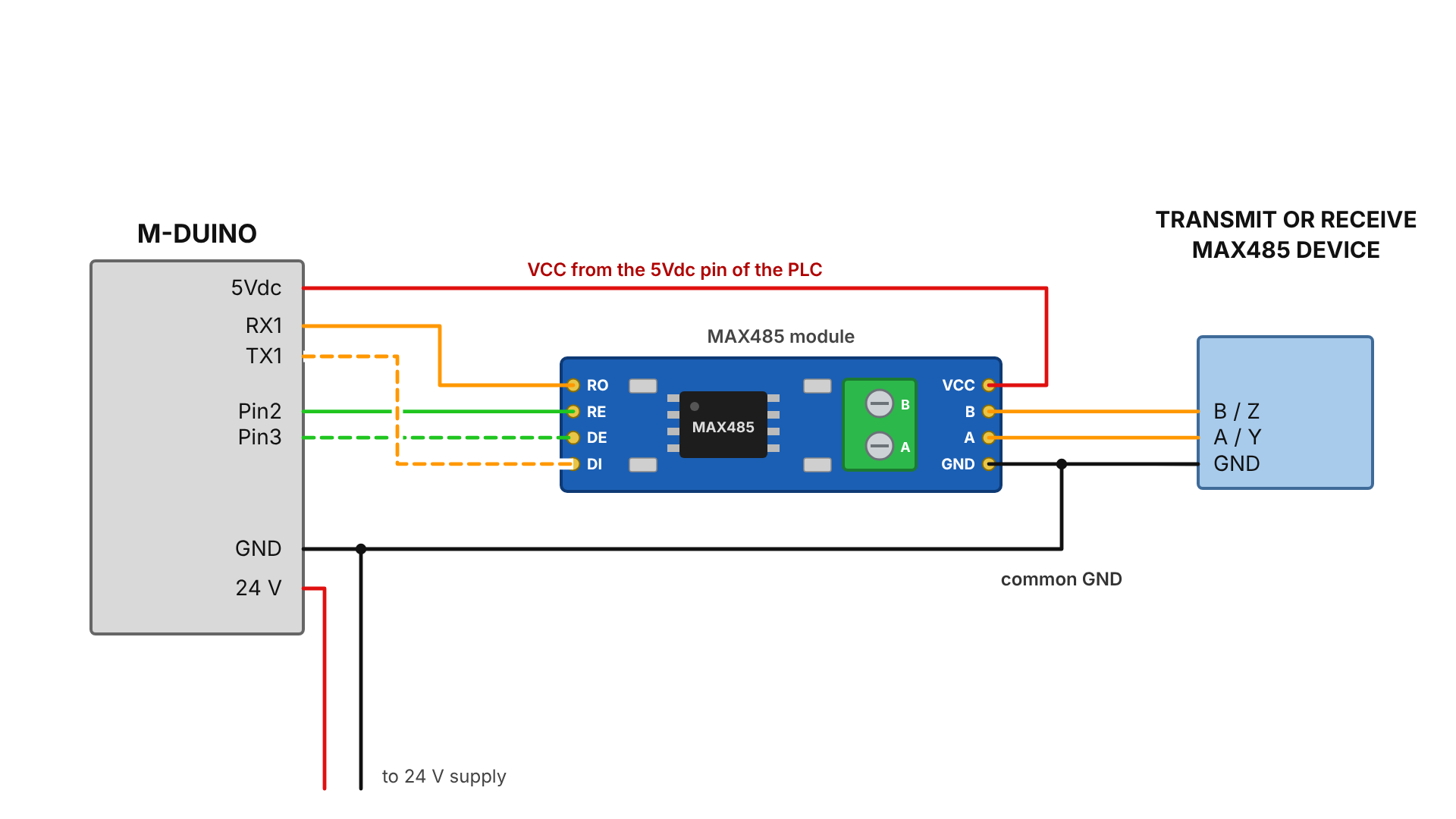
Connect A to A (or A+) and B to B (or B-) on every device. If the bus stays silent, first swap A and B at one device: manufacturers do not always use the same letters for the same line.
Direction control in code: switch DE only after the last byte
The built-in RS-485 port of the M-Duino is driven by the RS485 library of the Industrial Shields boards package. With an external MAX485 module, the program must switch DE and RE itself. The rule is simple: set the driver on, send the frame, wait until the last bit has left the UART, then set the driver off and listen.
Serial1.write() only puts bytes in a buffer and returns at once. Serial1.flush() waits until the transmission is complete. If you set DE LOW before flush() returns, the last byte (usually the CRC of a Modbus frame) is cut, and the slave does not answer. If you leave DE HIGH too long, you block the answer of the slave.
The example reads two holding registers from Modbus RTU slave 1 (function code 03) at 9600 baud, 8N1. It builds the frame, adds the CRC-16, handles the direction pins and checks the answer.
// MAX485 module on an M-Duino PLC: Modbus RTU "read holding registers" (function 03)
// Wiring: RO -> RX1 (pin 19), DI -> TX1 (pin 18), RE -> Pin 2, DE -> Pin 3,
//         VCC -> 5Vdc, GND -> GND. Communication switches for RX1/TX1, Pin 2 and Pin 3 to OFF.

const uint8_t RE_PIN = 2;          // receiver enable, active LOW
const uint8_t DE_PIN = 3;          // driver enable, active HIGH
const uint32_t BAUD = 9600;
const uint16_t TIMEOUT_MS = 200;   // wait for the first byte of the answer
const uint8_t GAP_MS = 5;          // silence that ends the frame (3.5 characters, about 4 ms at 9600 baud)

void busTransmit() {               // driver on, receiver off
  digitalWrite(RE_PIN, HIGH);
  digitalWrite(DE_PIN, HIGH);
}

void busReceive() {                // driver off, receiver on
  digitalWrite(DE_PIN, LOW);
  digitalWrite(RE_PIN, LOW);
}

uint16_t crc16(const uint8_t *buf, uint8_t len) {   // CRC-16/MODBUS
  uint16_t crc = 0xFFFF;
  for (uint8_t i = 0; i < len; i++) {
    crc ^= buf[i];
    for (uint8_t b = 0; b < 8; b++) {
      crc = (crc & 1) ? (crc >> 1) ^ 0xA001 : crc >> 1;
    }
  }
  return crc;
}

// Returns the number of registers read, or -1 on timeout or bad answer.
int readHolding(uint8_t slave, uint16_t first, uint8_t count, uint16_t *out) {
  if (count == 0 || count > 32) return -1;    // answer buffer holds 32 registers
  uint8_t req[8] = { slave, 0x03, (uint8_t)(first >> 8), (uint8_t)first, 0, count };
  uint16_t crc = crc16(req, 6);
  req[6] = crc & 0xFF;             // CRC low byte first
  req[7] = crc >> 8;

  while (Serial1.available()) Serial1.read();   // drop old bytes

  busTransmit();
  Serial1.write(req, sizeof(req));
  Serial1.flush();                 // wait until the last stop bit has left the UART
  busReceive();                    // only now release the bus

  uint8_t ans[5 + 2 * 32];
  uint8_t n = 0;
  uint32_t t = millis();
  while (millis() - t < TIMEOUT_MS && n == 0) {
    if (Serial1.available()) ans[n++] = Serial1.read();
  }
  if (n == 0) return -1;           // no answer
  t = millis();
  while (millis() - t < GAP_MS) {  // read until the line is silent
    if (Serial1.available()) {
      if (n < sizeof(ans)) ans[n++] = Serial1.read(); else Serial1.read();
      t = millis();
    }
  }

  if (n < 5 || ans[0] != slave || ans[1] != 0x03 || ans[2] != 2 * count) return -1;
  if (n != 5 + 2 * count) return -1;
  uint16_t rxCrc = ans[n - 2] | (ans[n - 1] << 8);
  if (rxCrc != crc16(ans, n - 2)) return -1;

  for (uint8_t i = 0; i < count; i++) {
    out[i] = (ans[3 + 2 * i] << 8) | ans[4 + 2 * i];
  }
  return count;
}

void setup() {
  pinMode(RE_PIN, OUTPUT);
  pinMode(DE_PIN, OUTPUT);
  busReceive();                    // never leave the driver on at start-up
  Serial.begin(115200);            // USB, for the serial monitor
  Serial1.begin(BAUD);             // SERIAL_8N1 by default
}

void loop() {
  uint16_t regs[2];
  int r = readHolding(1, 0, 2, regs);   // slave 1, registers 0 and 1
  if (r < 0) {
    Serial.println(F("No valid answer"));
  } else {
    Serial.print(F("Reg 0: ")); Serial.print(regs[0]);
    Serial.print(F("  Reg 1: ")); Serial.println(regs[1]);
  }
  delay(1000);
}
Tested points: the sketch compiles without warnings for the ATmega2560 with the Arduino AVR core 1.8.6 (6,118 bytes of flash, 682 bytes of RAM). The CRC function gives 84 0A for the frame 01 03 00 00 00 01 and C4 0B for 01 03 00 00 00 02, the reference values of Modbus RTU. In a simulation of the serial port, the request leaves with DE HIGH, the bus returns to receive mode after flush(), a valid answer is decoded, and a wrong CRC or a silent slave returns -1.
For a full Modbus RTU master with more function codes, see Modbus RTU with Arduino and ESP32 based PLCs and the Modbus RTU master library. Those examples use the built-in RS-485 port.
Echo test without a second device. Set DE HIGH and RE LOW, send a few bytes and read RO. If the same bytes come back, the UART, the pins and the module work. If nothing comes back, check the switches, the 5 V supply of the module and RO to RX1.
Full duplex with two MAX485 modules needs four wires
One MAX485 cannot send and receive at the same time. Two modules give full duplex only on a 4-wire link: one pair for each direction. One module is fixed as a transmitter (DE and RE HIGH) and drives the pair that goes to the receiver of the other device. The second module is fixed as a receiver (DE and RE LOW) and listens to the pair that comes from the transmitter of the other device. Two modules on the same 2-wire pair are still half duplex.
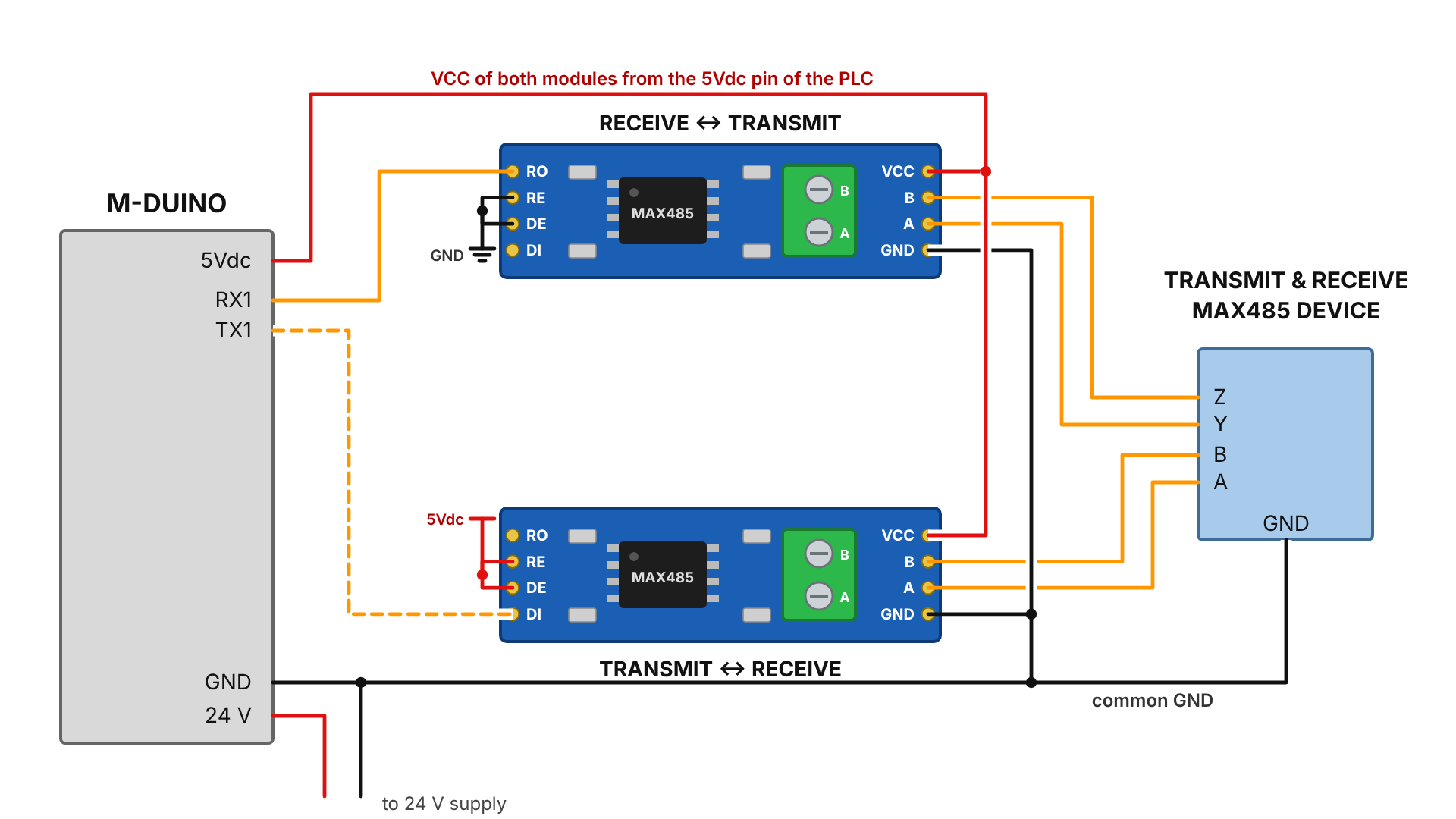
Before you add two modules, check the built-in port. The M-Duino RS-485 port has A+, B-, Y+ and Z- terminals and supports full duplex: set the FD/HD switch to FD and connect A+ to Y+, B- to Z-, Y+ to A+ and Z- to B- of the other device. See RS-485 with Arduino and ESP32 based PLCs. For a single-chip full-duplex transceiver, the same datasheet lists the MAX488 to MAX491.
RS-485 bus rules that also apply to a MAX485 module
Most problems with a MAX485 module are bus problems, not chip problems. These rules come from the RS-485 standard (TIA/EIA-485) and apply to any transceiver:
- Topology: one line from device to device (daisy chain). Avoid stars and long stubs.
- Cable: twisted pair for A and B. At low baud rates, RS-485 reaches about 1200 m. At high rates the distance is much shorter.
- Termination: one 120 Ω resistor between A and B at each end of the line, and nowhere else. Many low-cost modules have a resistor between A and B on the board. Measure A to B with the module unpowered: about 120 Ω means it is there. Remove it on modules in the middle of the bus.
- Idle state: the MAX485 fail-safe works only with open inputs. On a terminated bus with all drivers off, the voltage between A and B is near zero and the receivers can read noise as data. Bias resistors (pull-up on A, pull-down on B) at one point of the bus keep the idle line in a defined state.
- Reference: RS-485 is differential, but the transceivers need a common reference. Run a reference wire (GND or signal common) with the pair.
- Load: the MAX485 counts as one unit load. With MAX485 inputs, keep to 32 devices per bus segment.
- Isolation: the MAX485 module has no galvanic isolation. Inside one cabinet this is usually fine. Between cabinets or buildings with different ground potentials, use an isolated transceiver or an isolated repeater.
When the bus does not work, follow the step-by-step checks in RS485 problems: step-by-step bus fault diagnosis. For the basics of the RS-485 port of the PLC, see Basics about RS-485 of an industrial PLC.
Built-in RS-485 port or MAX485 module: when to use each
| Built-in RS-485 port | MAX485 module on Serial1 | |
|---|---|---|
| Role | First RS-485 bus | Second, independent RS-485 bus |
| Duplex | Half or full duplex (FD/HD switch) | Half duplex (full duplex with two modules and four wires) |
| Direction control | RS485 library of the boards package | Your code, with DE and RE |
| Connection | Terminals A+, B-, Y+, Z- on the PLC | Module wired to RX1, TX1, Pin 2, Pin 3, 5Vdc and GND |
| Pins used | None of the general I/O | I0.5 and I0.6 (and I1.5, I1.6 where present) become TTL pins |
| Mounting | Inside the PLC housing | Extra board to fix in the cabinet |
A common case for two buses is a gateway. The M-Duino keeps Ethernet for the SCADA (Modbus TCP) and RS-485 for the field devices (Modbus RTU). See the Modbus TCP to RTU gateway on an M-Duino PLC and VFD RPM control over Modbus RTU in the PLC Solution Library.
More about RS-485 on PLCs
- How to communicate a Raspberry Pi 4 B with a MAX485 module
- How to connect two industrial PLCs through RS-485
- How to use TTL on an industrial Arduino based PLC
- Case study: conveyor belt speed control with an M-Duino 42+ and a frequency inverter (analog speed reference, with RS-485 and Modbus RTU as the fieldbus option)
Need a second serial bus on the PLC? The M-Duino family (Arduino PLC) has Ethernet, RS-485, RS-232, TTL, I2C and SPI on every model, from the M-Duino 19R+ to the M-Duino 58+.
See the Arduino PLC family (M-Duino)Open the PLC Solution Library
FAQ about the MAX485 module and PLCs
Can a MAX485 module work at 3.3 V?
The MAX485 is specified for a single 5 V supply. On a 3.3 V controller, such as an ESP32, use a transceiver made for 3.3 V instead of powering a MAX485 out of its range. The M-Duino uses 5 V logic, so the MAX485 fits it.
Why does the slave not answer, or answer only sometimes?
The most common cause is DE going LOW before the last byte has left the UART. Call Serial1.flush() before you switch to receive. Then check the baud rate and parity, A and B polarity, the slave address and the termination.
Do I need the 120 Ω resistor on the module?
Only if the module is at one end of the bus. A short bench cable at 9600 baud often works without it. A long line needs one resistor at each end and no more.
Can I connect the MAX485 module to the built-in RS-485 port of the same PLC?
Yes. Connect A of the module to A+ and B to B- of the PLC, with the port in half duplex. It is a quick test: send from Serial1 and read with the RS485 library, at the same baud rate on both sides.
How many devices can share one MAX485 bus?
Up to 32 devices with one unit load each, like the MAX485. Devices with a fraction of a unit load allow more. The cycle time of the master also limits how many slaves you can poll in practice.
Is the MAX485 module isolated?
No. Between cabinets or buildings with different ground potentials, use an isolated RS-485 transceiver or an isolated repeater.