Case study · Water bottling · TouchBerry Pi 7"
One touch panel runs a bottling station. PLC and HMI in one.
Conveyor, sensors, cylinder and pump, on the panel I/O.
Many people see a Panel PC only as a screen. This example shows that a TouchBerry Pi 7" can also run a small machine.
One panel reads the sensors, drives the actuators and shows the data of every bottle.
This is an example application published by Industrial Shields in 2020, not a customer installation. The devices, the sequence, the I/O count and the data to collect come from the example. The times and the values in the panels are illustrative.
The challenge
A small process, a short list of signals.
A water bottling station has a limited number of sensors and actuators. The goal of the example was to control them with the TouchBerry Pi 7" alone, and to learn which devices can be connected to the panel and how.
Find the bottle
The bottles arrive on a conveyor belt. A capacitive sensor under the pump detects each bottle when it is right under the pump.
Move the pump
A pneumatic cylinder carries the pump forward and back. Two inductive sensors on the cylinder say where it is.
Fill the right amount
When the cylinder is forward, the pump fills the bottle with the correct quantity of water.
Keep the data
The panel is also the HMI: it shows the signals and compiles data such as cycle time, hour, batch and machine failures.
PLC and HMI in one device
The TouchBerry Pi 7" has its own inputs and outputs, configurable by software, and runs GNU/Linux. The same device runs the sequence and the screen.
How it works
Three views: the sequence, the data, the size of the I/O.
Each panel shows one part of the example. Press the buttons. The panels are illustrative simulations: the devices, the sequence and the data come from the example, but the times, the batches and the extra stations are examples.
Bottle, cylinder, pump, and back.
The conveyor brings a bottle. The capacitive sensor sees it under the pump. The panel moves the cylinder forward, and when the inductive sensor confirms it, the pump fills the bottle. Then the cylinder goes back and the next bottle comes. Run the line, then make a sensor fail.
- 3 digital inputs: capacitive sensor and two inductive cylinder sensors
- 4 digital outputs: conveyor, cylinder forward, cylinder back, pump
- Conveyor and pump motors through solid state relays
Filling sequence (example)
Illustrative simulation. Example values. The example gives the devices and the order: bottle on the conveyor, capacitive sensor, cylinder forward, inductive sensor high, pump fills. The rest is a typical way to do it: the conveyor stops while the bottle is filled, the pump runs for a set time, the cylinder goes back before the conveyor starts again, and a step that waits more than 3 s for its sensor stops the line with a fault.
Practise a step sequence with sensors and timeouts in the assembly station simulator
The same panel is the screen of the machine.
Because the TouchBerry is also an HMI, the data of the process stays where the operator is: cycle time, hour, batch and machine failures. Start a batch and cause a failure.
- Cycle time of every bottle
- Bottles per batch, with date and hour
- Machine failures logged with their time
Data on the HMI (example)
Illustrative simulation. Example values. The example says the panel can compile data from the signals, such as cycle time, hour, batch and machine failures. It does not publish a screen. In this example the panel counts the bottles of each batch, keeps the average cycle time and logs every failure with its time.
See cycle times, stops and failures of a machine in the machine monitor simulator
When the panel I/O is not enough, add a module.
The example fits in the I/O of the panel. A longer line needs more signals: the example adds a 16 I/O signal distributor on RS-485, and for a whole plant, several TouchBerries in a network. Add stations and see where the limit is.
- Built-in I/O for small machines
- 16 I/O module on RS-485 for more signals
- Several panels in a network for a plant
I/O count (example)
Illustrative simulation. Example values. The filler of the example uses 3 digital inputs and 4 digital outputs. The TouchBerry Pi 7" of today has 3 digital inputs, 5 digital outputs and 2 analog inputs. For more signals the example adds a 16 I/O module, programmable by software, on RS-485. The capper and the labeller are examples of what a line could add.
System architecture
How does a Panel PC run a bottling station as PLC and HMI?
The capacitive sensor and the two inductive sensors go to the digital inputs of the TouchBerry Pi 7". Its digital outputs drive the solid state relays of the conveyor and the pump, and the forward and backward coils of the cylinder solenoid valve. The screen shows the process and keeps the data. For more signals, a 16 I/O module joins on RS-485, and Ethernet or WiFi reach the rest of the plant.
| Signal | Between | Type | Purpose |
|---|---|---|---|
| Bottle under the pump | BetweenCapacitive sensor → panel | TypeDigital input (I2) | PurposeDetects the bottle right under the pump |
| Cylinder forward | BetweenInductive sensor → panel | TypeDigital input (I3) | PurposeThe pump is in position to fill |
| Cylinder back | BetweenInductive sensor → panel | TypeDigital input (I4) | PurposeThe pump is out of the way of the next bottle |
| Conveyor | BetweenPanel → solid state relay → motor | TypeDigital output (O0) | PurposeBrings the bottles |
| Cylinder forward | BetweenPanel → solenoid valve coil | TypeDigital output (O1) | PurposeMoves the pump to the bottle |
| Cylinder back | BetweenPanel → solenoid valve coil | TypeDigital output (O2) | PurposeMoves the pump back |
| Water pump | BetweenPanel → solid state relay → pump | TypeDigital output (O3) | PurposeFills the bottle with the correct quantity |
| More signals | BetweenPanel ↔ 16 I/O module | TypeRS-485 | PurposeWhen the built-in I/O is not enough |
Why it works
The right size of controller for a small machine.
One device, two jobs
The panel runs the sequence and is the operator screen: one device to wire and program.
Enough I/O for the job
A water bottling station has few sensors and actuators. The 7 signals of the example fit in the I/O of the panel.
Data where the operator is
Cycle time, hour, batch and machine failures stay on the screen of the machine.
Room to grow
More signals come from a 16 I/O module on RS-485, and a plant can use several TouchBerries in a network.
Open software
GNU/Linux on the panel, Node-RED preinstalled today, and the examples of our blog to start programming.
Connected
Ethernet and WiFi give access to the parameters and the I/O of the system from the rest of the plant.
Hardware
A 7" industrial Panel PC with its own inputs and outputs.
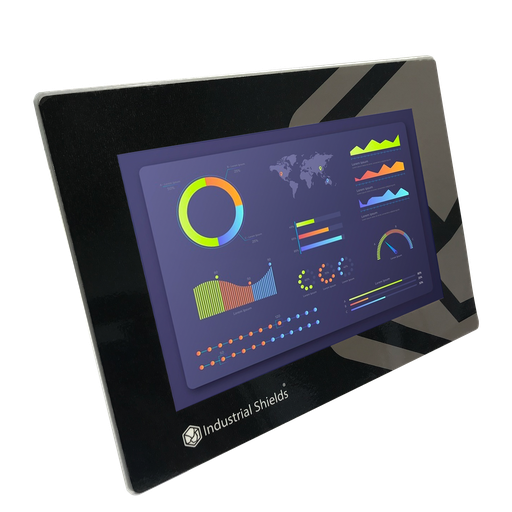
Used in the exampleTouchBerry Pi Panel PC 7" FLEX
A 7" industrial touch panel with a Raspberry Pi 4 inside, its own I/O, one serial port and a UPS. The example used the TouchBerry Pi 7" of 2020.
- Role in this example
- Runs the filling sequence on its own I/O and is the operator screen
- Computer
- Raspberry Pi 4, 4 or 8 GB RAM, Linux preinstalled on SD card
- Inputs
- 3 digital (I2 to I4, 5-24 Vdc, PNP) and 2 analog (I0 and I1, 0-10 V or 4-20 mA, 12-bit)
- Outputs
- 5 digital (O0 to O4, PNP, 12-24 Vdc, 250 mA each, 0.4 A in total)
- Communication
- Gigabit Ethernet, WiFi, one serial port (RS-485, RS-232 or TTL, chosen at order), I2C, SPI, USB
- Software
- Node-RED preinstalled; programmable like a Raspberry Pi
- Power
- 12 to 24 Vdc for the panel, and a separate 12 to 24 Vdc supply for the I/O
- Extras
- UPS included, capacitive touch screen
The digital outputs are not short-circuit protected and give 250 mA each, 0.4 A in total. Use them for relay coils, solid state relays and small valve coils; for anything bigger, add an interposing relay. All the details are in the TouchBerry Pi technical features and the TouchBerry Pi family datasheet.
Questions about this case
Can a Panel PC run a small machine on its own?
For a small machine, yes. In this example the TouchBerry Pi 7" reads three sensors and drives four actuators with its own I/O, and it is the screen of the machine too. For machines with many signals or fast safety functions, a PLC next to the panel is still the better choice.
How many inputs and outputs does the TouchBerry Pi 7" have?
Today: 3 digital inputs (5-24 Vdc), 2 analog inputs (0-10 V or 4-20 mA) and 5 digital outputs (PNP, 250 mA each, 0.4 A in total). The example says 10 I/O configurable by software; the details are in the technical features page.
Why solid state relays for the conveyor and the pump?
Because the outputs of the panel are small signals of 250 mA at most. The example drives the motors of the conveyor and the pump through solid state relays, which also switch often without wear. The coils of the cylinder valve can go straight to the outputs if they stay within the current limits.
How does the panel know the cylinder is forward?
Two inductive sensors on the cylinder, one for each end position, go to two digital inputs. The pump only fills when the forward sensor is high. A typical safeguard is a timeout: if the sensor does not arrive in a few seconds, the panel stops the line and logs a fault.
What if I need more signals?
The example adds a 16 I/O signal distributor, programmable by software, on the RS-485 port. Order the panel with its serial port as RS-485. For a complete plant, several TouchBerries can work in a network over Ethernet or WiFi.
Which data can the panel keep?
The example names cycle time, hour, batch and machine failures. Node-RED, preinstalled on the panel, can show them on the screen and save them, for example to a CSV file or a database.
Download the case study
4-page PDF with the challenge, the logic, the architecture and the hardware. No form required.
A small machine to automate?
Tell us about your machine. An engineer will answer.
Tell us the sensors and actuators of your machine, the sequence and the data you want to see. We will tell you if a TouchBerry Pi can run it alone or if it needs a PLC next to it.
- You get an answer from our technical team
- Panel PC as PLC and HMI, or PLC plus panel
- Raspberry Pi, ESP32 or Arduino based controllers