Case study · Current metering · M-Duino 19R+
Read the current with a clamp. Cut it at the limit.
One current sensor, one Arduino based PLC, one Panel PC.
The measurement takes care of itself.
One sensor on the cable and one PLC: measure, keep the history, cut when it goes too far.
This case describes how a company measures its current consumption with Industrial Shields equipment. The case does not name the company. The sensor, the PLC, the relay cut, the MQTT link, the database, Node-RED and the VPN come from the case. The values in the panels are examples, not data from the installation.
The challenge
Know the consumption, keep the history, stop the excess.
The company wants to measure the current it uses with a current sensor at a strategic point of the current flow. It wants statistics of the consumption for medium and long-term tracing, and it wants to stop the current when it goes over the allowed limit.
Accurate, with no people
Accuracy in the measurement. No person takes the readings, which protects against reading errors.
A history, not a snapshot
The data is stored, so the consumption can be followed over weeks and months, not only now.
Pre-cut and cut
Measure and control the pre-cutting and the cutting of the electrical energy from the control centre, in a fully automatic way.
The centre knows first
An event log with the lack of voltage and the lack of current. The system warns the centre at once, so nobody has to call to complain.
Remote access, with permission
The client also wanted to see the data from outside. The system is connected to a VPN, so a web client can reach the server, as long as it has permission.
How it works
Three jobs: measure, decide, keep the record.
Each panel shows one job. Press the buttons. The panels are illustrative simulations: the sensor, the relay cut, MQTT, the database and the VPN are the ones of the case, but the loads, limits, ranges and rates are examples, not data from the installation.
A clamp on the cable, a voltage on the input.
The YHDC SCT010T-D is a split-core current sensor: it opens like a clamp and closes around one conductor, with no need to cut it. It gives a voltage that follows the current, and the PLC reads it on an analog input, again and again. Change the load, then lose the supply.
- Sensor at a strategic point of the current flow
- Analog input of the PLC, read periodically
- No people in the reading, no manual reading errors
Analog readings (example)
Illustrative simulation. Example values, not data from the installation. The case reads the YHDC SCT010T-D on an analog input and does not publish its range. In this example: the 50 A version with a 0 to 5 Vdc output, as described in our blog, on a 0 to 10 V input with 10-bit resolution (1023 at 10 V), and one reading per second.
Pre-cut first. Cut if it goes on.
The PLC compares the current with the allowed limit. The case asks for pre-cutting and cutting, fully automatic, controlled from the control centre. On an anomaly, a relay output of the PLC cuts the current. Add an overload, then reconnect from the centre.
- Limit kept in the PLC program
- Relay output cuts the current
- Events for the lack of voltage and of current
Event log (example)
Illustrative simulation. Example values, not data from the installation. The case names pre-cutting and cutting, and logs the lack of voltage and of current. It does not publish the logic. In this example: a pre-cut warning at 90 % of the limit, the cut after 3 s over the limit, and a voltage presence contact on a digital input to see a lack of voltage, because the current sensor only sees the current.
Every reading in a database. Graphs for the long term.
The PLC sends the data over Ethernet with MQTT. On the Panel PC, the MQTT broker (Mosquitto) receives it, the data goes to an SQL database on the SD memory, and Node-RED shows it in graphs for the medium and the long term. A VPN lets a web client with permission see it from outside. Change the period, then try both remote clients.
- MQTT broker and database on the Panel PC
- Node-RED graphs: day, week, month
- Remote access over VPN, only with permission
MQTT and database (example)
Illustrative simulation. Example values, not data from the installation. The case sends the data over Ethernet with MQTT to the Panel PC, stores it in a database on the SD and shows graphs with Node-RED. It does not publish its topics, its tables or its charts. The topic, the hourly averages and the access rule are examples.
Try it with more meters
Several circuits? Practise with energy meters.
This case reads one current sensor. When you need kWh per machine and per shift, energy meters on Modbus are the next step. The simulator runs them.
System architecture
How do you meter the current of a company with a PLC?
A YHDC SCT010T-D current sensor sits on the cable, at a strategic point of the current flow, and goes to an analog input of the Ethernet PLC. The PLC reads it periodically, checks the limit and, on an anomaly, cuts the current with a relay output. It sends the data over Ethernet with MQTT to a Panel PC based on Raspberry Pi. There, the Mosquitto broker passes the data to Node-RED, the data is stored in an SQL database on the SD memory, and Node-RED shows the graphs. A VPN gives remote access to web clients with permission.
| Signal | Between | Type | Purpose |
|---|---|---|---|
| Current | BetweenCable → SCT010T-D | TypeSplit-core sensor, no cut | PurposeMeasures the current at a strategic point of the flow |
| Sensor output | BetweenSCT010T-D → PLC | TypeAnalog in | PurposeA voltage that follows the current, read periodically |
| Cut | BetweenPLC → relay switch | TypeRelay out, ON/OFF | PurposeCuts the current on an anomaly or over the limit |
| Readings and events | BetweenPLC → Panel PC | TypeEthernet, MQTT | PurposeTo the Mosquitto broker on the Panel PC |
| Storage | BetweenNode-RED → database | TypeSQL on the SD memory | PurposeHistory for the medium and the long term, event log |
| Graphs | BetweenNode-RED → screen | TypeDashboard | PurposeThe consumption in graphic form |
| Remote access | BetweenWeb client ↔ Panel PC | TypeVPN, VNC | PurposeOnly for clients with permission |
Why it works
Measure on the cable. Decide in the PLC. Keep it on the Panel PC.
No cut in the cable
A split-core sensor closes around the conductor. You add the measurement to a running installation without opening the circuit to the sensor.
The PLC acts on its own
The limit and the relay cut run in the PLC program. The cut does not wait for the Panel PC, the network or a person.
Readings you can trust
No person takes part in the measurement, which the case sees as the answer to reading errors. Every value comes from the same sensor at the same rate.
A history that answers questions
Every reading goes to a database. Node-RED shows it by day, week or month, so you see trends, not only the value of now.
Events reach the centre
A lack of voltage or of current is logged and sent at once. The centre knows before the consumer has to complain.
Room for more circuits
The M-Duino 19R+ has 4 analog/digital inputs of 0 to 10 V. A typical way to grow: one sensor per circuit or per phase, each on its own input.
From the original case
The diagram and the sensor of the case.
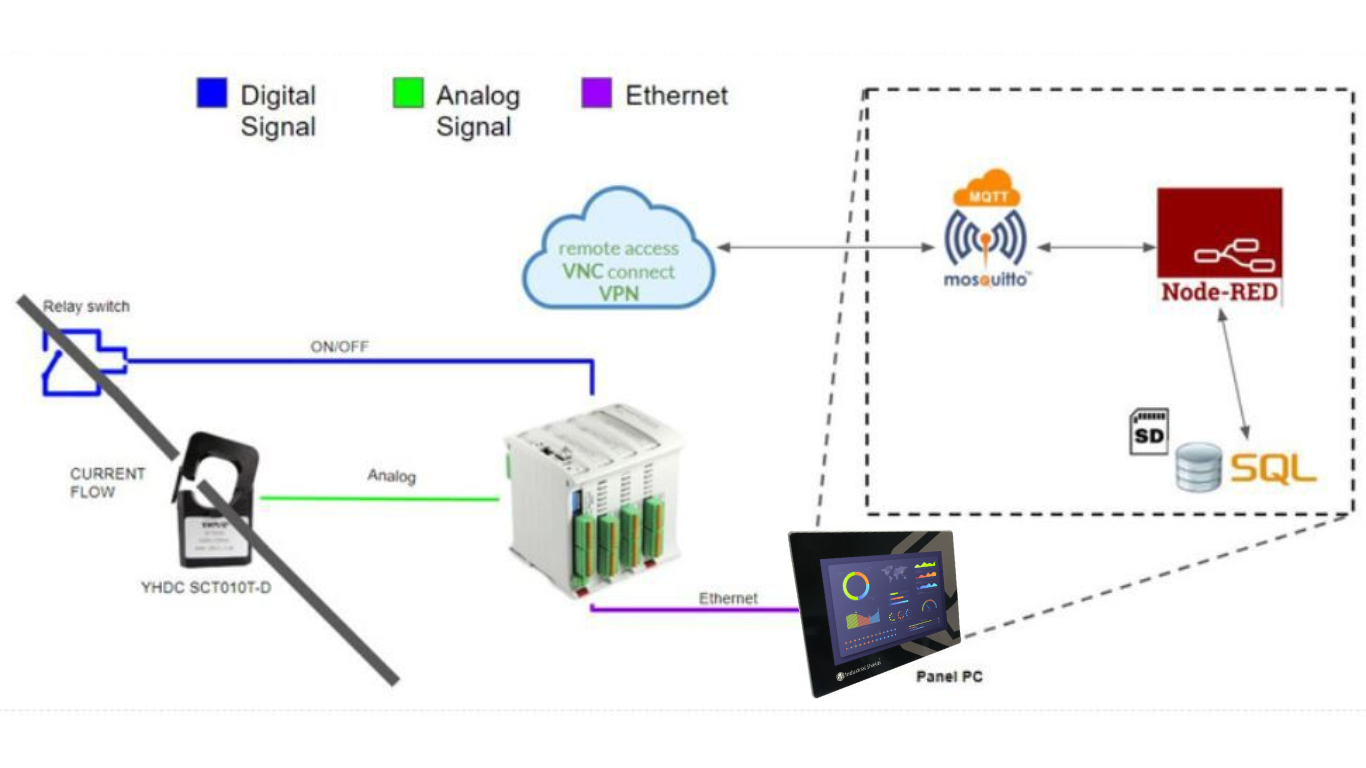
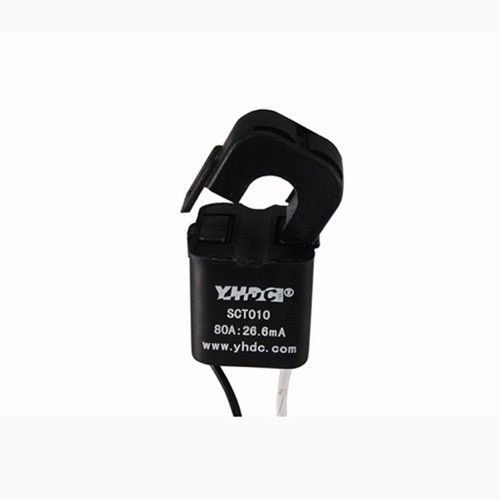
The case does not publish photos of the installation.
Hardware
A PLC that measures and cuts. A Panel PC that keeps and shows.
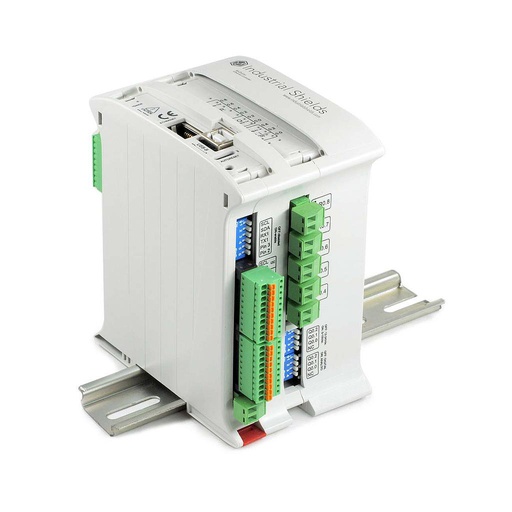
Current equivalentM-DUINO ETHERNET PLC ARDUINO 19R
The case names an Ethernet PLC based on Arduino and shows an M-Duino 19R. This is its current version, the M-Duino 19R+. Here it reads the current sensor, checks the limit, cuts with a relay output and sends the data to the Panel PC. You program it with the Arduino IDE.
- Role in this design
- Reads the sensor, pre-cut and cut logic, relay cut, MQTT to the Panel PC
- Inputs
- 6: 4 analog/digital (0-10 Vdc), 2 digital optoisolated with interrupts (5-24 Vdc)
- Outputs
- 11: 8 relays (230 Vac 4 A / 24 Vdc 2 A, resistive load), 3 analog/digital/PWM (0-10 V)
- Comms
- Ethernet, RS-485, RS-232, I2C, SPI, TTL serial
- Built in
- Real-time clock, µSD slot
- Programming
- Arduino IDE
- Power supply
- 12 to 24 Vdc
- Mounting
- DIN rail, IP20
Reference IS.MDuino.19R+. To cut a power circuit, the relay output drives a contactor sized for the load. A contactor coil is an inductive load: the datasheet recommends an RC snubber, sized for the coil.
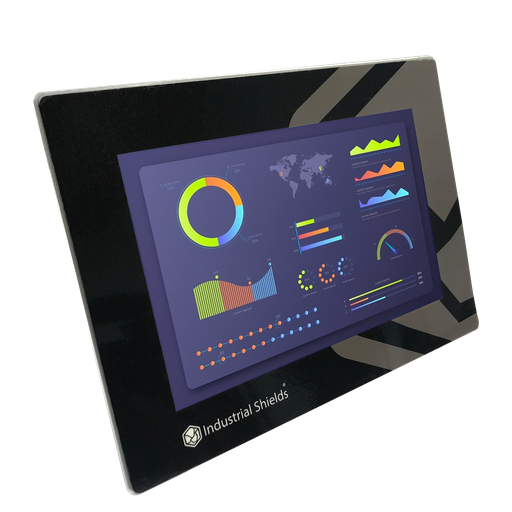
Current equivalentTouchBerry Pi Panel PC 10.1" FLEX
The screen and the local server of the system. In this case it runs the MQTT broker, the SQL database on the SD memory and Node-RED, shows the graphs and opens the VPN.
- Role in this design
- Mosquitto MQTT broker, SQL database, Node-RED graphs, VPN access
- Screen
- 10.1"
- Computer
- Raspberry Pi 4
- Link to the PLC
- Ethernet
The case used a Panel PC based on Raspberry Pi 3. The image and the link show the current model, the TouchBerry Pi Panel PC 10.1" FLEX, with a Raspberry Pi 4. To start the dashboard on its own at boot, see kiosk mode for a Node-RED dashboard.
Questions about this case
How do you measure current with a PLC?
With a current sensor and an analog input. A split-core sensor, such as the YHDC SCT010T-D of this case, closes around one conductor and gives a voltage that follows the current. The PLC reads that voltage and scales it to amps. Our blog shows the wiring of the SCT010T-D to an M-Duino and a sketch that reads it.
What does the YHDC SCT010T-D give to the PLC?
A DC voltage that follows the AC current. The 50 A version in our blog gives 0 to 5 Vdc, with a response time of 300 ms, for 50 to 60 Hz. The case does not publish the range it used. The analog inputs of the M-Duino 19R+ take 0 to 10 V, so a 0 to 5 V sensor uses half of the scale. Some SCT010 versions give a current instead of a voltage: check the label before you wire it.
Can one current sensor give the energy in kWh?
Not on its own. Energy needs the voltage and the power factor as well as the current. With only the current, a kWh value is an estimate. When you need real energy per circuit, use an energy meter or a current analyzer on Modbus, as in the electrical network analysis case.
How does the PLC cut the current?
With a relay output. In this case, on an anomaly the PLC cuts the current through the relay switch. The relays of the M-Duino 19R+ take 230 Vac 4 A on a resistive load, so a power circuit is cut with a contactor driven by the relay. The case also asks for a pre-cut step; a typical way to do it is a warning to the centre before the cut.
Where is the data stored, and how do you see it?
On the Panel PC. The PLC sends each reading over Ethernet with MQTT. The Mosquitto broker on the Panel PC receives it, the data goes to an SQL database on the SD memory, and Node-RED shows it in graphs. To log events in a database, see MySQL alarm logging with Node-RED. To build the screen, see the Node-RED touchscreen dashboard example.
Can I see the consumption from outside the company?
Yes, with permission. In this case the system is connected to a VPN, so a web client can reach the server on the Panel PC as long as it has permission. The diagram of the case also shows VNC for remote access to the screen.
Download the case study
4-page PDF with the challenge, the logic, the architecture and the hardware. No form required.
Metering your own supply?
Tell us what you want to measure. An engineer will answer.
Tell us how many circuits or phases, which currents, which limits and who must see the data. We will tell you which sensor, which controller and how to connect them.
- You get an answer from our technical team
- Sensors, I/O count and controller sizing
- Arduino, ESP32 or Raspberry Pi based PLCs