Case study · Electrical network · M-Duino 19R+
Voltage and current, live. An alarm past the limit.
A current analyzer, an M-Duino PLC and a Panel PC watch a street lighting supply.
Information is power. First you have to see it.
Three questions for each supply: what does it use now, is it over the limit, who has to know.
This case describes how to analyze the consumption of an electrical network with Industrial Shields equipment. The example is the supply of street lamp posts. The case does not name the installation. The values in the panels are examples, not data from the installation.
The challenge
Real-time consumption, not a total at the end of the month.
Street lighting uses energy every night. Real-time knowledge of what it uses helps to know what the installation costs now. The system must read voltage and current, raise an alarm when the current passes a set limit, act on the circuits if needed, and show all of it live, also from far away.
Read the analyzer
A current analyzer measures the voltage and the current of the supply. Analyzers normally talk over RS-485, and Modbus RTU is a good protocol for it.
A limit on the current
When the current passes a set limit, the PLC raises an alarm. The limit is a value in the PLC program.
Act on the circuits
Contactors on the relay outputs of the PLC can cut the current flow when there is an alarm. This part is optional.
See it from anywhere
A dashboard on the Panel PC shows the data live. A VPN gives access from a PC or a smartphone.
When the analyzer gives contacts
Alarm contacts can go to the digital inputs of the PLC, and these alarms reach the server through its Ethernet port. RS-232 and SPI are other options to talk to an analyzer.
How it works
Three stages: read, decide, show.
Each stage shows one part of the system. Press the buttons and move the sliders. The panels are illustrative simulations: lamps, powers, limits and times are examples, not data from the installation.
The PLC asks. The analyzer answers.
The analyzer measures the voltage and the current of the supply. The PLC is the Modbus RTU master on the RS-485 line: it asks the analyzer for its values, one read after the other. Move the number of lamps, switch to day, then disconnect the cable.
- Voltage and current from the analyzer
- RS-485 line, Modbus RTU, the PLC is the master
- A typical way to do it: a comms alarm when the analyzer stops answering
Modbus RTU reads (example)
Illustrative simulation. Example values. Example: 90 W per lamp, 230 V, power factor 0.95, one read per second, energy shown 60 times faster. A comms alarm after 3 reads without an answer is a typical choice, not data from the case.
Read 32-bit values over Modbus RTU with an M-Duino: see the Modbus 32-bit counter example.
Over the limit: alarm, and the relay can act.
The PLC compares the current with the limit set in its program. Over the limit, it raises an alarm and sends it over Ethernet. If you use the option, a relay output opens a contactor and cuts the current flow. An alarm contact of the analyzer can also arrive on a digital input. Add a fault load, then try it with the contactor action off.
- Limit set in the PLC program
- Alarm sent through the Ethernet port
- Optional: contactors on the relay outputs
- Analyzer alarm contacts on digital inputs
Alarms (example)
Illustrative simulation. Example values. Example: 30 lamps, a fault load of 8 A and a delay of 3 s before the alarm, so a short peak does not raise it. The real limit and delay of the installation are not published.
Keep a history of every alarm: MySQL alarm logging with Node-RED.
A dashboard on site. Access from anywhere.
The data goes to the Panel PC. It runs an MQTT broker (Mosquitto) and Node-RED. A typical way to do it: the PLC publishes each value on an MQTT topic, and the Node-RED dashboard shows it live and warns on an alarm. A VPN gives a PC or a smartphone access to the Panel PC, and VNC shows its screen. Open the remote view, then cut the internet link.
- MQTT broker and Node-RED on the Panel PC
- Live dashboard and alarm warnings
- Remote access over VPN, screen over VNC
- Time from a clock with a 3.3 V lithium coin cell
MQTT messages (example)
Illustrative simulation. Example values. Example topics and values. The case does not publish its topics, its dashboard or its VPN settings.
Build the screen: MQTT status on a Node-RED touchscreen dashboard. Try kWh, demand peaks and alarms on several meters: Energy Meter simulator.
System architecture
How do you analyze an electrical network with a PLC?
The current analyzer measures the voltage and the current of the street lighting supply. The M-Duino PLC reads it over RS-485 with Modbus RTU, checks the limit, can drive contactors from its relay outputs and reads alarm contacts on its digital inputs. It sends the data over Ethernet to the Panel PC. There, an MQTT broker shares the data with Node-RED, which shows the dashboard and the alarms. A VPN gives access from a PC or a smartphone.
| Signal | Between | Type | Purpose |
|---|---|---|---|
| Voltage | BetweenSupply → analyzer | TypeMeasurement | PurposeVoltage of the lighting supply |
| Current | BetweenSupply → analyzer | TypeMeasurement | PurposeCurrent of the lighting supply |
| Readings | BetweenAnalyzer ↔ M-Duino | TypeRS-485, Modbus RTU | PurposeVoltage and current data. The PLC is the master |
| Alarm contacts (option) | BetweenAnalyzer → M-Duino | TypeDigital in | PurposeAlarms that reach the server through the Ethernet port |
| Circuit action (option) | BetweenM-Duino → contactors | TypeRelay out | PurposeActs on the current flow when there is an alarm |
| Data and alarms | BetweenM-Duino → Panel PC | TypeEthernet | PurposeTo the MQTT broker on the Panel PC |
| Dashboard | BetweenBroker ↔ Node-RED | TypeMQTT | PurposeLive data and alarm warnings on the screen |
| Remote access | BetweenPanel PC ↔ PC or smartphone | TypeVPN, VNC | PurposeAccess to the data from any other point |
| Time | BetweenInternal clock | Type3.3 V coin cell | PurposeKeeps the time synchronised for the readings and the alarms |
Why it works
Read in the field. Decide in the PLC. Show on site.
The bus analyzers already use
Current analyzers normally have an RS-485 port, and Modbus RTU is a common protocol for it. The M-Duino has RS-485 on board, so the analyzer connects straight to the PLC.
The PLC keeps the limit
The check against the limit and the relay action run in the PLC program. The dashboard shows the alarm. The PLC acts without it.
Open tools on the Panel PC
Mosquitto is an MQTT broker and Node-RED builds the dashboard as a flow. Both run on the Raspberry Pi inside the Panel PC.
Remote access with a VPN
The VPN puts the PC or the smartphone in the same private network as the Panel PC. From there you open the dashboard, or the screen with VNC.
Every value with its time
An internal clock with a 3.3 V lithium coin cell keeps the time, also during a power cut. Each reading and each alarm has a correct time.
Room to grow
The PLC has 6 inputs and 8 relays. A typical way to grow: more analyzers on the same RS-485 line, each one with its own Modbus address.
Hardware used
A PLC that reads and acts. A Panel PC that shows.
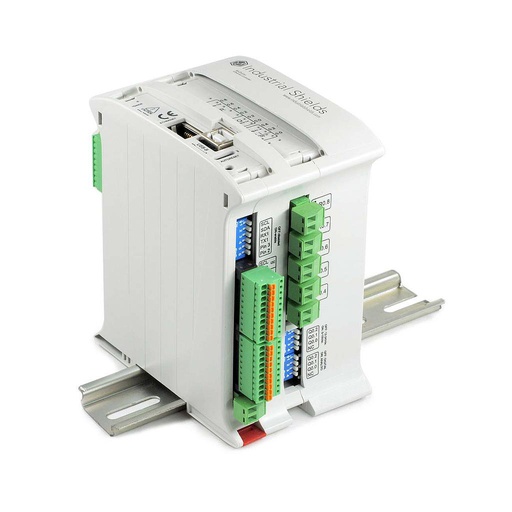
M-DUINO ETHERNET PLC ARDUINO 19R
The M-Duino 19R+ named in the case. An industrial PLC built around an original Arduino Mega 2560, with 8 relay outputs, Ethernet and RS-485. Here it reads the analyzer, checks the limit, drives the contactors and sends the data to the Panel PC. You program it with the Arduino IDE.
- Role
- Modbus RTU master, current limit, relay action, data to the Panel PC
- Inputs
- 6: 4 analog/digital (0-10 Vdc), 2 digital optoisolated with interrupts (5-24 Vdc)
- Outputs
- 11: 8 relays (230 Vac 4 A / 24 Vdc 2 A, resistive load), 3 analog/digital/PWM (0-10 V)
- Comms
- Ethernet, RS-485, RS-232, I2C, SPI, TTL serial
- Built in
- Real-time clock, µSD slot
- Programming
- Arduino IDE
- Power supply
- 12 to 24 Vdc
- Mounting
- DIN rail, IP20
Reference IS.MDuino.19R+, the current product. A contactor coil is an inductive load: the datasheet recommends an RC snubber, sized for the coil. The PLC has no galvanic isolation between the grounds of different systems: check the ground of the analyzer before you connect the RS-485 line.
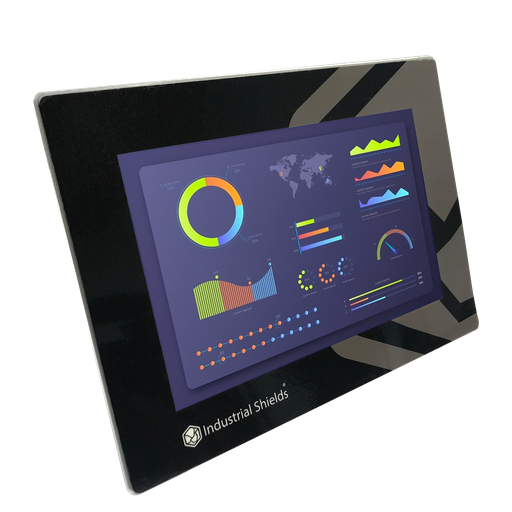
TouchBerry Pi Panel PC 10.1" FLEX
The screen and the local server of the system. An industrial Panel PC with a Raspberry Pi 4, connected to the PLC over Ethernet. In this case it runs the MQTT broker and Node-RED, shows the dashboard and the alarms, and opens the VPN.
- Role
- MQTT broker, Node-RED dashboard and alarms, VPN access
- Screen
- 10.1"
- Computer
- Raspberry Pi 4
- Link to the PLC
- Ethernet
The case used the TouchBerry Pi 10.1" with a Raspberry Pi 4B. The image and the link show its current version, the TouchBerry Pi Panel PC 10.1" FLEX. The family also has 7" and 18.5" models. To start the dashboard on its own at boot, see kiosk mode for a Node-RED dashboard.
Questions about this case
How do you read a power analyzer with a PLC?
Over RS-485 with Modbus RTU, the usual port and protocol of current analyzers. The PLC is the master: it asks the analyzer for the registers of its values at a fixed rate. The register map comes from the manual of the analyzer. Many values, such as energy counters, use two 16-bit registers: see the Modbus 32-bit counter example on an M-Duino.
Which values does the case use?
Voltage and current. Many analyzers also give power, power factor and energy counters. Check the register map of your model before you design the dashboard.
How does the alarm work when the current is too high?
The PLC compares the current with a limit set in its program. Over the limit, it raises an alarm, sends it over Ethernet and, as an option, opens a contactor with a relay output. The relays take 230 Vac 4 A on a resistive load. For a contactor coil, add an RC snubber as the datasheet recommends.
Can I see the data from outside the site?
Yes. The Panel PC has a VPN connection, so a PC or a smartphone in the virtual private network can open the Node-RED dashboard, or the screen through VNC. See how to build the screen in the Node-RED touchscreen dashboard example.
What if my analyzer has no RS-485 port?
The M-Duino also has RS-232 and SPI, among others. If the analyzer only gives alarm contacts, wire them to the digital inputs of the PLC. Those alarms then reach the server through the Ethernet port.
Is this the same as a street lighting controller?
No. This case is about the analysis of a supply: read the analyzer, check a limit, act and show the data on a local dashboard. To switch lighting circuits on an astronomical schedule and report to a web platform over GPRS, see the smart street lighting controller case.
Download the case study
4-page PDF with the challenge, the logic, the architecture and the hardware. No form required.
Similar network?
Tell us your network and your analyzer. An engineer will answer.
Tell us what you want to measure, which analyzer you have or plan to use, which limits matter and who must see the data. We will tell you which controller fits and how to connect it.
- You get an answer from our technical team
- Analyzer link, I/O count and controller sizing
- Arduino, ESP32 or Raspberry Pi based PLCs