Case study · Data center · M-Duino 19R+
Measure at the rack. Cool only where it is needed.
PLCs measure each rack, so the HVAC acts on the hot spots.
The room sensors saw the room. The rack sensors found the problem.
Three questions for each rack: how hot is the air, how dry is it, what does it cost to cool it.
This case describes a data center whose operator wanted to rationalise its energy use. The case does not name the operator or the site, and it does not publish its figures. The values in the panels are examples, not data from the installation.
The challenge
More servers in the same rooms. A higher energy bill.
The data center almost doubled its equipment after new contracts. The growth went into rooms that were sized before, and the energy cost grew fast. The facility was modern, with a powerful and versatile HVAC and environmental sensors in each room. The operator wanted to know where the energy was lost, and how to use less of it without risk for the servers.
Air at the right temperature
The case quotes ASHRAE: 65 to 80 °F (18.3 to 26.7 °C), and close to 22 °C for safe humidity levels. Current ASHRAE guidance: 18 to 27 °C at the server inlet.
Humidity in a band
40 to 60 % relative humidity. The case keeps it above 30 to 35 % against electrostatic discharges. An adequate humidity also protects the equipment against corrosion.
Hot spots
One critical point can heat the whole room and lower its relative humidity. A sensor on the wall of the room does not show where it is.
Energy for the cooling
PUE compares the total energy of the data center with the energy that reaches the IT equipment. To cool the whole room for a few hot racks raises the PUE.
Complete the HVAC, do not replace it
The PLCs complement and improve the existing installation. The operator chose them for their versatility and for the freedom of programming of open source hardware.
How it works
Three stages: find, measure, act.
Each stage shows one part of the method. Press the buttons and move the sliders. The panels are illustrative simulations: racks, temperatures, thresholds and powers are examples, not data from the installation.
The history shows where the energy goes.
First, the historical data of the facility was analysed to find patterns: places and moments where the facility does not work at an adequate level and uses too much energy. After the analysis, with the HVAC correctly sized, a more detailed measurement was chosen. A typical way to look at it: the cooling energy for each kWh that reaches the IT equipment, hour by hour. Move the threshold, then switch to a hot week.
- Historical data of the facility, analysed first
- Patterns of excess energy use
- A typical way to do it: cooling energy per IT kWh, hour by hour
Patterns found (example)
Illustrative simulation. Example values. Example: 100 kW of IT load, 8 kW of other loads, cooling energy per IT kWh hour by hour. The case analysed its historical data but does not publish it.
Keep a history of every alarm: MySQL alarm logging with Node-RED.
Sensors at the foot of the rack find the hot spot.
A more detailed measurement at the foot of the racks found critical points that heated the whole room and lowered its relative humidity, with a risk of electrostatic discharges. More sensors then gave a complete view: the whole room, each rack and parts of a rack. The PLC checks each point against its band and raises an alarm when a value is out of range. Create the hot spot, then switch the rack sensors off.
- Temperature and humidity at the foot of each rack
- An alarm when a value is out of range
- A typical way to do it: a band for each point and a short delay before the alarm
Alarms (example)
Illustrative simulation. Example values. Example: inlet band 18 to 27 °C (ASHRAE recommended), humidity floor 35 % (the case), 3 s before an alarm so a short peak does not raise it. The real set points of the installation are not published.
Watch many points from one screen: Node-RED dashboard for multi-station monitoring. The same band logic runs a full day in the mushroom room of the greenhouse climate simulator.
Cool the hot zone, not the whole room.
With the new data, some parameters of the HVAC changed. The air flow and the control of the cooling output were adapted to manage temperature and humidity better. The HVAC acts on each area, instead of cooling the whole room to protect a few critical racks. Compare the two modes and change the size of the hot spot.
- Air flow and cooling output adapted to the data
- Action on each area, not on the whole room
- Automations and alarms from the monitored values
HVAC changes (example)
Illustrative simulation. Example values. Illustrative model: 100 kW of IT load, 8 kW of other loads, and a cooling power that grows 5 % for each degree of colder supply air. The case reports energy savings but does not publish its figures.
Write a set point to a cooling unit over Modbus RTU: Modbus RTU chiller control with an M-Duino. Try kWh and demand peaks on several Modbus meters: Energy Meter simulator.
System architecture
How do you find the hot spots of a data center with a PLC?
Temperature and humidity sensors sit at the foot of each rack. The M-Duino PLC reads them, checks each value against its band and raises the alarms. It sends the data over Ethernet to a server, where the history is stored and analysed. The room sensors that were already in place give the room view. As an option, the PLC sends enable signals or set points to the HVAC, and reads energy meters for the PUE.
| Signal | Between | Type | Purpose |
|---|---|---|---|
| Rack inlet temperature | BetweenSensor at the foot of the rack → PLC | TypeRS-485, Modbus RTU (typical) | PurposeFind the hot spots, rack by rack |
| Rack relative humidity | BetweenSensor at the foot of the rack → PLC | TypeRS-485, Modbus RTU (typical) | PurposeFind dry air and the risk of discharges |
| Room temperature and humidity | BetweenRoom sensors, already installed | TypeExisting | PurposeThe room view, before the rack sensors |
| Data and history | BetweenPLC → server | TypeEthernet | PurposeStore the values and find the patterns |
| Alerts and alarms | BetweenServer → operators | TypeEthernet | PurposeValues out of range |
| HVAC action (option) | BetweenPLC → HVAC | TypeRelay out or Modbus | PurposeAutomations on the air flow and the cooling output |
| Energy (option) | BetweenEnergy meters → PLC | TypeRS-485, Modbus RTU | PurposeTotal energy and IT energy for the PUE |
Why it works
Measure where the heat is. Act where it matters.
History first
The analysis of the historical data came before any new sensor. It showed where the facility used too much energy.
A sensor where the heat is
The air that enters a server is the air at the rack. A sensor at the foot of each rack shows the hot spot that the room average hides.
Temperature and humidity together
When a hot spot heats the air, its relative humidity falls. Both values come from the same point, so the PLC sees the risk of discharges too.
One band for each point
Each point has its own limits and its own alarm. One rack out of range is an alarm, even when the room looks fine.
Act on the area
The HVAC was already powerful and versatile. With data for each area, it cools the hot zone and does not overcool the stable ones.
Open hardware, your own code
The PLCs are based on open source hardware and programmed with the Arduino IDE. The program fits the installation, and the installation can grow.
Hardware used
A PLC on the rack row. Data for every point.
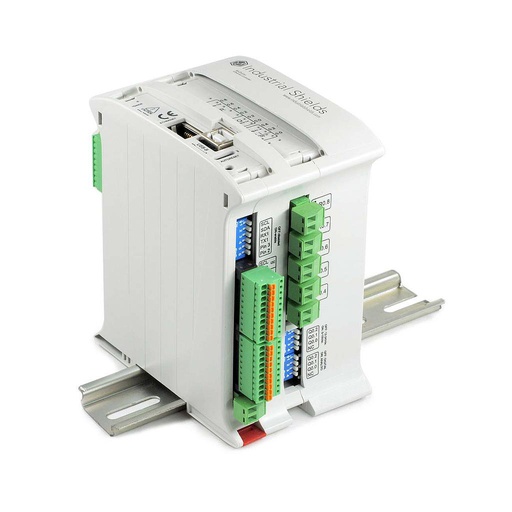
M-DUINO ETHERNET PLC ARDUINO 19R
An industrial PLC built around an original Arduino Mega 2560, with Ethernet, RS-485 and 8 relay outputs. Here it reads the sensors of the racks, checks each band, raises the alarms and sends the data to the server. You program it with the Arduino IDE.
- Role
- Reads the rack sensors, checks the bands, alarms, data to the server
- Inputs
- 6: 4 analog/digital (0-10 Vdc), 2 digital optoisolated with interrupts (5-24 Vdc)
- Outputs
- 11: 8 relays (230 Vac 4 A / 24 Vdc 2 A, resistive load), 3 analog/digital/PWM (0-10 V)
- Comms
- Ethernet, RS-485, RS-232, I2C, SPI, TTL serial
- Built in
- Real-time clock, µSD slot
- Programming
- Arduino IDE
- Power supply
- 12 to 24 Vdc
- Mounting
- DIN rail, IP20
The case says "Arduino PLC" and does not publish the exact model or the number of units. The old page of the case shows an M-Duino 19R. The image and the link show its current version, the M-Duino 19R+ (IS.MDuino.19R+). The RS-485 port uses a MAX485 transceiver referenced to the PLC ground: on a long sensor line, keep a common reference or add an isolated RS-485 repeater.
Questions about this case
What temperature and humidity should a data center keep?
Today, ASHRAE recommends 18 to 27 °C (64.4 to 80.6 °F) at the server inlet for classes A1 to A4, with humidity set by dew point (-9 °C to 15 °C) and a maximum relative humidity. The case quotes an older ASHRAE band: 65 to 80 °F, close to 22 °C, and 40 to 60 % relative humidity, kept above 30 to 35 % against electrostatic discharges. Check the current edition for the class of your equipment.
Why measure at the foot of the rack and not only in the room?
The room sensors give a room view. In this case, a measurement at the foot of the racks found critical points that heated the whole room and lowered its relative humidity. A sensor for each rack, and for parts of a rack, shows where to act.
How do you connect many sensors to one PLC?
A typical way to do it: temperature and humidity sensors with Modbus RTU on one RS-485 line, each one with its own address. The PLC is the master and reads them one after the other. For a few sensors with a 0-10 V output, the 4 analog inputs of the M-Duino 19R+ are another option. See how an M-Duino reads Modbus RTU registers in the Modbus 32-bit counter example.
How does rack monitoring save energy?
With data for each area, the HVAC cools the hot zone instead of the whole room. It does not overload or oversize the air conditioning to protect a few critical racks. The case reports significant energy savings, but it does not publish figures. PUE, the total energy divided by the energy of the IT equipment, shows the effect over time.
Can the PLC change the settings of the HVAC?
In this case, the air flow and the control of the cooling output were adapted to the new data, and the monitoring allowed some automations and alarms. A typical way to do it: the PLC sends enable signals with its relay outputs, or writes set points over Modbus RTU, as in the Modbus RTU chiller control example. The HVAC keeps its own protections.
Is this the same as the immersion cooling case?
No. This case measures the air at each rack to find the hot spots and use less energy for cooling. To control the oil temperature of an immersion tank, the climate of the room and the ventilation with one PLC, see the HVAC for oil immersion cooling case.
Download the case study
4-page PDF with the challenge, the logic, the architecture and the hardware. No form required.
Similar data center?
Tell us your rooms and your racks. An engineer will answer.
Tell us how many rooms and racks you have, which sensors and HVAC are installed, which limits matter and who must see the alarms. We will tell you which controller fits and how to connect it.
- You get an answer from our technical team
- Sensor bus, I/O count and controller sizing
- Arduino, ESP32 or Raspberry Pi based PLCs