Case study · Healthcare buildings
The patient presses once. The nurses know at once.
A PLC turns on two alarms in the room and sends the call to the nurses on Telegram.
A call from a hospital bed must be heard in the room and seen by the team.
So one button starts two local alarms and one message to every nurse on duty.
This page comes from an application case published by Industrial Shields in 2019. It does not describe a customer installation. The push button, the audible and visible alarms, the rule for switching them off and the Telegram bot come from that case. Hold times, rooms, messages and network events on this page are examples of a typical way to do it. This is not a certified nurse call system: see the questions below.
The challenge
A call that reaches the room and the phones.
The case shows a way to activate a hospital alarm and to send the emergency to the nurse team with a Telegram bot. The patient has a push button. The alarm must be heard by a nurse nearby, seen from the corridor, and reach the team on their phones, even if nobody is next to the room.
One button for the patient
A push button at the disposal of the patient starts the call.
Heard in the room
An audible alarm lets a nurse nearby hear the call. It stays on until someone pushes the button again.
Seen from the corridor
A visible alarm turns on at the same time, and stays on for a certain time after the audible one is off.
On every phone
The PLC sends a message to a Telegram bot, and the bot shares it with all the nurses who have the app.
The visible alarm outlasts the sound
The case follows a hospital rule: the visible alarm must stay active even after the audible alarm is switched off.
How it works
Three parts of one program: the room, the message, the ward.
Each panel shows one part of the PLC program. Press the buttons. The panels are illustrative simulations: rooms, times and messages are examples, not data from a hospital.
Press to call. Press again to silence.
When the patient presses the button, the PLC turns on the audible and the visible alarm and sends the call. When a nurse presses the same button again, the sound stops, but the visible alarm stays on for a hold time before it goes off. Make a call, then answer it.
- One input, two outputs
- The same button switches the sound off
- The light stays on for a hold time
PLC events (example)
- Room 12, no call.
Illustrative simulation. Example values, no data from a hospital. Example values: a hold time of 30 s, shown faster here. The case says the visible alarm stays on "for a certain time" and does not give the value.
One bot, the whole team, and the room never waits for the network.
The PLC connects to the Telegram bot with its token and sends one message, and the bot shares it with every nurse who has the app. The local alarms do not depend on the network: if the link drops, the room still rings and lights up, and the PLC sends the message when the link is back. Try a second call, then a network loss.
- The token links the PLC with the bot
- One message reaches N phones
- Local alarms first, message as soon as possible
Message path (example)
- Bot ready, 6 nurses.
Illustrative simulation. Example values, no data from a hospital. Example values. The case does not describe network losses. A typical way: the local alarms run in the PLC with no network, and the message waits in a queue until the link is back.
One PLC for several rooms, and a reminder for a long wait.
The same program repeats for each room: one input and two outputs per bed. A typical way adds a reminder: if a call stays open for more than a few minutes, the PLC sends it again. Pick a moment of the night.
- One input and two outputs per room
- Open calls and their waiting time
- A reminder after a long wait, typical way
Ward view (example)
- Pick a moment of the night.
Illustrative simulation. Example values, no data from a hospital. Example data for 4 rooms. The reminder after 5 minutes is an example of a typical way; the case does not describe it.
System architecture
How does a PLC send a hospital alarm to the nurses?
An ESP32 PLC 21 FLEX reads the call button of each bed. It drives the audible and the visible alarm of the room on two outputs, and holds the visible one after the sound is off. Over the hospital network it sends the call to a Telegram bot, which shares it with the phones of the nurse team.
| Signal | Between | Type | Purpose |
|---|---|---|---|
| Call | BetweenPush button at the bed → ESP32 PLC 21 | TypeDigital in | PurposeStarts the alarms and the message |
| Silence | BetweenSame button, pressed again → PLC | TypeDigital in | PurposeSwitches the audible alarm off |
| Audible alarm | BetweenPLC → buzzer in the room | TypeDigital out, through a relay if the load needs it | PurposeA nurse nearby hears the call |
| Visible alarm | BetweenPLC → lamp at the room | TypeDigital out, through a relay if the load needs it | PurposeSeen from the corridor, held for a time |
| Call message | BetweenPLC → Telegram bot | TypeWi-Fi or Ethernet, HTTPS | PurposeReaches every nurse in the bot |
| Link state | BetweenNetwork → PLC program (typical way) | TypeProgram | PurposeQueue the message while the link is down |
Why it works
Simple wiring, two channels, one clear rule.
One input per bed
A push button on a digital input is all the patient needs. The program does the rest.
Local first
The room rings and lights up from the PLC outputs. The message adds reach, it does not replace the local alarms.
A rule for switching off
The same button silences the sound, and the light stays on for the hold time, as the case says hospital rules ask.
Reach without new hardware
A Telegram bot shares one message with the whole team, on the phones they already carry.
Easy to replicate
One input and two outputs per room, the same program for each one.
Open programming
The PLC is programmed with the Arduino IDE, with the UniversalTelegramBot library named in the case.
Hardware
One ESP32 PLC with Wi-Fi and Ethernet.
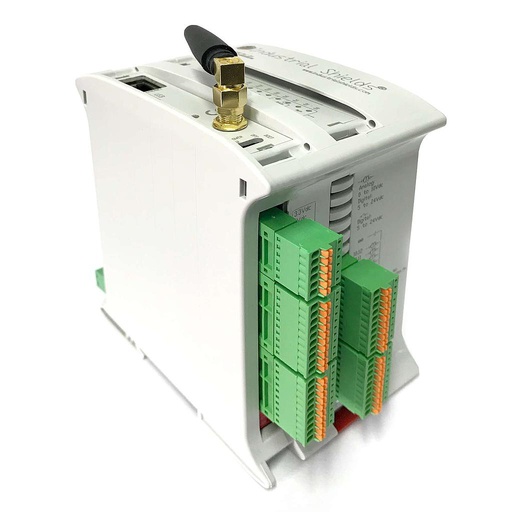
One current optionESP32 PLC 21 FLEX
An industrial controller built on the dual-core ESP32, for DIN rail, programmed with the Arduino IDE. It reads the call buttons, drives the audible and visible alarms, and talks to the Telegram bot over Wi-Fi or Ethernet.
- Role
- Call buttons, local alarms, hold time, messages to the bot
- Processor
- ESP32 dual core, up to 240 MHz
- Inputs
- 13: 6 analog/digital (0-10 V, 11-bit), 7 digital optoisolated (5 to 24 Vdc), 2 of them with interrupt
- Outputs
- 8: 3 analog/digital/PWM (0-10 V, 12-bit), 5 digital optoisolated (5 to 24 Vdc)
- Communications
- Wi-Fi, Bluetooth LE, Ethernet, RS-485, RS-232
- Programming
- Arduino IDE
- Power supply
- 12 to 24 Vdc
- Mounting
- DIN rail TS35, IP20, inside a cabinet
The 2019 case used an M-Duino and does not name the model. The Telegram Bot API works over HTTPS, and the ESP32 handles the secure connection on its own, so today an ESP32 PLC is the simple choice. With 7 isolated inputs and 5 isolated outputs, one ESP32 PLC 21 FLEX serves two rooms with the layout of this page. It is an industrial controller, not a medical device.
Questions about this case
How does a PLC send an alarm to Telegram?
Create a bot in Telegram and keep its token. In the PLC program, a client uses the token to talk to the bot over HTTPS and sends a message when the call button is pressed. The case uses the UniversalTelegramBot library for Arduino. Every nurse who has Telegram and joins the bot gets the message. For a worked Telegram bot on a PLC, see this Telegram bot example.
Why must the visible alarm stay on after the audible one?
The case says that hospital rules ask for it: the sound can be silenced at the bedside, but the light must stay active for a certain time, so the team still sees that there was a call. The PLC does it with a timer on the visible alarm output, started when the button is pressed again.
Is this a certified nurse call system?
No. This case shows how a PLC can switch local alarms and send a message. Nurse call systems in hospitals have their own requirements, such as DIN VDE 0834 in Germany or UL 1069 in the United States, and medical alarm signals are covered by IEC 60601-1-8. A PLC and a Telegram bot can add a notification channel, next to the certified system of the building.
What happens if the network or Telegram is down?
The local alarms do not need the network: the PLC switches them on its own outputs. A typical way is to queue the message and retry until the link is back, and to show the link state on a lamp. Write the reconnection so that it never blocks the program: see non-blocking Wi-Fi reconnection on an ESP32 PLC. A hardware watchdog restarts the PLC if the program ever hangs.
Telegram or another channel for the alerts?
Telegram is what the case uses: one bot reaches a whole team for free on the phones they already have. Other channels work with the same PLC: email, a message to the building management system, or a nurse call panel. See email alerts from a monitoring server.
How many rooms can one PLC handle?
Each room in this layout needs one input and two outputs. The ESP32 PLC 21 FLEX has 7 isolated digital inputs and 5 isolated digital outputs, enough for two rooms with spare inputs, or more with larger models of the family or I/O over RS-485. The case shows one room.
Download the case study
4-page PDF with the challenge, the logic, the architecture and the hardware. No form required.
Similar project?
Tell us about your building. An engineer will answer.
Tell us how many rooms or points you need, which alarms must sound or light, and who must get the messages. We will tell you which controller and which link fit, next to the systems you already have.
- You get an answer from our technical team
- Inputs, outputs and the message channel
- Arduino, ESP32 or Raspberry Pi based PLCs