Case study · Solar tracking
Your panels follow the sun. A PLC in every group reports each move.
A reference design from Industrial Shields. Each solar panel moves on two axes to follow the sun. One PLC drives each group of panels, and a master PLC collects their data over LoRa. A Panel PC shows it, and the cloud stores it.
The path of the sun is known in advance.
The PLC turns it into two motor positions.
This case study is a technical pattern, not a named customer. It shows how Industrial Shields designed the control and the monitoring of autonomous solar panels: sun positions calculated in advance, one PLC per group of panels, a master PLC that collects the data over LoRa, a Panel PC as HMI, and storage in the cloud. The case does not publish a site, a plant size or measured yields. Short version: your panels follow the sun, and you see every group from one screen.
The challenge
Follow a moving target, in every group, all day.
The sun moves all day. A fixed panel gets the most light only around noon. To get more energy, every panel has to change its position hour by hour. And you need to know where each panel is and what it produces, without a walk across the field. Sound familiar?
Two axes per panel
Each panel moves on an x axis and a y axis, with one motor for each axis. Every panel needs the right position at every hour.
A field, not a cabinet
Your panels stand in groups across the field. Each group has its own PLC. The case links the groups to the master PLC over LoRa radio.
Data you can use
Weather conditions, panel positions and energy, at any time. In the cloud, so you can improve the program and plan maintenance.
The energy is used or stored
A DC/AC inverter sends the energy to the AC distribution lines. The surplus energy goes through a DC/DC converter to a battery bank, for later use.
How it works
Two loops: the tracking, and the monitoring.
These two loops show the general pattern. Move the slider, press the buttons and watch what the PLCs do. The panels are illustrative simulations with a generic sun path and generic groups. They do not show the program or the data of a real installation.
A sun table becomes two motor positions
Before the panels move, the sun positions for each hour of the day are calculated. The table goes into the PLC program, loaded with the Arduino IDE. During the day, the PLC of each group reads the hour and drives the x and y motors to the position for that hour. Move the slider. Compare a fixed panel with a tracked panel.
- Sun positions calculated in advance, hour by hour
- Program and table loaded with the Arduino IDE
- One PLC drives the x and y motors of its group
- The real time clock of the PLC keeps the hour (example function)
Light on the panel
Illustrative simulation. Generic sun path and simple geometry. This is not a yield model.
Every group reports. One screen shows the field.
Each field PLC sends its data to the master PLC over LoRa. The master sends it over Ethernet to the Panel PC, your HMI, and uploads it to the cloud. Over time, the data in the cloud helps you improve the PLC program. Press the buttons: a normal round, a passing cloud and a silent group.
- Field PLC to master PLC: LoRa
- Master PLC to Panel PC and cloud: Ethernet
- Weather, position and energy at any time
- A silent group shows up on the HMI (example function)
Frames at the master PLC (example)
Illustrative simulation. Generic groups, scaled times, example values.
System architecture
How does a PLC network control and monitor autonomous solar panels?
Field PLCs drive the x and y motors of each PV group and send their data over LoRa to a master PLC. The master sends it over Ethernet, through a hub, to the Panel PC and to the cloud server. On the power side, a DC/AC inverter feeds the AC distribution lines, and a DC/DC converter charges the battery bank. The diagram follows the original schematic of the case. It shows three groups as an example.
| Flow | Between | Type | Purpose |
|---|---|---|---|
| Sun table | Engineering PC → PLCs | Arduino IDE | Loads the positions calculated in advance for each hour |
| Axis drive | Field PLC → x and y motors | AC motors | Moves each panel to the position for the hour. Wiring not published |
| Weather and position | Field → field PLC | Example | Weather conditions and panel position. Sensors not published |
| Field data | Field PLCs → master PLC | LoRa | Position, energy and other data of each PV group |
| Supervision | Master PLC → hub → Panel PC | Ethernet | HMI with the status of the whole field |
| Cloud storage | Master PLC → hub → server | Ethernet | Keeps the data to improve the PLC program over time |
| Energy to the lines | Panels → DC/AC inverter → AC lines | Power | Sends the energy to the places that need it |
| Surplus energy | Panels → DC/DC converter → batteries | Power | Stores the extra energy in the battery bank |
Why it works
One pattern for any field of moving panels.
Calculated, not guessed
The path of the sun is known. You calculate the positions once, load them with the Arduino IDE, and each PLC executes them. The M-Duino Ethernet PLC Arduino 19R+ has a real time clock on board.
One controller per group
Each PV group has its own PLC, and the master collects the data of every group.
Data that improves the program
The cloud keeps the history of weather, positions and energy. With it, you refine the program over the long term. For a ready example, see the two-axis solar tracker project pack.
Hardware used
PLCs in the field. A Panel PC for the whole view.

M-Duino Ethernet PLC Arduino 19R+
The case uses the M-Duino Ethernet PLC Arduino 19R+, the relay version of the Arduino Mega based M-Duino family. Its schematic shows the same type of controller in each PV group and as the master PLC.
- Inputs
- 6 (4 analog 0-10 V)
- Outputs
- 11 (8 relays, 3 analog/PWM)
- Clock and storage
- Real time clock (RTC), µSD card socket
- Communications
- Ethernet, RS-485, RS-232, TTL, I2C, SPI
- Power
- 12 to 24 Vdc, IP20
In the case, the field PLCs and the master talk over LoRa. The case does not publish the radio module or the frequency band. Tell us your distances and your region (EU868, US902 or another band), and we will size the link with you.
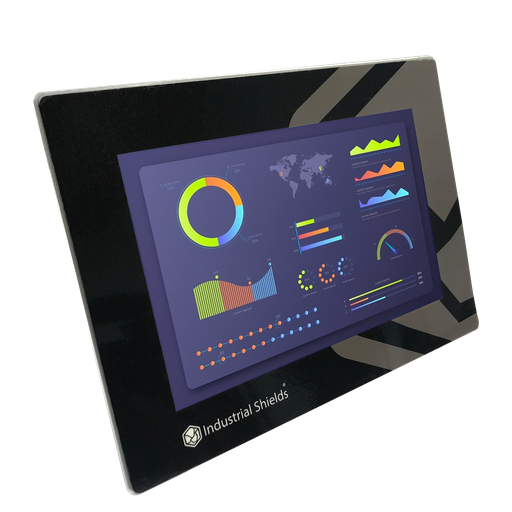
TouchBerry Pi Panel PC 10.1" FLEX
The case lists the TouchBerry Pi 10.1" with a Raspberry Pi 4B as the HMI. It shows the data that the master PLC sends over Ethernet. The FLEX is its current version.
- Role
- HMI for the whole field
- CPU
- Raspberry Pi 4B, 4 GB or 8 GB RAM
- Screen
- 10.1" touch screen
- Communication boards
- Options: LoRa, 4G, CAN
- Protection
- IP20 standard, IP65 option
Questions about this case
Why do sun tracking panels produce more energy?
A tracked panel faces the sun for more hours of the day, so more light reaches its surface. The case cites up to 30% more energy than static panels. Your real gain depends on your site, your latitude and your weather.
How does the PLC know where the sun is?
In this case, the sun positions are calculated in advance for the hours of the day and loaded into the PLCs with the Arduino IDE. Each PLC moves its panels to the position for the current hour. To calculate the position on a Raspberry PLC, see the solar tracker algorithm with PyEphem in our Solution Library.
Why LoRa between the field PLCs and the master?
LoRa is a long range, low power radio for small data packets. You do not need a cable across the field to each group. The case does not publish the distances, the radio module or the frequency band. Tell us your field and we will check the link with you.
What happens to the surplus energy?
A DC/AC inverter sends the energy to the AC distribution lines. The surplus energy with no destination goes through a DC/DC converter to a battery bank, for later use.
Which parts of this case are facts, and which are examples?
Facts: two axes and one motor per axis on each panel, sun positions calculated in advance and loaded with the Arduino IDE, one PLC per PV group, a master PLC linked over LoRa, a Panel PC and a cloud server over Ethernet, the inverter, the DC/DC converter, the battery bank and the hardware. Examples: the number of groups, the sensors, the wiring, the sun values and the alarms. We label each example where you see it on this page.
Can I try it before I build it?
Yes. The Solar Field Monitor simulator runs a full day on a tracker plant, with clouds, wind, tracker faults and alarms. For code, the two-axis solar tracker project pack has runnable examples.
Download the case study
4-page PDF with the challenge, the logic, the architecture and the hardware. No form required.
Similar project?
Tell us about your field. An engineer will answer.
Tell us how many panels or trackers you have, how you group them, how far they are from your control room, and what you want to see on your HMI. We will tell you which controllers fit and how to connect them.
- You get an answer from our technical team
- Controller sizing per PV group, and the radio link to the master
- Arduino, ESP32 or Raspberry Pi based PLCs