MQTT client on Arduino and ESP32 PLCs over Ethernet
MQTT client on Arduino and ESP32 PLCs over Ethernet
You have seen how to work with Eclipse Mosquitto on a Raspberry PLC. In this lesson an Arduino or ESP32 PLC connects to that broker over Ethernet as an MQTT client, publishes a message and subscribes to a topic.
Software
The PubSubClient library manages the MQTT communication. Download it from its GitHub repository or install it from the Arduino IDE library manager. The same example is in the IDE at File → Examples → PubSubClient → mqtt_basic.
- Initialise the Ethernet and define the IP address of the PLC:
#include <Ethernet.h> byte mac[] = { 0xDE, 0xED, 0xBA, 0xFE, 0xFE, 0xED }; IPAddress ip(10, 42, 0, 100); EthernetClient ethClient; // In setup(): Ethernet.begin(mac, ip); - Configure the MQTT client with the broker address and a callback that runs when a message arrives:
#include <PubSubClient.h> IPAddress server(10, 42, 0, 1); PubSubClient client(ethClient); void callback(char* topic, byte* payload, unsigned int length) { Serial.print("Message arrived ["); Serial.print(topic); Serial.print("] "); for (unsigned int i = 0; i < length; i++) { Serial.print((char)payload[i]); } Serial.println(); } // In setup(): client.setServer(server, 1883); client.setCallback(callback); - Add a reconnection function, in case the connection drops, and call
client.loop()in every cycle. If your broker requires a user and password (as it should, see the Mosquitto lesson), pass them toconnect():void reconnect() { // Loop until we are reconnected while (!client.connected()) { Serial.print("Attempting MQTT connection..."); // Client ID, user and password of the broker if (client.connect("arduinoClient", "plcuser", "your-password")) { Serial.println("connected"); // Once connected, publish an announcement... client.publish("outTopic", "hello world"); // ... and resubscribe client.subscribe("inTopic"); } else { Serial.print("failed, rc="); Serial.print(client.state()); Serial.println(" try again in 5 seconds"); // Wait 5 seconds before retrying delay(5000); } } } void loop() { if (!client.connected()) { reconnect(); } client.loop(); }
Use a different client ID for every PLC: two clients with the same ID disconnect each other from the broker.
Hardware
Connect the PLC to the PC (or to the Raspberry PLC) with an Ethernet cable and check these points before testing:
- PLC and broker are in the same subnet. The code above uses the IP 10.42.0.100 for the PLC and 10.42.0.1 for the broker. To match these values on the Raspberry PLC, add the address to its Ethernet port:
sudo ip address add 10.42.0.1/24 dev <eth_interface> - The Ethernet of the Arduino / ESP32 PLC is active. The orange LED must be ON, which means the interface is linked and ready to share packets. The green LED shows the speed of the port (OFF for 10 Mbps, ON for 100 Mbps).
Check that the devices reach each other. From the Raspberry PLC:
ping -I <eth_interface> 10.42.0.100Testing MQTT
Open a terminal and subscribe to the topic outTopic in the broker:
mosquitto_sub -h 10.42.0.1 -u plcuser -P 'your-password' -t "outTopic"Open another terminal and publish to inTopic:
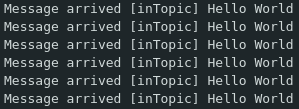
mosquitto_pub -h 10.42.0.1 -u plcuser -P 'your-password' -t "inTopic" -m "Hello World"The PLC receives the message and prints it in the serial monitor. When the PLC reboots, it connects to the broker and publishes to outTopic, and the terminal shows it.

Choose your PLC at www.industrialshields.com.
There are no comments for now.
to be the first to leave a comment.