Case study · Smart office · Raspberry PLC
Who gets in, how bright, how warm. Raspberry PLCs run the office.
Biometric access, automatic lights and the climate on your phone.
A company decided to turn its office into a smart office, to improve the security and the efficiency of its operations.
The same PLCs control the door, the lights, the climate and the alarm.
This case describes a smart office project with Raspberry PLCs, published by Industrial Shields in 2023. The case does not name the company or the building, and it does not publish results. The functions come from the case: biometric access, lights by presence and daylight, temperature from a mobile app and an intrusion alarm. The values in the panels are examples.
The challenge
Security and comfort in the same office.
A smart office automates daily tasks and processes. In this case the company wanted two things at once: control who enters the building and its sensitive areas, and give each employee more control over the light and the temperature at work, with less energy wasted.
Who gets in
Access to the building and to the sensitive areas must be controlled. The company chose biometric technology: fingerprint and facial recognition.
Light where people are
The lights must turn on and off by themselves with presence sensors in the rooms, and adapt to the light outside and to the preferences of the employees.
Each person sets the comfort
Employees set their own light and temperature preferences from a mobile app. The system takes the occupancy and the weather into account.
Intruders
Motion sensors must detect any unauthorised movement in the office. When there is an intrusion, the alarm starts.
Start with the risks
The first step of the project was to identify the potential risks to mitigate. The automated safety system was designed after that, and then installed, wired, programmed and tested.
How it works
Three jobs: light the rooms, keep each person comfortable, guard the door.
Each panel shows one job. Press the buttons. The panels are illustrative simulations: the functions are the ones of the case, but the sensors, the levels, the delays and the rules are examples, not data from the office.
Lights by presence and by daylight.
Presence sensors in each room tell the PLC when someone is there. A light sensor tells it how much daylight comes in. The PLC switches the lights and dims them so the desk gets enough light, not more. Change the sky and walk in or out.
- On and off with presence sensors in the rooms
- Dimmed by the light from outside
- Off by itself when the room is empty
Lighting of one room (example)
Illustrative simulation. Example values, not data from the office. The case says the lights switch with presence sensors in the rooms and adapt to the outdoor light. It does not publish the sensors, the levels or the delays. In this example: a presence sensor on a digital input, a 0-10 V light sensor, a relay for the circuit and a 0-10 V output for dimmable drivers, 500 lx on the desk (the EN 12464-1 value for office work) and lights off 10 minutes after the last movement.
The temperature you set on your phone.
Employees choose their temperature from a mobile app. Temperature sensors give the PLC the real value of the room, and the PLC asks the heating or the cooling for more. When the office is empty, it can fall back to an energy saving setpoint. Change the weather and use the app.
- Temperature preference from a mobile app
- Temperature sensors close the loop
- Occupancy and weather change the setpoint
Climate of one zone (example)
Illustrative simulation. Example values, not data from the office. The case says employees set their temperature preference from a mobile app, and that the system takes occupancy and weather into account. It does not publish the HVAC units, the setpoints or the app. In this example: the app can choose from 19 to 26 °C, the PLC heats or cools with 0.5 °C of hysteresis, and an empty office falls back to 17 °C in heating and 28 °C in cooling.
Biometric access by day, an alarm at night.
Fingerprint and face readers control the access to the building and to the sensitive areas. Motion sensors watch the office, and the PLC starts the alarm when there is an intrusion. Close the office and try to get in.
- Fingerprint and facial recognition
- The alarm starts when motion sensors detect an intruder
- A valid access stops the alarm
Entrance and alarm (example)
Illustrative simulation. Example values, not data from the office. The case uses fingerprint and facial recognition for the building and the sensitive areas, and starts the alarm when motion sensors detect an intrusion. It does not publish the readers, how they talk to the PLC or the arming rules. In this example the reader recognises the person and gives the PLC an access contact, the PLC opens the lock with a relay for 5 s, and the alarm is armed outside office hours.
System architecture
How do you connect access, lights, climate and alarm to one PLC system?
In each zone, presence, light, temperature and motion sensors send their information to the Raspberry PLCs. At the entrance and the sensitive areas, fingerprint and face readers decide who gets in. The PLCs drive the actuators: lights, heating and cooling, door locks and the alarm. A mobile app on the office network lets each employee send light and temperature preferences. The case uses PLCs, in plural; a typical split is one PLC per floor or per group of rooms.
| Signal | Between | Type | Purpose |
|---|---|---|---|
| Presence | BetweenPresence sensor in each room → PLC | TypeDigital input | PurposeLights on and off with people in the room |
| Daylight | BetweenLight sensor → PLC | TypeAnalog input, 0-10 V | PurposeThe lighting adapts to the light from outside |
| Room temperature | BetweenTemperature sensor → PLC | TypeAnalog input, 0-10 V | PurposeThe real value against the setpoint of the app |
| Movement | BetweenMotion sensors → PLC | TypeDigital input | PurposeDetect unauthorised movement and start the alarm |
| Access | BetweenFingerprint or face reader → PLC | TypeContact, RS-485 or Ethernet | PurposeWho gets into the building and the sensitive areas |
| Lights | BetweenPLC → lighting circuits | TypeRelay output and 0-10 V output | PurposeSwitch and dim the lights |
| Heating and cooling | BetweenPLC → HVAC units | TypeRelay outputs | PurposeAsk for heat or cold to meet the setpoint |
| Door locks | BetweenPLC → electric locks | TypeRelay output | PurposeOpen the door after a valid access |
| Alarm | BetweenPLC → siren and alert | TypeRelay output and network message | PurposeStop or start the emergency alarm |
| Preferences | BetweenMobile app ↔ PLC | TypeOffice network | PurposeLight and temperature chosen by each employee |
Why it works
Risks first, people in control, and a system that keeps working.
Risks first
The project started with the risks to mitigate, and only then designed the automated safety system. The sensors and the alarm answer those risks.
Tested before use
Once the devices are installed and wired, the PLCs are programmed and the whole system is tested to make sure it works properly.
Maintained, not forgotten
Regular maintenance and monitoring of the PLC system find potential problems before they become critical failures.
Less energy wasted
Lights only with people in the room, dimmed by daylight, and a climate that follows occupancy. The case expects lower energy consumption and a smaller carbon footprint.
People in control
Each employee sets light and temperature from the phone. The case says this improves comfort and gives people more control over their work environment.
Open and modular
There are no licence fees. The system can be expanded in the future, and our support team is there before, during and after the installation.
Hardware
A Raspberry PLC with relays for a building.
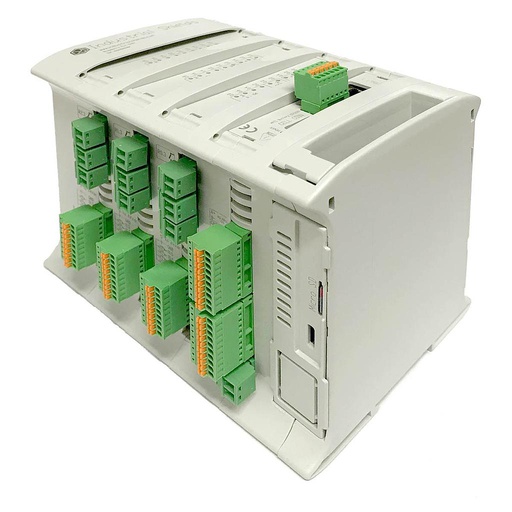
Current fitRASPBERRY PLC 57R FLEX
A Raspberry Pi based PLC with 24 relays and 12 analog inputs. It runs Linux, so the same controller can host the logic and the service for the mobile app.
- Role in this design
- Reads the sensors of a floor or zone, drives lights, climate, locks and alarm, and talks to the app
- Computer
- Raspberry Pi 4, quad core 64-bit, 1.8 GHz, 2, 4 or 8 GB RAM
- Software
- Debian 64-bit: Python, Node-RED, C/C++
- Inputs
- 18: 12 analog/digital (0-10 V, 12-bit) and 6 digital optoisolated, 5 to 24 Vdc
- Outputs
- 33: 24 relays (230 Vac 4 A / 24 Vdc 2 A, resistive) and 9 analog/digital/PWM (0-10 V)
- Communication
- Gigabit and 10/100 Ethernet, 2 x RS-485, Wi-Fi, Bluetooth LE
- Reliability
- UPS with supercapacitors for a safe shutdown, real-time clock with battery
- Power and mounting
- 12 to 24 Vdc, DIN rail TS35, IP20, 0 to 50 °C
The case says Raspberry PLC and does not publish the model. We show the 57R because it has relays for every load of a zone and analog inputs for light and temperature. For a smaller office, the RASPBERRY PLC 38R has 16 relays and 8 analog inputs. All the models are in the Raspberry PLC family datasheet.
Questions about this case
What does a smart office automate?
In this case: access to the building and to the sensitive areas with fingerprint and facial recognition; lights that switch with presence and adapt to daylight; a temperature that each employee sets from a mobile app, with occupancy and weather; and an intrusion alarm fed by motion sensors.
How does a biometric reader connect to a PLC?
The case does not publish it. A typical way: the reader or its access terminal recognises the person and keeps the templates. It gives the PLC an access contact, or sends the event over RS-485 or Ethernet. The PLC opens the lock with a relay and links the event to the alarm. Biometric data is a special category of personal data under the GDPR (Article 9), so keep it in the system the company controls; the PLC only needs a yes, a no or a user ID. For access with an AI camera, see the AI access control case.
How do lights follow presence and daylight?
A presence sensor on a digital input says if the room is in use. A light sensor on a 0-10 V input measures the daylight. A relay switches the circuit and a 0-10 V output dims the drivers, so the desk gets about 500 lx, the EN 12464-1 value for office work. The relays of the PLC are rated 4 A resistive: for LED drivers with high inrush current, add a contactor.
Can employees set the temperature from their phone?
Yes, that is what the case does with a mobile app. The Raspberry PLC runs Linux, so a typical way is a Node-RED dashboard or an MQTT service on the office network. Keep the limits in the PLC, for example 19 to 26 °C, so the app cannot ask for extreme values. For remote access, use a VPN instead of open ports.
What happens when an intruder is detected?
In the case, motion sensors detect the unauthorised movement and the system starts the emergency alarm; it can also stop it. A typical rule: the alarm is armed outside office hours and a valid access disarms it. If the intrusion system must meet insurance or certification rules, it follows EN 50131, and the PLC can work next to a certified alarm panel.
Which Raspberry PLC fits a smart office?
Count the signals of each zone: presence, light, temperature and motion inputs; relays for lights, heating, cooling, locks and siren; 0-10 V outputs for dimming. The RASPBERRY PLC 57R FLEX has 24 relays and 12 analog inputs. For more zones, add more PLCs on Ethernet: the case uses PLCs, in plural.
Download the case study
4-page PDF with the challenge, the logic, the architecture and the hardware. No form required.
Planning a smart office?
Tell us about your building. An engineer will answer.
Tell us the zones, the doors, the sensors you already have and what people must control from their phone. We will propose the PLCs, the wiring and the software.
- You get an answer from our technical team
- Access, lighting, climate and alarm on one system
- Raspberry Pi, ESP32 or Arduino based PLCs