Case study · Small hydro plant · Raspberry PLC
Start, follow the river, stop. From far away.
Two Raspberry PLCs on a CAN bus run a small hydro plant.
The PLC runs the turbine. The office watches it from far away.
Each action waits for its condition: water, speed, the grid, the limits.
This case describes how to automate a small hydro plant with Industrial Shields equipment. It comes from a real project and does not name the customer or the sites. The project uses Raspberry PLC controllers with a CAN board, in standard cabinets built in series, plus a second cabinet for the plant. The control logic on this page is a typical pattern for this type of plant, not the published logic of the project.
The challenge
A small hydro plant is far away. Its control must not need a visit.
Many small hydro plants are in remote valleys, with no operator on site. The control has to start the turbine in the right order, follow the water that the river brings, and stop the unit safely when something goes wrong. The office must see what happens and act from far away. And each new plant should get the same tested cabinet.
Conditions before water
The turbine starts only when the level, the inlet valve and the protections allow it.
Speed before the grid
The unit speeds up with no load. A synchronizer closes the breaker at the right moment.
The river sets the power
In a run-of-river plant, the guide vanes follow the headwater level, not a power set point.
A stop that protects
On a trip, the vanes close along a ramp and then the inlet valve closes. A fast closing causes water hammer.
One cabinet design, many plants
The project builds its control cabinets in series: the same controller and the same wiring. A typical way to run them: the same program at each site, the office sees all the plants in one place, and each plant keeps its logic and stores its data when the link drops.
How it works
Three stages: start, follow the river, stop safely.
Each stage shows one part of a typical plant logic. Press the buttons and move the sliders. The panels are illustrative simulations: levels, times and limits are examples, not data from a plant.
Permissives, inlet valve, speed, synchronizer. In that order.
Before a start, the PLC checks the permissives: the headwater level is above the start level, the protection relay has no trip, the emergency stop chain is closed and the inlet valve is closed. Then it opens the inlet valve (where there is a bypass, it equalizes the pressure first), sets the guide vanes to a small start opening and lets the unit speed up with no load. Near the rated speed the voltage regulator (AVR) excites the generator and the PLC enables the synchronizer. The synchronizer sends raise and lower pulses to the PLC speed loop and to the AVR, and closes the generator breaker when voltage, frequency and phase match. Then the PLC opens the vanes to take load. Press Start. Tick the box to try a start with a low level.
- Permissives on digital and analog inputs
- Shaft speed from a pulse sensor on an interrupt input
- Raise and lower pulses from the synchronizer (ANSI 25), which closes the breaker
Try this start sequence in the Process Plant simulator, in its small hydro unit mode.
Start steps (example)
Illustrative simulation. Example values, no data from a plant. Example values: start level 50 %, valve opening 20 s, speed up 30 s, shown 10 times faster. The real values come from the turbine supplier and the water permit.
The headwater level sets the opening. The river sets the power.
A run-of-river plant has little storage. The PLC reads the headwater level on an analog input and moves the guide vanes to hold the level at its set point: more water arrives, the vanes open; less water, they close. A turbine cannot run below a minimum opening. If the level falls to the stop level, the PLC unloads and stops the unit, so the intake does not run dry and the residual flow stays in the river. When the level comes back, the unit starts again. Move the river inflow.
- Headwater level transmitter on an analog input
- Guide vane set point on an analog output, position back from a CANopen encoder
- Stop and restart levels with a gap between them
Level events (example)
Illustrative simulation. Example values, no data from a plant. Example values: set point 60 %, stop level 30 %, restart at 55 %, minimum opening 20 %. Power is shown as a share of the rated power. The turbine curve and the water permit set the real values.
A trip closes the water along a ramp. The office gets the alarm.
The PLC watches the trips it is in charge of, such as overspeed, bearing temperature and a breaker opened by the grid protection. On a trip it closes the guide vanes along a closing ramp and then closes the inlet valve. A closing that is too fast raises the pressure in the penstock (water hammer). A closing that is too slow lets the speed rise after a load rejection. The turbine supplier sets the closing time. The alarm goes to the remote office. Pick a fault, change the closing time and cut the link.
- Bearing temperature and vibration on analog inputs
- Closing ramp first, inlet valve closed after
- Alarm to the office, stored on site while the link is down
The Remote Site Telemetry simulator shows the same link loss pattern on a water network: stored data and alarms at remote sites.
Trip events (example)
Illustrative simulation. Example values, no data from a plant. Example values: pressure is shown as a share of the static pressure, speed as a share of the rated speed. The faster the closing, the higher the pressure; the slower, the higher the speed after a load rejection. Times are shown 5 times faster.
System architecture
How does a PLC automate a small hydro plant?
Two Raspberry PLCs share the work. In the turbine cabinet, a Raspberry PLC 21 with a CAN board reads the unit: shaft speed, inlet valve limit switches, breaker status, protection trip, emergency stop chain, penstock pressure, bearing temperatures and vibration. It drives the inlet valve, the guide vane set point and the synchronizer enable, and it reads the guide vane position from a CANopen encoder. Over RS-485 it reads the electrical values from the protection relay or the energy meter with Modbus RTU. In the plant cabinet, a Raspberry PLC 42 reads the plant signals, such as the headwater level, and links the plant to the remote office over Ethernet. In this layout, one CAN bus joins the two PLCs and the encoder.
| Signal | Between | Type | Purpose |
|---|---|---|---|
| Shaft speed | BetweenPulse sensor → PLC 21 | TypeDigital in, interrupt | PurposeSpeed up, synchronizer enable, overspeed trip |
| Inlet valve open and closed | BetweenLimit switches → PLC 21 | Type2 digital in | PurposeConfirms each step of the start and the stop |
| Breaker closed | BetweenBreaker contact → PLC 21 | TypeDigital in | PurposeUnit on the grid: take load. Opens on a grid trip |
| Protection trip | BetweenProtection relay → PLC 21 | TypeDigital in | PurposeGenerator or grid protection tripped: stop the unit |
| Emergency stop chain | BetweenSafety relay → PLC 21 | TypeDigital in | PurposeStatus only. The stop itself does not depend on the PLC program |
| Penstock pressure | BetweenTransmitter → PLC 21 | TypeAnalog in | PurposeStart permissive, pressure during the closing ramp |
| Bearing temperatures | BetweenTransmitters → PLC 21 | Type2 analog in | PurposeAlarm, then trip. Turbine and generator bearings |
| Vibration | BetweenVelocity transmitter → PLC 21 | TypeAnalog in | PurposeAlarm, then trip |
| Guide vane position | BetweenCANopen encoder → PLC 21 | TypeCAN | PurposeClosed loop of the opening |
| Guide vane set point | BetweenPLC 21 → actuator | TypeAnalog out 0-10 V | PurposeOpening that follows the level |
| Inlet valve open and close | BetweenPLC 21 → valve actuator | Type2 digital out | PurposeWater to the turbine. Closed at the end of a stop |
| Synchronizer enable | BetweenPLC 21 → synchronizer | TypeDigital out | PurposeNear rated speed. The synchronizer closes the breaker |
| Speed raise and lower | BetweenSynchronizer → PLC 21 | Type2 digital in | PurposeSmall changes of the guide vane opening while synchronizing. One on an analog/digital input in digital mode |
| Electrical values | BetweenProtection relay or meter → PLC 21 | TypeRS-485, Modbus RTU | PurposeActive power, voltage, frequency, energy |
| Headwater level | BetweenLevel transmitter → PLC 42 | TypeAnalog in | PurposeStart permissive, level control, stop level |
| Unit data | BetweenPLC 21 ↔ PLC 42 | TypeCAN | PurposeStates, values and commands between the cabinets |
| Remote office | BetweenPLC 42 → router → office | TypeEthernet | PurposeData, alarms, remote start and stop |
Why it works
Simple steps, clear limits, the same cabinet everywhere.
Permissives, then actions
Each step starts only when the step before is confirmed by a signal: level, valve limit switch, speed, breaker contact. The PLC program can be written as a sequence of states with clear exits and a time limit on each step.
The right device for each job
The PLC brings the unit near the rated speed. A synchronizer trims the speed through the PLC and the voltage through the AVR, and closes the breaker. A protection relay watches the generator and the grid. Each device does the job it is made for.
A ramp, not a slam
The guide vanes close along a ramp set by the turbine supplier. The ramp keeps the penstock pressure and the speed rise inside their limits.
Linux next to the control
The Raspberry PLC runs Debian. The same controller can log data, keep a local database and talk MQTT to the office. A typical way to do it: run the control program as a systemd service that starts at boot and restarts on a failure.
Clean power loss
Both PLCs have a UPS with supercapacitors that shuts Linux down cleanly when the 24 V supply drops, and a real-time clock with a battery, so the logs keep the right time after a restart.
Built in series
The project builds its cabinets in series. A typical way to keep one program for many plants: the plant values, such as level set points and ramps, live in a settings file, not in the code.
Hardware used
A Raspberry PLC for the turbine. A bigger one for the plant.
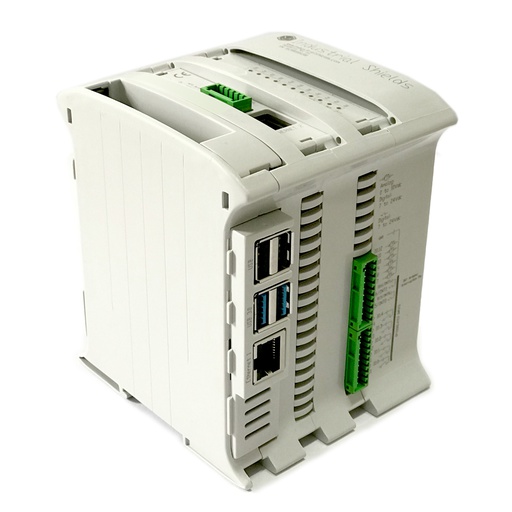
Raspberry PLC 21 FLEX
An industrial controller built on a Raspberry Pi 4, with 13 inputs, 8 outputs, two Ethernet ports, two RS-485 ports and one expansion board. In this plant the expansion board is CAN. It runs the turbine: start sequence, level control, trips and the guide vane loop.
- Role
- Turbine cabinet: sequence, level control, trips
- Inputs
- 13: 6 analog/digital (0-10 V, 12-bit), 7 digital optoisolated (5-24 Vdc), 2 with interrupt
- Outputs
- 8: 3 analog/digital/PWM (0-10 V, 12-bit), 5 digital optoisolated (5-24 Vdc)
- Expansion
- One board. CAN in this plant (also LoRa, 4G or M-Bus master)
- Comms
- Ethernet 1 Gigabit + 1 10/100, 2 x RS-485, Wi-Fi, Bluetooth LE
- Computer
- Raspberry Pi 4, Debian 64-bit
- Reliability
- UPS with supercapacitors, real-time clock with battery
- Power supply
- 12 to 24 Vdc
- Mounting
- DIN rail TS35, IP20
The project uses a Raspberry PLC 21 with the CAN board: the FLEX version is the configuration that offers it. The outputs are transistor outputs, not relays: use interface relays where the valve actuator or the synchronizer need a dry contact. This layout uses 12 of the 13 inputs and 4 of the 8 outputs. For a 4-20 mA transmitter on a 0-10 V input, add a 500 Ω precision shunt.
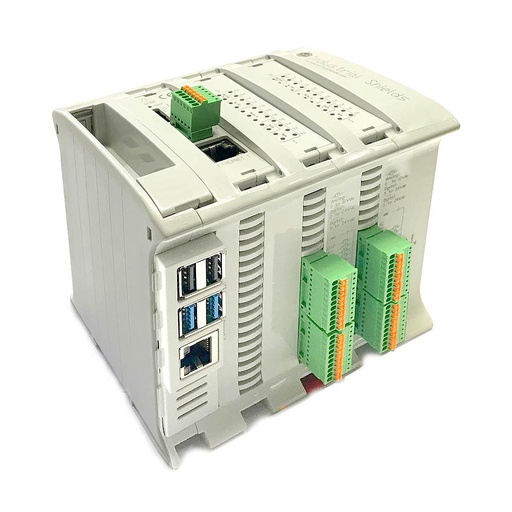
Raspberry PLC 42
The same family with more I/O: 26 inputs and 16 outputs. In the plant cabinet it reads the plant signals, shares the unit data over CAN and links the plant to the remote office over Ethernet.
- Role
- Plant cabinet: plant signals, link to the office
- Inputs
- 26: 12 analog/digital (0-10 V, 12-bit), 14 digital optoisolated (5-24 Vdc), 4 with interrupt
- Outputs
- 16: 6 analog/digital/PWM (0-10 V, 12-bit), 10 digital optoisolated (5-24 Vdc)
- Expansion
- One board. CAN in this plant (also LoRa or 4G)
- Comms
- Ethernet 1 Gigabit + 1 10/100, 2 x RS-485, Wi-Fi, Bluetooth LE
- Reliability
- UPS with supercapacitors, real-time clock with battery
The project has a second cabinet with a Raspberry PLC 42 and CAN. The case does not publish which plant signals go to it: the headwater level is an example. Spare inputs can take plant auxiliaries, such as intake gates or a trash rake.
Questions about this case
How does a PLC start a small hydro turbine?
It follows a fixed sequence. A typical one: check the permissives (headwater level, no protection trip, emergency stop chain closed, inlet valve closed); open the bypass where there is one, then the inlet valve; set the guide vanes to a start opening; let the unit speed up with no load; near the rated speed, excite the generator and enable the synchronizer; after the breaker closes, open the vanes to take load. Each step waits for a signal and has a time limit. If a step does not finish in time, the PLC stops the start and raises an alarm.
Does the PLC synchronize the generator to the grid?
Not on its own. The PLC brings the unit near the rated speed and enables an automatic synchronizer (ANSI device 25). The synchronizer sends raise and lower pulses to the PLC speed loop and to the voltage regulator (AVR), and closes the breaker when voltage, frequency and phase angle match. Many generator protection relays include a synchronism check (25); automatic synchronizing is often a separate device. The grid interface protection follows the rules of the country: in Europe, the national rules that apply the RfG network code (Regulation (EU) 2016/631) often refer to EN 50549-1 (low voltage) and EN 50549-2 (medium voltage).
How does the PLC hold the headwater level in a run-of-river plant?
It reads the level transmitter on an analog input and moves the guide vane set point to keep the level at its set point. The vane position comes back from a CANopen encoder, see CANopen encoder reading on a Raspberry PLC. Below a minimum opening the turbine must stop, so the logic needs a stop level and a higher restart level. The water permit of the plant sets the residual flow that must stay in the river.
Which safety devices work alongside the PLC in a hydro plant?
The PLC runs the sequence, the level control and the trips it is in charge of, and it reports the state. Around it, as in any hydro unit: an overspeed device that does not depend on the PLC, a protection relay for the generator and the grid interface, and an emergency stop chain that does not depend on the standard PLC program (for the machine side, IEC 60204-1 and ISO 13850). The case does not publish its safety circuit. See safety interlocks and e-stop on a Raspberry PLC.
Why must the guide vanes close slowly on a trip?
The water in a penstock has a lot of momentum. If the vanes close too fast, the pressure rises (water hammer) and can damage the penstock. If they close too slowly after a load rejection, the unit speeds up. The turbine supplier calculates the closing time from the penstock and the machine, and the PLC follows that ramp. IEC 61362 is the guide to specify hydraulic turbine governing systems.
What happens when the link to the remote office drops?
The control runs in the plant PLCs, so the unit keeps following its logic. A typical way to do it: store the data and the alarms on the PLC with their time stamps, and send them when the link comes back. Two building blocks: an MQTT to SQL Server bridge in Python and a MySQL alarm history with Node-RED. The Remote Site Telemetry simulator shows the link loss pattern on a water network.
Download the case study
4-page PDF with the challenge, the logic, the architecture and the hardware. No form required.
Similar plant?
Tell us your plant and your sequence. An engineer will answer.
Tell us the turbine type, the signals you have, how the guide vanes or the nozzle move, and where the data must go. We will tell you which controllers fit and how to wire them.
- You get an answer from our technical team
- I/O count and controller sizing for your plant
- Help to write the control program, if you need it