Case study · Occupancy · M-Duino PLC
People in, people out. The PLC keeps the count.
Occupancy at the door and a scheduled ozone treatment, on one Arduino PLC.
A shop with a capacity limit has to know, at every moment, how many people are inside.
So the count runs on the PLC: a beam at the door, a limit set on the panel, and a message on the screen when the shop is full.
This case is a design proposal by Industrial Shields engineers for a small shop or any premises open to the public. It is not the report of one installation, and no customer is named. The original material gives the devices and the sequence: an Arduino based PLC with a 24 V power supply, a TouchBerry Panel PC on Ethernet, an infrared photocell at the door, an ozone sensor, and an ozone generator switched through a solid state relay. The original version, written for the COVID-19 rules, also took the temperature of each customer with a laser sensor. This page keeps the parts that apply to any shop today: occupancy and air treatment. The panels, counts, hours and levels on this page are examples of a typical way to do it.
The challenge
Know how many people are inside. Treat the air when nobody is.
The owner of a small shop has to respect a maximum capacity and keep the room clean, with no one counting at the door. The system must count people, warn when the limit is reached, run an air treatment on a schedule, and let the owner change the settings.
Count at the door
An infrared photocell at the door signals each person who passes. The PLC turns those signals into the number of people inside.
Stop new entries when full
The maximum capacity is a setting. When the count reaches it, the screen says that nobody else can enter until someone leaves.
Treat the room on a schedule
An ozone generator runs at set hours, at the lunch break and at night, until an ozone sensor says that the concentration is right.
Change the settings on a screen
The owner sets the capacity and the treatment hours on a touch panel, and sees the alarms there.
Standard devices around one PLC
The design uses common parts: a photocell, an ozone sensor, an ozone generator and a touch panel. One Arduino based PLC reads them, decides and switches the generator. Its program is written in the Arduino IDE.
How it works
Three steps: count, treat the air, set and warn.
Each panel shows one step, and the three share the same count and settings. Press the buttons. The panels are illustrative simulations: counts, limits, hours and levels are examples, not data from an installation.
Each pass at the door changes the count. The PLC compares it with the limit.
The photocell gives a digital signal to the PLC each time a person crosses its beam. The PLC keeps the number of people inside and compares it with the maximum capacity set on the panel. When the count reaches the limit, the panel shows that new people cannot enter until someone leaves. One beam tells the PLC that someone passed, not in which direction, and the case does not say how it counts exits. A typical way: two beams a short distance apart, so the order in which they break gives the direction; or one door to enter and another to leave, with one photocell each. Let people in and out, up to the limit.
- Photocell on a digital input of the PLC
- Count of people inside, compared with the limit
- Message on the panel when the shop is full
PLC events (example)
Illustrative simulation. Example values, not data from an installation. Two beams are an example of a typical way to tell entries from exits. The original design names one photocell and does not say how it counts exits.
At the set hour, the generator runs until the ozone level is right.
At each treatment hour set on the panel, the PLC switches on the ozone generator. Its digital output gives 24 V at most and the generator works at 220 V, so the output drives a solid state relay. The ozone sensor, on an analog input, tells the PLC the concentration in the air. That input reads 0-10 V, so the sensor needs a 0-10 V output, or 4-20 mA with a shunt. The generator runs until it is right, and then stops. The original plan runs the treatment at the lunch break and at night, when the shop is closed. Ozone at treatment levels is harmful to breathe, so a typical design also uses the count of step 1 as a condition: no start while anyone is inside. Start a treatment with people inside, then with the room empty.
- Start at the hours set on the panel
- Solid state relay between the 24 V output and the 220 V generator
- Stop when the ozone sensor reaches the target
- Example: no start while the count is above zero
Treatment (example)
Illustrative simulation. Example values, not data from an installation. Example levels, in % of the target set for the treatment, and faster than real time. The case does not publish concentrations or times. Blocking the start while the count is above zero, and waiting for the level to fall before opening, are typical additions; follow the maker of the generator and the local rules.
The owner sets the limit and the hours. The panel shows each alarm.
The TouchBerry Panel PC is connected to the PLC over Ethernet. On it the owner enters the maximum capacity and the hours of the treatment, and receives the alarms of the system. The case does not publish the protocol between the panel and the PLC. A typical way: Modbus TCP, with the capacity, the hours and the count in registers of the PLC, as in this Modbus TCP register map on an M-Duino. Change the limit here and try step 1 again.
- Panel PC on Ethernet
- Capacity and treatment hours set on the screen
- Alarms: shop full, treatment running
Panel and PLC (example)
Illustrative simulation. Example values, not data from an installation. Example screen, limits and hours. The case says that the panel sets the capacity and the hours and shows the alarms. The protocol is not published.
System architecture
How does a PLC count people and control an ozone treatment?
From the original diagram: the photocell is on a digital input, the ozone sensor on an analog input, the ozone generator on a digital output with a solid state relay, and the Panel PC on Ethernet. A 24 V power supply feeds the PLC. The original diagram also has a temperature sensor on an analog input, which this page does not use. A typical addition, not in the diagram: a second beam to tell entries from exits.
| Signal | Between | Type | Purpose |
|---|---|---|---|
| People passing | BetweenPhotocell → PLC | TypeDigital in | PurposeCount of people inside |
| Second beam (example) | BetweenPhotocell → PLC | TypeDigital in | PurposeEntry or exit. Not in the original diagram |
| Ozone concentration | BetweenOzone sensor → PLC | TypeAnalog in, 0-10 V | PurposeStop the generator at the target. Sensor with a 0-10 V output, or 4-20 mA with a shunt |
| Generator on | BetweenPLC → solid state relay → generator | TypeDigital out, 24 V | PurposeTreatment at the set hours |
| Capacity and hours | BetweenPanel PC → PLC | TypeEthernet | PurposeSettings from the owner |
| Count and alarms | BetweenPLC → Panel PC | TypeEthernet | PurposeShop full, treatment running |
| Power | Between24 V supply → PLC | Type24 Vdc | PurposeThe PLC works at 12 to 24 Vdc |
Why it works
The count and the clock in the controller. The settings on the screen.
The count lives in the PLC
The PLC reads the photocell and keeps the count itself. The panel shows it and sets the limit, but the decision is in the controller. See the basics of digital inputs.
The clock is in the PLC
The M-Duino has a real-time clock, so it can start the treatment at the set hours on its own, with no PC in the loop.
A sensor closes the loop
The generator does not run for a fixed time. It runs until the ozone sensor says that the concentration is right, as the original design asks. See the basics of analog inputs.
Mains voltage stays off the PLC
The digital output gives 24 V at most. A solid state relay switches the 220 V generator, so mains voltage never reaches the PLC output.
Settings without a programmer
Capacity and treatment hours are values on the panel, not constants in the code. The owner changes them on the touchscreen.
Room for more sensors
The M-Duino 19R has 4 analog inputs for 0 to 10 V. The design uses one for the ozone sensor. The others stay free for more sensors, for example a CO2 transmitter (see the FAQ).
Hardware used
An Ethernet PLC in the cabinet, and a panel for the owner.
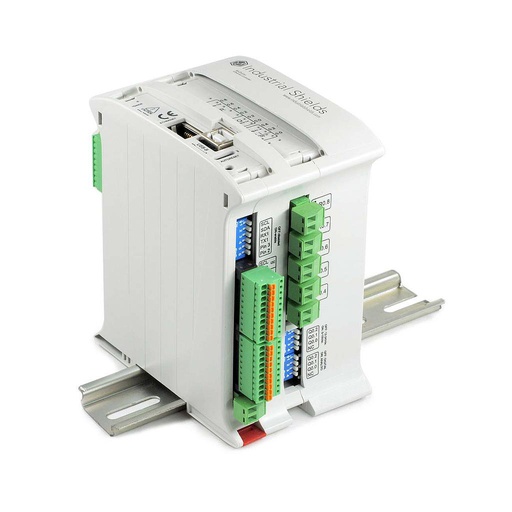
M-DUINO ETHERNET PLC ARDUINO 19R
An Arduino Mega 2560 based PLC for DIN rail with 17 I/O, Ethernet, RS-485 and RS-232, a real-time clock and a microSD slot. In this case it counts the people at the door, compares the count with the limit, starts and stops the ozone generator, and talks to the panel over Ethernet.
- Role
- People count, limit, treatment schedule, generator command
- Inputs
- 6: 4 analog/digital (0-10 V, 10-bit), 2 digital optoisolated (5 to 24 Vdc), 2 with interrupt
- Outputs
- 11: 3 digital/PWM/analog (digital up to 24 Vdc, analog 0-10 V), 8 relays (4 A at 230 Vac, 2 A at 24 Vdc, resistive)
- Comms
- Ethernet (W5500, 10/100), RS-485, RS-232, TTL serial, I2C, SPI
- Built in
- Real-time clock, microSD slot, USB
- Power and mounting
- 12 to 24 Vdc, DIN rail TS35, IP20, 0 to 60 °C
The original material names an Industrial Shields Arduino PLC with a 24 V power supply, and its product image is an M-Duino 19R. The image and the link show the M-DUINO ETHERNET PLC ARDUINO 19R, the current version of that model. The high level of its digital outputs is set by the voltage on QVdc, up to 24 Vdc. Check that it matches the input range of the solid state relay.
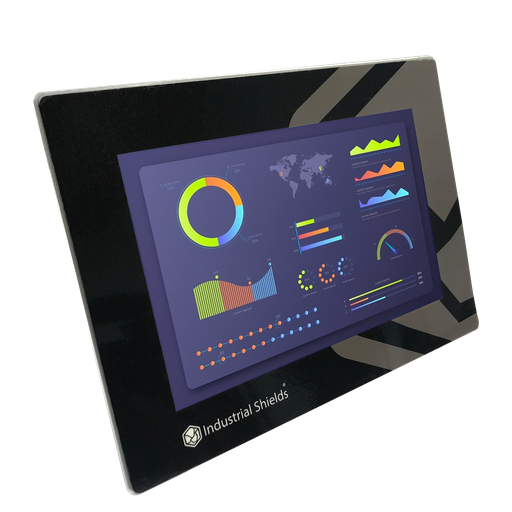
TouchBerry Pi Panel PC 10.1" FLEX
The original material names a TouchBerry Panel PC on Ethernet, and the old page links to the 10.1" Raspberry Pi panel. The TouchBerry Pi Panel PC 10.1" FLEX is the current version: a Raspberry Pi 4 behind a 10.1" touchscreen, with Gigabit Ethernet and one serial port. To run a dashboard full screen on it, see kiosk mode for a Node-RED dashboard.
- Role
- Capacity and hours, count on screen, alarms
- Screen
- 10.1" IPS, 1280 x 800, capacitive, 900 nits
- Serial port
- One: RS-485, RS-232 or TTL, chosen when you order
- Front
- IP20 or IP65, chosen when you order
- Comms
- Gigabit Ethernet, 4 x USB, I2C, SPI
- Power
- 12 to 24 Vdc, UPS for safe shutdown, 0 to 45 °C
The image shows the TouchBerry Pi Panel PC 10.1" FLEX, not the unit of a real shop.
Questions about this case
How does a PLC count the people inside a shop?
An infrared photocell at the door gives a digital signal each time a person crosses the beam, and the PLC keeps the count. One beam only says that someone passed. To know the direction, a typical way is two beams a short distance apart: if A breaks before B, it is an entry; if B breaks before A, it is an exit. Another way is one door to enter and one to leave, with a photocell each. The M-Duino inputs accept 5 to 24 Vdc, and two of them can trigger an interrupt. See the basics of digital inputs and a pulse counter with interrupts (ESP32 PLC example; the idea is the same).
What happens when the shop reaches its maximum capacity?
In this design the owner sets the maximum capacity on the panel. When the count reaches it, the panel shows a message: new people cannot enter until someone leaves. The count goes down with each exit, and the message goes away. A typical addition is a red and green light at the door on a PLC output, so people see it before they enter.
When does the ozone treatment run, and how is the room kept empty?
In the original plan, at the lunch break and at night, when the shop is closed. Ozone at the concentrations used to treat a room is harmful to breathe, so nobody should be inside. A typical way to add a condition in the PLC: start only when the count is zero, and switch the generator off if someone enters. Before opening again, follow the maker of the generator and the local rules for the waiting time and the ventilation. These conditions in the program add to the safety instructions of the generator.
Why a solid state relay between the PLC and the ozone generator?
The digital output of the PLC gives 24 V at most, and the generator in this design works at 220 V. A solid state relay takes the 24 V signal on its input and switches the mains load on its output. The M-Duino 19R also has relay outputs rated 4 A at 230 Vac with a resistive load. If you use one of them instead, check the current and the type of load of the generator against that rating.
Can the same PLC monitor CO2 or other air quality values?
The original design does not include a CO2 sensor. It reads one air value: the ozone concentration, on an analog input. The M-Duino 19R has 4 analog inputs for 0 to 10 V. A CO2 transmitter with a 0 to 10 V output can use a free input. One with a 4 to 20 mA output can use a 500 Ω precision shunt, as the M-Duino 19R product page explains. The panel can then show the value next to the count. The limits and the action, for example starting a fan, are decisions for your project. See the basics of analog inputs.
Which parts of this case are facts, and which are examples?
Facts: a design proposal for a small shop; an Industrial Shields Arduino PLC with a 24 V power supply; a TouchBerry Panel PC on Ethernet that sets the maximum capacity and the treatment hours and shows the alarms; an infrared photocell at the door on a digital input; a message on the panel when the limit is reached; an ozone sensor on an analog input; an ozone generator at 220 V on a digital output through a solid state relay; the treatment at the lunch break and at night until the concentration is right. The original version also took the temperature of each customer with a laser sensor; this page does not use it. Examples: counts, limits, hours, levels, the second beam, the condition on the count, the protocol and the texts of the alarms.
Download the case study
4-page PDF with the challenge, the logic, the architecture and the hardware. No form required.
Counting people or treating a room?
Tell us about your premises. An engineer will answer.
Tell us how many doors you have, your maximum capacity, which sensors you use or want (photocell, ozone, CO2) and where the settings must be changed. We will propose a controller and an architecture.
- You get an answer from our technical team
- PLC, sensors and panel for your premises
- Arduino, ESP32 or Raspberry Pi based PLCs