Case study · Car park access · M-Duino PLC
A card at the gate. The PLC knows every user.
RFID cards for a company car park, with the user list on the PLC itself.
A car park gate has to answer in front of the car, every time.
So the check happens at the gate: the PLC looks for the card in its own copy of the user list.
This case describes a real project for the car park of a company. The customer is not named. The original material gives the architecture: an RC522 RFID reader, an M-Duino 19R PLC with Ethernet and the user list on its SD card, a TouchBerry Pi 10.1" panel on a serial link, a server with the master list, and the motor of the gate. It does not publish the program, the number of users or the protocol to the server. The panels, card numbers, times and messages on this page are examples of a typical way to do it.
The challenge
One controller at the gate. A user list that changes in the office.
The company wanted to control the access to its car park with open source technology and a single PLC. That PLC must know all the registered users, accept changes to the list from a distance, act on the gate and let people follow the whole process.
Read the card
Each user has a personal card with a unique reference. The reader must detect it each time a driver presents it.
Check it against the list
The PLC decides if the reference belongs to a registered user. Only then does the gate open.
Change the list from the office
Users are added and removed on a server. Each change must reach the PLC without a visit to the gate.
Show the driver what happens
A panel next to the reader shows the reading process while the driver waits at the gate.
Open source, and a single controller
The customer asked for open source technology and one PLC that knows every user, can be changed remotely, drives the gate and lets the process be monitored. The answer was an Arduino based M-Duino PLC with Ethernet, with the RFID reader, the panel and the server around it.
How it works
Three steps: read and decide, keep the list in sync, show and record.
Each panel shows one step. Press the buttons. The panels are illustrative simulations: card numbers, list versions, times and messages are examples, not data from the installation.
A card at the reader. A yes or a no from the PLC, in front of the car.
The RC522 reader sends the unique reference of the card, its UID, to the PLC over SPI. The PLC looks for it in the user list on its microSD card. If the card is there, the PLC switches its output to the motor of the gate until the gate is fully open, and closes it afterwards. If not, the gate stays closed. Pick a card and present it.
- UID read over SPI from the RC522
- Lookup in the local list, with no call to the server
- Output to the motor only for a registered card
PLC steps (example)
Illustrative simulation. Example values, not data from the installation. Example timing, shown faster than real time. A typical way to do it: the output to the motor stays on until a limit switch says the gate is fully open; the gate closes after a set time.
The office changes the list. The PLC updates its SD card.
The master list of users is on a server. When someone adds or removes a user, the server tells the PLC, and the PLC updates its local list on the microSD card. Because the list is local, a cut in the network does not stop the gate: in a typical design the PLC keeps working with its last list and takes the changes when the link is back. Add a user, remove one, cut the network and test the cards. To see a PLC that takes its orders from a database table, and what it does when the link drops, open the Gate control simulator.
- Master list on the server, local copy on the SD card
- The server tells the PLC when the list changes
- Last list in use while the network is down
List changes (example)
Illustrative simulation. Example values, not data from the installation. Example list and versions. The case does not publish how the server tells the PLC. A typical way to do it: a message with the new list version, then the PLC downloads the list and replaces its file on the SD card only when the new file is complete.
The driver sees each step. The office can see each read.
A Panel PC next to the reader is connected to the PLC on a serial port (UART). It shows the reading process: card read, user found or not, gate opening. A typical addition: the PLC also sends each read to the server with the time of its real-time clock, and keeps the reads on the SD card while the network is down. Present a card, cut the network, and present it again.
- Panel PC on the serial port of the PLC
- A message for each step of the read
- Example: each read sent to the server, kept on the SD card when offline
Reads (example)
Illustrative simulation. Example values, not data from the installation. Example messages and times. The case says that the panel shows the reading process. Recording each read on the server is a typical addition, not a published fact.
System architecture
How does an RFID parking access system with a PLC work?
The original diagram labels the reader link SPI/I2C/Wiegand 26 (see the FAQ below) and the gate drive as a servomotor with an ON/OFF signal. On the M-Duino, SPI is also the bus of the microSD card. The Panel PC is on a serial port (UART). Ethernet goes through a router to the server with the master list. A typical addition, not in the diagram: a limit switch that tells the PLC the gate is fully open.
| Signal | Between | Type | Purpose |
|---|---|---|---|
| Card reference (UID) | BetweenRC522 reader → PLC | TypeSPI | PurposeWho is at the gate |
| User list | BetweenmicroSD card ↔ PLC | TypeSPI, on the PLC | PurposeLocal copy of the registered cards |
| Open the gate | BetweenPLC → motor of the gate | TypeDigital out (ON/OFF) | PurposeOpen for a registered card, then close |
| Gate fully open (example) | BetweenLimit switch → PLC | TypeDigital in | PurposeStops the open command. The case does not publish this signal |
| Reading status | BetweenPLC → Panel PC | TypeSerial (UART) | PurposeMessages for the driver at the gate |
| List changes | BetweenServer → PLC | TypeEthernet | PurposeUsers added and removed in the office |
| Reads (example) | BetweenPLC → server | TypeEthernet | PurposeA record of each read with its time |
Why it works
The decision at the gate. The list in one place.
The check is local
The PLC has the whole user list on its microSD card. It does not ask a server each time a car arrives, so the answer does not depend on the network.
One master list
Users are managed on the server. The PLC only keeps a copy and updates it when the server tells it that the list has changed.
A common reader on a standard bus
The RC522 talks SPI, and an open source library reads its cards from the Arduino IDE. See how to read RFID tags with the RC522 and an M-Duino PLC.
Relays for the gate command
The M-Duino 19R has 8 relay outputs, rated 4 A at 230 Vac or 2 A at 24 Vdc with a resistive load. A relay contact can give the open command to the controller of the gate. Its 6 inputs leave room for a limit switch or a vehicle detector.
Every event with its time
The M-Duino has a real-time clock and a microSD slot, so it can time stamp each read and keep it locally.
Open source the team can change
The program is written in the Arduino IDE. The customer asked for open source technology, so its own team can read and change the logic.
Hardware used
An Ethernet PLC at the gate, and a panel for the driver.
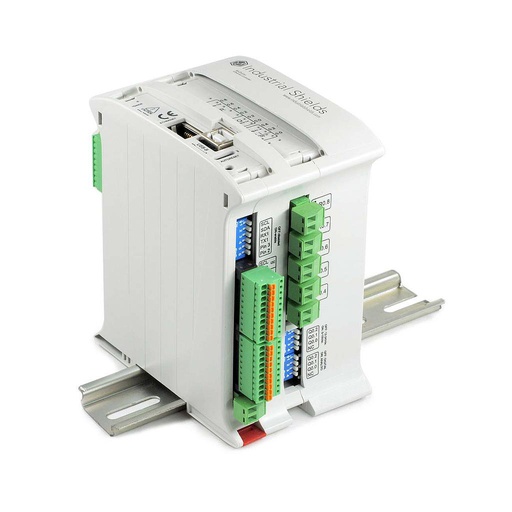
M-DUINO ETHERNET PLC ARDUINO 19R
An Arduino Mega 2560 based PLC for DIN rail with 17 I/O, 8 of them relays, Ethernet, SPI, RS-485 and RS-232, a real-time clock and a microSD slot. In this case it reads the RFID reader, keeps the user list on its SD card, talks to the panel on a serial port and to the server over Ethernet, and gives the open command to the motor of the gate.
- Role
- Card check, user list, gate command, link to panel and server
- Inputs
- 6: 4 analog/digital (0-10 V, 10-bit), 2 digital optoisolated (5 to 24 Vdc), 2 with interrupt
- Outputs
- 11: 8 relays (4 A at 230 Vac, 2 A at 24 Vdc, resistive), 3 analog/digital/PWM (0-10 V)
- Comms
- Ethernet (W5500, 10/100), RS-485, RS-232, TTL serial, I2C, SPI
- Built in
- Real-time clock, microSD slot, USB
- Power and mounting
- 12 to 24 Vdc, DIN rail TS35, IP20, 0 to 60 °C
The original page lists the M-Duino 19R (relay outputs) among the products of this case, and its main image shows an M-Duino 58. The image and the link show the M-DUINO ETHERNET PLC ARDUINO 19R, the current version of that model. For an inductive load such as a contactor coil, add an RC snubber sized for the load.
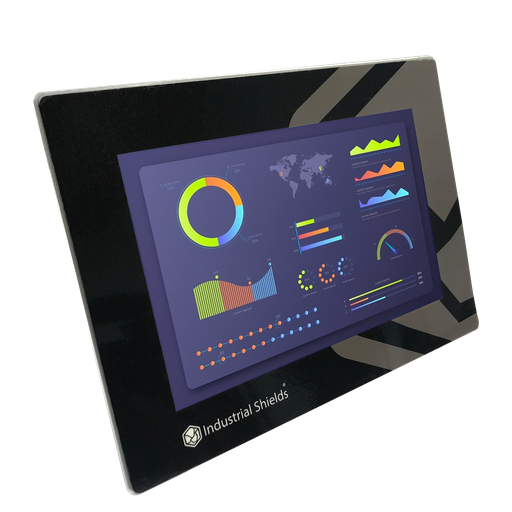
TouchBerry Pi Panel PC 10.1" FLEX
The original page lists a TouchBerry Pi 10.1" with a Raspberry Pi 4B, on the serial port of the PLC. The TouchBerry Pi Panel PC 10.1" FLEX is the current version: a Raspberry Pi 4 behind a 10.1" touchscreen, with one serial port and Gigabit Ethernet.
- Role
- Messages for the driver at the gate
- Screen
- 10.1" IPS, 1280 x 800, capacitive, 900 nits
- Serial port
- One: RS-485, RS-232 or TTL, chosen when you order
- Front
- IP20, or IP65 on the FLEX version
- Comms
- Gigabit Ethernet, 4 x USB, I2C, SPI
- Power
- 12 to 24 Vdc, UPS for safe shutdown, 0 to 45 °C
The image shows the TouchBerry Pi Panel PC 10.1" FLEX, not the unit of the installation. For a panel at an outdoor gate, check the front protection and the temperature range in the datasheet.
Questions about this case
How does a PLC read an RFID card for car park access?
In this case an RC522 reader sends the unique reference of the card (its UID) to the PLC, and the PLC compares it with its list of registered users. On an M-Duino, the RC522 is wired to the SPI pins and powered at 3.3 V, and the open source MFRC522 library reads the UID from the Arduino IDE. See the wiring table and the code in Detecting RFID tags with the RC522 reader and M-Duino PLC.
Where is the user list, and what happens if the network goes down?
The list of all user references is on the microSD card of the PLC, and the master list is on a server. The PLC checks each card against its local list, so the check does not need the network. In a typical design, while the network is down the PLC keeps using its last list, and asks for the latest one when the link is back. Try a PLC that takes orders from a database and loses the link in the Gate control simulator, and see offline first logging on an SD card (the example runs on an ESP32 PLC; the idea is the same).
How does a change on the server reach the PLC?
In this case, when the database on the server changes, the PLC is told and updates the list on its SD card. The case does not publish the protocol. A typical way to do it: the server sends a short message with the new list version, for example over MQTT; the PLC downloads the list, writes it to a new file, and uses it only when the file is complete. A cut in the middle then never leaves half a list. See MQTT remote commands with a response topic (ESP32 PLC example) and SD card basics on an industrial PLC.
RC522 or a Wiegand reader: which one for a gate?
The original material names an RC522 and the Wiegand 26 format. They are two different things. The RC522 is a 13.56 MHz reader module that talks SPI, a bus for short distances inside a cabinet, so the reader must be close to the PLC. Wiegand 26 is the output of many standalone access readers: 26 bits on two data lines, made for a cable run to a controller. If the reader is far from the cabinet, choose a reader with an interface made for that distance, and check its signal levels and pulse width against the inputs in the PLC datasheet.
Which safety devices work alongside the PLC at a car park gate?
The PLC gives the open command and reads the status of the gate. Around it, the gate and its own controller protect people and cars: photocells, safety edges, vehicle detection and force limits, installed as the gate maker says and as the rules of your country require. These devices stay in the gate circuit.
Which parts of this case are facts, and which are examples?
Facts: a company car park, open source technology, a personal card with a unique reference for each user, an RC522 reader, a PLC with Ethernet, a local list of all users on its SD card, the master list on an external server, the PLC updated when the list changes, the motor of the gate on until the gate is fully open and then closed, and a Panel PC on a serial port that shows the reading process. Products named on the original page: the M-Duino 19R and the TouchBerry Pi 10.1"; its main image shows an M-Duino 58. Examples: card numbers, times, list versions, messages, the protocol to the server, the limit switch and the record of reads.
Download the case study
4-page PDF with the challenge, the logic, the architecture and the hardware. No form required.
Controlling a gate or a door?
Tell us about your gate and your users. An engineer will answer.
Tell us which reader you use or want, how many gates and users you have, where the user list is, and what the gate must do when the network is down. We will propose a controller and an architecture.
- You get an answer from our technical team
- Reader, PLC and panel for your gate
- Arduino, ESP32 or Raspberry Pi based PLCs