Case study · OEM laundry machine · Raspberry PLC 58
One controller design. Every machine in the series.
The same PLC, panel and I/O in every laundry machine. Service over 4G.
A machine builder does not build one machine. It builds the same machine many times.
So the controller is part of the product: one bill of materials, one test, one way to service it.
This case describes a pattern, not a customer. It starts from the hardware that a builder of industrial laundry machines fits in its series: a Raspberry PLC 58 with a 4G board, a TouchBerry Pi Panel PC and moduleX remote I/O. It does not name the builder, the machines or where they work, and it does not publish the machine program. The signals, options, test steps and fault codes on this page are examples of a typical way to do it.
The challenge
One machine is a project. A series is a product.
A laundry machine builder ships the same machine to many laundries. Each machine needs the same control, the same screen and the same checks before it leaves the factory. The models change in size and options, and the builder does not want a new cabinet for each one. When a machine stops in a laundry far away, the service team needs to know why before a technician travels.
One bill of materials
Every machine in the series uses the same controller, the same panel and the same main cabinet.
Options without a new design
More dosing pumps or a water recovery tank add remote I/O modules on a bus. The main cabinet stays the same.
Tested before it ships
Each controller runs the same end-of-line test, and the result is saved with the serial number.
The builder's screen
The operator sees the machine builder's interface on the panel, with its own programs and menus.
Service from a distance, with a person at the machine
The machines work in laundries that the builder does not run. Over 4G, the controller sends its state and its alarms to the builder. A service engineer can read a fault and prepare a change. The change is applied only when the machine is stopped and a person accepts it on the panel.
How it works
Three moments in the life of each machine: configure, test, service.
Each panel shows one moment. Press the buttons and move the controls. The panels are illustrative simulations: the signals, options, steps, times and codes are examples, not the program of a real machine.
Three models, one main cabinet. Options go on the bus.
The base machine uses a fixed set of PLC inputs and outputs: door, safety status, level, temperature, water meter, valves, heating and the drive. Options that change from one order to the next, such as dosing pumps or a water recovery tank, go on moduleX remote I/O, on RS-485. The model size changes only a parameter set. Pick a model, move the pumps and tick the tank.
- Base signals on the Raspberry PLC 58
- Options on moduleX modules, Modbus RTU over RS-485
- One parameter set per model
Bill of materials (example)
Illustrative simulation. Example values, not data from a machine. Example I/O: the base machine uses 7 inputs and 6 outputs of the PLC. Each dosing pump adds 1 output and 1 low level input; the recovery tank adds 2 outputs and 1 input. The model size changes parameters, not hardware.
The same test for every serial number.
Before a machine leaves the factory, the controller runs one test program. It checks the panel link, the remote I/O, the analog signals, every output and the 4G link, and saves a report with the serial number. A wrong Modbus ID or a missing antenna stops the machine on the line, not at the customer. Pick a case and press Run the test. For a full end-of-line test bench, see the end-of-line testing case.
- One test program on the PLC for the whole series
- The operator confirms what the PLC cannot see
- A report per serial number
Test report (example)
Illustrative simulation. Example values, not data from a machine. Example steps and serial numbers. A typical way to do it: the test program runs on the PLC itself, the operator confirms what the PLC cannot see, and the report is a text file per serial number (see plain-text test reports from a Raspberry PLC).
Events go out. Changes come in, and wait for a person.
In the laundry, the PLC sends its events over 4G: cycle start and end, faults with a code, changes accepted. If the link is down, it keeps the events and sends them later. The service team can send a new parameter, but the panel shows it as waiting, and the PLC applies it only when the machine is stopped and a person accepts it. Run a cycle, simulate a slow drain, cut the link, and send a change. To try machine states, downtime and alarms on a live line, open the Machine Monitor simulator.
- Events with a code, kept while the link is down
- Remote changes wait for a stopped machine
- A person accepts the change on the panel
Events (example)
Illustrative simulation. Example values, not data from a machine. Example cycle, codes and times, shown much faster than real time. A typical way to do it: events go out over MQTT; a change from the service team waits on the panel and is applied only with the machine stopped.
System architecture
How does an OEM build one controller into a series of laundry machines?
A typical way to do it: the Raspberry PLC 58 reads the door switches, the status of the safety relay and the water meter on digital inputs, and the level and temperature transmitters (4-20 mA, through 500 Ω converters) on 0-10 V inputs. Its digital outputs drive the water valves, the heating contactor, the door lock command and the drive permit, through interposing relays. The first RS-485 port reads the moduleX remote I/O for the options; the second talks Modbus RTU to the drum drive. The TouchBerry Pi panel is on Ethernet. The 4G board sends events to the service server.
| Signal | Between | Type | Purpose |
|---|---|---|---|
| Door closed, door locked | BetweenDoor switches → PLC | TypeDigital in | PurposeThe cycle starts only with the door closed and locked. The interlock itself is a safety function (see the FAQ) |
| Safety circuit OK | BetweenSafety relay → PLC | TypeDigital in | PurposeThe PLC reads the status. It does not perform the safety function |
| Water level | BetweenLevel transmitter 4-20 mA → 500 Ω converter → PLC | TypeAnalog in (0-10 V) | PurposeFill to the level of each step. Well below 2 V (for example under 1.8 V, about 3.6 mA) means a broken wire |
| Water temperature | BetweenTransmitter 4-20 mA → 500 Ω converter → PLC | TypeAnalog in (0-10 V) | PurposeHeat to the temperature of each step |
| Water meter | BetweenPulse output → PLC | TypeDigital in | PurposeWater use per cycle |
| Cold, hot and drain valves | BetweenPLC → interposing relays → valves | TypeDigital out | PurposeFill and drain |
| Heating | BetweenPLC → interposing relay → contactor | TypeDigital out | PurposeElectric heating on and off |
| Door lock, drive permit | BetweenPLC → lock and drive, via the safety relay | TypeDigital out | PurposeRequest to lock the door and to run the drum |
| Drum drive | BetweenPLC ↔ drive (VFD) | TypeRS-485, Modbus RTU | PurposeSpeed, direction, drive faults |
| Dosing pumps, low levels, recovery tank | BetweenPLC ↔ moduleX MX-8DO and MX-8DI | TypeRS-485, Modbus RTU | PurposeOptions of each order, on remote I/O |
| Operator screen | BetweenPLC ↔ TouchBerry Pi 7" | TypeEthernet | PurposePrograms, steps, alarms, service login, changes waiting |
| Events and changes | BetweenPLC ↔ service server | Type4G LTE Cat 4 | PurposeEvents out, kept while offline. Changes in, applied after a local accept |
Why it works
Fixed hardware. Variants in software and on the bus.
The hardware does not change per model
The main cabinet, the PLC and the panel are the same in every machine. A model is a parameter set: drum size, water levels, times. One bill of materials is simpler to buy, stock and repair.
Options on remote I/O
moduleX talks Modbus RTU over RS-485. The configurable kit takes up to 6 I/O modules in its enclosure, and the Xbus allows up to 16 per master. The master ID is set by DIP switch. An order with more options adds modules; you can reserve free slots in the enclosure for later.
Room on the controller
The Raspberry PLC 58 has 39 inputs and 24 outputs. In this example the base machine uses 7 and 6 of them, so a new feature does not force a new controller.
Linux for the panel and the services
The PLC and the TouchBerry Pi run Linux. The machine interface can be a Node-RED dashboard that opens on boot in kiosk mode, with a service login for the technician.
A clean stop when the power goes
Both the PLC and the panel have a UPS with supercapacitors that shuts Linux down cleanly, so a power cut does not corrupt the SD card. The PLC also has a real-time clock with its own battery, so events keep the right time.
Remote, with a person in the loop
Events go out on their own. Changes come in only as a request: the PLC applies them with the machine stopped and after a person accepts them on the panel. In this pattern, remote access cannot start the drum.
Hardware used
A controller, a panel and remote I/O. The same in every machine.
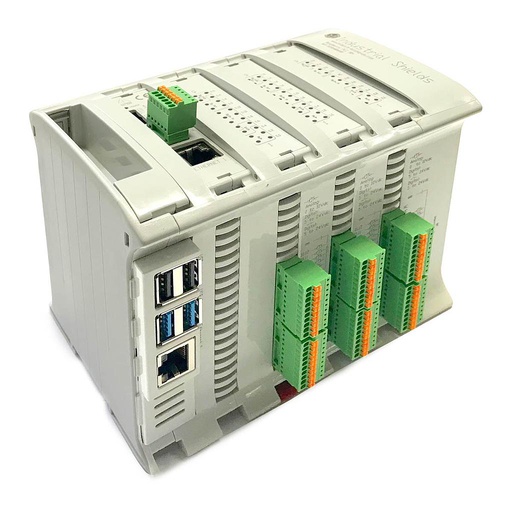
Raspberry PLC 58
An industrial PLC built around a Raspberry Pi 4, with 39 inputs and 24 outputs, two Ethernet ports, two RS-485 ports, Wi-Fi and Bluetooth LE, for DIN rail. It runs Debian 64-bit. In this pattern it runs the machine, reads the remote I/O and the drive on its two RS-485 ports, and sends the events over its 4G board.
- Role
- Machine control, remote I/O, drive, events over 4G
- Inputs
- 39: 18 analog/digital (0-10 V, 12-bit), 21 digital optoisolated (5 to 24 Vdc)
- Outputs
- 24: 9 analog/digital/PWM (0-10 V), 15 digital optoisolated (5 to 24 Vdc)
- Comms
- 1 x Gigabit and 1 x 10/100 Ethernet, 2 x RS-485, Wi-Fi, Bluetooth LE, I2C, SPI
- Expansion
- One board: CAN, LoRa or 4G (LTE-M/NB-IoT or LTE Cat 4)
- Computer
- Raspberry Pi 4, 2, 4 or 8 GB RAM, Debian 64-bit
- Reliability
- UPS for safe shutdown, real-time clock with battery
- Power and mounting
- 12 to 24 Vdc, DIN rail TS35, IP20, 0 to 50 °C
The image shows the Raspberry PLC 58. Choose the 4G (LTE Cat 4) expansion board when you configure it. The outputs are optoisolated transistor outputs, not relays: drive valves and contactors through interposing relays.
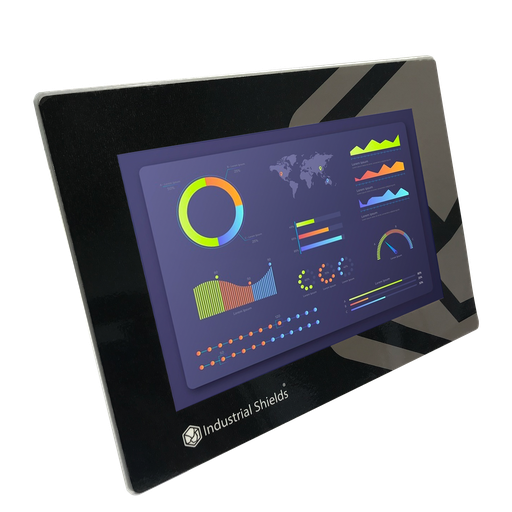
TouchBerry Pi Panel PC 7" FLEX
The operator panel of the machine: a Raspberry Pi 4 behind a 7" capacitive touchscreen, on Ethernet to the PLC. It shows the builder's interface, the programs, the alarms and the changes waiting for a person.
- Role
- Machine interface, alarms, local accept of changes
- Screen
- 7" IPS, 1024 x 600, capacitive, 900 nits
- Front
- IP20 or IP65 on the FLEX version
- Own I/O
- 3 digital in, 2 analog in, 5 digital out
- Comms
- Gigabit Ethernet, 4 x USB, one serial port (RS-485, RS-232 or TTL)
- Power
- 12 to 24 Vdc, UPS for safe shutdown
The family also has a 10.1" model.
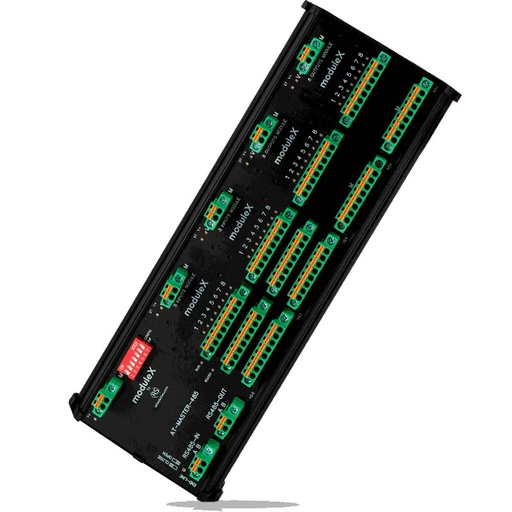
moduleX Inputs Outputs Module
Remote I/O for the options of each order. A master module talks Modbus RTU over RS-485 to the PLC, and the I/O modules snap onto it. You choose the modules, and the enclosure is sized to your choice.
- Role
- Dosing pumps, low levels, recovery tank
- Modules
- MX-8DI, MX-8DO, MX-4AI, MX-4AOV
- Bus to the PLC
- RS-485, Modbus RTU slave, ID by DIP switch
- Modules per master
- Up to 6 in the enclosure of the configurable kit. The Xbus allows up to 16 per master, 10 ms refresh
- Wiring
- Pluggable push-in terminals, 0.2 to 1.5 mm²
- Mounting
- DIN rail, IP20
Questions about this case
How do you choose a PLC for a machine built in series?
Start from the base machine and leave room. Count its inputs, outputs and buses, then put the options of each order on remote I/O, so the main cabinet does not change. Check the links you need: a bus for the drive, Ethernet for the panel, a remote link for service. And check how the controller behaves on a power cut. In this pattern the Raspberry PLC 58 has 63 I/O, two RS-485 ports, two Ethernet ports, an optional 4G board and a UPS for safe shutdown.
How do you service laundry machines remotely over 4G?
A typical way to do it: the PLC publishes events (cycle start and end, faults with a code) over MQTT to a server, and keeps them while the link is down. The server never writes to the outputs. A change from the service team is a request: the PLC shows it on the panel and applies it only with the machine stopped and after a person accepts it. See an MQTT to SQL Server bridge on a Raspberry PLC, and try machine states and alarms in the Machine Monitor simulator.
What does the EU Machinery Regulation 2023/1230 change for connected machines?
The Regulation (EU) 2023/1230 applies from 20 January 2027 and replaces the Machinery Directive 2006/42/EC. Its essential requirements add protection against corruption (Annex III, 1.1.9): software and data that are critical for the machine's compliance with the essential health and safety requirements must be identified and protected against accidental or intentional corruption, and the machine must collect evidence of legitimate or illegitimate interventions in that software or its configuration. The control system must also stay safe against reasonably foreseeable malicious attempts by third parties (1.2.1). Compliance is for the whole machine and its builder, not for the controller alone. Logging every change and accepting it locally are two steps in that direction.
Does the PLC lock the door of a washer-extractor?
No. The door interlock and the stop of the drum before the door opens are safety functions. They are built with safety-rated components, such as a safety relay and a guard locking device (ISO 14119), following ISO 10472-2 (washing machines and washer-extractors) and ISO 13849-1. The standard PLC asks for the lock, reads the status of the safety circuit and shows it. See safety interlocks and e-stop on a Raspberry PLC.
How do you read 4-20 mA sensors on a Raspberry PLC 58?
Its analog inputs read 0-10 V. A 500 Ω resistor turns 4-20 mA into 2-10 V. A DIN rail 500 Ω converter does it in the cabinet. 4 mA gives exactly 2 V, the live zero. A reading well below 2 V (for example under 1.8 V, about 3.6 mA) then means a broken wire or a dead transmitter, so the PLC can raise an alarm instead of filling the drum. See closed-loop current calibration on a Raspberry PLC.
Why put the options on moduleX remote I/O?
So the main cabinet is the same in every machine. The options of each order (dosing pumps, low level switches, a recovery tank) go on moduleX modules on RS-485, close to the devices. The PLC reads them as a Modbus RTU master. The configurable kit takes up to 6 modules in its enclosure (the Xbus allows up to 16 per master), and the master ID is set by DIP switch, so the end-of-line test checks it. See a Modbus RTU master over RS-485 (the example runs on an ESP32 PLC; the protocol is the same).
Download the case study
4-page PDF with the challenge, the logic, the architecture and the hardware. No form required.
Building machines in series?
Tell us about your machine and your series. An engineer will answer.
Tell us the I/O of the base machine, the options, the drive, the panel and how you want to service it. Tell us if it is one machine or a series. We will propose a configuration and how to test it.
- You get an answer from our technical team
- I/O count, options and remote I/O for your series
- Arduino, ESP32 or Raspberry Pi based PLCs