Case study · Manufacturing line · Ardbox PLC
Three checks against bad parts. One small Ardbox PLC.
No drilling without the part in place, a LED test and a QR check.
A small factory makes components with indicators for cars. Some parts left the line with misplaced holes or a QR code that nobody could read.
The answer was not a new machine. It was three checks around the old one.
This case is based on a project published by Industrial Shields in 2019. It does not name the company. The problems, the checks and the hardware come from the case. The values in the panels are examples.
The challenge
Fewer non-compliant parts, with small changes to the line.
The company needed to improve three verification processes to reduce non-compliant products. It is a small company, so it asked for a simple solution around the machines it already had.
Holes in the wrong place
The support that holds the plastic part was manufactured with a measurement error. The part does not fit perfectly, and the drill can make the holes in the wrong position.
LED strips that must work
The LED strips placed in the parts never had significant problems. The company still wants to verify them, even if it changes its LED supplier.
QR codes nobody can read
The QR sticker is used for traceability. Due to the environment of the factory it is sometimes printed badly, and 7 % of the codes were not read correctly.
Use what is already there
Where possible, the solution reuses what the factory has: the PLC runs from a 12 V / 2 A supply left from an old prototype.
Check, then let the operator decide
Each check gives the operator a clear signal: the drill only works with the part in place, the LED strip lights up on demand, and a lamp confirms the QR code before the part is finished.
How it works
Three checks: the part in place, the LEDs, the QR code.
Each panel shows one check. Press the buttons. The panels are illustrative simulations: the functions and the wiring are the ones of the case, but the times, the counts and the reference are examples, not data from the factory.
No part in position, no power to the drill.
A small button on the support is pressed only when the plastic part sits correctly. The PLC reads it and keeps the 230 V supply of the drill off with a relay until then. A misplaced part cannot be drilled. Place the part and try to start the drill.
- A button on the support, on a digital input
- A relay of the PLC on the 230 V supply of the drill
- Holes only with the part correctly placed
Drilling station (example)
Illustrative simulation. Example values, not data from the factory. The case puts a small button on the support that is active when the part is correctly placed, and the program cuts the current of the drill when no part is detected or it is misplaced. In this example a relay of the PLC drives the drill supply; for a drill motor, a typical way is to have the relay switch a contactor.
Practise an interlocked station step by step in the assembly station simulator
Push a button, see every LED.
The operator pushes a button. The PLC closes a relay that connects the LED strip to the 12 V supply, and the strip lights up. The operator sees at once if one LED does not work. Choose a strip and press the test button.
- Push button on a digital input
- LED strip powered through a relay from the same 12 V supply
- The operator checks the strip, whatever the supplier
LED strip test (example)
Illustrative simulation. Example values, not data from the factory. The case connects the LED strip to the same 12 V supply as the PLC through a relay. When the operator pushes a button, the relay closes and the strip lights up, so the operator can see that every LED works. In this example the test lasts 3 s and a strip has 8 LEDs.
A lamp says the QR code can be read.
At the end of the process, a QR reader on RS-232 reads the sticker. If the PLC receives the correct reference, it lights a LED. If not, the operator checks the label before the part is finished. Try a clean label, a bad print and a wrong reference.
- QR reader on the RS-232 port of the PLC
- The PLC compares the code with the reference
- A LED tells the operator the QR code is good
QR check at the end of the process (example)
Illustrative simulation. Example values, not data from the factory. The case uses a QR reader on RS-232. The PLC reads the code, and if it receives a correct reference, a LED lights up to say that the QR code was read correctly. The operator checks it before finishing the process. In this example the reference is IND-4521 and the reader gives up after 2 s.
Run a pass or fail test on many parts in the end-of-line test simulator
System architecture
How do you add three checks to a line with one small PLC?
Everything goes to one Ardbox Relay PLC. The button on the support, the LED test button and the QR reader are its inputs. Its relays switch the 230 V supply of the drill, the LED strip and the QR OK lamp. A 12 V / 2 A supply that the company had from an old prototype powers the PLC and the LED strip. Inputs and outputs are still free for more processes.
| Signal | Between | Type | Purpose |
|---|---|---|---|
| Part in place | BetweenButton on the support → PLC | TypeDigital input | PurposeActive only when the part is correctly placed |
| Drill supply | BetweenPLC → 230 V supply of the drill | TypeRelay output (to a contactor, typical) | PurposeNo current to the drill without the part in position |
| LED test | BetweenPush button → PLC | TypeDigital input | PurposeThe operator asks for the LED test |
| LED strip | BetweenPLC → LED strip, from the 12 V supply | TypeRelay output | PurposeThe strip lights up so the operator can check it |
| QR code | BetweenQR reader → PLC | TypeRS-232 | PurposeThe code of the sticker, read at the end of the process |
| QR OK | BetweenPLC → indicator LED | TypeRelay or digital output | PurposeLights when the reference is correct |
| Power | Between12 V / 2 A supply → PLC and LED strip | Type12 Vdc | PurposeA supply the company already had, no new one bought |
Why it works
Small checks where the defects start.
At the source of the error
The support had a measurement error. Instead of a new support, the drill simply cannot run until the part sits right.
People stay in the loop
The operator sees the LED strip and the QR lamp, and decides before the part is finished. The PLC gives a clear signal.
Independent of the supplier
The LED test works with any strip, so the company can change its LED supplier and still check every part.
Reuse what is there
The PLC runs from a 12 V / 2 A supply that the company had from an old prototype. No resources spent on a new power supply.
One compact controller
The three checks run on one Ardbox Relay PLC, 45 mm wide on the DIN rail, next to the machines it controls.
Room to grow
Inputs and outputs of the PLC are still free, so more checks or processes can be added with the same controller.
Hardware
An Arduino based PLC with relays, in 45 mm of DIN rail.
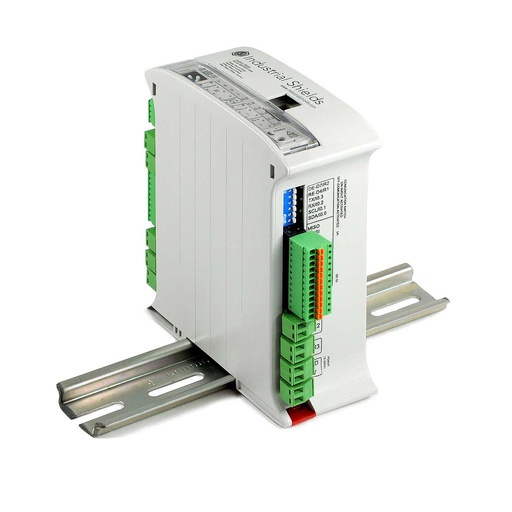
Used in the caseARDBOX Relay ARDUINO based PLC
A compact Arduino based PLC with 8 relays and serial ports. The case used the ARDBOX PLC 20 I/Os RELAY HF; today it is the Ardbox Relay HF+.
- Role in this case
- Reads the support button, the LED test button and the QR reader; switches the drill supply, the LED strip and the QR OK lamp
- Inputs
- 10: 6 analog/digital (0-10 V, 10-bit) and 4 digital optoisolated (5 to 24 Vdc), 1 with interrupt
- Outputs
- 10: 8 relays (230 Vac 4 A / 24 Vdc 2 A, resistive) and 2 analog/digital (0-10 V)
- Communication
- RS-232 and RS-485, I2C, SPI, USB for programming
- Controller
- Arduino Leonardo, ATmega32U4, 16 MHz
- Programming
- Arduino IDE with the Industrial Shields boards
- Power
- 12 to 24 Vdc, 30 W max.
- Size and mounting
- 100 x 45 x 115 mm, DIN rail, 0 to 60 °C
The relays are rated for resistive loads. A drill motor draws a high starting current, so a typical way is to switch it through a contactor. All the specifications are in the Ardbox HF+ family datasheet.
Questions about this case
How can a PLC stop a drill when the part is misplaced?
In this case a small button on the support is pressed only when the part is correctly placed. The PLC reads it and keeps a relay open on the 230 V supply of the drill until then, so the drill has no current. A typical way for a motor is to let the relay switch a contactor. This interlock prevents bad holes; if it must also protect the operator, it has to be designed as a safety function (ISO 13849-1), with a safety relay or a safety PLC.
Why test the LED strip with a button instead of measuring it?
Because the operator sees it at once. The PLC closes a relay and the strip lights up from the 12 V supply; a dark LED is obvious. If you need a record of every test, the PLC can also measure the current of the strip on an analog input and save the result.
How does a QR reader talk to an Ardbox PLC?
Over RS-232, as in the case. The reader sends the decoded text when it reads a code, and the program compares it with the expected reference. The Ardbox has RS-232 and RS-485; check how the serial port of your model is configured before wiring the reader.
What happens when a QR code cannot be read?
The OK lamp stays off, so the operator checks the label before finishing the part. In the case 7 % of the codes were not read correctly, because the factory environment sometimes spoils the print. A typical next step is to count the failed reads to see when the printer needs attention.
Is one Ardbox enough for the three checks?
Yes. The three checks use three inputs or ports and three relays, and the case says there are still free inputs and outputs for more processes. For larger lines, the end-of-line testing case shows a bigger test station with an M-Duino.
Which power supply does the Ardbox need?
12 to 24 Vdc. In the case the PLC runs from a 12 V / 2 A supply that the company had from an old prototype, and the same supply feeds the LED strip through a relay. The Ardbox family draws between 700 mA and 1.5 A, so add the current of the LED strip when you size the supply.
Download the case study
4-page PDF with the challenge, the logic, the architecture and the hardware. No form required.
Similar line?
Tell us where your defects start. An engineer will answer.
Tell us what goes wrong on your line, which machines and readers you have and how many checks you need. We will tell you which PLC fits and how to wire each check.
- You get an answer from our technical team
- Interlocks, test buttons and code readers
- Arduino, ESP32 or Raspberry Pi based PLCs