Case study · Online shop warehouse · ESP32 PLC
An order comes in. A labelled parcel goes out.
Pick, pack and ship for an online beauty shop, run by an ESP32 PLC.
An online order is a list of products on different shelves.
Find them, bring them together and ship them with the right label.
This case study describes an automated warehouse for a company that sells beauty and personal care products online. The layout, the areas and the steps come from the case. The case does not publish the robots, the ERP, the scanners or results in figures. The values in the panels are examples. No photos of the installation are published.
The challenge
Receive the order, pick the products, send them to packing.
The company needed an automated warehouse to manage its inventory and to make its operations more efficient. The system had to receive the customer orders, pick the products from the warehouse and send them to the packing area. An ESP32 PLC controls the movement of the products.
From the web to the shelf
When a customer places an order online, the system records it and sends it to the storage area. The PLC looks up the location of every product in the inventory.
About a hundred references
The warehouse is made of modular shelves with about a hundred product references. Presence sensors on each rack detect where there is product.
Single items and grouped orders
Most products that ship on their own are packed in a fully automatic process. When an order groups several products, an operator usually works in a semi-automated process.
Every parcel registered
Barcode scanners register the products and send the data to the shipment tracking system. Grouped products are scanned twice: each product, then the group.
Synchronised with the ERP
The data saved during the process labels every parcel, single or grouped. The ERP prints the label, requests the collection from the parcel company and sends the tracking to the customer.
How it works
Three steps: pick, pack and ship.
Each panel shows one step of the case. Press the buttons. The panels are illustrative simulations: the locations, the references, the order sizes, the messages and the checks are examples, not data from the case.
Look up the location, then send the robot.
The order arrives from the online shop. The PLC searches the inventory for the location of each product and sends the orders to the mobile robots that pick them. Each rack has presence sensors. A typical way to use them: check the sensor before the pick job, and hold the order if the location is empty. Place an order, then empty a location.
- The order is recorded and sent to storage
- The PLC looks up the location of every product
- The robots pick and carry the products to packing
PLC events (example)
Illustrative simulation. Example values, not data from the case. 12 of about 100 locations are shown. The case says that the PLC looks up the locations and sends the orders to the robots. It does not publish how the robots get their jobs. Checking the presence sensor before the pick job is a typical way to do it.
One product goes straight through. A group waits for the operator.
Most products that ship on their own go into the fully automatic process. Grouped orders usually go to an operator station, in a semi-automated process. Barcode scanners register every product, and a grouped order is scanned twice: first each product, then the group. Try a single item, a group and a missed scan.
- Single items: automatic packing
- Groups: operator station, semi-automated
- Groups scanned twice: products, then group
Packing area (example)
Illustrative simulation. Example values, not data from the case. The routes and the two scans of a grouped order come from the case. Comparing the scans with the number of items in the order is a typical check, not a published one.
Label, collection, tracking.
The packed parcel goes to the shipping area. With the data saved during the process, the ERP prints the label, requests the collection from the parcel company and sends the tracking to the customer. Close a parcel, then cut the ERP link and bring it back.
- The ERP prints the label
- The ERP requests the collection
- The ERP sends the tracking to the customer
ERP events (example)
Illustrative simulation. Example values, not data from the case. The three ERP tasks come from the case. The case does not publish the link between the PLC and the ERP. Keeping the events in a queue and sending them again when the link is back is a typical way to do it.
System architecture
How does an online order become a parcel?
The online shop sends the order to the ERP and to the warehouse. The ESP32 PLC reads the presence sensors of the racks, looks up the location of each product and sends the pick jobs to the mobile robots. Sensors and cameras check that the products reach the right place. In the packing area, barcode scanners register each product and feed the shipment tracking system. The ERP prints the label, requests the collection and sends the tracking. The case does not publish the links between the PLC, the robots and the ERP.
| Signal | Between | Type | Purpose |
|---|---|---|---|
| Customer order | BetweenOnline shop → ERP and warehouse | TypeOrder data | PurposeThe products to pick |
| Product presence | BetweenRack presence sensors → ESP32 PLC | TypeDigital input (typical) | PurposeThere is product at a location |
| Pick job | BetweenESP32 PLC → mobile robots | TypeMessage (link not published) | PurposeThe location of each product of the order |
| Delivery check | BetweenSensors and cameras → system | TypeNot published | PurposeThe products reach the right place |
| Product scan | BetweenBarcode scanners → shipment tracking | TypeBarcode read | PurposeRegisters each product |
| Group scan | BetweenScanner at the operator station → shipment tracking | TypeBarcode read | PurposeSecond scan for a grouped order |
| Parcel | BetweenPacking area → shipping area | TypeProduct flow | PurposePacked and ready to leave |
| Label | BetweenERP → label printer | TypePrint job | PurposeThe label of every parcel, single or grouped |
| Collection and tracking | BetweenERP → parcel company and customer | TypeMessage | PurposeCollection request and tracking of the parcel |
Why an ESP32 PLC
Open, modular and ready for the network.
Open solution
The ESP32 PLC is programmed in C++ with the Arduino IDE. There are no licence fees for the software, and the code belongs to the project.
Modular
In this project, a solution whose specification can grow in the future was one of the reasons to choose it. The ESP32 PLC family adds I/O modules over I2C, remote I/O over Modbus RTU and one optional communication board: LoRa, 4G or CAN.
Network built in
Ethernet, Wi-Fi and Bluetooth LE are on board. A warehouse controller can join the plant network and talk to a server or an ERP. The case does not publish which link it used.
Industrial hardware
DIN rail mounting, a 12 to 24 Vdc supply with polarity protection and optoisolated digital I/O, for the cabinet of a warehouse.
Support from the first sketch
Our technical team works with the customer before, during and after the sale and the installation.
Learn the pieces
See how an ESP32 PLC logs MQTT data to an SD card when the network is down, reads data from a server over HTTP and works as a Modbus RTU master over RS-485.
Hardware
The PLC of the warehouse.
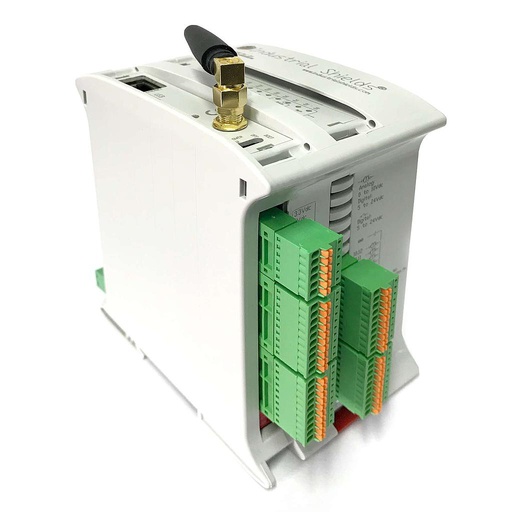
ESP32 PLC 21 FLEX
The case does not publish the exact ESP32 PLC model. The image of the original case shows an ESP32 PLC 21. The ESP32 PLC 21 FLEX is its current version, configurable with LoRa, 4G or CAN. It reads the presence sensors, looks up the locations and sends the pick jobs.
- Role in this case
- Controls the movement of the products: locations, presence and pick jobs
- Processor
- ESP32 dual core, up to 240 MHz, 16 MB flash, 520 KB SRAM
- Inputs
- 13: 6 analog/digital (0-10 V, 11-bit) and 7 digital optoisolated, 5 to 24 Vdc, 2 with interrupt
- Outputs
- 8: 3 analog/digital/PWM (0-10 V, 12-bit) and 5 digital optoisolated, 5 to 24 Vdc
- Communications
- Ethernet 10/100, Wi-Fi 2.4 GHz, Bluetooth LE, RS-485, RS-232, TTL, I2C, SPI
- Power and mounting
- 12 to 24 Vdc, DIN rail TS35, IP20; real-time clock with backup battery
The case does not publish how many presence sensors there are. The ESP32 PLC 21 FLEX has 13 inputs. For more sensors, add I/O modules over I2C (up to 127), remote I/O over Modbus RTU, or choose an ESP32 PLC with more I/O.
Questions about this case
What does a PLC do in an e-commerce warehouse?
In this case the ESP32 PLC controls the movement of the products. It reads the presence sensors of the racks, looks up the location of each product of an order in the inventory and sends the pick orders to the mobile robots. Packing, labelling and tracking are synchronised with the ERP.
How does the warehouse know where each product is?
The inventory keeps the location of each of the about a hundred references, and presence sensors on each rack detect where there is product. A typical way to combine them: the PLC looks up the location and checks the sensor before it sends the pick job.
Why is a grouped order scanned twice?
Each product is scanned first, and then the group. The first scans register what is in the parcel. The group scan links those products to one shipment, so the label and the tracking cover the whole order.
Which orders are packed automatically?
Most products that ship on their own go into the fully automatic process. When an order groups several products, an operator usually takes part in a semi-automated process.
How does the ERP take part in shipping?
With the data saved during the process, the ERP prints the label of each parcel, requests the collection from the parcel company and sends the tracking to the customer. The case does not name the ERP.
Can an ESP32 PLC talk to an ERP?
Yes. It has Ethernet and Wi-Fi, so it can send and receive data with a server over protocols such as HTTP or MQTT. The case does not publish which link it used. If the network can fail, the PLC can keep the events and send them again later.
Download the case study
4-page PDF with the challenge, the logic, the architecture and the hardware. No form required.
Automating a pick and pack warehouse?
Tell us your orders, your shelves and your ERP. An engineer will answer.
Tell us how many references and locations you have, how products move from the shelf to packing, how you scan them and which ERP prints your labels. We will tell you which controller fits and how to connect it.
- You get an answer from our technical team
- I/O count and controller sizing for your warehouse
- Arduino, ESP32 or Raspberry Pi based PLCs