
To set PROFINET communication on Linux with a Raspberry PLC, use p-net, the open source PROFINET IO-device stack from RT-Labs. Clone the v0.2.0 tag of p-net (the last public version with the build system and the sample application), build it with cmake, give the Ethernet interface an IP address and run sudo ./pn_dev -v. The board is then a PROFINET IO-device that sends LLDP and DCP frames and waits for an IO-controller.
This tutorial runs the p-net sample application on a Raspberry board as IO-device and uses the Raspberry PLC on the same network to capture the PROFINET frames with tshark. In the second part, the Raspberry PLC becomes the IO-controller with CODESYS and exchanges cyclic data with the device.
Industrial Shields does not provide PROFINET libraries for the inputs and outputs of the Raspberry PLC. To read and write the PLC I/O, use the C++, Python or Node-RED libraries in the Industrial Shields GitHub, or CODESYS on the Raspberry PLC.
What is PROFINET?
PROFINET (Process Field Network) is the industrial Ethernet standard of PROFIBUS & PROFINET International (PI), defined in IEC 61158 and IEC 61784. It runs on standard Ethernet and connects an IO-controller (the PLC) with IO-devices (remote I/O, drives, sensors). A GSDML file describes each IO-device to the engineering tool of the controller.
| Channel | What travels on it | Typical cycle |
|---|---|---|
| TCP/IP and UDP/IP | Configuration, parameters, diagnostics, acyclic reads and writes | Not time critical |
| Real-Time (RT) | Cyclic I/O data, directly on Ethernet with Ethertype 0x8892 | From 1 ms, typical in factory automation |
| Isochronous Real-Time (IRT) | Motion control with reserved bandwidth, needs IRT hardware in switches and devices | Below 1 ms |
p-net is a PROFINET IO-device stack written in C. It supports Conformance Classes A and B, Real-Time class 1, LLDP, SNMP, alarms and multiple Ethernet ports on Linux. It does not support IRT or media redundancy (MRP), and it does not implement an IO-controller. It is dual licensed: GPLv3, or a commercial license from RT-Labs for commercial products.
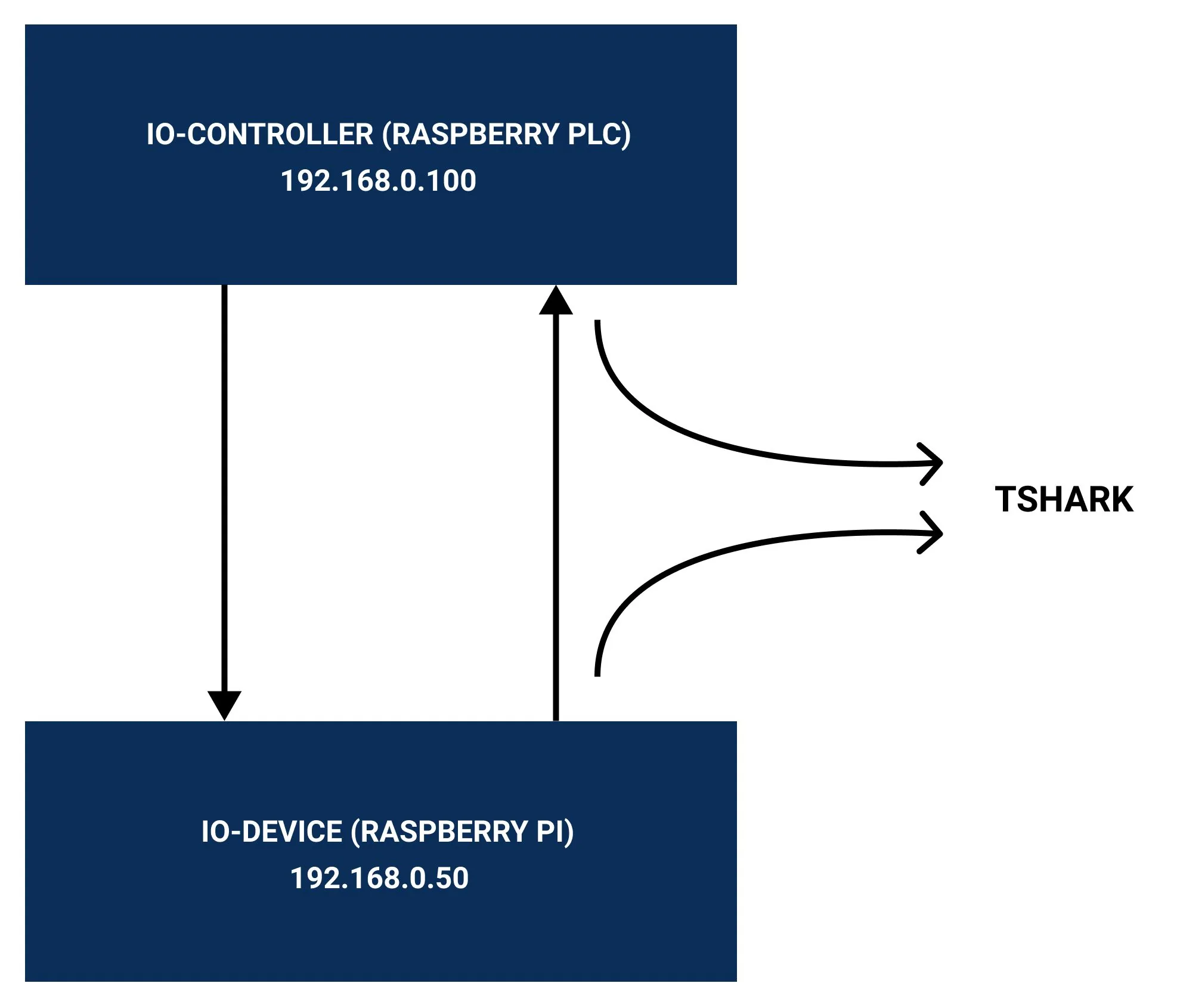
Test setup: IO-device, Raspberry PLC and tshark
| Board | Role in this tutorial | IP address |
|---|---|---|
| Raspberry Pi (or a second Raspberry PLC) | PROFINET IO-device with the p-net sample application | 192.168.0.50 |
| Raspberry PLC | Captures the PROFINET frames with tshark. IO-controller with CODESYS in part 2 | 192.168.0.100 |
- A Raspberry Pi with Raspberry Pi OS and its USB-C power supply, or a second Raspberry PLC
- A Raspberry PLC with Ethernet
- An Ethernet switch and two Ethernet cables
- Internet access on both boards to download the packages, by LAN or Wi-Fi
Install the build tools on Raspberry Pi OS
On the IO-device board, install git, cmake and the compiler. p-net needs cmake 3.14 or later, and Raspberry Pi OS based on Debian 12 (Bookworm) already has cmake 3.25 in its repository, so the snap version of the first edition of this tutorial is not needed.
sudo apt update
sudo apt install -y git cmake build-essential
cmake --version
Download and build p-net v0.2.0
Since 2024, the default branch of the p-net repository on GitHub contains only the sources of the stack: no CMakeLists.txt, no sample application and no documentation (checked in October 2026). The last public version with the build system and the pn_dev sample application is the tag v0.2.0 (April 2022). Clone that tag with its submodules:
mkdir -p /home/pi/profinet
cd /home/pi/profinet
git clone --branch v0.2.0 --recurse-submodules https://github.com/rtlabs-com/p-net.git
cmake -B build -S p-net -DBUILD_TESTING=OFF
cmake --build build --target install
These commands build pn_dev in /home/pi/profinet/build. We checked them with cmake 3.28 and gcc 13 on Linux. -DBUILD_TESTING=OFF skips the unit tests and the download of googletest, which also fails with CMake 4.
Already cloned without submodules? Run git submodule update --init --recursive in the p-net folder.
Settings for a real-time test. This cmake command builds a debug version with shared libraries and SCHED_FIFO scheduling:
cmake -B build -S p-net -DCMAKE_BUILD_TYPE=Debug -DBUILD_TESTING=OFF -DBUILD_SHARED_LIBS=ON -DUSE_SCHED_FIFO=ONRun the p-net sample application
- Go to the build directory:
cd /home/pi/profinet/build - Bring up the Ethernet interface and set the initial IP address.
ipreplaces the oldifconfig, which is not always installed:sudo ip link set eth0 up sudo ip addr add 192.168.0.50/24 dev eth0 - Run the sample application with a high log level:
sudo ./pn_dev -v -v -v -v
The application prints its station name (rt-labs-dev by default) and IP address, and waits for a connection from an IO-controller. Without a controller it already sends an LLDP frame every 5 seconds and a DCP Hello request with its station name.
| Option of pn_dev | What it does |
|---|---|
-i eth0 | Ethernet interface to use (default eth0) |
-s NAME | Station name, if not already stored (default rt-labs-dev) |
-b FILE, -d FILE | Read Button1 and Button2 from a file or a GPIO |
-p PATH | Directory for the stored settings |
-r, -f | Remove the stored files, or reset to factory settings |
-v | More log output, can be repeated |
Let p-net manage the IP address of the IO-device. A PROFINET IO-controller sets the name and the IP address of the device with DCP, and the DHCP client of Linux interferes with it. On Raspberry Pi OS Bookworm, NetworkManager is that client: stop it on the device interface with sudo nmcli device set eth0 managed no. Do not give the IO-device a static IP in the network settings.
Capture PROFINET frames on the Raspberry PLC with tshark
- Give the Raspberry PLC the IP address 192.168.0.100 on the same network. On Bookworm, use
nmclior follow how to configure a static IP on a Raspberry PLC. For a quick test:sudo ip addr add 192.168.0.100/24 dev eth0 - Install tshark, the command line version of Wireshark. Answer Yes when it asks if non-superusers can capture packets, and add your user to the
wiresharkgroup:sudo apt update sudo apt install -y tshark sudo usermod -a -G wireshark $USER - Log out and log in again, and check the installation. If you answered No, run
sudo dpkg-reconfigure wireshark-common.tshark --version tshark -D - Capture on eth0. The capture filter keeps only LLDP and PROFINET frames:
tshark -i eth0 -f "ether proto 0x88cc or ether proto 0x8892"
The capture shows an LLDP frame from the IO-device every 5 seconds:

The capture also shows the DCP Hello request with the station name rt-labs-dev. Without the filter you also see the IP traffic of the device at 192.168.0.50 (ARP, IGMP and mDNS):

LLDP and DCP in a PROFINET network
PROFINET uses LLDP (Link Layer Discovery Protocol, IEEE 802.1AB) to know which device is connected to which switch port. Each device sends LLDP frames to the multicast MAC address 01-80-C2-00-00-0E, with Ethertype 0x88CC. The controller uses this neighbourhood information for topology detection and to replace a device without engineering tools.
DCP (Discovery and Configuration Protocol) travels with the PROFINET Ethertype 0x8892. The controller uses it to find a device by its station name and to set its IP address. That is why the station name of the device must match the name in the controller project.

Start the p-net application at boot with systemd
p-net includes a systemd service for the sample application. Copy it, check it and enable it on the IO-device:
sudo cp /home/pi/profinet/p-net/src/ports/linux/pnet-sampleapp.service /lib/systemd/system
sudo cp /home/pi/profinet/p-net/src/ports/linux/enable-rpi-gpio-pins.sh /usr/bin/
sudo chmod +x /usr/bin/enable-rpi-gpio-pins.sh
sudo nano /lib/systemd/system/pnet-sampleapp.service
sudo systemctl daemon-reload
sudo systemctl enable pnet-sampleapp.service
sudo systemctl start pnet-sampleapp.service
Before you enable it, check three lines of the service file:
ExecStartPre=/sbin/ifconfig eth0 up: change it toExecStartPre=/usr/sbin/ip link set eth0 upififconfigis not installed.ExecStartPre=/usr/bin/enable-rpi-gpio-pins.shand the-band-doptions read buttons on GPIO 27 and GPIO 22 of a Raspberry Pi. On a Raspberry PLC, do not export GPIOs that the PLC uses: remove these parts, or point-band-dto text files.WorkingDirectoryandExecStartmust point to your build directory.
To see the status of the service and its log output:
sudo systemctl status pnet-sampleapp.service
journalctl -fu pnet-sampleapp
To follow the log of the device on a serial console, add the line enable_uart=1 to /boot/firmware/config.txt (/boot/config.txt before Bookworm) and reboot.
Next step: the Raspberry PLC as PROFINET IO-controller. In part 2, CODESYS on the Raspberry PLC loads the GSDML file of p-net, connects to the IO-device and exchanges 8 digital inputs and 8 digital outputs. To see a Raspberry PLC that collects data from field protocols and sends it to a higher system, read the onboard data gateway case study.
PROFINET IO-controller with CODESYSRead the data gateway case study
FAQ about PROFINET on the Raspberry PLC
Can a Raspberry PLC be a PROFINET IO-device?
Yes, with p-net on Linux, as in this tutorial. The board needs to send and receive raw Ethernet frames, which Raspberry Pi OS allows with root rights.
Can a Raspberry PLC be a PROFINET IO-controller?
Yes, with CODESYS Control for Raspberry Pi SL and the PROFINET controller of CODESYS. See part 2 of this tutorial. p-net itself is only a device stack.
Why does cmake fail after cloning p-net?
The default branch of the repository has no CMakeLists.txt since 2024. Clone the tag with git clone --branch v0.2.0 --recurse-submodules.
Does p-net support PROFINET IRT?
No. p-net supports Real-Time class 1 (RT) with Conformance Classes A and B. IRT needs dedicated hardware.
Can I use p-net in a commercial product?
p-net is under GPLv3. For a commercial product that does not follow GPLv3, RT-Labs sells a commercial license.
More about the Raspberry PLC on industrial networks
- PROFINET and Raspberry PLC: trigger alarms with CODESYS
- Setting up CODESYS for Raspberry Pi PLC
- EtherNet/IP vs PROFINET vs Modbus TCP
- How to check the Ethernet configuration
- Choosing an industrial controller
Choose the model and the I/O mix in the Raspberry PLC family.