Success story · Gañar Group · Raspberry PLC
One PLC for the mall HVAC. Watched from afar.
One Raspberry PLC runs, logs and reports the HVAC unit.
Fewer boxes in the panel. More data from the unit.
Three questions for each HVAC unit: how long it runs, how it is doing, and who can see it from afar.
Gañar Group, together with its integration partner Square One Project Group, integrated an Industrial Shields Raspberry PLC to automate, control and remotely monitor a 5,000 m² shopping area in Pretoria, South Africa. The success story was published in 2021. The values in the panels are examples, not data from the installation.
From the project
The unit, the cabinet and the PLC.
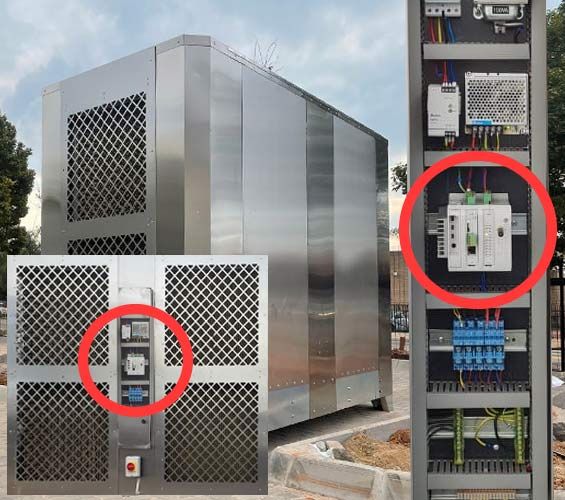
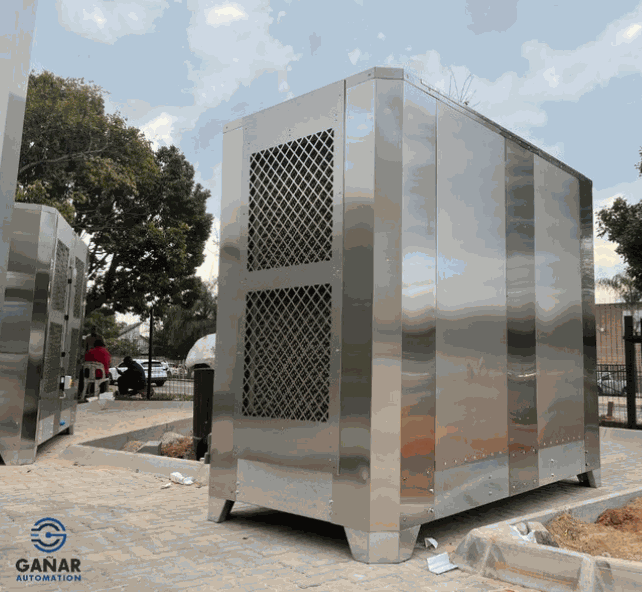
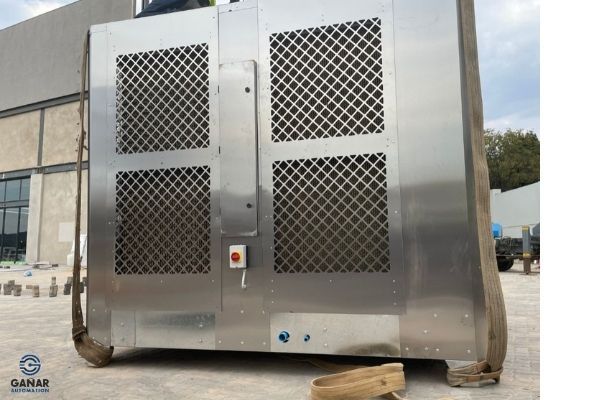
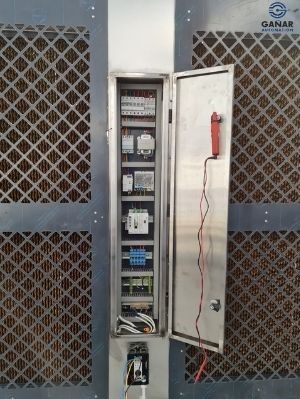
Real photos from the original success story. They show the HVAC units built by Gañar and the control cabinet with the Raspberry PLC.
The challenge
Better control of the mall HVAC. Less energy. Fewer parts.
Shopping centres need HVAC for the comfort of the visitors and for energy efficiency. Gañar Group asked for a better design of an HVAC system for the heating, ventilation and air conditioning of a shopping centre. The customer wanted better control and more information from the monitoring, to anticipate the best configuration, keep the comfort for the visitors and prevent a high energy consumption.
Simplify the hardware
Reduce the number of elements that control and monitor the HVAC.
Remote control
Control the HVAC installation without a person at the unit.
Better monitoring
Status, consumption, warnings and alerts of the HVAC, in one place.
Optimal performance
The best environmental conditions in the mall, without a high energy consumption.
Too many boxes before
The installed equipment could not do this without extra hardware, external modules and several software interfaces and protocols. The goal: one PLC, open source technology, and the operating hours and air conditioning parameters recorded in the same controller.
How it works
Three jobs for one PLC: record, watch, report.
Each panel shows one job of the PLC. Press the buttons and move the slider. The panels are illustrative simulations: modes, temperatures, limits and times are examples, not data from the installation.
Every hour of every stage, counted by the PLC.
Gañar Group wanted one PLC with the knowledge and recording of the operating hours and of the air conditioning parameters. A typical way to do it: the PLC counts the hours of the fans, the compressor and the heater from their run signals, and the starts of the compressor. Change the mode and watch the counters.
- Operating hours of each stage, recorded on the PLC
- Air conditioning parameters next to the hours
- A typical way to do it: count from the run feedback, not from the command
Run log (example)
Illustrative simulation. Example values. Example: the clock runs 5 minutes for every 0.2 s. The case asks for the operating hours and the air conditioning parameters to be recorded, but it does not publish them.
Switch a PLC output from a Node-RED flow: control a Raspberry PLC digital output from Node-RED.
Status, warnings and alarms before the visitors feel it.
The customer wanted better monitoring of the HVAC status, consumption, warnings and alerts. A typical way to do it: the PLC reads the air temperatures, the pressure drop on the filter and the current of the compressor, and checks each value against a limit. Clog the filter, then trip the compressor.
- Warnings before a fault, alarms at the fault
- A short delay, so one peak does not raise an alarm
- Trip contacts of the unit read by the PLC
Warnings and alarms (example)
Illustrative simulation. Example values. Example limits: warning at 250 Pa of filter pressure drop, alarm at 300 Pa after 3 s, alarm at once on a compressor trip. The real limits of the installation are not published.
Keep every warning and alarm with a time stamp: MySQL alarm logging with Node-RED.
The SCADA sees the unit. The unit takes orders from the SCADA.
In the case, the GPRS and Wi-Fi of the Raspberry PLC send the data to the SCADA for remote monitoring, and the installation can be controlled from afar. Today the RASPBERRY PLC 21 FLEX does the same job with a 4G board. Cut the link, change the set point, then restore the link.
- Remote monitoring in the SCADA
- Remote control of the installation
- A typical way to do it: keep the records on the PLC while the link is down
SCADA log (example)
Illustrative simulation. Example values. A typical way to do it. The case used GPRS and Wi-Fi to the SCADA, but it does not publish the protocol, the report rate or how data is kept during a link loss.
Send PLC data to a database over MQTT: MQTT to SQL Server bridge on a Raspberry PLC. The same pattern of remote alarms over a mobile link runs on a town water network in the remote site telemetry simulator.
System architecture
How does one PLC control and monitor a shopping mall HVAC unit?
The Raspberry PLC sits in the control cabinet of the HVAC unit. It switches the fans, the compressor and the heater through relays, reads the run and trip contacts, and reads the air sensors. It records the hours and the parameters, and it sends them to the SCADA over the mobile network, with Wi-Fi on site. The case does not publish its signal list: the diagram and the table show a typical layout.
| Signal | Between | Type | Purpose |
|---|---|---|---|
| Return and supply air temperature | BetweenSensors → PLC | Type2 analog in, 0-10 V | PurposeComfort in the mall, check of the coil |
| Filter pressure drop | BetweenPressure transmitter → PLC | TypeAnalog in, 0-10 V | PurposeDirty filter warning |
| Compressor current | BetweenCurrent transducer → PLC | TypeAnalog in, 0-10 V | PurposeLoad and run check |
| Fan run, compressor trip, stop button | BetweenUnit contacts → PLC | Type3 digital in | PurposeStatus, alarms, operating hours |
| Fans, compressor, heater | BetweenPLC → relays and contactors | Type3 digital out | PurposeStart and stop each stage |
| Fan speed (option) | BetweenPLC → fan drive | TypeAnalog out, 0-10 V | PurposeAir flow |
| Energy (option) | BetweenEnergy meter → PLC | TypeRS-485, Modbus RTU | PurposeConsumption of the unit |
| Data and commands | BetweenPLC ↔ SCADA | Type4G today (GPRS in the case), Wi-Fi | PurposeRemote monitoring and remote control |
Why it works
One controller, one program, one view from afar.
Fewer parts
One PLC with enough inputs, outputs and industrial communications replaced the extra hardware, the external modules and the separate software interfaces.
Hours and parameters together
The operating hours and the air conditioning parameters are recorded in the same controller that runs the unit.
Control and monitoring from afar
The GPRS and Wi-Fi of the PLC send the data to the SCADA, so the installation is managed without a visit.
Lab tests first
Gañar sized the unit and ran the laboratory tests. Then it built and programmed the unit and shipped it for commissioning on site.
Software the customer owns
Open source software made the programming shorter. The customer owns the program and can add, modify or adjust the solution.
Room to grow
A variety of inputs and outputs fits the PLC into the existing system, and the system can be expanded later.
Hardware used
A Raspberry PLC in the cabinet of the unit.
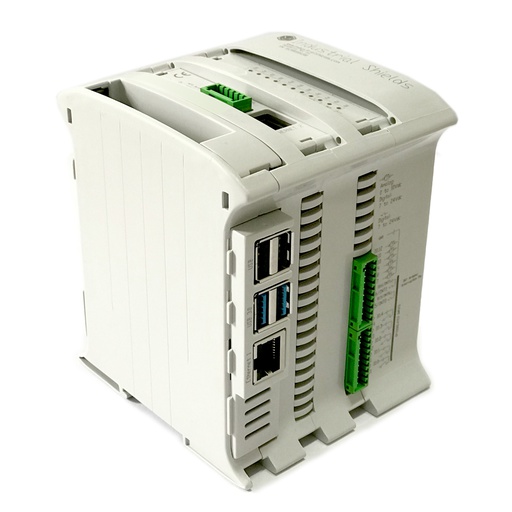
RASPBERRY PLC 21 FLEX
An industrial PLC built around a Raspberry Pi 4, for the DIN rail. Here it switches the stages of the HVAC unit, reads its sensors and contacts, records the operating hours and the parameters, and talks to the SCADA.
- Role
- Unit control, run hours, alarms, link to the SCADA
- Inputs
- 13: 6 analog/digital (0-10 V, 12-bit), 7 digital optoisolated (5-24 Vdc), 2 with interrupt
- Outputs
- 8: 3 analog/digital/PWM (0-10 V, 12-bit), 5 digital optoisolated (5-24 Vdc)
- Expansion
- One board: 4G to do the job of the GPRS in this case (also LoRa, CAN or M-Bus master)
- Comms
- Ethernet 1 Gigabit + 1 10/100, 2 x RS-485, Wi-Fi, Bluetooth LE
- Computer
- Raspberry Pi 4, Debian 64-bit
- Reliability
- UPS with supercapacitors, real-time clock with battery
- Power supply
- 12 to 24 Vdc
- Mounting
- DIN rail TS35, IP20
The case used a Raspberry PLC & GPRS 21 I/Os Analog/Digital PLUS, which is no longer in the catalogue. Its current equivalent is the RASPBERRY PLC 21 FLEX: the FLEX version takes one communication board, and a 4G board takes the place of the GPRS modem. The outputs are transistor outputs, so the fans, the compressor and the heater switch through relays or contactors; in the project photo, a row of relay modules sits under the PLC. The typical layout above uses 4 of the 6 analog inputs, 3 of the 7 digital inputs, 3 of the 5 digital outputs and 1 of the 3 analog outputs.
Questions about this success story
What did Gañar Group build for the shopping centre?
An HVAC system for the heating, ventilation and air conditioning of a 5,000 m² shopping area in Pretoria, South Africa, with its integration partner Square One Project Group. Gañar sized the HVAC unit, built and programmed it after laboratory tests, and shipped it for commissioning on site. One Industrial Shields Raspberry PLC controls and monitors it.
Why record the operating hours of an HVAC unit?
Gañar Group wanted the operating hours and the air conditioning parameters recorded in the PLC. In general, the hours of the fans, the compressor and the heater show how much each stage works, and they help to plan service, such as filter changes, by real use and not by the calendar.
Can a Raspberry PLC send HVAC data to a SCADA over a mobile network?
Yes. In this case, the GPRS and Wi-Fi of the Raspberry PLC sent the data to the SCADA for remote monitoring. Today the RASPBERRY PLC 21 FLEX takes a 4G board for the same job. A typical way to do it is MQTT or Modbus TCP over the mobile link, with the records kept on the PLC while the link is down.
Why one PLC instead of several modules?
The installed equipment needed extra hardware, external modules and several software interfaces and protocols to give the monitoring the customer wanted. One PLC with enough inputs, outputs and industrial communications does the control and the monitoring, with one program to maintain.
Who owns the program of the HVAC unit?
The customer. The case used open source software: the programming took less time, the integration of the elements was easy, and the customer owns the software and can add, modify or adjust the solution.
Is this the same as the HVAC immersion cooling case?
No. This success story is the HVAC unit of a shopping centre: run hours, status, alarms and remote monitoring over a mobile network. To control the oil temperature of a server immersion tank, the room climate and the ventilation with one PLC, see the HVAC for oil immersion cooling case.
Download the case study
4-page PDF with the challenge, the logic, the architecture and the hardware. No form required.
Similar HVAC project?
Tell us your units and your building. An engineer will answer.
Tell us how many HVAC units you have, which stages and sensors they use, what you want to record and who must see the alarms, and where the SCADA is. We will tell you which controller fits and how to connect it.
- You get an answer from our technical team
- I/O count, relays and controller sizing
- Arduino, ESP32 or Raspberry Pi based PLCs