Registering a device in The Things Network and reading its data
Obtaining credentials
LoRaWAN can be used with private networks using your own infrastructure. Apart from that, you can use it through the public infrastructure of The Things Network.
In this example, before attempting to use LoRaWAN, it is needed to create the device in The Things Network.
To do so, create and account there with the Free Plan and head to the Cloud console. Once there, click on the plus button in the top right corner and select "Register end device in an application". If you don't have already created an Application, create one with your own name. In our case, we will name it test-sat.
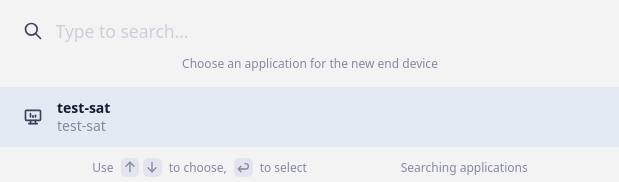
After selecting the Application, copy the following specs of the end device:
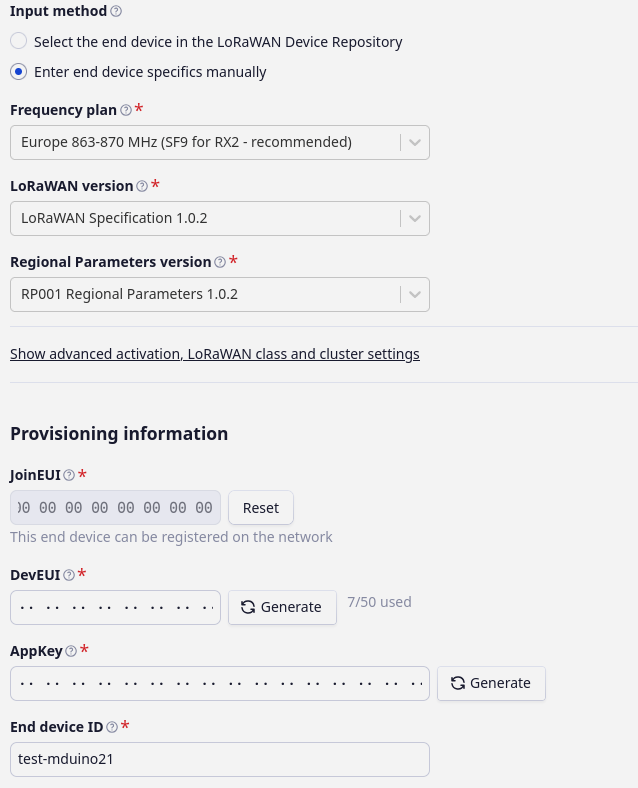
The frequency plan may vary depending on your location if your device will not be in Europe. For the LoRaWAN version, select version 1.0.2 for convenience. The Arduino PLC can work with every version, but the RN2483 module has problems with newer versions. The regional parameter is 1.0.2.
For advanced activation, choose OTAA (default). The JoinEUI is fixed for non-programmable devices, but as we are indeed programming the PLC, fill the box with zeros as the hint box suggests. For the DevEUI and Appkey, generate them or set them manually. We will generate them automatically, as the AppKey is in charge of encryption.
Finally, set a name for your end device and register it.
Getting messages
In the subsequent chapters you will learn how to program your PLC in order to send messages over LoRaWAN, but how can you read them? To do so, head up to "Live data" tab in the TTN Console. There you will see how all the messages are sent and received as soon as the PLC sends data to the console. Check this image for reference:

In this case, we sent the message "hello rpi", and it successfully arrived to the Console.
LoRaWAN Gateway
It is recommended the use of a LoRaWAN Gateway in order to attempt a LoRaWAN connection to the existent LoRaWAN Network, as some locations may not have a nearby LoRaWAN Gateway, and therefore can't make use of LoRaWAN at all.
Consider this section if having issues while joining the LoRaWAN Network.
There are no comments for now.
to be the first to leave a comment.