Complete guide: OpenPLC with industrial PLCs
An external variable in OpenPLC is a variable that the Ladder diagram and the C++ code of an Arduino extension share. Declare it in the Ladder variables table with the class External, declare a variable with the same name and type in the Arduino extension with an initial value, and then read or write it by name in sketch_loop(). BOOL and UINT values are assigned directly; a STRING needs its length and its characters.
Arduino extensions let you add C++ to an OpenPLC project for what Ladder cannot do: an HTTP request, a library function, a sensor protocol. External variables are the bridge between both parts. This guide shows the three common types on an M-Duino 42+, with code that compiles against the OpenPLC types, and how to read a PLC input directly from the extension.
Before you start
- A PLC: we used an M-Duino 42+, but any M-Duino or Ardbox or ESP32 PLC works if you select the right model in OpenPLC.
- The OpenPLC Editor with the Industrial Shields mod, so that the PLC appears in the board list and the extension can use the Industrial Shields libraries and pin names such as
Q0_0orI0_7. Installation is in Using ESP32 PLC, M-Duino and Ardbox with OpenPLC. - Basic use of the Editor (variables, Ladder, transfer). If you have never used it, follow First steps with OpenPLC and Arduino Mega first.
Editor version. Arduino extensions and the screenshots below come from the classic OpenPLC Editor, the one the Industrial Shields mod was made for in 2024. OpenPLC Editor v4 is a new application: check that your PLC model and the Arduino extension are available in it before you start a project.
How to declare an external variable
- In the Ladder variables table, add a variable and set its class to External.

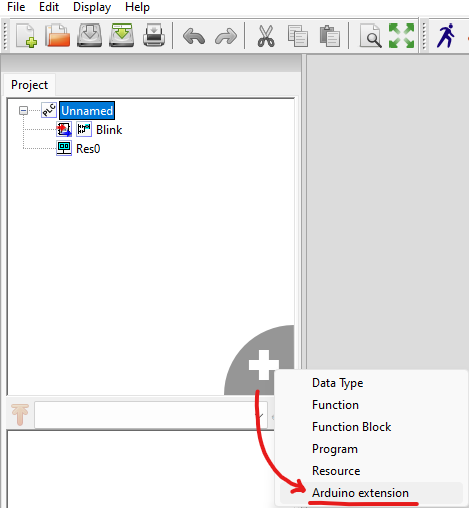
- Create an Arduino extension: click the grey + icon of the project tree and select Arduino extension.
- In the variables table of the extension, declare the same variable, with the same name and type, and give it an initial value.
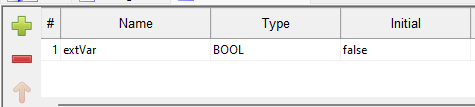
The variable is now available in both places. In the extension you use it by its name: the Editor generates a #define that points the name to the PLC variable, so extVar = true; writes the same memory that the Ladder diagram reads.
When the extension code runs
The extension has two functions. sketch_setup() runs once at start, after OpenPLC has set up the inputs and outputs. sketch_loop() runs once per scan cycle, after the PLC has read the inputs, solved the Ladder logic and written the outputs. Three things follow from that:
- A value written by the extension reaches the Ladder logic in the next scan.
- A
delay()or a long wait insidesketch_loop()delays the whole PLC scan. Usemillis()to time things instead. - Do not write from the extension to an output that also has a located variable in Ladder (for example
%QX0.0): OpenPLC writes it again in every scan. Give the value to Ladder through an external variable instead, as in the examples below.
Which C type each OpenPLC type becomes
OpenPLC stores variables as IEC 61131-3 types. In the extension they are plain C types, except STRING, which is a structure.
| OpenPLC type | C type in the extension | Range |
|---|---|---|
| BOOL | uint8_t | false (0) or true (1) |
| INT | int16_t | -32768 to 32767 |
| UINT, WORD | uint16_t | 0 to 65535 |
| DINT | int32_t | -2147483648 to 2147483647 |
| REAL | float | 32-bit floating point |
| STRING | structure with len and body | Up to 126 characters |
BOOL external variables
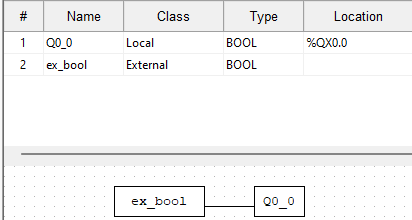
BOOL is the simplest case: assign true or false in the extension. In this example the Ladder diagram copies ex_bool to the digital output Q0_0 (%QX0.0), and the extension turns it on.
// Arduino extension: turn on the output while the extension says so
void sketch_setup()
{

}

void sketch_loop()
{
    ex_bool = true;
}
UINT external variables and analog scaling
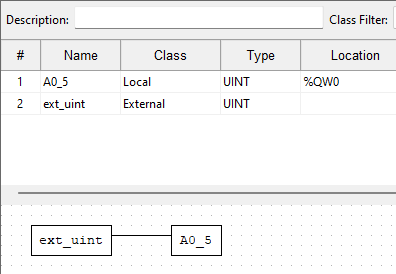
UINT values are also assigned directly, but analog values need scaling. OpenPLC uses 0 to 65535 for every analog signal, while analogRead() on an M-Duino returns 0 to 1023. This example reads the analog input I0_7 in the extension, multiplies it by 64 and gives it to the Ladder diagram, which sends it to the analog output A0_5 (%QW0).
// Arduino extension: copy analog input I0_7 to the Ladder variable
void sketch_setup()
{
    pinMode(I0_7, INPUT);
}

void sketch_loop()
{
    ext_uint = analogRead(I0_7) * 64;   // 0 to 1023 becomes 0 to 65472
}
Reading the input in the extension is also how you use a pin directly from C++. Here the input has no located variable in Ladder, so the extension is its only reader. Use these factors to convert between the PLC functions and the OpenPLC range:
| PLC family | analogRead() to OpenPLC | OpenPLC to analogWrite() |
|---|---|---|
| M-Duino and Ardbox | multiply by 64 | divide by 256 |
| ESP32 PLC (all models except the 14) | multiply by 32 | divide by 16 |
| ESP32 PLC 14 | multiply by 16 | divide by 16 |
For example, to drive an analog output of an M-Duino from a UINT that Ladder writes, use analogWrite(A0_5, ext_uint / 256); in the extension, and do not give that output a location in Ladder.
STRING external variables
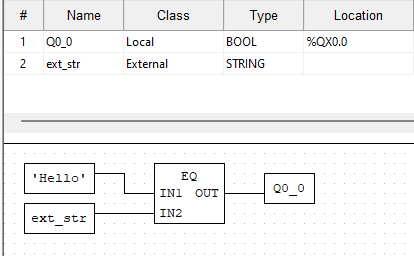
A STRING is a structure with two fields: len, the number of characters, and body, an array of up to 126 characters. To write it you copy the characters into body and set len. In this example the extension writes "Hello" and the Ladder diagram turns on Q0_0 when ext_str is equal to 'Hello'.
// Arduino extension: write "Hello" into a STRING variable
void sketch_setup()
{

}

void sketch_loop()
{
    const char *str = "Hello";
    size_t n = strlen(str);
    if (n > STR_MAX_LEN) {
        n = STR_MAX_LEN;               // the body holds 126 characters
    }
    memcpy(ext_str.body, str, n);      // copy the characters
    ext_str.len = n;                   // then set the length
}
Two details matter here. In C a text goes in double quotes ("Hello"); single quotes are for one character, and 'Hello' does not compile as a string. In Ladder it is the other way round: IEC 61131-3 writes strings in single quotes. OpenPLC uses len to know where the text ends, so body does not need a final zero.
Exact match. In the OpenPLC library, EQ on two STRING values compares only as many characters as the shorter one has, so an empty string is equal to 'Hello'. If the match must be exact, also check that LEN(ext_str) is 5.
Common errors
| What you see | Likely cause | What to do |
|---|---|---|
| The build fails with an undeclared variable | The variable is External in Ladder but missing from the extension table, or the name is different | Declare it in the extension with the same name and type |
| The analog output barely moves | The raw analogRead() value (0 to 1023) was not scaled | Multiply by the factor of your PLC family |
| An output set from the extension switches back off | The output also has a location in Ladder, and OpenPLC rewrites it every scan | Pass the value through an external variable, or remove the location |
| The PLC scan becomes slow | delay() inside sketch_loop() | Time with millis() |
| The STRING comparison is true too early | EQ compares only the shorter string | Also compare LEN() |
Ladder and C++ in real projects
Mixing a PLC program with C++ is common when a project needs a protocol or a library that the PLC language does not have, as in HTTP on M-Duino with OpenPLC. If the C++ part grows, the Arduino IDE with the Industrial Shields boards gives direct access to every library. The OpenPLC guide compares both options, and how to choose an industrial controller helps if you are still picking the hardware.
Watch a PLC run a sequence before you write yours. In the process plant simulator, a PLC starts a turbine or a pump step by step and stops it safely. Change the conditions and see how each step waits for its signals.
Open the process plant simulatorAsk an engineer about your project
FAQ about OpenPLC external variables
What is the difference between a Local, Global and External variable?
A Local variable belongs to one program. A Global variable belongs to the resource and every program can use it. External tells a program that the variable is declared somewhere else, here in the Arduino extension, and that it should use that one.
Can the extension read a variable that Ladder writes?
Yes. The sharing works both ways. The extension sees the value written by Ladder in the same scan, because sketch_loop() runs after the logic.
Can I use REAL or DINT external variables?
Yes. They become float and int32_t in the extension and are assigned directly, like BOOL and UINT.
How long can a STRING be?
Up to 126 characters, the default STR_MAX_LEN of OpenPLC. Limit the copy to that size, as the example does.
Can I use Industrial Shields libraries in the extension?
Yes. With the Industrial Shields mod, the extension is compiled for the PLC model you select, so you can use its pin names and libraries as in the Arduino IDE.