
A Raspberry PLC talks Modbus RTU through its RS-485 ports and Modbus TCP through its Ethernet ports. In Python you use the pymodbus library, and in Node-RED the node-red-contrib-modbus nodes. Both can work as the master that polls meters, drives and sensors, or as the slave that a SCADA system reads.
This guide gives working Python code for the current pymodbus version, the Node-RED settings, the RS-485 port names of each Raspberry PLC version and the checks to do when a device does not answer. The protocol part (addresses, timeouts, exception codes, 32-bit values) applies to any Linux controller, also if you will not program in Python.
Tested The Python examples were run with pymodbus 3.16.1 (the latest version in October 2026) and Python 3.13 on Linux: Modbus TCP on 127.0.0.1 and Modbus RTU over a virtual serial link. pymodbus changes its API often. If your PLC has an older version, the pymodbus versions section tells you what to change.
How does Modbus work on a Raspberry PLC?
Modbus is a request and response protocol. The master (client) sends a request with a function code, an address and a quantity. The slave (server) executes it and answers. A slave never sends data on its own. The Modbus specification and pymodbus now say client and server. This guide also uses master and slave, because most device manuals still do.
Modbus RTU and Modbus TCP use the same function codes and the same data model. Only the transport changes: a serial line with a device address and a CRC in every frame, or a TCP connection with an MBAP header.
| Modbus RTU | Modbus TCP | |
|---|---|---|
| Physical layer | RS-485, two wires (A+ and B-), half duplex | Ethernet |
| Port on the Raspberry PLC | /dev/ttySC0 to /dev/ttySC3, depending on the version | eth0 or eth1, TCP port 502 |
| Device address | 1 to 247 in every frame. 0 is broadcast and gets no answer | The IP address. The unit identifier in the header selects a device behind a gateway |
| Error check | CRC-16 in every frame | TCP checksum. No Modbus CRC |
| Masters | One master per RS-485 line | Several clients can connect to one server |
| Devices | 32 per segment without repeater | Limited by the network and by the server |
| Default settings in the specification | 19200 bit/s, 8 data bits, even parity, 1 stop bit | Port 502 |
Modbus has four data tables. Coils are read and write bits (FC01, FC05, FC15). Discrete inputs are read-only bits (FC02). Input registers are read-only 16-bit words (FC04). Holding registers are read and write 16-bit words (FC03, FC06, FC16). The examples in this guide write and read holding registers, the table that almost every device has.
RS-485 and Ethernet ports of the Raspberry PLC for Modbus
The RS-485 ports of the Raspberry PLC appear in Linux as serial devices. The device name depends on the hardware version of the PLC, not on the model:
| Raspberry PLC version | RS-485 ports in Linux |
|---|---|
| V3, and V4 without expansion board | /dev/ttySC0 and /dev/ttySC1 |
| V6, and V4 with expansion board | /dev/ttySC2 and /dev/ttySC3 |
To be sure, list the ports on your PLC with ls /dev/ttySC*. The guide RS-485 with Raspberry PLC shows the terminals and a loop test between the two ports of the same PLC. Do this test first: if the loop test fails, Modbus will fail too.
- Connect A+ to A+ and B- to B- on all devices, with twisted pair cable.
- Wire the devices as a line, one after the other, not as a star. On long lines, put a termination resistor that matches the cable (typically 120 Ω) at the two ends of the line. The datasheet of the Raspberry PLC V6 lists a 120 Ω termination resistor on both RS-485 ports, so wire the PLC at one end of the line.
- All devices on one line must use the same baud rate, parity and stop bits. A mismatch gives no answer at all, not an error message.
For Modbus TCP, the PLC uses its Ethernet ports. By default, eth0 has the static address 10.10.10.20. Two new PLCs on the same network have the same address on eth0, so change the address of one of them before the test (see how to configure a static IP on a Raspberry PLC). If you use eth1, it has 10.10.11.20 by default and, according to the datasheet, a fixed 10BT half duplex setting with auto-negotiation disabled. Check the addresses with ip a.
Install pymodbus 3.16 in a Python virtual environment
Install pymodbus in a virtual environment. Raspberry Pi OS based on Debian 12 (Bookworm) and later blocks pip install outside a virtual environment, and a virtual environment also keeps the pymodbus version of your project fixed. The [serial] option installs pyserial, which Modbus RTU needs.
python3 --version   # pymodbus 3.9 and later need Python 3.10 or later
python3 -m venv ~/modbus-venv
source ~/modbus-venv/bin/activate
pip install "pymodbus[serial]==3.16.1"
python -c "import pymodbus; print(pymodbus.__version__)"
Run your scripts with ~/modbus-venv/bin/python script.py. Use the same path in a systemd service.
Most examples on the internet were written for older pymodbus versions, and they fail with the current one. These are the changes that break old code:
| pymodbus version | Change | What you write now |
|---|---|---|
| 3.0 | unit= becomes slave= | See 3.10 |
| 3.7 | ModbusRtuFramer is replaced by FramerType. The default device ID is 1, not 0 | framer=FramerType.RTU |
| 3.8 | Client parameters after the address are keyword only | read_holding_registers(0, count=5, ...) |
| 3.10 | slave= becomes device_id=. ModbusSlaveContext becomes ModbusDeviceContext | device_id=1 |
| 3.12 and 3.13 | The server uses SimData and SimDevice. The old datastore classes give a deprecation warning | SimDevice(1, simdata=SimData(...)) |
Source: pymodbus API changes. With pymodbus 3.16.1, an old example fails with errors like got an unexpected keyword argument 'slave' or cannot import name 'ModbusRtuFramer'.
Modbus RTU master and slave in Python
For this test you need two Raspberry PLCs with their RS-485 ports wired together, A+ to A+ and B- to B-. One PLC runs the slave and the other runs the master. In a real installation the slave is usually a meter, a drive or a sensor, and the Raspberry PLC is the master.
Modbus RTU slave with pymodbus
from pymodbus.framer import FramerType
from pymodbus.server import StartSerialServer
from pymodbus.simulator import DataType, SimData, SimDevice

PORT = "/dev/ttySC0"  # RS-485 port, check the name for your PLC version
DEVICE_ID = 1         # Modbus address of this slave (1 to 247)

# 100 registers (addresses 0 to 99), all at 0
device = SimDevice(
    DEVICE_ID,
    simdata=SimData(0, count=100, values=0, datatype=DataType.REGISTERS),
)

StartSerialServer(
    device,
    framer=FramerType.RTU,
    port=PORT,
    baudrate=9600,
    bytesize=8,
    parity="N",
    stopbits=1,
)
This slave uses device ID 1. Its 100 registers (addresses 0 to 99) answer to holding register and input register requests. A request outside this range gets exception code 02 (illegal data address). In our test, pymodbus 3.16.1 also answered requests for other device IDs with exception code 04, so use this test slave alone on the line, without other slaves.
Modbus RTU master with pymodbus
from pymodbus.client import ModbusSerialClient
from pymodbus.exceptions import ModbusException
from pymodbus.framer import FramerType

PORT = "/dev/ttySC0"  # RS-485 port, check the name for your PLC version
DEVICE_ID = 1         # address of the slave, never 0 (0 is broadcast)

client = ModbusSerialClient(
    port=PORT,
    framer=FramerType.RTU,
    baudrate=9600,
    bytesize=8,
    parity="N",
    stopbits=1,
    timeout=1,
)
if not client.connect():
    raise SystemExit(f"Cannot open {PORT}")

try:
    # FC16: write 5 holding registers from address 0
    rr = client.write_registers(0, [10, 20, 30, 40, 50], device_id=DEVICE_ID)
    if rr.isError():
        print("Write error:", rr)
    else:
        print("Write successful")

    # FC03: read the same 5 holding registers
    rr = client.read_holding_registers(0, count=5, device_id=DEVICE_ID)
    if rr.isError():
        print("Read error:", rr)
    else:
        print("Read successful:", rr.registers)
except ModbusException as exc:
    # No answer, CRC error or wrong device ID
    print("Modbus error:", exc)
finally:
    client.close()
Expected output when the communication works:
Write successful
Read successful: [10, 20, 30, 40, 50]
Two details make this example work. The device ID is 1, never 0: address 0 is broadcast, and slaves execute a broadcast write but never answer it. And only one program can use a serial port at a time: two programs on the same /dev/ttySC* port take bytes from each other, and you get timeouts and CRC errors. Stop the Node-RED flows that use the port before you run the script.
Modbus RTU in Node-RED with node-red-contrib-modbus
If Node-RED is not installed on your PLC yet, follow how to install Node-RED on a Raspberry PLC. Then install node-red-contrib-modbus from Menu, Manage palette, Install. Version 5.62.0 declares Node-RED 4 or later and Node.js 22 or later, so check node -v first.
This flow is a Modbus RTU master. It writes a counter to register 0 of the Python slave and reads it back every 5 seconds.
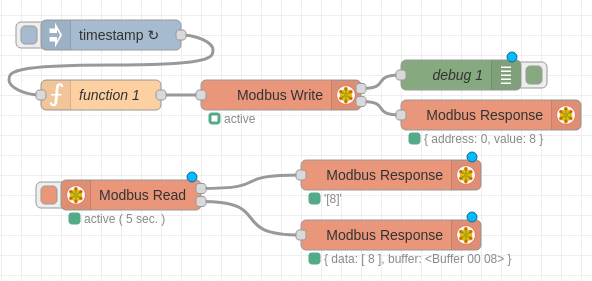
- Inject node: repeat every 5 seconds.
- Function node: a counter that adds 1 at each message.
if (context.hasOwnProperty('num')) { context.num = context.num + 1; } else { context.num = 0; } msg.payload = context.num; return msg; - Modbus-Write node. In Server, create a Modbus-Client with Type
Serial, Serial port/dev/ttySC0(or the port of your PLC version), Serial typeRTU, Baud rate9600, Data bits8, ParityNone, Stop bits1and Unit-Id1. Then set FC toFC 6: Preset Single Register, Address0, Quantity1. - Modbus-Read node with the same Modbus-Client: FC
FC 3: Read Holding Registers, Address0, Quantity1, Poll Rate5seconds. - Debug or Modbus-Response nodes on the outputs.
Run the Python slave of the previous section on the other PLC. The Modbus-Write output shows { address: 0, value: 8 } and the Modbus-Read output shows [8], with the current value of the counter. To read many slaves on the same line from one flow, see using multiple Modbus RTU slaves in Node-RED.
Modbus TCP server and client in Python
You can test Modbus TCP on one PLC. Run the server in one terminal and the client in a second terminal, with the address 127.0.0.1. Then move the client to a second PLC or to a PC, and use the IP address of the PLC that runs the server.
Modbus TCP server
from pymodbus.server import StartTcpServer
from pymodbus.simulator import DataType, SimData, SimDevice

# Port 502 is the Modbus TCP standard. Linux opens ports under 1024
# only for root, so this test uses 5020.
PORT = 5020
DEVICE_ID = 1

device = SimDevice(
    DEVICE_ID,
    simdata=SimData(0, count=100, values=0, datatype=DataType.REGISTERS),
)

# 0.0.0.0 listens on all interfaces: eth0, eth1 and localhost
StartTcpServer(device, address=("0.0.0.0", PORT))
On a standard Linux system, only root can open TCP ports under 1024. A normal user who starts a server on the Modbus port 502 gets a PermissionError. That is why the test uses port 5020. In production, run the service with the rights it needs or redirect port 502 to the port of your server.
Modbus TCP client
from pymodbus.client import ModbusTcpClient
from pymodbus.exceptions import ModbusException

HOST = "127.0.0.1"  # IP address of the slave, or 127.0.0.1 on the same PLC
PORT = 5020
DEVICE_ID = 1       # unit identifier, see the device manual (often 1 or 255)

client = ModbusTcpClient(HOST, port=PORT, timeout=2)
if not client.connect():
    raise SystemExit(f"No connection to {HOST}:{PORT}")

try:
    rr = client.write_registers(0, [10, 20, 30, 40, 50], device_id=DEVICE_ID)
    if rr.isError():
        print("Write error:", rr)
    else:
        print("Write successful")

    rr = client.read_holding_registers(0, count=5, device_id=DEVICE_ID)
    if rr.isError():
        print("Read error:", rr)
    else:
        print("Read successful:", rr.registers)
except ModbusException as exc:
    print("Modbus error:", exc)
finally:
    client.close()
On Modbus TCP, the IP address selects the device. The unit identifier (device_id) only selects a device behind a gateway, for example an RTU slave behind a Modbus TCP to RTU gateway. Many devices ignore it, and others answer only to 1 or to 255. Use the value in the device manual.
Modbus TCP in Node-RED
Use the same flow as for Modbus RTU and change only the Modbus-Client configuration:
- Type:
TCP, TCP typeDEFAULT. - Host: IP address of the Modbus TCP server, or
127.0.0.1if the server runs on the same PLC. - Port:
5020for the Python test server,502for most devices. - Unit-Id:
1, or the value in the device manual.
Modbus-Write (FC 6, address 0) and Modbus-Read (FC 3, address 0, quantity 1, poll rate 5 seconds) stay the same.
Timeouts, retries and reconnection in a Modbus polling loop
A master in production must continue to work when a slave restarts, a cable is disconnected or a frame arrives with a bad CRC. pymodbus reports problems in two different ways, and the polling loop must handle both:
- Exception response. The slave answered, but it refused the request.
rr.isError()is true and the exception code says why. - No valid answer. Timeout, closed connection or broken frame. The client raises a
ModbusException.
import time

from pymodbus.client import ModbusTcpClient
from pymodbus.exceptions import ModbusException

HOST = "127.0.0.1"
PORT = 5020
DEVICE_ID = 1
POLL_S = 1.0  # read every second

client = ModbusTcpClient(HOST, port=PORT, timeout=2, retries=1)

while True:
    if not client.connected and not client.connect():
        print("Slave not reachable, new try in 5 s")
        time.sleep(5)
        continue
    try:
        rr = client.read_holding_registers(0, count=5, device_id=DEVICE_ID)
        if rr.isError():
            print("Exception response:", rr)  # the slave answered with an error code
        else:
            print(rr.registers)
    except ModbusException as exc:
        print("No valid answer:", exc)  # timeout or broken frame
        client.close()  # force a clean reconnect on the next cycle
    time.sleep(POLL_S)
The client waits timeout seconds for each try and repeats the request retries times. With timeout=1 and the default retries=3, a missing RTU slave blocked the call for about 4 seconds in our test. On an RS-485 line with several slaves, one dead slave slows down the polling of all the others. Keep timeout and retries low and skip a slave for some cycles after repeated failures.
| Exception code | Name | Usual cause |
|---|---|---|
| 01 | Illegal function | The device does not support this function code, for example FC 16 on a device that only accepts FC 6 |
| 02 | Illegal data address | Address or quantity out of range, often an address that is 1 too high |
| 03 | Illegal data value | Value out of range or wrong quantity in the request |
| 04 | Server device failure | The device could not execute the request |
| 0B (11) | Gateway target device failed to respond | A Modbus TCP to RTU gateway got no answer from the RTU slave behind it |
Register 40001 is address 0: Modbus addressing and 32-bit values
Many device manuals write holding registers as 40001, 40002 and so on. This is a documentation convention: the first digit 4 means holding register, and the numbering starts at 1. The address in the frame starts at 0. So register 40001 is address 0 in pymodbus and in Node-RED, and 40010 is address 9. Some manuals already number from 0: check the first register of the map. If you read one register too far, you get the next value or exception code 02.
A register has 16 bits. Values such as a float32 voltage or a 32-bit energy counter take two registers, and devices do not agree on which register comes first (the word order). pymodbus converts the registers for you:
from pymodbus.client import ModbusTcpClient

DT = ModbusTcpClient.DATATYPE

# Two holding registers read from a meter, for example with
# rr = client.read_holding_registers(100, count=2, device_id=1)
regs = [17254, 32768]  # 0x4366 0x8000

print(ModbusTcpClient.convert_from_registers(regs, DT.FLOAT32))
# 230.5
print(ModbusTcpClient.convert_from_registers(regs, DT.FLOAT32, word_order="little"))
# -2.4178003703460394e-41 (wrong word order for this device)
A value that is very small, very large or negative where it cannot be usually means that the word order is the other way round. Try word_order="little".
Modbus troubleshooting on a Raspberry PLC
| Symptom | What to check |
|---|---|
| RTU: timeout on every request | Baud rate, parity and stop bits of the device. A+ and B- swapped. Device ID. The /dev/ttySC* name for your PLC version |
| RTU: some requests fail, CRC errors | Termination at the two ends of a long line. Star wiring. Cable that is not twisted pair. Two programs on the same port |
| Exception code 02 | Address offset (40001 is address 0) or a quantity that goes past the last register |
unexpected keyword argument 'slave' or 'unit' | The example is for an older pymodbus. Use device_id= |
cannot import name 'ModbusRtuFramer' or 'ModbusSlaveContext' | The example is for an older pymodbus. Use FramerType and SimDevice |
| TCP: connection refused | The server does not run, the port is wrong or a firewall blocks it |
TCP server: PermissionError on port 502 | Ports under 1024 need root. Use port 5020 for tests |
| TCP works on 127.0.0.1 but not from the other PLC | Both PLCs have 10.10.10.20 on eth0, the PLCs are in different subnets, or the server listens only on 127.0.0.1 |
Raspberry PLC 21
Modbus RTU master and Modbus TCP server on one PLC
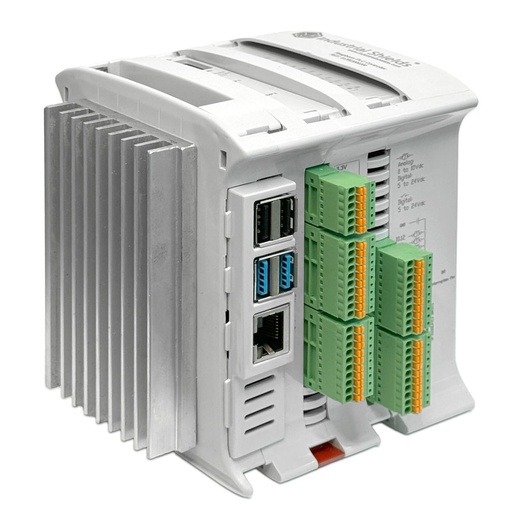
The Raspberry PLC 21 has two RS-485 ports with 120 Ω termination and two Ethernet ports. One unit can poll the meters on the RS-485 line and serve the values to the SCADA over Modbus TCP. It runs Debian 64-bit, so the pymodbus code and the Node-RED flows of this guide run on it: check the port names with ls /dev/ttySC* first.
Raspberry PLC Modbus examples in real projects
- Biogas plant automation: one Raspberry PLC 58 controls four sections of a biogas plant, and the meters with Modbus RTU go on one of its two RS-485 ports.
- Schneider Altivar 320 drive over Modbus TCP: the command word sequence to start a drive, and why the drive answers on unit ID 255.
- Fronius inverter over Modbus TCP with SunSpec: the SunSpec models are found automatically, so you do not need raw register addresses.
- TCP socket between Python and Node-RED: pass the values that Python reads to a Node-RED dashboard on the same PLC.
Choose the controller for your Modbus project. The Raspberry PLC family runs Linux, Python and Node-RED, with RS-485 for Modbus RTU and Ethernet for Modbus TCP. Compare the I/O and ports of each model.
More about Modbus on Raspberry PLC and other PLCs
- Introduction to Modbus and Raspberry PLC, part 1, part 2, part 3 and part 4
- How to use pymodbus with a Raspberry PLC
- Modbus on a Raspberry PLC with CODESYS
- Modbus RTU with Arduino PLC and ESP32 PLC
- Modbus TCP master with Arduino PLC and ESP32 PLC
- EtherNet/IP, Profinet or Modbus TCP for a new line
- Modbus specifications (Modbus Application Protocol 1.1b3, Modbus over Serial Line 1.02)
Take it further
Take the Modbus code of this guide into a network you can break, a real project and a drive that runs over Modbus TCP.
Case study
Many thermometers. One Modbus network.
Local M-Duino PLCs read Modbus RTU thermometers on RS-485, and a main PLC collects the readings over Modbus TCP.
Read the case study
Simulator
Run a Modbus RTU and TCP network and find the fault
An M-Duino 21 polls four Modbus RTU slaves on RS-485 and serves the data on Modbus TCP. Switch a slave off or change the baud rate and find the fault in the frames.
Open the simulator
PLC Solution Library
Driving a Schneider Altivar 320 pump over Modbus TCP
A Python example for a Raspberry Pi that walks the drive state machine over Modbus TCP, sets the speed reference and supervises status, current and pressure.
See the example
FAQ about Modbus on Raspberry Pi PLCs
Can a Raspberry PLC be a Modbus master and a Modbus slave at the same time?
Yes. Run the master and the server as two programs on different ports. A common setup reads meters as Modbus RTU master on RS-485 and gives the values to a SCADA system as a Modbus TCP server on Ethernet. Each serial port can have only one program.
Should I use Modbus RTU or Modbus TCP?
Use the protocol of the device you connect. Many meters, small drives and sensors only have RS-485 with Modbus RTU. Drives, inverters, PLCs and gateways often have Modbus TCP. With RTU there is one master per line. With TCP several clients can read the same server over the existing network.
Why does pymodbus say "unexpected keyword argument 'slave'"?
Since pymodbus 3.10, the parameter slave= is device_id=. Version 2.x used unit=. Change the parameter, or install the pymodbus version that the example was written for.
Is holding register 40001 address 0 or address 1?
Address 0. The 4xxxx notation numbers registers from 1, and the address in the Modbus frame starts at 0. Register 40001 is address 0 and register 40100 is address 99.
Why doesn't my Modbus TCP server start on port 502?
On Linux, only root can open ports under 1024. Start the server as root, give it the rights it needs, or use a port such as 5020 and configure the clients with the same port.
How many Modbus RTU devices can one RS-485 port read?
Modbus RTU has 247 slave addresses (1 to 247). The Modbus serial line specification allows 32 devices on one RS-485 segment without a repeater. The real limit is often the polling time: every slave adds its request, its answer and, if it fails, its timeout.