
Complete guide: Modbus RTU and TCP with Python and Node-RED
To write and read a coil over Modbus RTU from a Raspberry PLC in Python, install pymodbus in a virtual environment, open the RS-485 port with ModbusSerialClient(port, framer=FramerType.RTU, ...), and call write_coil(address, value, device_id=...) (function code 05) and read_coils(address, count=1, device_id=...) (function code 01). The examples of this post were tested with pymodbus 3.16.1.
This is part 3 of the Modbus and Raspberry PLC series. Parts 1 and 2 use Node-RED, and this part and part 4 use Python. All the details, such as Modbus TCP, timeouts, addressing and Node-RED settings, are in the Modbus guide for Raspberry Pi PLCs.
What you need
- A Raspberry PLC. It is the Modbus RTU master.
- A Modbus RTU slave: any device with RS-485, or another Industrial Shields PLC working as a slave, for example an Arduino or ESP32 based PLC as in Modbus RTU with Arduino and ESP32 based PLCs.
- RS-485 wiring: A+ to A+ and B- to B-, with termination at the ends of the bus.
- The serial settings of the slave: address (device ID), baud rate, parity and stop bits. This post uses device ID 31 at 38400 bit/s, 8N1. Change them to match your slave.
Install pymodbus
Install pymodbus with pip in a virtual environment, and fix the version. Raspberry Pi OS Bookworm and later block pip install outside a virtual environment, and the version that apt installs depends on the OS release. pymodbus changes its API between versions, so the version decides if an example runs.
python3 -m venv ~/modbus-venv
source ~/modbus-venv/bin/activate
pip install "pymodbus[serial]==3.16.1"
ls /dev/ttySC*
The last command lists the serial ports. On the Raspberry PLC v3, and on the v4 without expansion, RS-485 is /dev/ttySC0 and /dev/ttySC1. On the v6, and on the v4 with expansion, it is /dev/ttySC2 and /dev/ttySC3. This post uses /dev/ttySC0.
Write a coil with Python (FC05)
Save this code as rtu_write_coil.py:
from pymodbus.client import ModbusSerialClient
from pymodbus.exceptions import ModbusException
from pymodbus.framer import FramerType

PORT = "/dev/ttySC0"  # RS-485 port, check the name for your PLC version
DEVICE_ID = 31        # Modbus address of the slave (1 to 247, never 0)
COIL = 0              # coil address (coil 00001 in the device manual is address 0)

client = ModbusSerialClient(
    port=PORT,
    framer=FramerType.RTU,
    baudrate=38400,
    bytesize=8,
    parity="N",
    stopbits=1,
    timeout=1,
)
if not client.connect():
    raise SystemExit(f"Cannot open {PORT}")

try:
    rr = client.write_coil(COIL, True, device_id=DEVICE_ID)  # FC05
    if rr.isError():
        print("Exception response:", rr)
    else:
        print(f"Coil {COIL} set to ON")
except ModbusException as exc:
    print("No valid answer:", exc)  # timeout, CRC error or wrong device ID
finally:
client.close()- Imports.
ModbusSerialClientis the RTU master,FramerTypeselects the RTU frame, andModbusExceptioncatches the cases where the slave does not answer. - Port and slave.
DEVICE_IDis the Modbus address of the slave. Address 0 is broadcast: slaves do not answer it. - Client. Baud rate, data bits, parity and stop bits must be the same as in the slave.
timeout=1waits one second for each answer. - Write.
write_coil(COIL, True, device_id=DEVICE_ID)sends function code 05. UseFalseto turn the coil off. - Two kinds of error.
rr.isError()is an exception response: the slave answered but refused the request, for example because the address does not exist.ModbusExceptionmeans that no valid answer came back.
Run it with the virtual environment active:
source ~/modbus-venv/bin/activate
python rtu_write_coil.py
Coil 0 set to ON
Write and read a coil in a loop (FC05 and FC01)
This version changes the coil every second and reads it back to check the value:
import time

from pymodbus.client import ModbusSerialClient
from pymodbus.exceptions import ModbusException
from pymodbus.framer import FramerType

PORT = "/dev/ttySC0"  # RS-485 port, check the name for your PLC version
DEVICE_ID = 31
COIL = 0

client = ModbusSerialClient(
    port=PORT,
    framer=FramerType.RTU,
    baudrate=38400,
    bytesize=8,
    parity="N",
    stopbits=1,
    timeout=1,
)
if not client.connect():
    raise SystemExit(f"Cannot open {PORT}")

state = True
try:
    while True:
        try:
            client.write_coil(COIL, state, device_id=DEVICE_ID)        # FC05
            rr = client.read_coils(COIL, count=1, device_id=DEVICE_ID)  # FC01
            if rr.isError():
                print("Exception response:", rr)
            else:
                print(f"Wrote {state}, read back {rr.bits[0]}")
        except ModbusException as exc:
            print("No valid answer:", exc)
        state = not state
        time.sleep(1)
except KeyboardInterrupt:
    pass
finally:
    client.close()
read_coils(COIL, count=1, device_id=DEVICE_ID)sends function code 01. The answer packs the coils in bytes, sorr.bitshas 8 values even if you read one coil. The first one,rr.bits[0], is the coil you asked for.- The client opens the port once and keeps it open. Each cycle catches its own errors, so a missing answer does not stop the loop.
- Press Ctrl+C to stop. The port is closed in
finally.
Output of our test:
Wrote True, read back True
Wrote False, read back False
Wrote True, read back True
Wrote False, read back False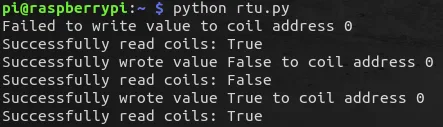
Errors with older examples
The first version of this post used ModbusSerialClient(method='rtu', ...) and the device ID as a positional argument. We ran it against a simulated slave with several pymodbus versions: it works with 3.0.2 and 3.6.9, and it fails with 3.7 and later.
| Error | Cause | Fix |
|---|---|---|
unexpected keyword argument 'method' | pymodbus 3.7 and later select the frame with framer | framer=FramerType.RTU |
unexpected keyword argument 'slave' | pymodbus 3.10 and later call it device_id | device_id=31 |
cannot import name 'ModbusSerialClient' from 'pymodbus.client' | pymodbus 2.x | Install pymodbus 3 in a virtual environment |
No response received | The slave does not answer | Device ID, baud rate, parity, A and B not swapped, termination |
| Exception response with code 02 | The coil address does not exist in the slave | The coil table in the manual of the slave |
What we tested. Python 3.13 and pymodbus 3.16.1 on Linux, with a simulated Modbus RTU slave (device ID 31, 38400 8N1) on a virtual serial link. Both scripts ran and gave the output shown above. The original code was run the same way with pymodbus 2.5.3, 3.0.2, 3.6.9, 3.7.4, 3.8.6 and 3.16.1. We did not run this update on Raspberry PLC hardware: the two screenshots come from the first version of the post.
Modbus RTU on a Raspberry PLC in a real plant. In the biogas plant case study, a Raspberry PLC 58 runs four process sections, and the meters with Modbus RTU go on one of its two RS-485 ports.
Read the biogas plant case studyOpen the complete Modbus guide
FAQ about Modbus RTU with Python
The manual says coil 00001. Which address do I use?
Address 0. pymodbus uses the address of the frame, which starts at 0, and many manuals number the coils from 1.
Why does read_coils return 8 values?
Because the answer carries the coils in whole bytes. pymodbus returns all the bits of those bytes. Use only the first count values.
Can I install pymodbus with apt?
You can, but you get the version of your OS release, which may have a different API from the examples. A virtual environment with a fixed version gives the same result on every PLC.
Can I use device ID 0?
Only for broadcast writes. All slaves execute them and none answers, so you cannot read with device ID 0.
How do I do the same over Ethernet?
With ModbusTcpClient and the IP address of the slave. See part 4: Modbus TCP and Python.
More about Modbus on the Raspberry PLC
- Modbus TCP and RTU guide for Raspberry Pi PLCs: Python and Node-RED examples
- How to use pymodbus with a Raspberry Pi PLC: async examples
- Part 1: Modbus RTU and Node-RED
- Part 2: Modbus TCP and Node-RED
- Part 4: Modbus TCP and Python
- Modbus RTU frame, function codes and CRC
- Choosing an industrial controller: PLC, embedded controller, IPC or gateway
Choose the model and the I/O mix in the Raspberry PLC family.