
Short answers to the questions our technical team gets most often about Industrial Shields PLCs: how to program them, how to power them, which communications each family has and how to choose a model. Each answer links to the full guide.
Programming
How are Industrial Shields PLCs programmed?
Arduino-based PLCs (M-Duino Arduino PLC and Ardbox Arduino PLC) and ESP32 PLCs are programmed with the Arduino IDE or PlatformIO. Ardbox Q Arduino PLC, based on the Arduino UNO Q, combines an STM32 microcontroller for real-time control with Linux for data and AI. Raspberry PLC runs Linux and is programmed in Python, Node-RED or C/C++.
Read more: How to program each family · Ardbox Q Arduino PLC
What is the Industrial Shields boards package and how do I install it?
It adds every Industrial Shields model to the Arduino IDE. It maps the pins and communication ports to the names printed on the PLC (I0.0, Q0.0, A0.5) and sets the right microcontroller options. You install it from the Boards Manager and then select your exact model and version.
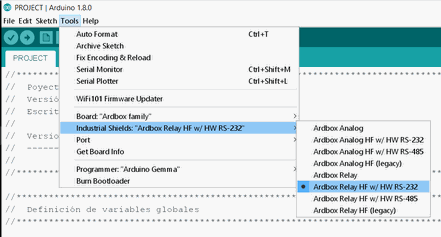
Read more: Install the boards package · Using the pin mapping
Do I need any licence?
No for the Arduino IDE, PlatformIO, Python or Node-RED: they are free. CODESYS on the Raspberry PLC is experimental, for prototypes, testing and training; commercial use needs another CODESYS licence.
Read more: CODESYS on Raspberry PLC (experimental)
Where do I start if I have never used one?
With the free courses: the Arduino-based PLC course covers installation, inputs, outputs and communications step by step, and the Raspberry PLC first steps cover access, libraries and the first program.
Read more: Arduino-based PLC course · Raspberry PLC first steps · All free courses
Power supply
What supply voltage do they need?
Industrial Shields PLCs are powered at 12 to 24 Vdc, Ardbox Q Arduino PLC included. Below 12 V the device does not work reliably. The digital outputs are powered separately, between 5 and 24 V, so each output delivers the voltage your load needs.
Read more: Datasheets
How much power do they consume?
It depends on the model and on how many outputs are active at the same time. Each datasheet gives the consumption of its model. As a reference, Ardbox Q Arduino PLC draws between 1.6 W at rest and 5.5 W with every output active (relay version at 12 V).
Read more: Datasheets
Communications
Which PLCs have Wi-Fi?
As standard: ESP32 PLC (Wi-Fi and Bluetooth LE), Raspberry PLC (Wi-Fi and Bluetooth LE) and Ardbox Q Arduino PLC (dual-band Wi-Fi 5 and Bluetooth 5.1, on the Linux side).
Read more: Compare all models
Can I use TCP/IP and Modbus TCP?
Yes, over Ethernet on M-Duino Arduino PLC, ESP32 PLC and Raspberry PLC, which has two Ethernet ports. One port handles several TCP connections at the same time. Ardbox Analog, Ardbox Relay and Ardbox Q Arduino PLC have no Ethernet.

Read more: Modbus TCP on Arduino and ESP32 · Modbus TCP and RTU on Raspberry · TCP client example
Do they have RS-485 and Modbus RTU?
Yes. Every PLC family has RS-485, and you can run Modbus RTU as master or slave over it. Raspberry PLC has two RS-485 ports. Most models also have RS-232.
Read more: What is RS-485 · Modbus RTU on Arduino and ESP32 · 6 checks when an RS-485 bus fails
Can I add LoRa, 4G or CAN?
Yes, in the FLEX versions of Raspberry PLC and ESP32 PLC: you choose the extra board when you configure the PLC. Raspberry PLC FLEX also offers M-Bus.
Read more: LoRa and LoRaWAN course · LoRaWAN with a PLC
Choosing a model
What is the difference between CORE and FLEX?
CORE is a fixed configuration, ready to ship. FLEX is configured to order: RAM, extra communications (LoRa, 4G, CAN, M-Bus) and the options of each model.
What is the difference between an Arduino or Raspberry Pi board and an Industrial Shields PLC?
A bare board is not built for an electrical cabinet. Our PLCs put it inside industrial hardware: DIN rail enclosure, 12 to 24 Vdc supply, industrial inputs and outputs. You keep open programming with no licence fees, on hardware made for the plant floor.
How do I choose the right model?
Start from three things: how many inputs and outputs you need and of which type (digital, analog, relay), which communications the installation uses, and the platform you want to program (Arduino, ESP32 or Raspberry Pi). The comparison table shows every model side by side.
Read more: Compare all models
PLC families at a glance
| Family | Programmed with | Ethernet | Wireless as standard | Linux | FLEX options |
|---|---|---|---|---|---|
| M-Duino Arduino PLC | Arduino IDE, PlatformIO | Yes | No | No | No |
| Ardbox Analog / Relay | Arduino IDE, PlatformIO | No | No | No | No |
| Ardbox Q Arduino PLC | Arduino (STM32) + Linux | No | Wi-Fi 5, BT 5.1 | Yes | No |
| ESP32 PLC | Arduino IDE, PlatformIO | Yes | Wi-Fi, BLE | No | LoRa, 4G, CAN |
| Raspberry PLC | Python, Node-RED, C/C++ | 2 ports | Wi-Fi, BLE | Yes | LoRa, 4G, CAN, M-Bus |
All PLC families are powered at 12 to 24 Vdc and have RS-485. For panel PCs see TouchBerry Pi and for gateways see GateBerry.
Support
Where do I find documentation?
Each model has its datasheet and user guide in the technical library. The blog and the free courses cover programming, communications and real examples.
Read more: Datasheets · User guides · Free courses
What if I cannot find the answer?
Open a support ticket with your model, its version and what you are trying to do. The technical team answers by email.
Read more: Open a ticket
Useful guides
Arduino and ESP32 PLC
Still choosing a PLC?
Compare every model by inputs, outputs and communications, or ask our technical team about your project.