Reading and writing over Modbus RTU and Modbus TCP
Modbus is the protocol most SCADA and HMI software expects to find on a PLC. In this lesson the pump station publishes its state and tank level in a register map that any Modbus client can read, and accepts a start command. You will use the official Industrial Shields Modbus library, which turns the PLC into a Modbus master or slave over RS485/RS232 (RTU) or Ethernet (TCP).
What you will learn
- Tell Modbus RTU from Modbus TCP and choose one for a project.
- Design a small register map before writing code.
- Run a Modbus TCP slave with the Industrial Shields library and test it from your PC.
You need: an M-Duino with Ethernet configured as in the foundations course, the library installed, and a PC on the same network.
Install the library
- Download the arduino-Modbus library from GitHub as a ZIP file.
- In the Arduino IDE, use Sketch > Include Library > Add .ZIP Library and select the file.
- The examples appear under File > Examples > Modbus.
RTU over RS485, TCP over Ethernet
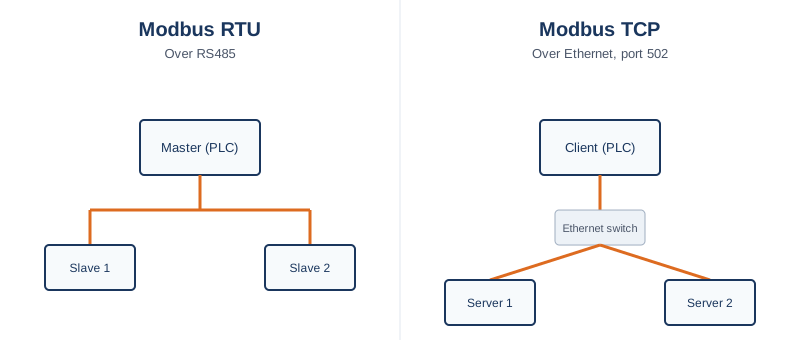
Modbus RTU runs over RS485: one master polls several slaves, each with its own address. Modbus TCP runs over Ethernet, on port 502 by default. The register model is the same in both, so what you design here applies to either.
Design the register map first
Before any code, decide what the SCADA will see. A written map avoids the most common integration problem: both sides disagreeing on what each register means.
| Holding register | Meaning | Direction |
|---|---|---|
| 0 | State (0 IDLE, 1 RUNNING, 2 FAULT) | PLC to SCADA |
| 1 | Tank level, raw analog count | PLC to SCADA |
| 2 | Start command (1 = start) | SCADA to PLC |
A detail that causes many off-by-one errors: the register address used in the library is usually the register number minus 1. Holding register number 40009 has address 8.
A Modbus TCP slave on the PLC
You map an array to the holding registers, call update() on every pass of loop(), and read or write the array in your own logic. Start Ethernet before the Modbus object.
#include <Ethernet.h>
#include <ModbusTCPSlave.h>

byte mac[] = { 0xDE, 0xAD, 0xBE, 0xEF, 0xFE, 0xED };  // use the MAC of your PLC
IPAddress ip(192, 168, 1, 50);

#define NUM_HOLDING_REGISTERS 3
uint16_t holdingRegisters[NUM_HOLDING_REGISTERS];

ModbusTCPSlave slave(502);

void setup() {
  Ethernet.begin(mac, ip);
  slave.setHoldingRegisters(holdingRegisters, NUM_HOLDING_REGISTERS);
  slave.begin();
}

void loop() {
  // publish PLC data
  holdingRegisters[0] = currentState;        // from lesson 1
  holdingRegisters[1] = analogRead(I0_6);

  slave.update();

  // read what the SCADA wrote
  if (holdingRegisters[2] == 1) {
    // request start: your state machine decides what to do with it
  }
}
The library is non-blocking, so this fits with the state machine and the millis() timing from the previous lessons.
Test it from your PC
Use any Modbus client, for example a free tool such as mbpoll or Modbus Poll. Connect to the PLC address on port 502 and read holding registers 0 to 2. You should see the state and the level change as you operate the inputs.
If it fails: check ping first, then the port, then that the register addresses match the map, remembering the minus 1 rule.
And over RS485 (RTU)
The register map and the arrays stay identical. What changes is the transport: you initialize the serial port and the Modbus object, and baud rate, parity and stop bits must match on every device on the bus, as in the foundations course. For RS485, start the port in half duplex, which works on both Ardbox and M-Duino (on an M-Duino the switch must match). The library examples under File > Examples > Modbus show the exact RTU initialization for your port.
#include <RS485.h>
#include <ModbusRTUMaster.h>

ModbusRTUMaster master(RS485);

void setup() {
  RS485.begin(9600, HALFDUPLEX, SERIAL_8E1);
  master.begin(9600);
}
Note that you pass the baud rate to the master's begin(), because it defines the internal Modbus timeouts.
Choosing RTU or TCP
If the SCADA and the PLC are already on the same RS485 bus with other field devices, RTU keeps one consistent network. If the PLC already has Ethernet and the SCADA speaks TCP, Modbus TCP avoids a second physical network for one integration.
Go deeper
- arduino-Modbus library (GitHub)
- Modbus TCP master with Arduino and ESP32 based PLCs
- RS-485 with Arduino and ESP32 based PLCs
- Modbus RTU vs Modbus TCP vs OPC UA: which to use
- RS485 problems: step-by-step bus fault diagnosis
Next lesson: keeping the pump station data after a power loss. Take the quiz below first.
There are no comments for now.
to be the first to leave a comment.