
Complete guide: How to choose an industrial controller
Node-RED vs CODESYS vs Arduino IDE: which one should you use to program your PLC?
Use CODESYS when the team already works in IEC 61131-3 (Ladder, Structured Text, SFC) and the job is sequential machine control; on Industrial Shields hardware it runs on the Raspberry PLC. Use Node-RED for data, gateways and dashboards, not for control loops with timing requirements. Use Arduino IDE (C/C++) on M-Duino and ESP32 PLC when you build machines in series and want no runtime license and full ownership of the code. Many projects combine two: control in CODESYS or Arduino IDE, data in Node-RED.
The question "which one is best?" reaches our technical support every week. The honest answer depends on two things: who will maintain the program in five years, and what the project does. This guide compares the three environments on the same criteria and gives a pick for each team profile.
- Machine controlCODESYSIEC 61131-3 teams, sequences, interlocks, online debugging
- Data and HMINode-REDGateways, MQTT, databases, web dashboards
- Series machinesArduino IDEC/C++ on M-Duino and ESP32 PLC, no runtime license
- BothTwo layersControl in CODESYS or C/C++, data in Node-RED
Comparison table: Node-RED, CODESYS and Arduino IDE
| Criterion | Arduino IDE | Node-RED | CODESYS |
|---|---|---|---|
| Language | C/C++, compiled for the microcontroller | Visual flows plus JavaScript, on Node.js | IEC 61131-3: LD, ST, FBD, SFC |
| Industrial Shields hardware | M-Duino (ATmega2560), Ardbox, ESP32 PLC | Raspberry PLC, TouchBerry, GateBerry (Linux) | Raspberry PLC (CODESYS Control for Raspberry Pi SL) |
| Determinism and cycle time | Highest: no operating system | Low: Node.js on Linux | High: supervised cyclic tasks |
| Runtime license per unit | None | None (open source, Apache 2.0) | One license per device; without it the runtime stops after two hours |
| Sequential machine logic | Good, with discipline | Poor as it grows | Excellent (SFC, ST) |
| Data and IT integration (MQTT, databases, dashboards) | Manual, with libraries | Excellent | Good, less direct |
| Debugging on site | Serial logs and your own instrumentation | Debug nodes, live injection | Online: live variables, forcing |
| Learning curve for a PLC programmer | Medium to high | Medium | Low |
| Learning curve for a software developer | Medium | Low | Medium to high |
| Maintenance by a third party | Depends on the author and the documentation | Good for small flows | Best: a universal standard |
| AI-assisted programming | Very good: mainstream C/C++ in text files | Partial: flows are JSON | Partial: ST is text, but the project file is binary |
What is each environment good at?
Arduino IDE (C/C++): total control, total responsibility
Programming a PLC with Arduino IDE means writing C/C++ that is compiled for the microcontroller: an ATmega2560 at 16 MHz in the M-Duino, or a dual-core ESP32 at up to 240 MHz in the ESP32 PLC. There is no operating system and no runtime in between, and there are no per-unit licenses.
- Strengths: predictable response times, start-up in milliseconds, direct access to interrupts and peripherals, zero cost per unit (for an OEM that builds 200 machines a year, that is margin), and code in a Git repository that belongs to the company.
- Limits: nothing comes built in. Each protocol, reconnection, safe state and watchdog is code that you write or a library that you choose and maintain. Maintainability depends on who wrote the code, and debugging on site means serial logs.
Start with the Modbus RTU guide for Arduino and ESP32 based PLCs. If you want IEC 61131-3 languages on these PLCs, use OpenPLC: see the OpenPLC guide for industrial PLCs.
Node-RED (flows and JavaScript): integration first
Node-RED is flow-based visual programming on Node.js. Its natural place is the Raspberry PLC, where it runs on Linux like on any Raspberry Pi. It does not come preinstalled: the Node-RED installation guide for the Raspberry PLC shows how to install it and start it as a service.
- Strengths: community nodes for Modbus RTU and TCP, MQTT, OPC UA, SQL databases, InfluxDB, email and Telegram. A plant gateway that reads ten Modbus slaves, stores the data and publishes it over MQTT takes an afternoon. The dashboard nodes serve a web HMI from the PLC itself, and a technician without programming training can read a well-built flow.
- Limits: a machine sequence with 15 states, interlocks and fault handling becomes a flow that nobody can audit. It is not deterministic: the Linux scheduler and the JavaScript garbage collector decide the timing. Flows are stored as JSON, which is hard to review in a Git diff.
CODESYS (IEC 61131-3): the language of the industry
CODESYS is the most widespread IEC 61131-3 environment: Ladder Diagram, Structured Text, Function Block Diagram and Sequential Function Chart. On the Raspberry PLC it runs with CODESYS Control for Raspberry Pi SL; our CODESYS setup guide for the Raspberry PLC uses CODESYS V3.5 SP19 Patch 3 and runtime 4.11 or later.
- Strengths: any PLC programmer can read it, so a new integrator who comes from Siemens, Schneider or Omron is productive in days. Cyclic tasks with priorities and a task watchdog, online debugging with live variables and forcing, and a migration path for logic written in Ladder or ST on another PLC.
- Limits: the runtime needs a license per device (without it, it stops after two hours), and commercial use has its own terms set by CODESYS GmbH: check them before you price a series. The Industrial Shields I/O blocks reach the I/O through I2C and are slow; their README recommends them for learning and testing, not for a commercial environment. IT integration works, but it is less direct than in Node-RED.
Next steps: Ladder programming with CODESYS on a Raspberry PLC and Modbus on a Raspberry PLC with CODESYS.
Which one fits your team?
The best fit comes first for each profile.
You come from classic automation (Siemens, Schneider, Omron)
Best fit: CODESYS. Then Node-RED. Last: Arduino IDE. The team already thinks in Ladder, ST and function blocks. CODESYS keeps that experience and the diagnosis habits from day one. Node-RED is a complement for the data layer, not for control.
You come from software or IT
Best fit: Node-RED. Then Arduino IDE. Last: CODESYS. JavaScript, Git, APIs and databases all point to Node-RED, and for a gateway, a data concentrator or a supervision layer it is the fastest option. If the project moves towards serious sequential control, put that part outside the flows.
You are an OEM and the PLC goes inside a machine built in series
Best fit: Arduino IDE. Then CODESYS. Last: Node-RED. Cost per unit, full control of the firmware and ownership of the code decide. Arduino IDE wins on one condition: software engineering discipline, with a repository, code reviews and documentation.
Which one fits your project?
- Machine or process control (sequences, interlocks, dosing): CODESYS or Arduino IDE. Not Node-RED.
- Data, gateways, historians, dashboards: Node-RED.
- Both: two layers. Control in CODESYS or Arduino IDE, and the data layer in Node-RED, either on the same Raspberry PLC or split between an M-Duino or ESP32 PLC for control and a Raspberry PLC for data.
The two layers usually talk over Modbus TCP or MQTT. The guide to Modbus RTU, Modbus TCP and OPC UA explains which protocol goes at each level.
Our recommendation: open tools, with AI assistance
If we could keep only one approach for a typical industrial project (a machine or process of medium complexity that must run for years and will be maintained by people who did not program it), our answer is open programming with the code owned by the customer: Arduino IDE on M-Duino and ESP32 PLC; Node-RED, Node.js or Python on the Raspberry PLC.
The classic objection was fair: an IEC 61131-3 program can be picked up by any automation professional, while C/C++ code depends on its author. AI assistants change that balance. They draft, explain, refactor and document C/C++, Python and JavaScript in minutes, and these mainstream languages are the ones they read best, so whoever inherits the code does not start alone. Open code is now powerful and fast to write, without runtime licenses or a closed environment between you and the machine.
That does not make it the right choice in every case. Node-RED is still the fastest way to build a gateway or a dashboard, and CODESYS is still the shortest path for a team standardized on IEC 61131-3 or for logic migrated from classic PLCs. The mistake is choosing out of habit without asking who will maintain the program and what the project does.
Decide in five minutes: checklist
- Is the logic sequential machine control? Rule out Node-RED for that part.
- Are there strict cycle-time requirements? Arduino IDE or CODESYS.
- Do you build in series and does the cost per unit matter? Arduino IDE takes the lead.
- Does the team come from traditional PLCs? CODESYS takes the lead.
- Is most of the project data, integration and visualization? Node-RED takes the lead.
- Will someone else maintain the program in five years? A versioned, documented code base with AI assistance covers it; CODESYS stays the safe choice if the maintainers only work in IEC 61131-3.
- Do you program with an AI assistant? Open code (Arduino IDE, or Python and Node.js on the Raspberry PLC) takes the overall lead.
FAQ about Node-RED, CODESYS and Arduino IDE
Can Node-RED replace a PLC program?
For monitoring, data collection and dashboards, yes. For control with timing requirements, interlocks or safety-relevant sequences, no: Node-RED runs on Node.js on Linux and is not deterministic.
Is CODESYS free on the Raspberry PLC?
The development system is free to download. The runtime, CODESYS Control for Raspberry Pi SL, needs a license per device; without it, it runs with all functions for two hours and then stops, which is enough for bench tests.
Can I program an M-Duino or an ESP32 PLC in Ladder?
Not with CODESYS. Use OpenPLC, which supports Ladder and the other IEC 61131-3 languages on M-Duino, Ardbox and ESP32 PLC, or program them in C/C++ with Arduino IDE.
Can Node-RED and CODESYS run on the same Raspberry PLC?
Yes. Both run on the Linux of the Raspberry PLC, and the usual split is CODESYS for control and Node-RED for data and dashboards. Plan how they exchange data, for example over Modbus TCP or MQTT.
Which one is easiest for a beginner?
Node-RED, for data and dashboards. For control, a beginner with an electrical background learns Ladder in CODESYS or OpenPLC faster than C/C++.
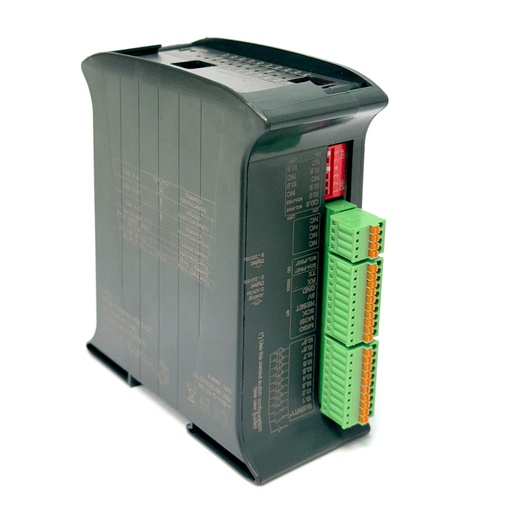
Ardbox Q
Arduino IDE and Node-RED on one device
Ardbox Q runs the control program on an STM32 microcontroller, programmed with the Arduino IDE, and Debian Linux on a separate processor, where Node-RED and Python can run. One DIN-rail device for the control logic and the data side.
Take it further
Node-RED, CODESYS and Arduino IDE each fit a different job. See an ESP32 PLC retrofit, a monitoring simulator and a Node-RED dashboard.
Case study
An old packaging line. New data at four levels.
A retrofit with an ESP32 PLC that adds OEE, energy and product data to a food packaging line that gave none.
Read the case study
Simulator
Machine Monitor simulator: OEE, alarms and energy on a live packaging line
An ESP32 PLC, a GateBerry gateway and a TouchBerry panel monitor a line: OEE, downtime Pareto, alarms over Telegram and MQTT data in real time.
Open the simulator
PLC Solution Library
A multi-station dashboard with gauges and LEDs in Node-RED
Four remote ESP32 PLC stations on one screen: a gauge per station and one LED that turns red when data stops arriving.
See the example
Choose the hardware with the environment. The controller guide compares Arduino, ESP32 and Raspberry Pi based PLCs by I/O, protocols and programming environment. The OpenPLC guide covers Ladder on M-Duino, Ardbox and ESP32 PLC.
Choose an industrial controllerRead the OpenPLC guide
Taking a Raspberry Pi prototype to the plant? Download the free guide "From prototype to plant": platform and environment selection, wiring, communications, CE marking and a realistic timeline.
More about programming industrial PLCs
- Setting up CODESYS for Raspberry Pi PLC in industrial automation
- Ladder programming with CODESYS on a Raspberry PLC
- Node-RED tutorial: example project
- Arduino PLC vs ESP32 PLC vs Raspberry Pi PLC: which to choose
- Industrial applications: 50 real examples by sector
Try the three environments on the same plant: the Raspberry PLC runs Node-RED and CODESYS on Linux, next to M-Duino and ESP32 PLC programmed in Arduino IDE.