
To configure a pin of an Arduino PLC as an input or an output, call pinMode(pin, mode) in setup() with the name of the PLC terminal: pinMode(Q0_0, OUTPUT) or pinMode(I0_0, INPUT). The Industrial Shields boards package turns each name (I0_0, Q0_0, A0_5, R0_1) into the right pin of the microcontroller.
This guide explains the syntax of pinMode(), how the pin names follow the labels printed on the PLC, the names of each family (M-Duino, Ardbox and ESP32 PLC) and two examples that compile with the Industrial Shields boards.
The pinMode() function
pinMode() sets how the microcontroller uses a pin: as an input that reads a voltage, or as an output that drives it. Call it once in setup(), before you read or write the pin in loop().
pinMode(pin, mode);| Parameter | Value | On an Industrial Shields PLC |
|---|---|---|
| pin | Name or number of the pin | Use the PLC name: I0_0, Q0_0, A0_5, R0_1 |
| mode | INPUT | Inputs (I). Digital inputs read 5 to 24 Vdc, analog inputs 0 to 10 V |
| mode | OUTPUT | Digital outputs (Q), analog outputs (A) and relays (R) |
| mode | INPUT_PULLUP | Turns on the internal pull-up resistor of the microcontroller. Only for pins at 5 V or 3.3 V logic level, not for the PLC inputs |
Do you need pinMode() on an Industrial Shields PLC? In the current boards package for M-Duino and Ardbox, the core sets the inputs as INPUT and the outputs as OUTPUT before setup() runs.
Write pinMode() anyway for the pins you use. It shows which pins the sketch needs, and it is the setup that the product guides show for the analog outputs.
How the pin names map to the PLC terminals
Each terminal of the PLC has a label such as Q0.0 or I1.5. In the sketch you write the same label with an underscore instead of the dot: Q0_0, I1_5.
The letter is the type of pin. The first number is the zone of the PLC and the second one is the position in that zone.
- IInputsDigital or analog. Read them with digitalRead() or analogRead()
- QDigital outputsSwitch them with digitalWrite()
- AAnalog outputs0 to 10 V. Set them with analogWrite()
- RRelaysSwitch them with digitalWrite()
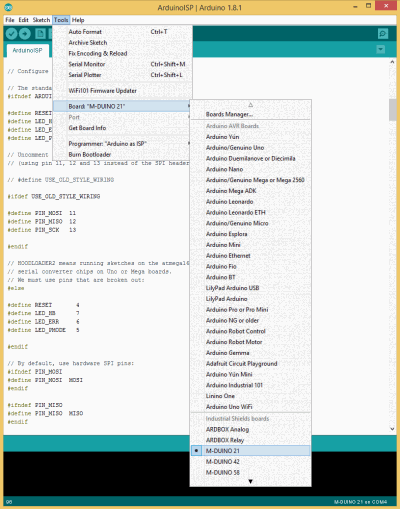
The names exist only when the right board is selected. Install the Industrial Shields boards in the Arduino IDE (how to install them). Then choose the family in Tools > Board, for example M-Duino family, and the exact model in Tools > Model, for example M-Duino 21+.
On the M-Duino 42+ and 58+, the expansion zones repeat the pattern: zone 1 has I1_x, Q1_x and A1_x, and zone 2 has I2_x, Q2_x and A2_x.
Pin names by PLC family
The table lists the pin names of zone 0 of each model, as the Industrial Shields boards package defines them. Zones 1 and 2 of the bigger models follow the same pattern.
| PLC | Inputs | Digital outputs | Analog outputs | Relays |
|---|---|---|---|---|
| M-Duino 21+, 42+, 58+ ESP32 PLC 21, 42, 58 | I0_0 to I0_12 (I0_7 to I0_12 also analog) | Q0_0 to Q0_7 | A0_5 to A0_7 | None |
| M-Duino 19R+, 38R+, 57R+ ESP32 PLC 19R, 38R, 57R | I0_0 to I0_5 (I0_2 to I0_5 also analog) | Q0_0 to Q0_2 | A0_0 to A0_2 | R0_1 to R0_8 |
| M-Duino 38AR+ ESP32 PLC 38AR | Zone 0 as the 21+, zone 1: I1_0 to I1_5 | Q0_0 to Q0_7, Q1_0 to Q1_2 | A0_5 to A0_7, A1_0 to A1_2 | R1_1 to R1_8 |
| Ardbox Analog HF+ | I0_0 to I0_9 (8 also analog) | Q0_0 to Q0_9 | A0_0 to A0_6 | None |
| Ardbox Relay HF+ | I0_0 to I0_9 (6 also analog) | None, see analog outputs | A0_0 and A0_1 (also digital) | R1 to R8 |
Shared pins. An analog output uses the same microcontroller pin as a digital output: A0_5 and Q0_5 on the M-Duino 21+, A0_0 and Q0_0 on the M-Duino 19R+ and on the Ardbox Analog. A switch on the PLC selects which terminal works, so use each pair as one or the other.
analogRead() returns 0 to 1023 (10 bits) on M-Duino and Ardbox, and analogWrite() takes 0 to 255 (8 bits). The ESP32 PLC reads with 11 bits and writes with 12 bits.
Models with GPRS, LoRa, Wi-Fi or DALI use some pins for the communication module, and the ESP32 PLC 14 has its own pin names. Check the pinout in the User Guide of your model before you wire it.
Example: inputs, outputs and an analog output
This sketch for the M-Duino 21+ uses the three kinds of pin. It copies input I0.0 to output Q0.0, blinks output Q0.1 and writes the value of the analog input I0.7 to the analog output A0.5.
// Board: M-Duino family, model M-Duino 21+
void setup() {
  pinMode(I0_0, INPUT);    // digital input (5 to 24 Vdc)
  pinMode(I0_7, INPUT);    // analog or digital input (0 to 10 V)
  pinMode(Q0_0, OUTPUT);   // digital output
  pinMode(Q0_1, OUTPUT);   // digital output
  pinMode(A0_5, OUTPUT);   // analog output (0 to 10 V)
  Serial.begin(9600);
}

void loop() {
  // Copy input I0.0 to output Q0.0
  digitalWrite(Q0_0, digitalRead(I0_0));

  // Blink output Q0.1 every second without delay()
  digitalWrite(Q0_1, (millis() / 1000) % 2);

  // Read I0.7 (0 to 1023) and set A0.5 (0 to 255)
  int value = analogRead(I0_7);
  analogWrite(A0_5, value / 4);
  Serial.println(value);
  delay(100);
}
To use A0.5 as an analog output, set its switch to the analog position, as the User Guide of the model shows.
Tested: compiled without errors for the M-Duino 21+ with the Industrial Shields AVR core 1.2.1 and avr-gcc 7.3.0. It has not been run on a PLC for this guide.
Example with relay outputs
On the relay models, a relay is an output like any other, but the numbering starts at 1: R0_1 to R0_8 on the M-Duino 19R+ and the ESP32 PLC 19R, R1 to R8 on the Ardbox Relay. Each relay switches up to 250 Vac 5 A or 30 Vdc 3 A.
// Board: M-Duino family, model M-Duino 19R+
void setup() {
  pinMode(I0_2, INPUT);    // input
  pinMode(R0_1, OUTPUT);   // relay 1 (relays start at R0_1)
  pinMode(Q0_0, OUTPUT);   // digital output
}

void loop() {
  // Relay R0.1 follows input I0.2
  digitalWrite(R0_1, digitalRead(I0_2));

  // Toggle output Q0.0 every 500 ms
  digitalWrite(Q0_0, HIGH);
  delay(500);
  digitalWrite(Q0_0, LOW);
  delay(500);
}
Tested: compiled without errors for the M-Duino 19R+ with the same core. It has not been run on a PLC for this guide.
Common mistakes with PLC pins
'Q0_0' was not declared in this scope: the selected board is not an Industrial Shields PLC, or the model has no pin with that name. Select the family and the model in the Tools menu.R0_0does not exist: the relays of the M-Duino and the ESP32 PLC start at R0_1.Q0.0with a dot is not valid C++. WriteQ0_0.- Pin numbers from a tutorial for another board, such as pin 13, do not match the PLC terminals. Use the PLC names.
- Values above 255 in
analogWrite()on M-Duino and Ardbox: the range is 0 to 255. INPUT_PULLUPon a PLC input does not replace the sensor wiring. The input needs a voltage from the sensor (see PNP digital inputs).
FAQ about pinMode() and PLC pins
What does pinMode() do in Arduino?
It sets a pin as an input (INPUT or INPUT_PULLUP) or as an output (OUTPUT). Call it in setup(), before you read or write the pin.
Do I have to call pinMode() on an Industrial Shields PLC?
With the current boards package, the M-Duino and the Ardbox start with the inputs as INPUT and the outputs as OUTPUT. Call pinMode() anyway for the pins you use: the sketch is clearer and easier to move to another model.
How do I configure a pin as an input?
Write pinMode(I0_0, INPUT); in setup(). Then digitalRead(I0_0) returns HIGH or LOW, and analogRead(I0_7) returns the value of an analog input.
How do I configure a pin as an output?
Write pinMode(Q0_0, OUTPUT); in setup(). Then digitalWrite(Q0_0, HIGH) switches the output on. Relays work the same way with their R names.
Where do I find the pin names of my PLC?
In the table of this guide and in the pinout of the User Guide of your model. The names match the labels printed next to each terminal, with an underscore instead of the dot.
Related guides
- How to install the Industrial Shields boards in the Arduino IDE
- Basics about digital inputs of an industrial controller
- Basics about analog inputs of an industrial PLC
- PNP digital inputs on an industrial PLC
- Arduino millis() vs delay() in industrial PLCs
- How to filter digital and analog inputs on an Arduino PLC
- Analysis of the M-Duino PLC pinout time response
M-Duino familyESP32 PLC familyArdbox Analog
Need the pinout of a specific model? Ask an engineer.