
Complete guide: Choosing an industrial controller
In PLC programming, an internal relay is a bit of memory that works like a relay coil and its contacts in the program, but has no terminal on the PLC. It is also called an auxiliary relay, marker, flag or memory bit: M bits in Siemens and Mitsubishi PLCs, B3 bits in Allen-Bradley SLC 500, a BOOL variable in CODESYS or in an Arduino sketch. A relay output is different: it is a real relay inside the PLC that closes a contact to switch an external load. On Industrial Shields PLCs each relay output switches up to 5 A at 250 Vac or 3 A at 30 Vdc, and you control it with digitalWrite().
This guide explains both meanings, because the first version of this post used "internal relay" for the relay outputs built into the PLC. You will see how to wire and program a relay output on an M-Duino or an Ardbox, and how to use an internal relay to latch a motor start in an Arduino program.
Internal relay or relay output: what is the difference?
| Internal relay (memory bit) | Relay output | |
|---|---|---|
| What it is | A bit in the PLC memory | A real relay with a contact on the PLC terminals |
| Other names | Auxiliary relay, marker, flag, M bit | Relay output, digital relay output |
| Where it is used | Only inside the program | To switch a contactor, a valve coil, a lamp or another load |
| How many | As many as the memory allows | As many as the model has (for example 8 on an Ardbox Relay) |
| In an Arduino sketch | bool motorRun = false; | digitalWrite(R0_1, HIGH); |
| Wear | None | Mechanical contact: limited number of switching cycles |
In ladder logic, an internal relay is a coil that is not wired to an output. Other rungs read it with normally open or normally closed contacts. It keeps an intermediate state: a motor that must keep running after the start button is released, a step of a sequence, an alarm that is waiting for acknowledgement.
Relay outputs on Industrial Shields PLCs
The Arduino based PLCs of Industrial Shields with relays, such as the Ardbox Relay and the M-Duino 19R, use one type of relay. Each relay output switches:
- Up to 5 A at 250 Vac
- Up to 3 A at 30 Vdc
These values are for resistive loads. For inductive loads such as contactor coils, solenoid valves or motors, add a suppressor across the load (an RC snubber in AC, a flyback diode in DC) and leave a margin on the current.

How to wire a relay output
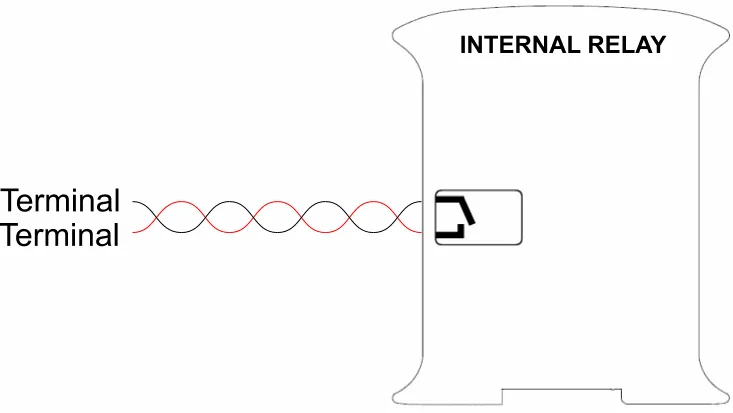
The contact of the relay has no polarity. It works like a switch between two terminals: connect the supply of the load to one terminal and the load to the other one. The relay can switch an AC or a DC circuit, separate from the supply of the PLC.
How to switch a relay output in the Arduino IDE
Install the Industrial Shields boards in the Arduino IDE and select your PLC model. Each relay has a name defined by the boards package:
| Family | Relay names | Example |
|---|---|---|
| Ardbox Relay | R1 to R8 | digitalWrite(R1, HIGH); |
| M-Duino with relays (19R, 38R, 57R...) | R0_1, R0_2... (R0.1 on the label) | digitalWrite(R0_1, HIGH); |
HIGH energises the relay and closes its contact. LOW releases it and opens the contact. This sketch switches R0_1 of an M-Duino 19R every second and writes the state on the serial monitor:
// Relay output R0_1 of an M-Duino 19R: on for 1 s, off for 1 s
// On an Ardbox Relay, use R1 instead of R0_1

void setup() {
  Serial.begin(9600);
  pinMode(R0_1, OUTPUT);
}

void loop() {
  digitalWrite(R0_1, HIGH);   // relay energised, NO contact closed
  Serial.println("R0_1 closed");
  delay(1000);
  digitalWrite(R0_1, LOW);    // relay released, NO contact open
  Serial.println("R0_1 open");
  delay(1000);
}
Internal relays in an Arduino program: a start and stop latch
A classic use of an internal relay is the seal-in circuit: a start button that is only pressed for a moment, and a motor that keeps running until the stop button is pressed. In ladder logic the rung is (Start OR Run) AND Stop = Run. In an Arduino sketch, the internal relay motorRun is a bool variable:
// Internal relay (memory bit) that latches a motor start
// M-Duino 19R: start button on I0_0 (NO), stop button on I0_1 (NC)
// The physical relay output R0_1 switches the motor contactor coil

bool motorRun = false;        // internal relay: a bit in memory, no hardware

void setup() {
  pinMode(I0_0, INPUT);
  pinMode(I0_1, INPUT);
  pinMode(R0_1, OUTPUT);
}

void loop() {
  bool startPressed = digitalRead(I0_0) == HIGH;
  bool stopOk       = digitalRead(I0_1) == HIGH;   // NC: LOW when pressed or wire cut

  // Same logic as a seal-in rung: (Start OR motorRun) AND Stop
  motorRun = (startPressed || motorRun) && stopOk;

  digitalWrite(R0_1, motorRun ? HIGH : LOW);
}
The stop button is wired normally closed: if its wire breaks, the input goes low and the motor stops, as with a hard-wired stop circuit. Use a safety relay or a safety PLC for an emergency stop: an internal relay in a standard PLC program is not a safety function.
Both sketches compile and link for the M-Duino 19R+ with the Industrial Shields AVR boards package (version 1.2.1, sketch of 6156 and 5794 bytes). They have not been tested on hardware for this post. For the Ardbox Relay, change R0_1 to R1 and use the input names of that model.
FAQ about internal relays in a PLC
What is an internal relay in a PLC?
A memory bit that the program uses like a relay coil and its contacts. It has no physical output. It stores an intermediate state, such as a latch or a step of a sequence.
Is an internal relay the same as an auxiliary relay or a marker?
Yes. Auxiliary relay, marker, flag, memory bit and M bit are names for the same idea. Each brand has its own memory area and addresses for them.
How many internal relays does a PLC have?
It depends on the PLC memory. In an Arduino based PLC or in CODESYS you declare them as BOOL variables, so the limit is the free memory, not a fixed list.
What voltage and current can the relay outputs switch?
On Industrial Shields PLCs, up to 5 A at 250 Vac or 3 A at 30 Vdc with a resistive load. Check the datasheet of your model for inductive loads.
Can I use internal relays with OpenPLC?
Yes. In OpenPLC, as in CODESYS, you program ladder logic with coils that are not linked to a physical output. See the OpenPLC guide for industrial PLCs.
More about PLC programming
- How to install Industrial Shields boards in the Arduino IDE
- Choosing an industrial controller
- OpenPLC guide for industrial PLCs
- Industrial applications: 50 real examples by sector
See the Ardbox Relay, the M-Duino 19R and all the Arduino based PLCs.
Take it further
Internal relays are the memory of a sequence. See sequences running in a real case, in a simulator and in code.
Case study
Soap, water, brushes and air in one fixed order.
An M-Duino 19R runs three phases in a fixed sequence, with one timer per phase and four relay outputs.
Read the case study
Simulator
Start a turbine or a pump step by step, and stop it safely
A Raspberry PLC 42 runs the start as a state machine and reads 4-20 mA transmitters for level, flow, vibration and pressure.
Open the simulator
PLC Solution Library
Safe solenoid valve sequencing on an ESP32 PLC with a state machine
Every actuation goes through one state machine, so a mixed load and unload condition cannot exist in the firmware.
See the example